
1. Product Overview
The Jeanoko EMAX ES08MA II is a durable, high-speed analog servo motor featuring metal gears. Designed for precision and reliability, this servo is suitable for various applications including fixed-wing aircraft, 450-class helicopters, and robotic projects. Its compact size and robust construction ensure consistent performance.
2. Key Features
- High Performance: Offers excellent speed and efficiency for demanding applications.
- Durable Construction: Made with premium, sturdy materials and metal gears for enhanced longevity.
- Standard Compatibility: Equipped with a standard Futaba / JR plug for broad compatibility with control systems.
- Fast Response: Achieves a working speed of 0.12 seconds/60 degrees at 4.8V and 0.10 seconds/60 degrees at 6V.
- Versatile Application: Ideal for fixed-wing models, 450 helicopters, and various robotic mechanisms.
3. Package Contents
Verify that all items listed below are included in your package. If any items are missing or damaged, please contact your retailer.
- EMAX ES08MA II Servo Motor
- Assorted Servo Horns (various shapes)
- Mounting Screws

Image: EMAX ES08MA II Servo Motor with included horns and mounting screws.
4. Specifications
| Model | EMAX ES08MA II |
| Type | Analog Servo |
| Gear Type | Metal Gear |
| Operating Voltage | 4.8V - 6V |
| Speed (4.8V) | 0.12 sec/60° |
| Speed (6V) | 0.10 sec/60° |
| Torque (4.8V) | 1.8 kg·cm |
| Torque (6V) | 2.2 kg·cm |
| Dimensions | 1.26 x 0.94 x 0.47 inches (32 x 24 x 12 mm) |
| Weight | 0.915 ounces (25.9 g) |
| Plug Standard | Futaba / JR compatible |
5. Setup and Installation
Follow these steps to properly install and connect your EMAX ES08MA II servo motor.
- Mounting the Servo: Secure the servo motor to your model or robotic frame using the provided mounting screws. Ensure it is firmly attached to prevent vibration and movement during operation.
- Attaching Servo Horns: Select the appropriate servo horn for your application. Align the horn with the servo spline and gently press it into place. Use the small screw provided to secure the horn to the servo spline.
- Connecting to Control System: Connect the servo's 3-wire cable to your receiver or servo controller. The standard Futaba/JR plug ensures correct polarity. Typically, the brown wire is ground, red is positive voltage, and orange/yellow is the signal wire.
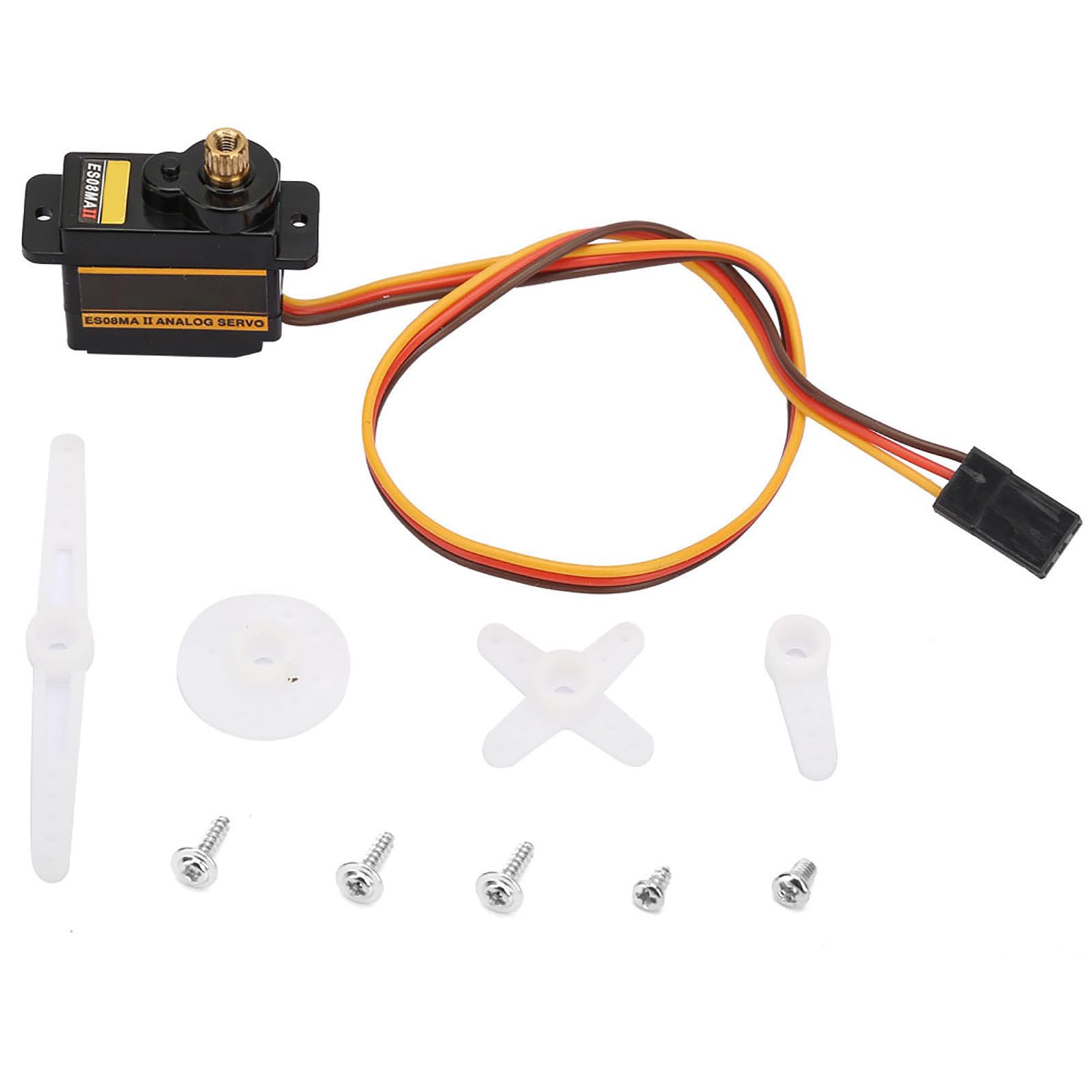
Image: Front view of the EMAX ES08MA II servo motor with its three-wire connector.

Image: EMAX ES08MA II servo motor with a white circular servo horn installed.
Setup Demonstration Video
Video: A demonstration of assembling and connecting servo motors to a control board, including testing with a controller.
6. Operating Instructions
Once the servo is correctly installed and connected to your control system (e.g., RC receiver, microcontroller), you can begin operation.
- Power On: Ensure your control system and servo are powered by a compatible voltage source (4.8V to 6V).
- Signal Input: The servo will respond to Pulse Width Modulation (PWM) signals from your control system. The pulse width determines the angular position of the servo horn.
- Range of Motion: The servo typically operates within a 180-degree range. Avoid forcing the servo past its mechanical limits, as this can cause damage.
- Testing: Use your remote control or programming interface to test the servo's movement. Observe for smooth operation and correct response to commands.
Operation Demonstration Video
Video: This video demonstrates the assembly and connection of servo motors, followed by their operation using a remote controller, showing the range of motion.
7. Maintenance
Proper maintenance ensures the longevity and optimal performance of your servo motor.
- Keep Clean: Regularly inspect the servo for dirt, dust, or debris, especially around the output shaft and gears. Clean with a soft, dry brush or compressed air.
- Avoid Overloading: Do not subject the servo to loads exceeding its specified torque limits. Excessive force can damage the gears and motor.
- Check Connections: Periodically verify that all electrical connections are secure and free from corrosion.
- Storage: Store the servo in a dry, cool environment away from direct sunlight and extreme temperatures.
8. Troubleshooting
| Problem | Possible Cause | Solution |
| Servo not responding | No power, incorrect wiring, faulty signal, damaged servo. | Check power supply and voltage. Verify wiring connections (ground, VCC, signal). Test with a known working signal source or servo tester. Inspect for physical damage. |
| Servo jitters or moves erratically | Noisy signal, insufficient power, mechanical binding, internal damage. | Ensure clean signal from controller. Check power supply for adequate current. Inspect for obstructions or excessive friction in the mechanical linkage. If issues persist, the servo may be damaged. |
| Servo makes grinding noise | Damaged gears, excessive load, foreign object. | Reduce load on the servo. Disassemble carefully to check for foreign objects or damaged gear teeth. Replace if gears are stripped. |
9. Warranty and Support
Jeanoko products are manufactured to high-quality standards. For warranty information, technical support, or assistance with your EMAX ES08MA II servo motor, please contact your original retailer or visit the official Jeanoko website for customer service details.
Please retain your proof of purchase for any warranty claims.


