
CROWNFUL IM1102-UL
Contents
CROWNFUL Nugget Ice Maker Countertop User Manual
Model: IM1102-UL | Brand: CROWNFUL
Introduction
Thank you for choosing the CROWNFUL Nugget Ice Maker. This manual provides essential information for the safe and efficient operation of your new appliance. Please read it thoroughly before first use and keep it for future reference.
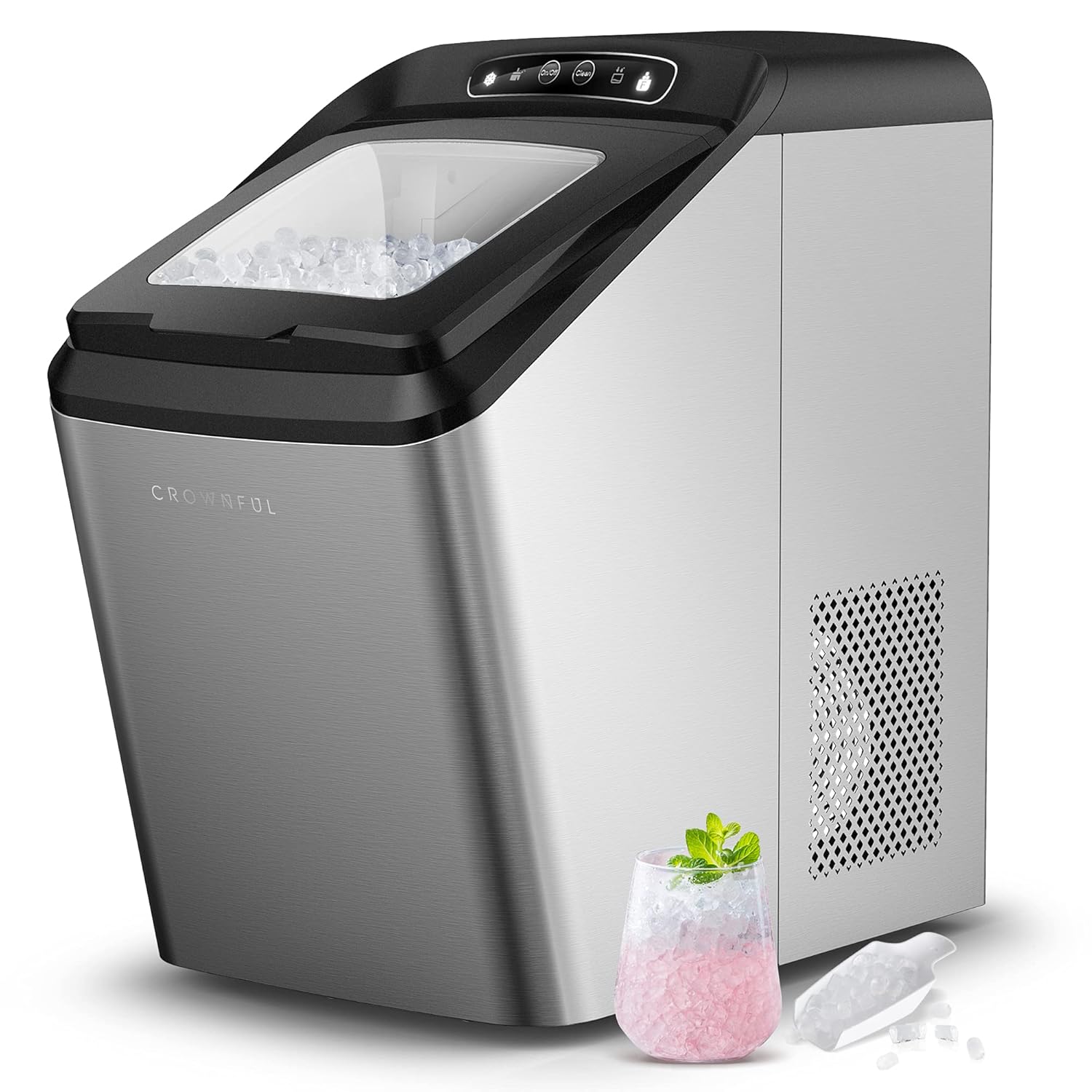
Figure 1: CROWNFUL Nugget Ice Maker. This image shows the compact, stainless steel design of the ice maker with a clear lid, revealing the nugget ice inside. An ice scoop and a glass with ice are also visible.
The CROWNFUL Nugget Ice Maker produces soft, chewable nugget ice, ideal for various beverages. It features a powerful compressor for efficient ice production, a self-cleaning function, and intelligent sensors for user convenience.
What's in the Box
Upon unpacking, please ensure all items listed below are present and in good condition:
- CROWNFUL Nugget Ice Maker Unit
- Ice Scoop
- Ice Basket
- User Manual (this document)
Setup and First Use
- Unpacking: Carefully remove the ice maker from its packaging. Remove all packing materials, tape, and protective films.
- Placement: Place the ice maker on a stable, level surface away from direct sunlight and heat sources. Ensure adequate ventilation around the unit.
- Initial Standby: Before plugging in, allow the ice maker to stand upright for at least 2-4 hours. This allows the refrigerant to settle, ensuring optimal performance.
- Cleaning: Before first use, clean the interior of the ice maker. Refer to the "Maintenance" section for detailed cleaning instructions.
- Add Water: Open the lid and remove the ice basket. Fill the water reservoir with clean, potable water up to the "MAX" fill line. Do not overfill.

Figure 2: Illustration of adding water to the ice maker. The image shows a hand pouring water into the reservoir, with a clear indication of the maximum fill line.
- Insert Ice Basket: Place the ice basket back into its position.
- Power On: Plug the ice maker into a grounded electrical outlet.
Operating Instructions
Ice Making Process
- Select Ice Size: On the control panel, press the "Select Mode" button to toggle between "Large Ice" and "Small Ice" options. The corresponding indicator light will illuminate.

Figure 3: Close-up of the ice maker's control panel, showing buttons for large/small ice, clean, start/stop, and indicators for ice making, add water, and ice full.
- Start Ice Production: Press the "Start/Stop" button to begin the ice making cycle. The "Ice Making" indicator light will turn on.

Figure 4: Graphic illustrating the fast ice making capability, showing 18 minutes for initial ice, 26 lbs/day production, and 3.3 lbs basket capacity.
- Monitor Progress: The ice maker can produce ice in as little as 18 minutes. You can observe the ice making process through the transparent window.
- Ice Full Indicator: When the ice basket is full, the "Ice Full" indicator light will illuminate, and the machine will automatically pause. Remove the ice from the basket. To resume ice making, press the "ON/OFF" key to restart the machine.
- Add Water Indicator: If the water level in the reservoir is low, the "Add Water" indicator light will illuminate, and the machine will pause. Add more water to the reservoir to resume operation.
Nugget Ice Benefits
Nugget ice, also known as pebble ice, is soft, chewable, and blends easily with drinks. It cools beverages quickly while retaining their flavor, making it ideal for cocktails, sodas, and other chilled drinks.

Figure 5: Visual comparison highlighting the benefits of nugget ice, such as being easy to chew, blending easily with drinks, cooling quickly, and suitability for various beverages, contrasted with standard ice cubes.
Maintenance and Cleaning
Automatic Self-Cleaning Function
The CROWNFUL Nugget Ice Maker features an advanced one-touch self-cleaning function to simplify maintenance and ensure fresh ice with every use.
- Initiate Cleaning: Ensure the water reservoir is filled. Press the "Clean" button on the control panel. The machine will begin an automatic cleaning cycle.

Figure 6: Graphic depicting the automatic self-cleaning function, showing water circulating within the ice maker to clean its internal components.
- Drain Water: After the cleaning cycle is complete, drain the water from the reservoir. Refer to the user manual for the location of the drain plug.
- Dry Interior: Wipe the interior surfaces dry with a clean, soft cloth.
General Cleaning Tips
- Regularly clean the ice basket and ice scoop with mild soap and water.
- Wipe the exterior of the unit with a damp cloth. Avoid abrasive cleaners.
- Ensure the unit is unplugged before performing any manual cleaning.
Important Note:
The ice maker is not a freezer. It does not have a refrigeration system to keep ice frozen. You should use the ice as soon as it is made or transfer it to your refrigerator's freezer compartment for storage.

Figure 7: Graphic illustrating energy-saving features like Ice-Full Reminder, Water Shortage Reminder, Thick Insulation Layer, and Water Cycle (melted ice flows back to reservoir).
Troubleshooting
If you encounter issues with your CROWNFUL Nugget Ice Maker, please refer to the following common problems and solutions before contacting customer support.
| Problem | Possible Cause | Solution |
|---|---|---|
| Ice Maker Not Producing Ice | No water in reservoir; Unit not plugged in; Ambient temperature too high. | Fill water reservoir; Ensure unit is properly plugged in; Operate in a cooler environment. |
| "Add Water" Indicator On | Water level is too low. | Add potable water to the reservoir up to the MAX fill line. |
| "Ice Full" Indicator On | Ice basket is full. | Remove ice from the basket. Press the ON/OFF button to resume ice making. |
| Ice is Melting Quickly | Ice maker is not a freezer; High ambient temperature. | Transfer ice to a freezer for long-term storage; Use ice immediately after production. |
| Unusual Noise During Operation | Normal operation sounds (compressor, water pump); Unit not level. | Ensure unit is on a stable, level surface. If noise is excessive or unusual, contact support. |
Specifications
| Feature | Detail |
|---|---|
| Brand | CROWNFUL |
| Model Name | Nugget Ice Maker |
| Item Model Number | IM1102-UL |
| Product Dimensions | 20.16"D x 12.2"W x 19.13"H |
| Weight | 37.35 Pounds |
| Capacity | 26 Pounds (ice production in 24H), 3 lbs (basket capacity) |
| Wattage | 170 watts |
| First Available Date | January 29, 2021 |

Figure 8: Diagram showing the dimensions of the CROWNFUL Nugget Ice Maker: 17.64 inches deep, 9.05 inches wide, and 16.96 inches high.
Warranty and Support
CROWNFUL offers a 12-month warranty for this product, along with lifetime customer support.
Customer satisfaction is our top priority. If you encounter any problems or have questions regarding your ice maker, please do not hesitate to contact CROWNFUL customer service for assistance.
For support, please visit the official CROWNFUL store or contact us through the platform where you purchased the product.
Documents and downloads
Ask a question about this manual
Ask about setup, troubleshooting, compatibility, parts, safety, or missing instructions. Manuals+ will review the question and use this page’s manual context to help answer it.