1. Introduction
This manual provides detailed instructions for the installation, operation, and maintenance of your Happybuy Sliding Gate Opener AC1400 3100LBS. Please read this manual thoroughly before installation and use to ensure proper function and safety.
Key Features:
- Powerful Pure Copper Motor: Equipped with a silent 500W motor, capable of moving a 3100 lbs gate at a speed of 43 ft/min. Features a sturdy, waterproof shell and a 9-inch high base to prevent submersion.
- Secure & Smart Design: Includes a temperature protector and adjustable motor thrust to prevent overloading. Obstruction detection technology ensures the gate stops and reverses if an obstacle is encountered.
- Wide Application: Compatible with various sliding gates, suitable for private residences, businesses, schools, hotels, farms, and ranches.
2. Safety Information
Always prioritize safety during installation and operation. Failure to follow these instructions may result in serious injury or property damage.
- Ensure all electrical connections are made by a qualified electrician and comply with local codes.
- Keep hands, feet, and clothing clear of the gate and opener mechanism during operation.
- Do not allow children to play near the gate or operate the remote controls.
- Regularly inspect the gate and opener for signs of wear, damage, or misalignment.
- In case of power failure, use the manual release keys to operate the gate.
3. Package Contents
Verify that all components listed below are present in your package:
- 1 x Sliding Gate Opener Unit
- 1 x 20ft. of Chain (can be split into 2 x 10ft. chains)
- 2 x Remote Controls (batteries not included)
- 2 x Manual Release Keys
- 1 x Mounting Hardware Set
- 1 x Installation Parts Set
- 1 x Owner's Manual
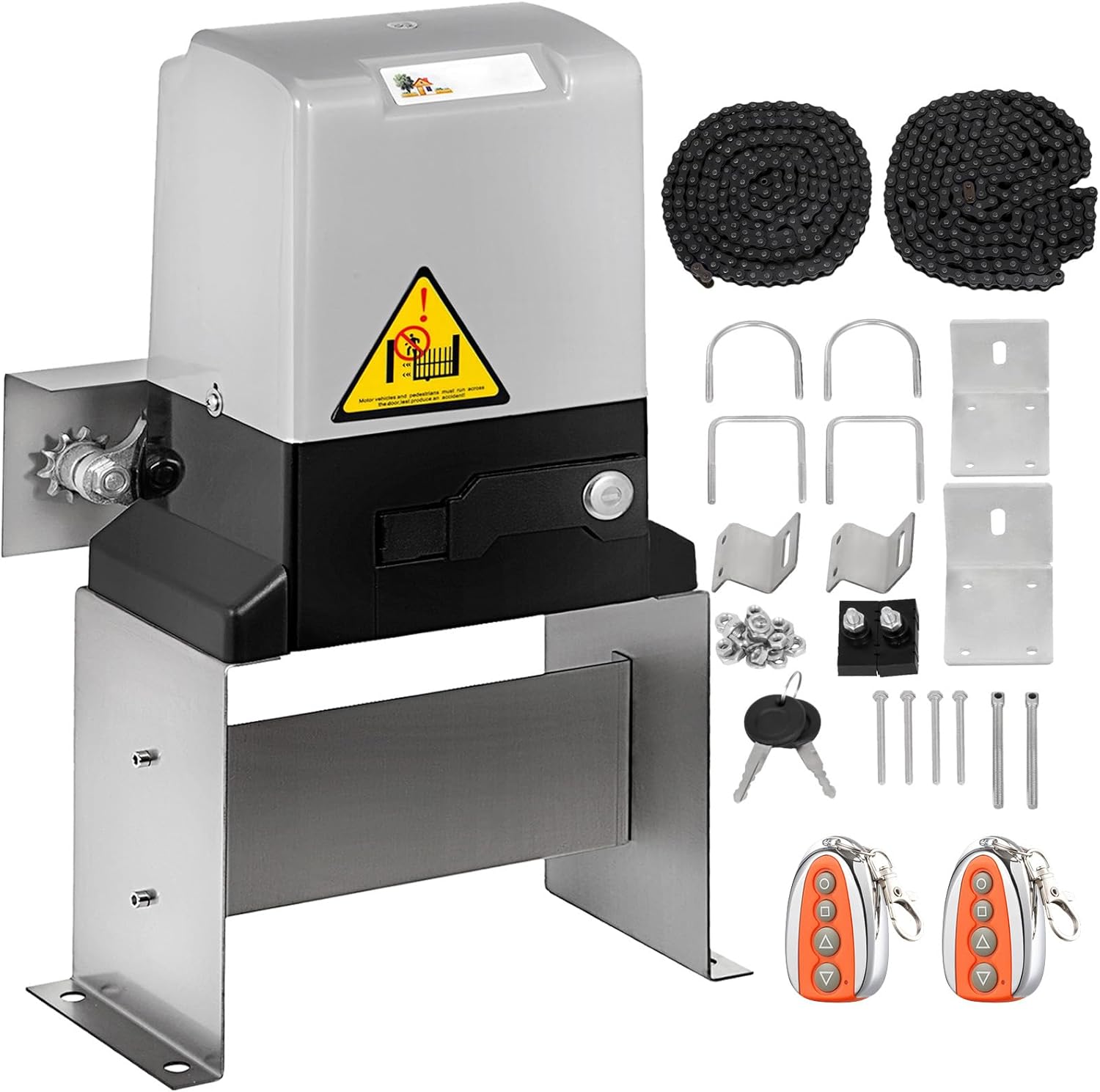
Figure 3.1: The complete Happybuy Sliding Gate Opener AC1400 system, including the main motor unit, two remote controls, two manual release keys, the 20ft chain, and various mounting hardware.

Figure 3.2: A comprehensive display of all hardware included with the Happybuy Sliding Gate Opener, such as the chain, remote controls, keys, bolts, and brackets, ready for assembly.
4. Specifications
| Feature | Specification |
|---|---|
| Manufacturer | Happybuy |
| Part Number | Happybuy Sliding Gate Opener AC1400 |
| Item Weight | 43.5 pounds |
| Product Dimensions | 14 x 13 x 19 inches |
| Item Model Number | Happybuy Sliding Gate Opener AC1400 |
| Size | 3100lbs |
| Color | Silver |
| Finish | Copper |
| Item Package Quantity | 1 |
| Batteries Required? | No |

Figure 4.1: Key product specifications, including track length and overall product dimensions.
5. Installation Instructions
The Happybuy Sliding Gate Opener is designed for straightforward installation. All necessary hardware and a detailed manual are included. A hexagonal wrench is also provided.
Installation Steps:
- Prepare the Mounting Area: Ensure a stable, level surface for the gate opener unit. Securely anchor the unit to the concrete or suitable foundation.
- Assemble the Chain: The 20ft track chain can be adjusted to fit your gate's length. Connect the chain to the gate and the opener's sprocket.
- Mount the Opener: Position the opener unit so that the drive sprocket aligns correctly with the gate chain.
- Connect Power: Follow the electrical wiring diagram in the included manual for safe power connection.
- Install Limit Switches: Attach the magnetic limit switches to the gate at the desired open and close positions.
- Test Operation: Perform initial tests to ensure smooth operation and correct limit switch functionality.

Figure 5.1: Schematic diagram outlining the basic setup for installing the sliding gate opener, showing the gate operator, chain, input power, and limit blocks for open and close positions.

Figure 5.2: The gate opener unit installed at the base of a sliding gate, with the drive chain connected, illustrating its function.

Figure 5.3: An illustration detailing the high-quality construction of the gate opener, including stainless steel gears, a rainproof cover, and a 9-inch high base.
Installation Video:
Video 5.1: This official installation video provides a step-by-step guide for setting up the Happybuy Sliding Gate Opener, demonstrating how to assemble the components, connect the chain, and adjust the limiters for proper gate operation. It covers the process from unboxing to final adjustments.
6. Operating Instructions
Your electric gate opener comes with two remote controls for convenient operation.
Using the Remote Control:
- Press the Open button to open the gate.
- Press the Close button to close the gate.
- Press the Stop button to halt the gate's movement at any point.
- The remote controls have an operating range of up to 100 feet.
Manual Operation:
In case of a power failure, use the provided manual release keys to disengage the motor and operate the gate manually.

Figure 6.1: A hand operating one of the two wireless remote controls, demonstrating the ability to open, close, and stop the gate. Also visible are the emergency release keys and the "Stop & Reverse Mode" feature.
7. Maintenance
Regular maintenance ensures the longevity and reliable operation of your gate opener.
- Lubrication: Periodically lubricate the gate chain and any moving parts of the gate itself to reduce friction and wear.
- Cleaning: Keep the gate opener unit and the gate track free from debris, dirt, and obstructions.
- Inspection: Regularly check all mounting hardware, electrical connections, and the chain for tightness and signs of damage.
- Limit Switch Check: Verify that the limit switches are securely in place and functioning correctly to prevent the gate from over-traveling.
8. Troubleshooting
This section addresses common issues you might encounter with your gate opener.
Common Issues and Solutions:
- Gate not moving: Check power supply, remote control batteries, and ensure the manual release is fully engaged.
- Gate stops unexpectedly: The obstruction detection system may have been triggered. Clear any obstacles in the gate's path. Check limit switch alignment.
- Remote control not working: Replace remote control batteries. Ensure you are within the operating range. Re-pair the remote if necessary (refer to the full owner's manual for pairing instructions).
- Unusual noises: Inspect the chain and moving parts for debris or lack of lubrication. Check for loose components.
For more complex issues, consult the detailed owner's manual or contact Happybuy customer support.
9. Warranty and Support
Happybuy products are designed for quality and durability. For warranty information, technical support, or replacement parts, please refer to the contact information provided in your product packaging or visit the official Happybuy website.


