
1. Introduction
Thank you for choosing the TECHTONGDA Automatic Paper Folding Machine. This machine is designed for efficient and precise folding of various paper sizes and thicknesses, making it ideal for offices, print shops, and businesses requiring high-volume document processing. This manual provides essential information for the safe and effective operation, maintenance, and troubleshooting of your new paper folding machine. Please read it thoroughly before initial use and keep it for future reference.

Figure 1.1: TECHTONGDA Automatic Paper Folding Machine (Model L122037)
2. Safety Information
To ensure safe operation and prevent damage to the machine or injury to personnel, please observe the following safety precautions:
- Always connect the machine to a grounded power outlet with the correct voltage.
- Do not operate the machine with wet hands or in damp conditions.
- Keep hands, hair, loose clothing, and jewelry away from moving parts, especially the rollers and paper feed area, during operation.
- Turn off and unplug the machine before performing any maintenance, cleaning, or clearing paper jams.
- Do not attempt to disassemble or repair the machine yourself. Refer all servicing to qualified personnel.
- Ensure the machine is placed on a stable, level surface to prevent tipping.
- Keep children and unauthorized personnel away from the machine during operation.
3. Product Overview and Components
The TECHTONGDA Automatic Paper Folding Machine is designed for robust performance and ease of use. Key components include the paper input tray, folding rollers, output tray, electronic counter, and speed control dial.
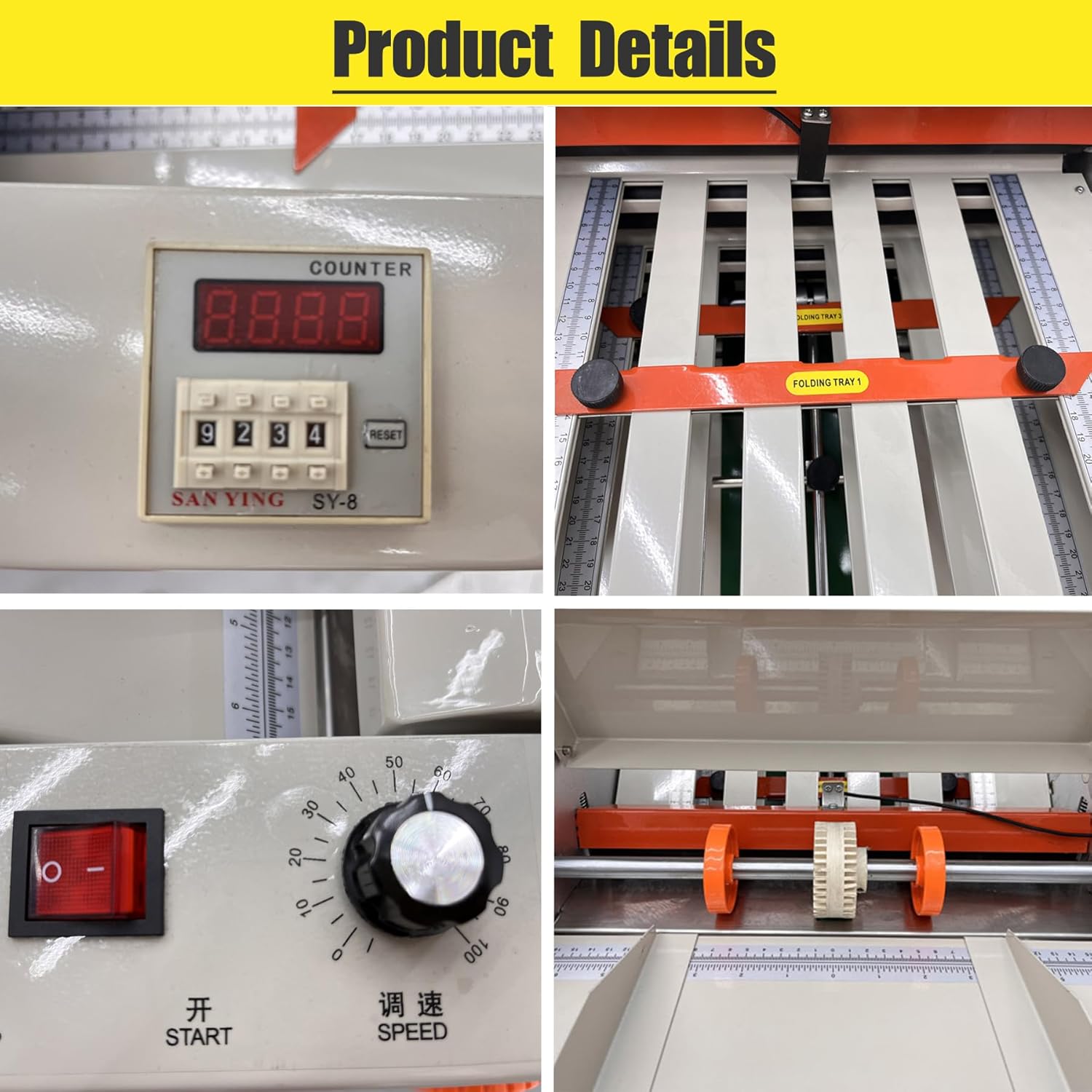
Figure 3.1: Detailed views of machine components (Electronic Counter, Speed Dial, Folding Tray, Rollers)
Key Features:
- Variable Speed Control: Allows adjustment of folding speed up to 80m/min (262ft/min) to accommodate different paper types and folding requirements.
- Electronic Counter: Enables precise control over the number of sheets to be folded, with automatic stop functionality.
- Durable Construction: Features a stable and robust paper tray, high-quality rollers, and multi-layer anti-rust spray paint for extended service life.
- Wide Paper Compatibility: Handles paper sizes from 50x70mm (1.97x2.76inch) up to 310x700mm (12.2x27.56inch) and thicknesses from 20G-125G.

Figure 3.2: Main components of the paper folding machine
4. Setup
Follow these steps to set up your paper folding machine for first use:
- Unpacking: Carefully remove the machine from its packaging. Retain all packaging materials for future transport or storage.
- Placement: Place the machine on a sturdy, level surface that can support its weight. Ensure there is adequate space around the machine for paper feeding and output.
- Power Connection: Connect the power cord to the machine and then to a suitable grounded electrical outlet.
- Install Trays: Attach the input and output trays securely to the machine.
- Adjust Paper Guides: Adjust the paper guides on the input tray to match the width of the paper you intend to fold. Ensure the paper fits snugly but can move freely.

Figure 4.1: Adjusting paper guides on the input tray
5. Operating Instructions
This section details the steps for operating your automatic paper folding machine.
5.1 Basic Operation
- Power On: Flip the red power switch to the 'ON' position.
- Load Paper: Place a stack of paper into the input tray, ensuring it is aligned correctly with the guides.
- Set Electronic Counter: Use the electronic counter to set the desired number of sheets to be folded. If you set '0010', the machine will stop after folding 10 sheets. If '0000' is displayed, the machine will not fold.
- Adjust Speed: Turn the speed control dial to set the desired folding speed. Start with a lower speed for testing and adjust as needed.
- Start Folding: Press the 'START' button to begin the folding process.
- Power Off: Once folding is complete or if you need to stop, press the 'STOP' button and then turn off the power switch.

Figure 5.1: Electronic Counter and Adjustable Speed Button
5.2 Adjusting for Different Fold Types
The machine can perform various fold types. Adjustments are made by manipulating the folding plates and rollers.
- Standard Folds: For common folds like single or double folds, adjust the folding plates according to the desired crease lines.
- Cross Fold: To achieve a cross fold, the horizontal crease is formed by adjusting the No. 1 plate. The vertical crease is an indentation. Adjust the position of the two rollers: moving them closer to the middle deepens the vertical indentation, while moving them farther apart makes the indentation disappear.
- Roller Adjustment: The machine is equipped with three soft rollers with gears for smooth feeding. Different rubbing pads can be chosen to adapt to various paper types.

Figure 5.2: Examples of various paper fold types
6. Maintenance
Regular maintenance ensures the longevity and optimal performance of your paper folding machine.
- Cleaning: Regularly clean the paper dust and debris from the input tray, rollers, and output area using a soft, dry cloth or a small brush. Ensure the machine is unplugged before cleaning.
- Roller Inspection: Periodically inspect the rollers for wear or damage. Worn rollers can affect folding quality.
- Lubrication: Refer to the manufacturer's guidelines for any specific lubrication requirements. Generally, moving parts may require light lubrication over time.
- Storage: When not in use for extended periods, store the machine in a clean, dry environment, preferably covered to protect it from dust.
7. Troubleshooting
This section addresses common issues you might encounter and their potential solutions.
| Problem | Possible Cause | Solution |
|---|---|---|
| Machine does not power on. | Power cord unplugged; power switch off; no power from outlet. | Check power cord connection; ensure power switch is ON; test outlet with another device. |
| Paper not feeding or jamming. | Paper guides misaligned; paper too thick/thin; rollers dirty/worn; paper loaded incorrectly. | Adjust paper guides; ensure paper meets specifications; clean rollers; reload paper correctly. |
| Folds are uneven or inaccurate. | Folding plates/rollers misadjusted; worn rollers; incorrect paper type. | Re-adjust folding plates and rollers; inspect and clean/replace rollers; use recommended paper. |
| Electronic counter not working or stuck at '0000'. | Counter not reset; internal sensor issue. | Press the 'RESET' button on the counter. If issue persists, contact support. |
| Machine is unusually noisy. | Loose components; lack of lubrication; foreign object. | Turn off and unplug. Inspect for loose parts or foreign objects. If necessary, contact support. |
If you encounter problems not listed here or if the suggested solutions do not resolve the issue, please contact customer support for assistance.
8. Specifications
Below are the technical specifications for the TECHTONGDA Automatic Paper Folding Machine (Model L122037):
| Feature | Specification |
|---|---|
| Model Number | L122037 |
| Brand | TECHTONGDA |
| Maximum Paper Size | 310 x 700 mm (12.2 x 27.56 inches) |
| Minimum Paper Size | 50 x 70 mm (1.97 x 2.76 inches) |
| Maximum Folding Speed | 80 m/min (262 ft/min) |
| Paper Thickness | 20G - 125G |
| Material Type | Paper |
| Dimensions (Approx.) | 105 cm (L) x 52 cm (W) x 56 cm (H) / 41 in (L) x 20.5 in (W) x 22 in (H) |

Figure 8.1: Machine Dimensions
9. Warranty and Support
For warranty information and customer support, please refer to the documentation provided at the time of purchase or contact TECHTONGDA customer service directly. Keep your purchase receipt as proof of purchase for any warranty claims.
For technical assistance, troubleshooting beyond this manual, or spare parts, please reach out to the official TECHTONGDA support channels.