
The MeatStick SLC068X
The MeatStick BBQ & Kitchen Set Wireless Meat Thermometer User Manual
Model: SLC068X | Brand: The MeatStick
1. Product Overview
The MeatStick BBQ & Kitchen Set provides a revolutionary wireless solution for monitoring meat temperatures during cooking. This set includes both The MeatStick and The MeatStick Mini, along with their respective charging bases, offering unparalleled convenience and precision for various cooking methods, from grilling and smoking to oven roasting and sous vide.

Figure 1.1: The MeatStick BBQ & Kitchen Set components and app interface.
Key Features:
- True Wireless Design: Insert the thermometer into the meat and leave it during the entire cooking process.
- Extended Range: The MiniX Charger acts as an Xtender, providing a Bluetooth range of up to 260 ft outdoors and 100 ft indoors.
- App-Controlled Monitoring: Utilize The MeatStick App on iOS/Android devices for real-time temperature tracking, customizable alerts, and a guided cook list.
- High Durability: Both MeatStick models are dishwasher-safe, deep-fryer proof, and suitable for various cooking environments including oven, grill, smoker, and sous vide.
- Dual Temperature Sensors: The MeatStick features an internal sensor (up to 212°F/100°C) and an ambient sensor (up to 572°F/300°C). The MeatStick Mini has one internal sensor (up to 185°F/85°C).
2. What's Included
Your MeatStick BBQ & Kitchen Set package contains the following items:
- 1 x The MeatStick (Red)
- 1 x The MeatStick Mini (Black)
- 1 x MS Charger (for The MeatStick)
- 1 x MiniX Charger (for The MeatStick Mini, also functions as an Xtender)
- 1 x Protective Carrying Case

Figure 2.1: All components included in the MeatStick BBQ & Kitchen Set.
3. Product Components and Specifications
3.1 The MeatStick
The MeatStick is designed for larger cuts of meat and features two sensors:
- Internal Temperature Sensor: Measures the internal temperature of the meat, with a maximum heat resistance of 212°F (100°C).
- Ambient Temperature Sensor: Measures the surrounding cooking temperature, with a maximum heat resistance of 572°F (300°C).
3.2 The MeatStick Mini
The MeatStick Mini is ideal for smaller cuts and features one sensor:
- Internal Temperature Sensor: Measures the internal temperature of the meat, with a maximum heat resistance of 185°F (85°C). Note: The MeatStick Mini does not have an ambient sensor.

Figure 3.1: Temperature sensor details and dimensions for MeatStick and MeatStick Mini.
3.3 Chargers
- MS Charger: Charges The MeatStick.
- MiniX Charger: Charges The MeatStick Mini and functions as a Bluetooth Xtender to extend the range of both thermometers.
4. Setup Guide
4.1 Initial Charging
- Before first use, fully charge both The MeatStick and The MeatStick Mini by placing them into their respective chargers.
- Ensure the chargers are powered (e.g., via USB for the MiniX Charger, or batteries for the MS Charger if applicable).
- A full charge typically provides 24+ hours of battery life for The MeatStick and 8+ hours for The MeatStick Mini.
4.2 App Installation and Pairing
- Download "The MeatStick App" from the Apple App Store (for iOS devices) or Google Play Store (for Android devices).
- Open the app and follow the on-screen instructions to pair your MeatStick thermometers. Ensure Bluetooth is enabled on your smartphone or tablet.
- The app will guide you through the initial setup, allowing you to connect to your devices.
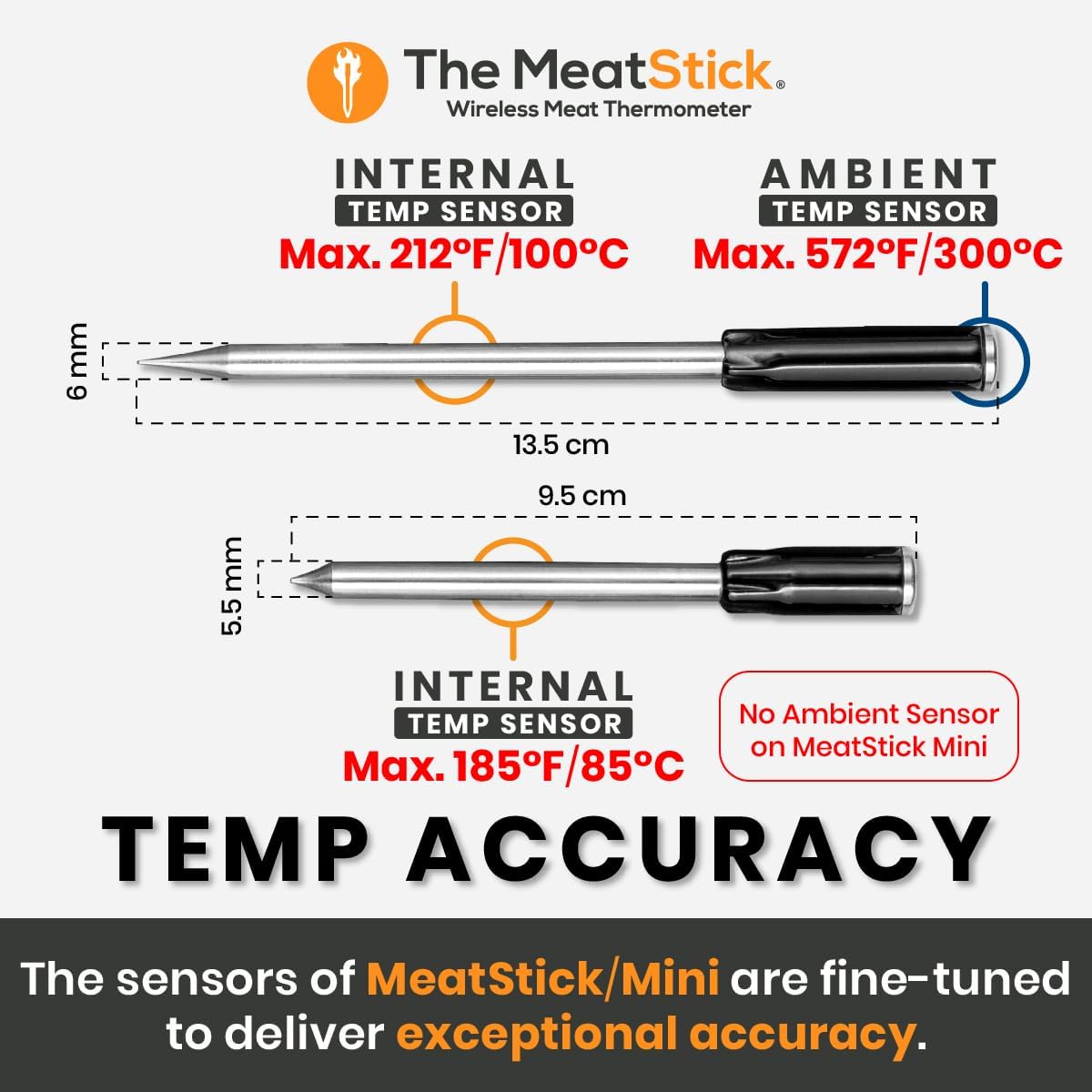
Figure 4.1: The MeatStick App interface for monitoring cooking progress.
5. Operating Instructions
5.1 Inserting the Thermometer
- Carefully insert the MeatStick or MeatStick Mini into the thickest part of the meat, avoiding bones.
- Ensure the entire metal probe is inside the meat, with only the ceramic handle exposed. For The MeatStick, ensure both internal and ambient sensors are correctly positioned.

Figure 5.1: Proper insertion of The MeatStick into meat for wireless monitoring.
5.2 Monitoring with The MeatStick App
- Once inserted, open The MeatStick App. It will automatically connect to the thermometer(s).
- Select your desired meat type and doneness from the guided cook list, or set custom target temperatures.
- The app displays real-time internal and ambient temperatures, estimated cooking time, and sends alerts when your meat is ready.
5.3 Maximizing Wireless Range
- The MiniX Charger acts as a Bluetooth Xtender. For optimal range, place the MiniX Charger within 6 feet of the MeatStick(s) during cooking.
- The extended range allows monitoring from up to 260 feet outdoors (line of sight) and 100 feet indoors.

Figure 5.2: The MiniX Charger's role in extending wireless range.

Figure 5.3: Detailed range capabilities with the MiniX Charger.
5.4 Compatible Cooking Methods
The MeatStick thermometers are designed to withstand various cooking environments:
- Oven: Safe for use in conventional ovens.
- Air Fryer: Suitable for air frying.
- Smoker: Ideal for low and slow smoking.
- Grill: Can be used on grills.
- Stove: Applicable for stove-top cooking.
- Deep Fryer: Deep-fryer proof.
- Sous Vide: Fully waterproof for sous vide cooking.

Figure 5.4: Versatility across different cooking methods.
6. Maintenance and Care
6.1 Cleaning
- Both The MeatStick and The MeatStick Mini are dishwasher-safe.
- For manual cleaning, wash with warm soapy water and a soft cloth. Ensure all food residue is removed.
- Wipe the chargers clean with a damp cloth. Do not immerse chargers in water.
6.2 Storage
- Store the thermometers and chargers in the provided protective carrying case when not in use.
- Store in a cool, dry place away from direct sunlight and extreme temperatures.

Figure 6.1: Durability features including dishwasher safety.
7. Troubleshooting
If you encounter issues with your MeatStick BBQ & Kitchen Set, please refer to the following common solutions:
| Problem | Possible Cause | Solution |
|---|---|---|
| Thermometer not connecting to app / Frequent disconnections |
|
|
| Inaccurate temperature readings |
|
|
| Thermometer not charging |
|
|
8. Technical Specifications
| Specification | Detail |
|---|---|
| Brand | The MeatStick |
| Model Name | MeatStick BBQ & Kitchen Set |
| Item Model Number | SLC068X |
| Connectivity Technology | Bluetooth |
| Wireless Range (Outdoor) | Up to 260 ft (with MiniX Xtender) |
| Wireless Range (Indoor) | Up to 100 ft (with MiniX Xtender) |
| MeatStick Internal Temp Sensor Max | 212°F (100°C) |
| MeatStick Ambient Temp Sensor Max | 572°F (300°C) |
| MeatStick Mini Internal Temp Sensor Max | 185°F (85°C) |
| Battery Life (MeatStick) | 24+ hours |
| Battery Life (MeatStick Mini) | 8+ hours |
| Dishwasher Safe | Yes (Thermometers only) |
| Deep-Fryer Proof | Yes (Thermometers only) |
| Material | Plastic (Chargers), Stainless Steel/Ceramic (Thermometers) |
| Item Weight | 2.01 pounds (total package) |
9. Warranty and Support
9.1 Warranty Information
The MeatStick products are manufactured with high-quality materials and undergo rigorous testing. For specific warranty terms and conditions, please refer to the warranty card included in your product packaging or visit The MeatStick official website.
9.2 Customer Support
Should you require assistance, have questions, or need to report an issue, please contact The MeatStick customer support team. Contact details can typically be found on the official website or within The MeatStick App's help section.
- Online Support: Visit The MeatStick Support Page (example link, actual link may vary).
- Email Support: Refer to your product documentation for the support email address.
Related documentsSLC068X


Ask a question about this manual
Ask about setup, troubleshooting, compatibility, parts, safety, or missing instructions. Manuals+ will review the question and use this page’s manual context to help answer it.