
1. Introduction
This user manual provides essential information for the safe and efficient use of your InfinityLab InstantCharger 20W USB-C Wall Charger. Please read this manual thoroughly before using the product and retain it for future reference.
2. Product Overview
The InfinityLab InstantCharger 20W is a compact USB-C Power Delivery (PD) wall charger designed for fast charging compatible devices. It features a single USB-C port and incorporates advanced safety mechanisms.
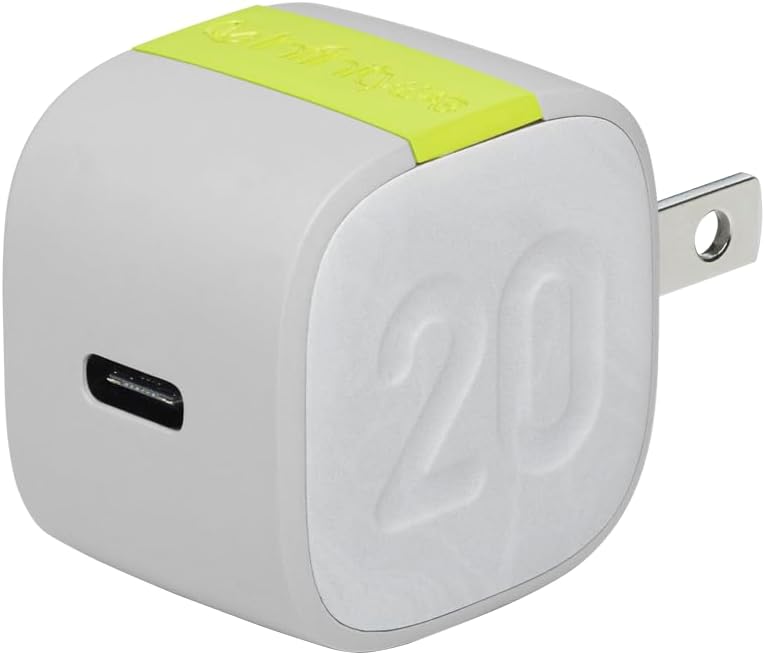
Image: The InfinityLab InstantCharger 20W USB-C Wall Charger. This compact white charger features a single USB-C output port on one side and a foldable two-prong plug on the other. A green accent band is visible on the top, and the number '20' is subtly embossed on its side, indicating its wattage.
3. Setup
- Unpack the Charger: Carefully remove the InstantCharger from its packaging.
- Connect to Power Outlet: Plug the charger into a standard wall power outlet. Ensure the outlet is easily accessible.
- Connect Your Device: Use a compatible USB-C charging cable (not included) to connect your device to the USB-C port on the InstantCharger.

Image: A person's hand is shown plugging a black USB-C cable into the InfinityLab InstantCharger. The charger is connected to a power strip on a wooden desk, with a smartphone and other electronic devices nearby, illustrating the connection process.
4. Operating Instructions
Once connected, the InstantCharger will automatically begin charging your device. The 20W Power Delivery (PD) 3.0 technology enables fast charging for compatible devices.
- For optimal fast charging, ensure your device and charging cable support USB Power Delivery.
- Charging times may vary based on device battery capacity and current charge level.

Image: An icon depicting a battery with a prominent lightning bolt, symbolizing the fast charging capability of the device.
5. Safety Information
The InstantCharger is equipped with advanced safety features to protect your devices and ensure safe operation.
- Auto Protection: Features protection against overheating, overcurrent, and overvoltage.
- Surge Protection: Guards against power surges.
- Do not expose the charger to liquids or extreme temperatures.
- Do not attempt to disassemble or modify the charger.
- Keep out of reach of children.

Image: An icon featuring a shield with a checkmark, representing the built-in safety and reliability features of the charger.
6. Maintenance
- Cleaning: Disconnect the charger from the power outlet before cleaning. Use a soft, dry cloth to wipe the surface. Do not use liquid cleaners or aerosols.
- Storage: Store the charger in a cool, dry place when not in use.

Image: An icon depicting the universal recycling symbol, highlighting the product's use of recycled materials and sustainable packaging.
7. Troubleshooting
- Issue: Device is not charging.
- Solution:
- Ensure the charger is securely plugged into a working power outlet.
- Verify that the USB-C cable is properly connected to both the charger and your device.
- Try using a different USB-C cable to rule out cable malfunction.
- Test the charger with a different device to confirm charger functionality.
- Issue: Device is charging slowly.
- Solution:
- Confirm that your device and USB-C cable support Power Delivery (PD) for fast charging.
- Ensure no other devices are drawing power from the same outlet if it's a shared circuit.
8. Specifications
| Feature | Detail |
|---|---|
| Model Number | ILINC20WWHTAM |
| Product Dimensions | 1.77 x 1.77 x 1.37 inches |
| Item Weight | 1.44 ounces |
| Brand | InfinityLab |
| Connector Type | USB Type C |
| Compatible Devices | Game Consoles, Smartphones (e.g., Samsung Galaxy S20, iPhone) |
| Special Feature | Fast Charging (Power Delivery 3.0) |
| Color | White |
| Amperage | 0.08 Amps |
| Total USB Ports | 1 |
| Wattage | 20 watts |
| Included Components | Protection Pouch |
9. Warranty and Support
For warranty information and customer support, please refer to the official InfinityLab website or contact their customer service directly. Details regarding product registration and warranty claims can typically be found on the manufacturer's support pages.
You can visit the InfinityLab Store on Amazon for more products and information.


