
1. Introduction
Thank you for choosing the Oraimo V2 Wired In-Ear Headphones, model OEP-E21. These headphones are designed for optimal performance, offering a range of useful features and a stylish, lightweight design. They provide clear audio for various activities including music playback, gaming, business meetings, and general communication.
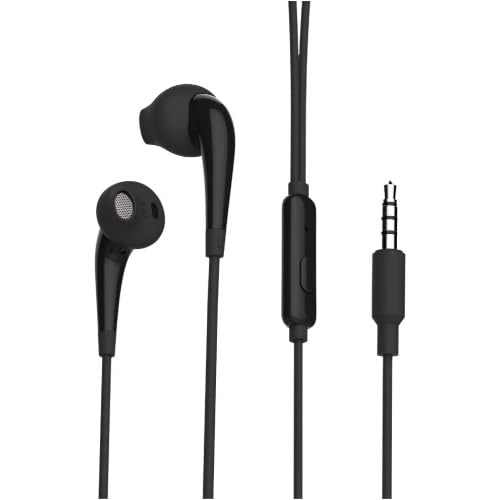
Image 1.1: The Oraimo V2 Wired In-Ear Headphones in black, showcasing their sleek design.
Key Features:
- Connectivity: Wired (3.5mm Jack)
- Design: Lightweight, In-Ear Form Factor
- Material: Durable Plastic
- Control: Voice Control functionality
2. Setup
Setting up your Oraimo V2 Wired In-Ear Headphones is simple and straightforward. No complex installation or software is required.
Connecting Your Headphones:
- Identify the Audio Port: Locate the 3.5mm audio jack on your compatible device (e.g., mobile phone, tablet, laptop, MP3 player). This port is typically marked with a headphone icon.
- Insert the Connector: Gently insert the 3.5mm jack of your Oraimo OEP-E21 headphones into the audio port of your device until it is fully seated.
- Adjust Volume: Once connected, adjust the volume on your device to a comfortable listening level.
Your headphones are now ready for use. Ensure the connection is secure to prevent audio interruptions.
3. Operating Instructions
The Oraimo V2 Wired In-Ear Headphones feature a built-in microphone and voice control capabilities for convenient use during calls and media playback.
Basic Functions:
- Audio Playback: Once connected, audio from your device will automatically play through the headphones.
- Voice Control: The integrated microphone supports voice control. Depending on your device, you can activate voice assistants (e.g., Siri, Google Assistant) or manage calls using voice commands. Refer to your device's manual for specific voice control features.
- Call Management: When a call comes in, you can typically answer or end it using the control button on the headphone cable (if present) or through your device's interface. The microphone allows for clear communication during calls.
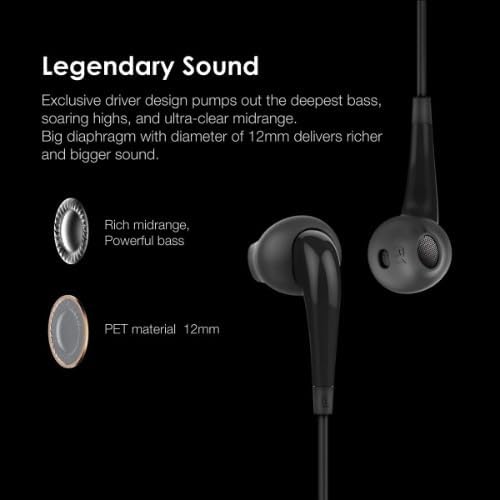
Image 3.1: Diagram illustrating the 'Legendary Sound' features, including rich midrange, powerful bass, and 12mm PET material drivers.
4. Maintenance
Proper care and maintenance will extend the lifespan of your Oraimo V2 Wired In-Ear Headphones.
Cleaning and Storage:
- Cleaning: Use a soft, dry cloth to wipe the earbuds and cable. Do not use harsh chemicals or abrasive cleaners. For ear tips, you may gently remove them and clean with a mild soap solution, then rinse and dry thoroughly before reattaching.
- Storage: When not in use, store the headphones in a clean, dry place, preferably in a small pouch or case to prevent tangling and damage.
- Cable Care: Avoid sharply bending or pulling the cable, especially near the connectors. The cable features durable Kevlar fiber for enhanced longevity, but excessive force can still cause damage.
Image 4.1: Illustration of the durable Kevlar fiber cable, designed to protect wiring and extend lifespan.
Important Considerations:
- Water Resistance: These headphones are not water resistant. Avoid exposure to water, sweat, or high humidity to prevent damage.
- Temperature: Do not expose the headphones to extreme temperatures (hot or cold).
5. Troubleshooting
If you encounter issues with your Oraimo V2 Wired In-Ear Headphones, refer to the following common troubleshooting steps:
| Problem | Possible Cause | Solution |
|---|---|---|
| No sound or low volume |
|
|
| Poor sound quality (e.g., static, distorted audio) |
|
|
| Microphone not working |
|
|
6. Specifications
Detailed technical specifications for the Oraimo V2 Wired In-Ear Headphones OEP-E21:
| Brand Name | Oraimo |
| Model Name | OEP-E21 V2 |
| Connectivity Technology | Wired |
| Headphone Jack | 3.5mm Jack |
| Headphones Form Factor | In-Ear |
| Ear Placement | In Ear |
| Color | Black |
| Material Type | Plastic |
| Item Weight | 50 grams |
| Product Dimensions | 10 x 10 x 5 cm |
| Impedance | 32 Ohm |
| Frequency Response | 20000 Hz |
| Noise Control | None |
| Control Type | Voice Control |
| Compatible Devices | Mobile Phone |
| Water Resistance Level | Not Water Resistant |
| Recommended Uses | Running, Gaming, Music Playback, Business Meetings, Communication |
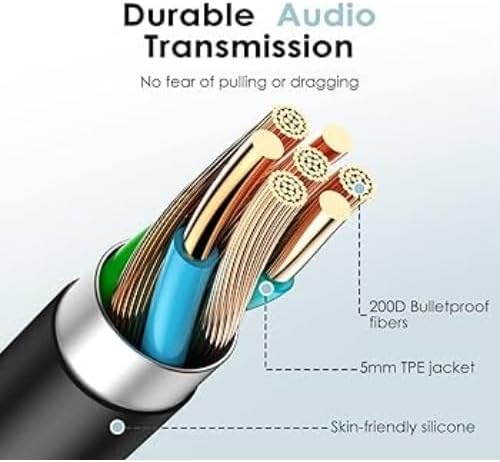
Image 6.1: Detailed view of the cable's internal structure, highlighting 200D bulletproof fibers and a 5mm TPE jacket for durable audio transmission.
7. Warranty Information
Specific manufacturer warranty details for the Oraimo V2 Wired In-Ear Headphones OEP-E21 are not provided in this manual. For information regarding the standard manufacturer's warranty, please refer to the product packaging or contact Oraimo customer support directly.
Extended protection plans may be available from third-party providers at the point of purchase. These plans are separate from the manufacturer's warranty.
8. Support
For further assistance, technical support, or inquiries regarding your Oraimo V2 Wired In-Ear Headphones OEP-E21, please use the following resources:
- Oraimo Official Website: Visit the official Oraimo website for product information, FAQs, and support contact details.
- Oraimo Brand Store: You can also visit the Oraimo Brand Store on Amazon for additional product details and customer service options.
Please retain this manual for future reference.