
1. Introduction
This manual provides detailed instructions for the safe and proper installation, operation, and maintenance of your InstallerParts 32-70 Inch TV Corner Mount. Please read this manual thoroughly before installation and retain it for future reference. This mount is designed to securely hold flat panel displays ranging from 32 to 70 inches, with a maximum weight capacity of 99 lbs.

Figure 1: InstallerParts 32-70 Inch TV Corner Mount, showcasing its robust design and high-quality material.
2. Safety Information
WARNING: Failure to read and follow all instructions may result in personal injury, property damage, or voiding of your warranty. The manufacturer is not liable for damage or injury caused by incorrect assembly or use.
- Ensure the mounting surface can safely support the combined weight of the mount and the display.
- Do not exceed the maximum weight capacity of 99 lbs (45 kg).
- Use only the provided hardware. If any parts are missing or damaged, contact InstallerParts for replacement.
- This product is intended for indoor use only.
- Always have at least two people for installation to prevent injury or damage.
- Verify VESA compatibility with your TV before installation.
3. Package Contents
Carefully unpack the box and ensure all components are present and undamaged. If any parts are missing or defective, contact customer support.
| Part | Description | Quantity |
|---|---|---|
| Wall Plate Assembly | Main mount frame for wall attachment | 1 |
| TV Brackets | Vertical bars that attach to the TV | 2 |
| Hardware Kit | Assorted screws, washers, spacers for TV and wall mounting | 1 set |
| HDMI Cable | 6ft HDMI cable | 1 |
| Instruction Manual | This document | 1 |
4. Setup and Installation
Before beginning installation, ensure you have the necessary tools (e.g., drill, stud finder, level, screwdriver) and that your TV and wall meet the requirements.
4.1 Pre-Installation Checks
- TV Size and Weight: Verify your TV is between 32 and 70 inches and weighs no more than 99 lbs.
- VESA Compatibility: Check the VESA mounting pattern on the back of your TV. This mount supports patterns from 75x75mm to 600x400mm.
- Wall Type: This mount is compatible with wood studs, concrete walls, and brick walls. Do not install on drywall alone.
- Cable Blockage: Ensure the mounting brackets will not block any ports or cables on your TV.

Figure 2: Important checks before installation, including TV size, VESA pattern, and potential cable blockage.

Figure 3: The mount is compatible with diverse wall types including brick, concrete, and wood studs.
4.2 Mounting the Wall Plate
- Determine the desired height and position for your TV in the corner.
- Use a stud finder to locate wood studs, or mark drill points for concrete/brick walls.
- Hold the wall plate assembly against the wall at the desired height and use a level to ensure it is perfectly horizontal. Mark the drill holes.
- Drill pilot holes according to your wall type and the provided hardware specifications.
- Secure the wall plate assembly to the wall using the appropriate lag bolts and washers. Ensure it is firmly attached.
4.3 Attaching TV Brackets to Display
- Lay your TV face down on a soft, clean surface to prevent scratches.
- Align the TV brackets with the VESA mounting holes on the back of your TV.
- Select the correct screws, washers, and spacers from the hardware kit that fit your TV's mounting holes.
- Securely attach the TV brackets to the back of your TV. Do not overtighten.
4.4 Mounting TV to Wall Plate
- With assistance, carefully lift the TV with the attached brackets.
- Hook the TV brackets onto the wall plate assembly. Ensure both brackets are securely seated.
- Engage any safety locks or screws on the brackets to prevent the TV from accidentally disengaging from the mount.
- Connect all necessary cables (e.g., HDMI, power).

Figure 4: Example of a TV securely mounted in a corner using the InstallerParts mount.
5. Operating the Mount (Adjustments)
Your InstallerParts TV Corner Mount offers flexible viewing options with swivel and tilt capabilities. The mount allows for a 60° swivel in either direction (total 120° range) and can tilt 15° upwards and downwards.
- Swivel Adjustment: Gently push or pull the TV to adjust the viewing angle horizontally.
- Tilt Adjustment: Loosen the tilt adjustment knobs on the TV brackets, adjust the TV to the desired vertical angle, and then securely tighten the knobs.

Figure 5: This image illustrates the swivel and tilt mechanism. Please refer to the specifications section for the exact swivel (60° in either direction) and tilt (15° up/down) ranges of this model.
6. Maintenance
- Periodic Checks: Periodically check that all screws and connections are secure. Retighten if necessary.
- Cleaning: Clean the mount with a soft, dry cloth. Avoid abrasive cleaners or solvents.
- Lubrication: No lubrication is required for the moving parts.
7. Troubleshooting
| Problem | Possible Cause | Solution |
|---|---|---|
| TV is not level | Wall plate not level during installation | Remove TV, loosen wall plate screws, adjust with a level, and retighten. |
| Mount feels unstable | Screws not fully tightened; incorrect wall type; TV too heavy | Ensure all screws are tight. Verify wall type and TV weight are within limits. Consult a professional if unsure. |
| Difficulty adjusting swivel/tilt | Tilt knobs too tight; mechanism stiff | Loosen tilt knobs before adjusting tilt. For swivel, ensure no cables are snagged. |
8. Specifications
- Model Number: 35384
- Mounting Type: Wall Mount (Corner)
- Movement Type: Swivel, Tilt
- Material: Alloy Steel
- Color: Black
- Compatible Devices: Television
- Minimum Screen Size: 32 Inches
- Maximum Screen Size: 70 Inches
- Maximum Weight Capacity: 99 lbs (45 kg)
- VESA Compatibility: 75x75mm to 600x400mm
- Swivel Range: 60° in either direction (120° total)
- Tilt Range: 15° Upwards and Downwards
- Extension Arm: 20" Dual Extension Arm
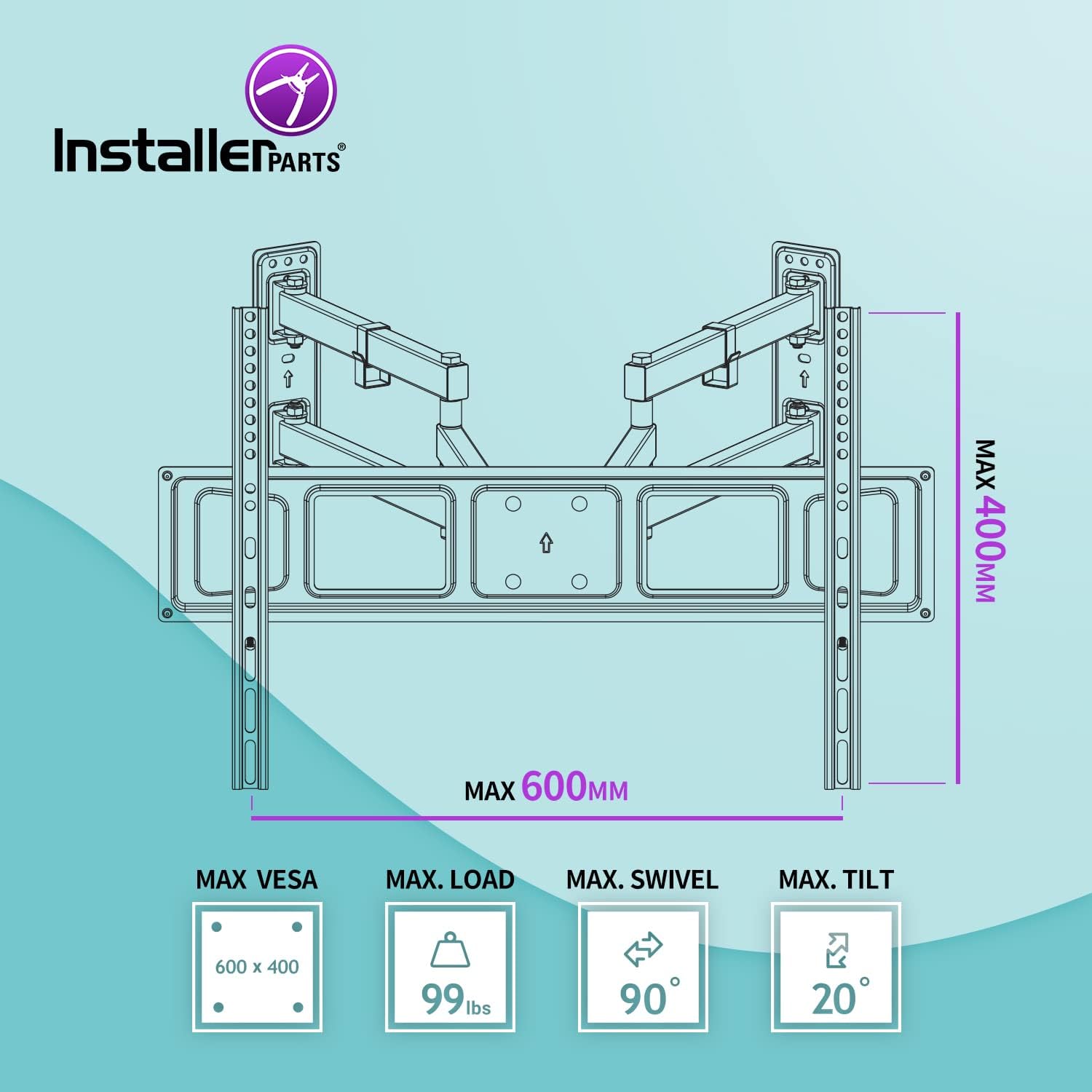
Figure 7: This image provides a visual overview of key specifications. Note that the swivel range for this model is 60° in either direction, and the tilt range is 15° up/down.
9. Warranty & Support
InstallerParts products are designed for durability and performance. For warranty information or technical support, please visit the official InstallerParts website or contact their customer service department.
Online Resources: InstallerParts Amazon Store
Please have your model number (35384) and purchase information ready when contacting support.