
ZOTAC ZT-A30810F-10P
Contents
ZOTAC GAMING GeForce RTX 3080 Ti AMP Holo User Manual
Model: ZT-A30810F-10P
Introduction
The ZOTAC GAMING GeForce RTX 3080 Ti AMP Holo graphics card is built on the NVIDIA Ampere architecture, featuring enhanced RT Cores and Tensor Cores, new streaming multiprocessors, and superfast GDDR6X memory. This manual provides essential information for installing, operating, and maintaining your graphics card to ensure optimal performance and longevity.

The ZOTAC GAMING GeForce RTX 3080 Ti AMP Holo, designed for amplified gaming performance.
What's in the Box
Upon unboxing your ZOTAC GAMING GeForce RTX 3080 Ti AMP Holo, please verify that all the following components are included:
- Graphics Card
- User Manual (Quick Installation Guide)
- 2x Dual 6-pin to 8-pin adapter

Included accessories: User Manual and two dual 6-pin to 8-pin power adapters.
Setup and Installation
Follow these steps to properly install your ZOTAC GAMING GeForce RTX 3080 Ti AMP Holo graphics card into your system.
System Requirements
- PCI Express-compliant motherboard with one dual-width x16 graphics slot.
- Sufficient power supply (refer to your PSU's specifications for compatibility).
- Windows 10 64-bit (build 2004 or later) or compatible operating system.
Physical Installation
- Ensure your computer is powered off and unplugged from the wall outlet.
- Open your computer case.
- Locate an available PCI Express x16 slot on your motherboard.
- Remove any expansion slot covers that correspond to the graphics card's size (this card occupies 3 slots).
- Carefully align the graphics card with the PCIe slot and press down firmly until it is securely seated.
- Secure the graphics card to the case with screws.
Power Connections
The ZOTAC GAMING GeForce RTX 3080 Ti AMP Holo requires dual 8-pin PCIe power connectors. Connect these directly from your power supply to the corresponding ports on the graphics card.
Display Connections
This graphics card supports multiple display outputs:
- 3 x DisplayPort 1.4a
- 1 x HDMI 2.1
Connect your monitor(s) to the appropriate ports. For 8K/60FPS or 4K/120FPS, an Ultra High Speed HDMI Cable is required.

Dimensions and port layout of the graphics card.
Operating Features
Explore the advanced features that enhance the performance and aesthetics of your ZOTAC GAMING GeForce RTX 3080 Ti AMP Holo.
IceStorm 2.0 Advanced Cooling
A refined IceStorm 2.0 cooling system is purpose-built for wider coverage to keep the GPU cooler and running stronger. It features a wide array aluminum heatsink with up to seven copper heat pipes, and 11-blade fans that increase airflow by up to 10% compared to previous generation designs.

Detailed view of the IceStorm 2.0 Advanced Cooling components.
Active Fan Control and FREEZE Fan Stop
The Active Fan Control feature allows users to adjust fan rotations independently, applying increased airflow only where and when it's needed. For triple fan models, the LEFT and CENTER fans will spin at the same RPMs. The FREEZE Fan Stop feature automatically enables efficient and quieter cooling by stopping the fans when the GPU is idle, reducing wear and tear on the fan system.

Active Fan Control allows independent fan speed adjustment, while FREEZE Fan Stop ensures silent operation at low loads.
SPECTRA 2.0 RGB Lighting (HoloBlack)
Exclusive to the AMP Holo, the unique HoloBlack design features an iridescent holographic finish and exudes an aurora-like glow. SPECTRA 2.0 enables beautiful lighted colors and expressive animated options with powerful Addressable RGB LEDs. Set different lighting modes and colors for specific independent lighting zones, or as a synchronized whole, using the ZOTAC GAMING FireStorm software.

Customize your card's aesthetics with SPECTRA 2.0 Dynamic RGB lighting.
FireStorm Utility Software
The FireStorm Utility provides comprehensive control over your ZOTAC GAMING graphics card. This software allows you to monitor performance, adjust fan curves, control SPECTRA 2.0 RGB lighting, and fine-tune other settings for optimal gaming experience.

The FireStorm Utility software provides detailed control and monitoring for your graphics card.
Durability and Resilience
The ZOTAC GAMING GeForce RTX 3080 Ti Series underlines durability with a full-board metal frontplate and lighted metal backplate, increasing overall card rigidity and structural integrity.
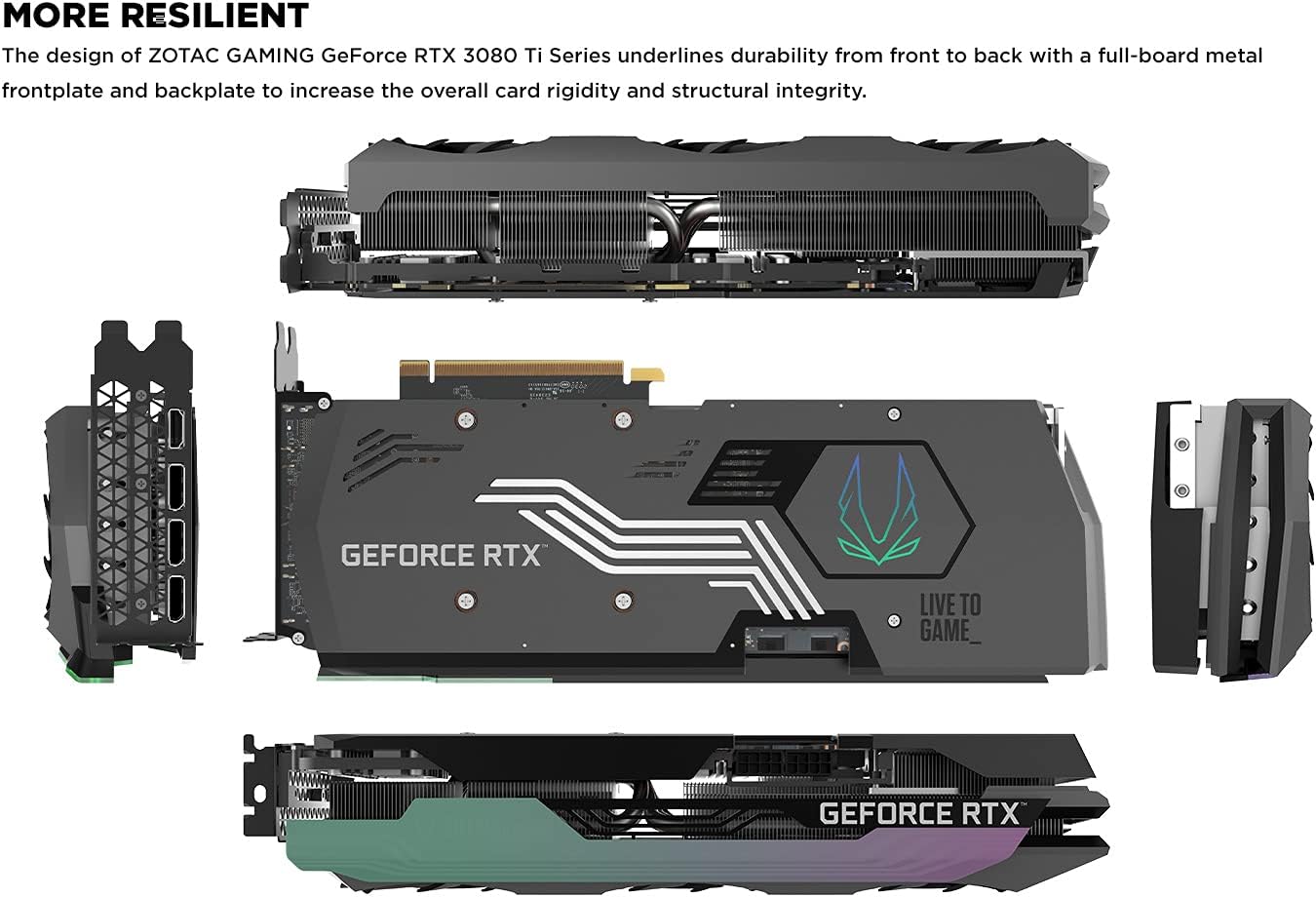
The robust design with metal frontplate and backplate ensures long-term durability.
Maintenance
To ensure the longevity and optimal performance of your graphics card, regular maintenance is recommended.
- Dust Removal: Periodically clean the fans and heatsink with compressed air to prevent dust buildup, which can impede cooling performance. Ensure the system is powered off and unplugged before cleaning.
- Driver Updates: Regularly check for and install the latest graphics drivers from the official NVIDIA or ZOTAC website. Updated drivers often include performance improvements, bug fixes, and compatibility enhancements for new games and applications.
- Software Updates: Keep the ZOTAC FireStorm Utility updated to access the latest features and optimizations.
Troubleshooting
If you encounter issues with your graphics card, consider the following common troubleshooting steps:
- No Display/Black Screen:
- Ensure all power cables (8-pin PCIe) are securely connected to the graphics card and the power supply.
- Verify that the display cable is firmly connected to both the graphics card and the monitor.
- Try a different display port on the graphics card or a different display cable.
- Ensure your monitor is set to the correct input source.
- System Instability/Crashes:
- Update your graphics drivers to the latest version.
- Monitor GPU temperatures using the FireStorm Utility or other monitoring software. Excessive heat can cause instability. Ensure proper case airflow.
- Verify that your power supply unit (PSU) meets the recommended wattage for the RTX 3080 Ti.
- Poor Performance in Games:
- Ensure your game settings are appropriate for your system.
- Check for background applications consuming system resources.
- Confirm that the graphics card is running at its expected clock speeds (monitor with FireStorm Utility).
- Fan Noise:
- Adjust fan curves using the FireStorm Utility to find a balance between cooling and noise.
- Ensure fans are free from obstructions and dust.
Specifications
Detailed technical specifications for the ZOTAC GAMING GeForce RTX 3080 Ti AMP Holo:
| Feature | Specification |
|---|---|
| Graphics Coprocessor | NVIDIA GeForce RTX 3080 Ti |
| Brand | ZOTAC |
| Graphics RAM Size | 12 GB GDDR6X |
| Memory Speed | 19 Gbps |
| Boost Clock | 1710 MHz |
| Video Output Interface | 3 x DisplayPort 1.4a, 1 x HDMI 2.1 |
| Max Screen Resolution | 7680x4320 pixels |
| Item Model Number | ZT-A30810F-10P |
| Item Weight | 5.65 pounds |
| Product Dimensions | 12.12 x 5.2 x 2.5 inches |
| Operating System | Windows 10 64-bit (build 2004 or later) |
| DirectX Support | DirectX 12 Ultimate |
| VR Ready | Yes |
Warranty and Support
ZOTAC provides dedicated support for its products. For customer service, technical support, or general inquiries, please visit the official ZOTAC support page.
- Official Support Page: www.zotac.com/support
- User Manual (PDF): A detailed user manual in PDF format is available for download. Download User Manual
Please register your product to ensure full warranty coverage and access to support services.
Ask a question about this manual
Ask about setup, troubleshooting, compatibility, parts, safety, or missing instructions. Manuals+ will review the question and use this page’s manual context to help answer it.