
Introduction
Thank you for choosing the Imetec Eco Perfect Steam Iron. This appliance is designed to provide efficient and effective ironing while optimizing water and energy consumption. Featuring a Pro Ceramic soleplate and a triple anti-calc protection system, this iron ensures smooth gliding and extended product life. Please read this manual carefully before first use to ensure proper operation and maintenance.

The Imetec Eco Perfect Steam Iron, highlighting its energy-saving capabilities.

An illustration of the Eco Tech feature, indicating up to 35% water savings and 25% energy savings.
Important Safety Instructions
When using electrical appliances, basic safety precautions should always be followed to reduce the risk of fire, electric shock, and injury to persons, including the following:
- Read all instructions before using the iron.
- Do not leave the iron unattended while it is connected to the power supply or on an ironing board.
- To protect against the risk of electric shock, do not immerse the iron in water or other liquids.
- The iron must always be turned to the 'OFF' position before plugging or unplugging from the outlet. Never yank cord to disconnect from the outlet; instead, grasp plug and pull to disconnect.
- Do not allow cord to touch hot surfaces. Let iron cool completely before putting away. Loop cord loosely around iron when storing.
- Always disconnect iron from electrical outlet when filling with water or emptying, and when not in use.
- Do not operate iron with a damaged cord or if the iron has been dropped or damaged. To avoid the risk of electric shock, do not disassemble the iron.
- Close supervision is necessary for any appliance being used by or near children. Do not leave iron within reach of children.
- Use the iron only for its intended use.
Product Overview
Familiarize yourself with the components of your Imetec Eco Perfect Steam Iron.

An angled view of the Imetec Eco Perfect Steam Iron, showing its ergonomic design.

Top-down view illustrating the various controls and buttons on the iron's handle.
Key Components:
- Pro Ceramic Soleplate: Ensures even heat distribution and smooth gliding.
- Water Tank: Transparent reservoir for water.
- Temperature Control Dial: Adjusts heat settings for different fabric types.
- Steam Button/Slider: Activates continuous steam or steam shot.
- Spray Nozzle: For misting fabrics.
- Self-Clean Button (Calc-Clean): For descaling the iron.
- Power Cord: Connects the iron to the electrical outlet.
Setup
1. Unpacking
Remove the iron and all accessories from the packaging. Retain the packaging for future storage or disposal. Ensure all components are present and undamaged.
2. Filling the Water Tank
- Ensure the iron is unplugged from the electrical outlet and has cooled down.
- Open the water tank filler cap, typically located at the front of the iron.
- Fill the water tank with clean tap water up to the 'MAX' indicator line. Do not overfill. For areas with hard water, distilled or demineralized water is recommended to prevent scale buildup.
- Close the filler cap securely.
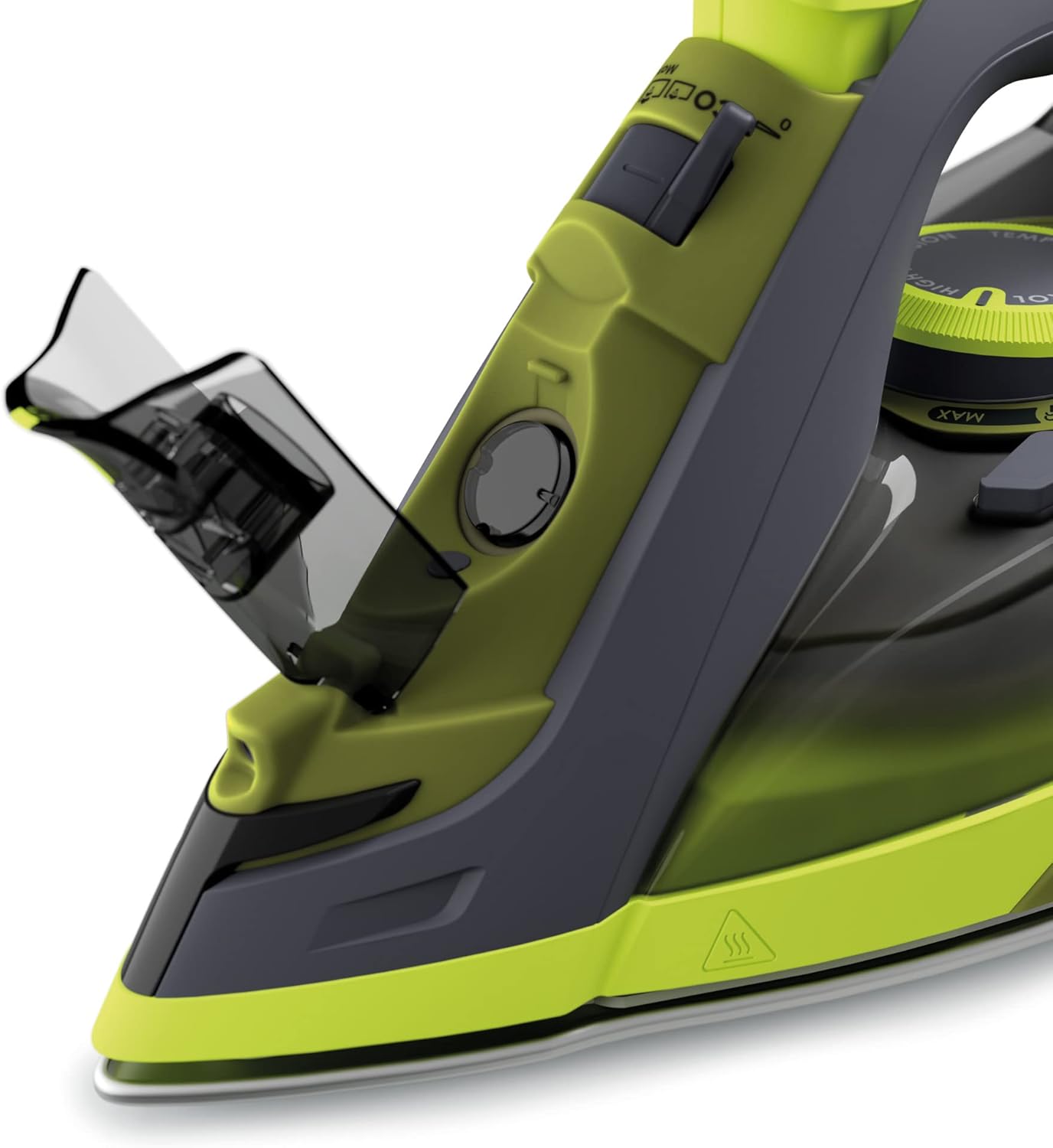
Detail of the water tank opening, ready for filling.
3. First Use
During the first use, a slight odor or small amount of smoke may be emitted. This is normal and will disappear after a short period. It is recommended to iron an old piece of fabric first to ensure no residue is transferred to your garments.
Operating Instructions
1. Setting the Temperature
- Plug the iron into a suitable electrical outlet.
- Turn the temperature control dial to the desired setting based on the fabric type. Refer to the fabric care labels on your garments.
- The indicator light will illuminate, indicating the iron is heating up. It will turn off when the set temperature is reached.

A detailed view of the temperature control dial, showing various fabric settings.
2. Steam Ironing
Steam ironing is suitable for most fabrics, except for very delicate ones like silk or synthetic materials that require lower temperatures.
- Ensure the water tank is filled.
- Set the temperature control dial to a steam-appropriate setting (usually indicated by steam symbols on the dial).
- Once the indicator light turns off, indicating the iron is hot enough, you can activate the steam.
- Continuous Steam: Slide the steam selector to the desired steam level. The Imetec Eco Perfect features Eco Tech, which optimizes steam and temperature for efficient ironing with reduced water consumption.
- Steam Shot: Press the steam shot button for an extra burst of steam to remove stubborn creases. Wait a few seconds between shots to allow the iron to reheat.

The iron in action, releasing steam to smooth out wrinkles on a shirt.
3. Dry Ironing
For dry ironing, ensure the water tank is empty or the steam selector is set to the 'no steam' position. Set the temperature according to the fabric type and iron as usual.
4. Vertical Steaming
The iron can be used for vertical steaming of hanging garments, curtains, or drapes. Hold the iron vertically a few centimeters away from the fabric and press the steam shot button. Ensure the iron is at its maximum temperature setting for best results.
Maintenance
Regular maintenance ensures optimal performance and extends the life of your iron.
1. After Each Use
- Unplug the iron and allow it to cool completely.
- Empty any remaining water from the tank.
- Wipe the soleplate with a damp cloth to remove any starch or fabric residue.
- Store the iron upright on its heel rest to prevent damage to the soleplate.
2. Anti-Calc System (Zerocalc 3X & Calc-Clean)
The Imetec Eco Perfect features a triple anti-calc protection system, including two internal filters and the Calc-Clean self-cleaning function, to reduce limescale buildup.
- Regular Cleaning: Perform the Calc-Clean function periodically, especially if you notice reduced steam output or white flakes.
- Calc-Clean Procedure:
- Fill the water tank to the MAX level.
- Set the temperature to maximum and allow the iron to heat up until the indicator light goes out.
- Unplug the iron.
- Hold the iron horizontally over a sink.
- Press and hold the Calc-Clean button (or activate the self-clean function as per specific model instructions). Hot water and steam will be expelled from the soleplate, carrying away scale particles.
- Shake the iron gently back and forth until the water tank is empty.
- Plug the iron back in and let it heat up to dry the soleplate.
- Unplug and let it cool before storing.

The ceramic soleplate of the iron, showing steam vents and its smooth surface.
Troubleshooting
| Problem | Possible Cause | Solution |
|---|---|---|
| Iron does not heat up. | Not plugged in; power outlet faulty; temperature dial set to 'OFF' or too low. | Check power connection; try another outlet; set temperature dial to desired heat. |
| No steam or insufficient steam. | Water tank empty; temperature too low for steam; steam vents clogged; steam selector in 'dry' position. | Fill water tank; set temperature to steam-appropriate level; perform Calc-Clean; move steam selector to steam position. |
| Water leaks from soleplate. | Temperature too low for steam; water tank overfilled; iron left horizontal when hot. | Increase temperature; do not overfill tank; store iron upright when hot. |
| White flakes or brown stains on fabric. | Limescale buildup; impurities in water; soleplate dirty. | Perform Calc-Clean; use distilled water; clean soleplate. |
Specifications
| Feature | Detail |
|---|---|
| Model Number | 9017 |
| Power | 2400 Watts |
| Voltage | 220 Volts |
| Frequency | 50 Hz |
| Soleplate Material | Ceramic |
| Dimensions (L x W x H) | 32.5 x 12.5 x 17 cm |
| Weight | 1.4 Kilograms |
| Special Feature | Eco-friendly (Eco Tech for water and energy saving) |
| Color | Green, Anthracite |
Warranty and Support
Imetec products are designed for reliability and performance. For information regarding warranty coverage, technical support, or spare parts, please refer to the warranty card included with your product or visit the official Imetec website. You may also contact Imetec customer service directly for assistance.
