
Ozito PXIDK-200
Ozito PXC 18V Impact Driver Kit - PXIDK-200 User Manual
Model: PXIDK-200 | Brand: Ozito
Introduction
This manual provides essential information for the safe and effective operation, maintenance, and troubleshooting of your Ozito PXC 18V Impact Driver Kit (Model: PXIDK-200). Please read this manual thoroughly before using the tool to ensure proper handling and to maximize its lifespan.
The Ozito PXC 18V Impact Driver Kit is designed for fastening screws and bolts with high torque. It features a quick connect chuck for easy accessory changes, an inbuilt LED worklight for improved visibility, and a compact, ergonomic design for comfortable use in various applications.
Key Features:
- 6.35mm Quick Connect Chuck: For fast and easy bit changes.
- 150Nm of Torque: Provides powerful fastening capability.
- Tri-Beam LED Worklight: Illuminates the work area for better visibility.
- Variable Speed Trigger: Allows for precise control over fastening speed.
- Ergonomic Design: Ensures comfortable handling and access to tight spaces.
- Includes 2.0Ah Battery and Standard Charger: Ready to use kit.

This image displays the complete Ozito PXC 18V Impact Driver Kit, including the impact driver, a 2.0Ah battery, and a standard charger. The packaging highlights key specifications such as the 6.35mm quick connect chuck, 150Nm of torque, and the Tri-Beam LED worklight, along with the 5-year replacement warranty.
Setup
1. Charging the Battery
Before first use, ensure the 2.0Ah Lithium Ion battery is fully charged. Connect the standard charger to a power outlet and insert the battery pack into the charger. The charger's indicator lights will show the charging status. A full charge typically takes approximately 80 minutes.
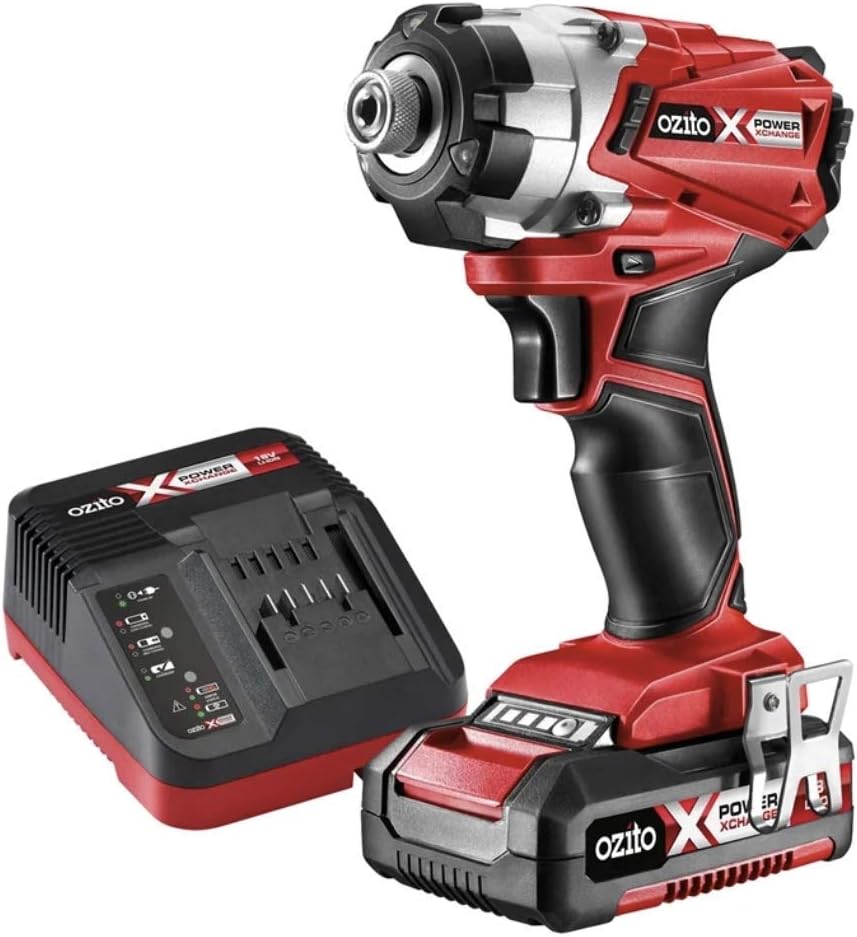
This image shows the Ozito PXC 18V Impact Driver alongside its standard charger. The charger is designed to accept the 18V Lithium Ion battery, which is visible attached to the driver in the foreground, and the charger itself is ready for battery insertion.
2. Attaching the Battery to the Impact Driver
Once charged, slide the battery pack onto the base of the impact driver until it clicks securely into place. Ensure it is firmly seated to prevent accidental detachment during operation.
3. Inserting a Bit into the Quick Connect Chuck
The impact driver features a 6.35mm (1/4") quick connect hex chuck. To insert a bit, pull the chuck collar forward, insert the hex shank bit fully into the chuck, and then release the collar. The bit should be held firmly in place. To remove, pull the collar forward again and pull the bit out.
Operating Instructions
1. Powering On/Off and Variable Speed Control
The tool is activated by pressing the variable speed trigger. The speed of the impact driver is controlled by the amount of pressure applied to the trigger; pressing it further increases the speed. Release the trigger to turn the tool off.
2. Forward/Reverse Rotation
A forward/reverse switch is located above the trigger. Push the switch to the left for forward rotation (tightening) and to the right for reverse rotation (loosening). Ensure the switch is in the central position for safety when not in use, as this locks the trigger.
3. Using the Tri-Beam LED Worklight
The Tri-Beam LED worklight automatically illuminates when the trigger is pressed, providing light to the work area. This feature is particularly useful in dimly lit environments.
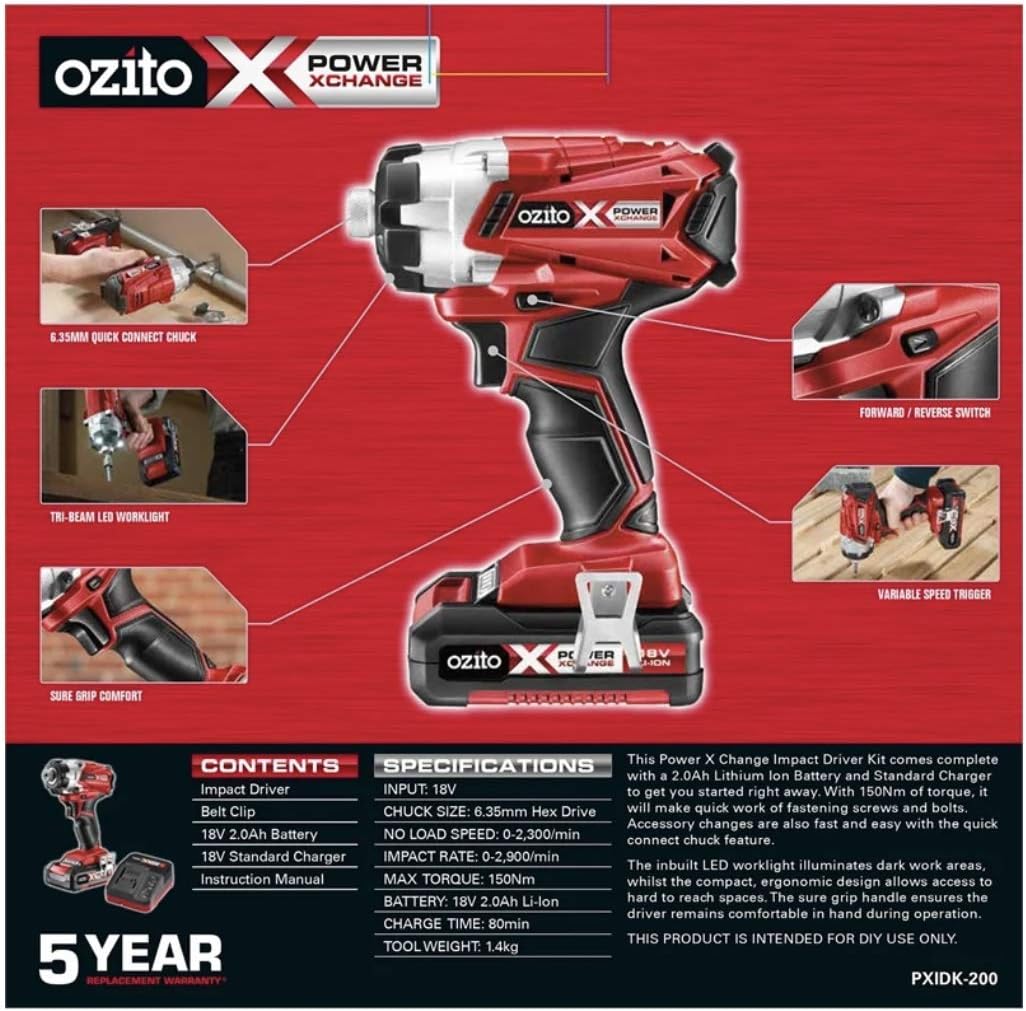
This image provides a close-up view of the Ozito PXC 18V Impact Driver, illustrating its functional components. These include the 6.35mm quick connect chuck for bit insertion, the Tri-Beam LED worklight for illuminating the work area, the forward/reverse switch for directional control, and the variable speed trigger for precise operation. The sure grip comfort handle is also visible.
4. General Operation Tips
- Always ensure the workpiece is securely clamped or held.
- Apply firm, steady pressure to the tool when driving fasteners.
- Start with a lower speed for precise starting, then increase as needed.
- Avoid over-tightening fasteners to prevent damage to the material or fastener.
Maintenance
1. Cleaning
Regularly clean the ventilation slots of the tool to prevent overheating. Use a soft brush or compressed air to remove dust and debris. Do not use water or chemical cleaners.
2. Battery Care
- Store batteries in a cool, dry place away from direct sunlight and extreme temperatures.
- Do not store batteries in a discharged state for extended periods.
- Avoid exposing batteries to moisture or impact.
3. Storage
When not in use, store the impact driver and its accessories in a clean, dry, and secure location, out of reach of children. Ensure the forward/reverse switch is in the central (locked) position.
Troubleshooting
| Problem | Possible Cause | Solution |
|---|---|---|
| Tool does not start. | Battery not charged or not properly inserted. Forward/reverse switch in locked position. | Charge battery fully and ensure it is securely clicked into place. Move forward/reverse switch to either forward or reverse position. |
| Reduced power or intermittent operation. | Low battery charge. Overheating. | Recharge the battery. Allow the tool to cool down. Ensure ventilation slots are clear. |
| Bit not held securely in chuck. | Bit not fully inserted. Chuck collar not fully released. | Ensure hex shank bit is pushed all the way in. Pull collar forward, insert bit, then release completely. |
Specifications
| Specification | Value |
|---|---|
| Brand | Ozito |
| Model | PXIDK-200 |
| Power Source | Battery Powered |
| Voltage | 18 Volts |
| Torque | 150 Newton Meters |
| Chuck Size | 6.35mm Hex Drive (Quick Connect) |
| No Load Speed | 0-2,300/min |
| Impact Rate | 0-2,900/min |
| Battery Type | Lithium Ion |
| Battery Capacity | 2.0 Amp Hours |
| Charger Type | Standard Charger |
| Charge Time | Approx. 80 minutes |
| Tool Weight | 1.4kg (approx.) |
| Special Features | Variable Speed, Tri-Beam LED Worklight |
Warranty and Support
Warranty Information
The Ozito PXC 18V Impact Driver Kit (PXIDK-200) comes with a 5-year replacement warranty. This warranty covers defects in materials and workmanship under normal use. Please retain your proof of purchase for warranty claims.
Customer Support
For technical assistance, spare parts, or warranty inquiries, please contact Ozito customer service. Refer to the product packaging or Ozito's official website for the most current contact information.
Note: This product is intended for DIY use only.
Ask a question about this manual
Ask about setup, troubleshooting, compatibility, parts, safety, or missing instructions. Manuals+ will review the question and use this page’s manual context to help answer it.