
1. Introduction
Thank you for choosing the HOMCOM 5-Tier Display Cabinet. This wall-mounted glass door cabinet is designed to elegantly showcase your small treasures, collectibles, figurines, and more. Its transparent design highlights your items while adding sophistication to any space. This manual provides essential information for safe assembly, operation, and maintenance of your new display cabinet.

Image: The HOMCOM 5-Tier Display Cabinet, showcasing its clear glass doors and multiple shelves filled with diverse items.
2. Safety Information
Please read all safety warnings and instructions carefully before assembly and use to prevent injury or damage.
- Wall Mounting is Crucial: This glass cabinet requires assembly and must be securely fixed to the wall to prevent tipping. Ensure it remains level for stability during setup.
- Weight Limits: The weight capacity for each shelf is 4.4 lbs (2 kg). Do not exceed this limit.
- Middle Shelf: Note that the middle shelf is not designed to bear heavy weight. Avoid placing overly heavy items on it.
- Children and Pets: Keep small parts and packaging materials away from children and pets during assembly.
- Proper Tools: Use appropriate tools for assembly as specified in the instructions.
3. Package Contents
Before beginning assembly, verify that all components are present and undamaged. If any parts are missing or damaged, please contact HOMCOM customer support.
- Glass Doors
- Adjustable Shelves (4 pieces)
- Cabinet Frame Components (Top, Bottom, Side Panels, Back Panel)
- Assembly Hardware (screws, wall anchors, etc.)
4. Specifications
| Feature | Detail |
|---|---|
| Overall Dimensions | 31.5" W x 3.7" D x 23.6" H (80 cm W x 9.5 cm D x 60 cm H) |
| Inner Size | 30.3" W x 3" D (77 cm W x 7.6 cm D) |
| Weight Capacity (each shelf) | 4.4 lbs (2 kg) |
| Number of Shelves | 4 (adjustable) |
| Number of Compartments | 5 |
| Mounting Type | Wall Mount |
| Material | Engineered Wood, Glass |
| Color | White |
| Assembly Required | Yes |
| Item Weight | 24 Pounds (10.9 kg) |

Image: Detailed dimensions of the display cabinet, including overall size and inner shelf depth.
5. Setup and Assembly
Assembly is required for this display cabinet. Follow these steps carefully. It is recommended to have two people for assembly and wall mounting.
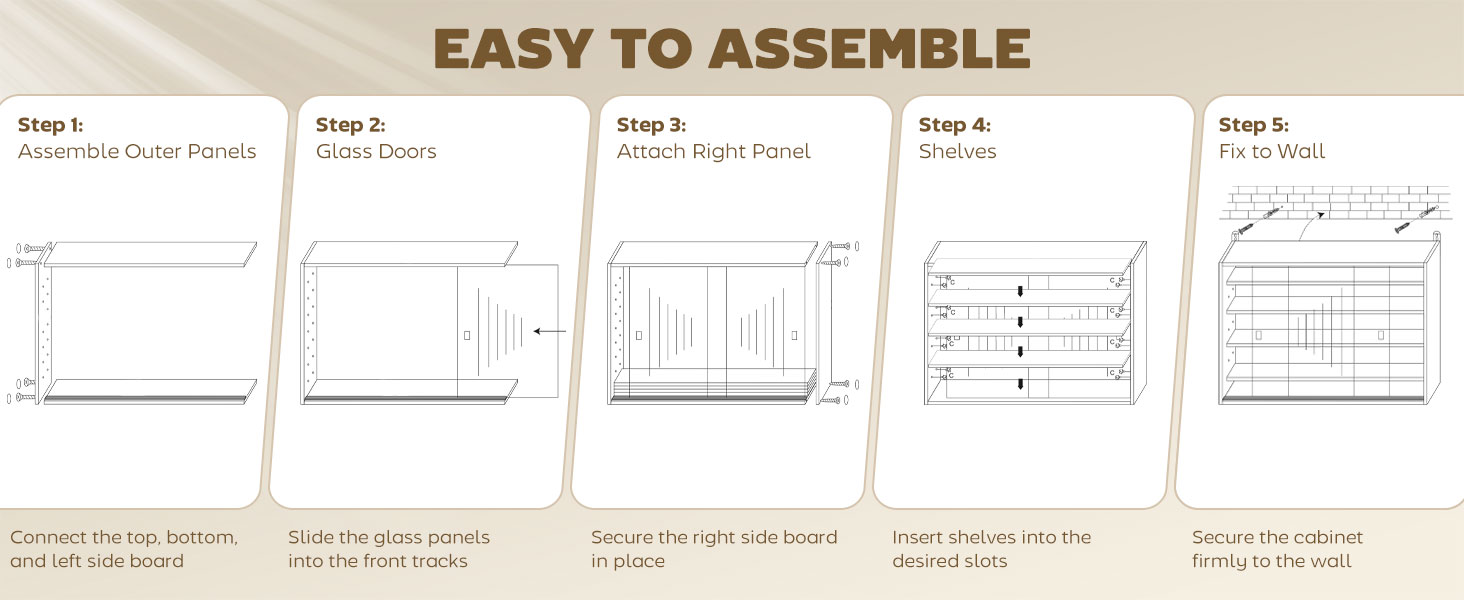
Image: Visual guide for the assembly process, from frame construction to wall mounting.
- Step 1: Assemble Outer Panels
Connect the top, bottom, and left side panels of the cabinet using the provided hardware. Ensure all connections are secure. - Step 2: Install Glass Doors
Carefully slide the glass panels into the designated front tracks. Ensure they move smoothly. - Step 3: Attach Right Panel
Secure the right side panel in place, completing the main frame of the cabinet. - Step 4: Insert Shelves
The cabinet features four adjustable shelves with seven position options. Insert the shelves into your desired slots. You can customize the layout to fit items of various heights. - Step 5: Secure to Wall
This is a critical step for safety and stability. Securely fix the cabinet to the wall using appropriate wall anchors and screws for your wall type. Ensure the cabinet is level before final tightening.
Note: Always ensure the cabinet is level during installation to prevent items from shifting and to ensure proper door operation.
6. Operating Instructions
The HOMCOM Display Cabinet is designed for ease of use and flexible display options.
6.1 Adjustable Shelves
The cabinet features four adjustable shelves that can be placed in seven different positions. This allows you to customize the internal layout to accommodate items of various sizes, from small figurines to taller collectibles.

Image: Examples of flexible shelf arrangements to display different sized ornaments and items.
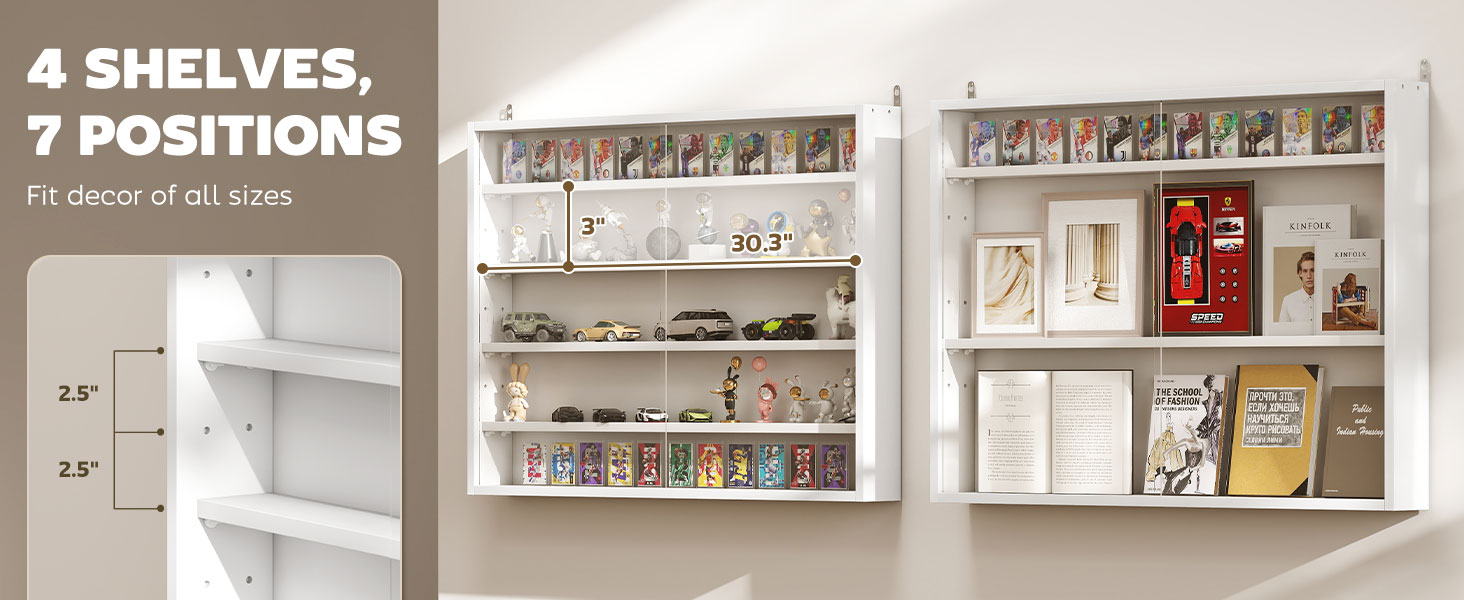
Image: Close-up of the shelf adjustment holes, showing the 2.5-inch (6.4 cm) increments for customization.
6.2 Glass Doors
The cabinet features two large glass doors that provide a full, unobstructed view of your displayed items while protecting them from dust and damage. The doors slide smoothly along their tracks and feature a groove handle for easy opening and closing.

Image: A hand demonstrating the smooth operation of the large glass doors with their integrated groove handles.
7. Maintenance and Care
Proper care will ensure the longevity and appearance of your display cabinet.
- Cleaning: Wipe the cabinet surfaces, including glass doors, with a soft, damp cloth. Avoid using harsh chemicals or abrasive cleaners, as they may damage the finish or glass.
- Dusting: Regularly dust the interior and exterior surfaces to maintain clarity and cleanliness.
- Inspection: Periodically check all screws and wall mounting hardware to ensure they remain tight and secure. Retighten if necessary.
- Sunlight Exposure: While the cabinet offers some UV protection, prolonged direct sunlight exposure may affect the color of displayed items or the cabinet finish over time.
8. Troubleshooting
If you encounter any issues with your display cabinet, consider the following common solutions:
- Cabinet feels unstable: Ensure the cabinet is securely mounted to the wall. Check that all wall anchors and screws are properly installed and tightened. Verify the cabinet is level.
- Glass doors do not slide smoothly: Check the tracks for any debris or obstructions. Ensure the cabinet is level, as an uneven installation can affect door operation.
- Shelves are wobbly: Confirm that the shelf pins are fully inserted into the desired holes and that the shelf is seated correctly on all four pins.
- Items appear dusty inside: Ensure the glass doors are fully closed when not accessing the cabinet. Regular cleaning as per maintenance instructions will help.
If problems persist, please contact HOMCOM customer support for further assistance.
9. Warranty and Support
For warranty information and customer support, please refer to the documentation provided with your purchase or visit the official HOMCOM website. HOMCOM is committed to providing quality products and support for its customers.
For direct inquiries, you may visit the HOMCOM Store on Amazon: HOMCOM Store