
1. Product Overview
The BAOFENG BF-88ST is a compact and user-friendly two-way radio system designed for reliable communication over short to medium distances. This package includes six BF-88ST walkie talkies and a convenient six-way multi-unit charger, making it ideal for group use in various environments such as hotels, warehouses, businesses, and events. The radios are pre-programmed with 16 FRS channels and are FCC certified (2AJGM-BF88ST), ensuring compliance and ease of use right out of the box.

Image: Six BAOFENG BF-88ST walkie talkies in their multi-unit charging dock, alongside the power adapter and a USB charging cable.
2. Package Contents
Before beginning, please verify that all items listed below are present in your package:
- 6 x BAOFENG BF-88ST Walkie Talkies
- 6 x Rechargeable Lithium-Ion Batteries
- 6 x Belt Clips
- 6 x Earpieces
- 6 x Hand Straps
- 1 x Six-Way Multi-Unit Charger
- 1 x Power Adapter for Charger
- 1 x English User Manual (this document)

Image: A complete set of BAOFENG BF-88ST walkie talkies and all included accessories, neatly arranged.
3. Key Features
- Integrated Antenna: Features a stronger, non-removable integrated antenna for enhanced durability and stable signal transmission.
- Upgraded Components: Incorporates an upgraded charger chip and improved battery contacts for shorter charging times and extended service life.
- Pre-programmed Channels: Comes with 16 FRS (Family Radio Service) channels pre-programmed for immediate use.
- Extended Range: Capable of up to 3 miles talking range under optimal conditions.
- Voice Operated Transmit (VOX): Allows for hands-free communication.
- Monitor Function: Temporarily disables squelch to listen for weak signals.
- Scan Function: Scans through active channels to find ongoing conversations.
- Time-Out Timer (TOT): Prevents accidental continuous transmission.
- LED Torch: Built-in flashlight for convenience in low-light conditions.
- CHIRP Programming Support: Allows for advanced customization of radio settings via CHIRP software (requires programming cable, sold separately).
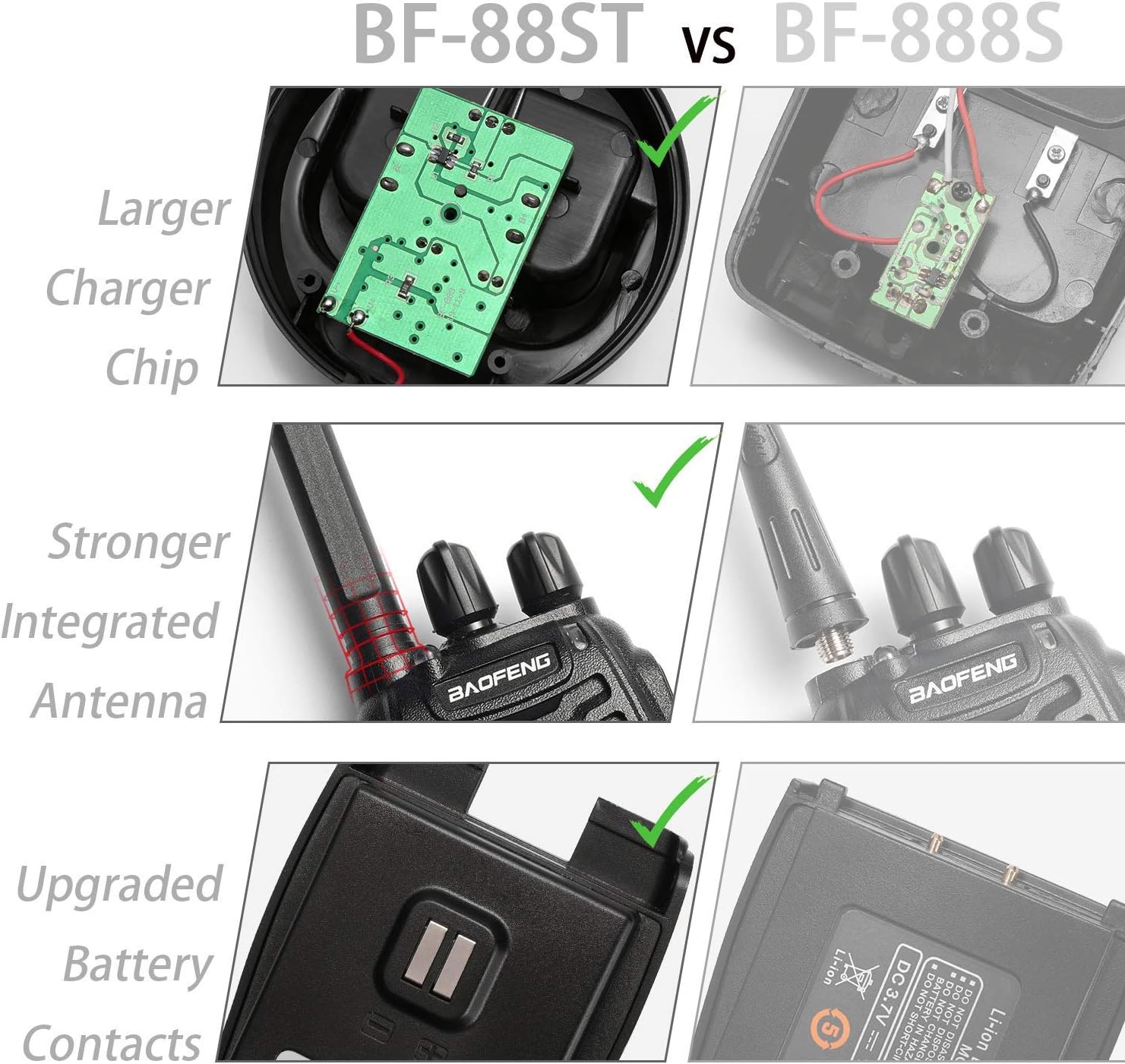
Image: Visual comparison illustrating the internal and external improvements of the BF-88ST model.
4. Getting Started (Setup)
4.1. Charging the Batteries
- Connect the power adapter to the six-way multi-unit charger.
- Plug the power adapter into a standard electrical outlet.
- Insert the rechargeable Lithium-Ion batteries into the charging slots. Ensure proper alignment.
- The indicator light on each slot will illuminate red during charging and turn green when the battery is fully charged.
- Once charged, slide the battery pack onto the back of each walkie talkie until it clicks securely into place.

Image: Walkie talkies and batteries being charged in the multi-unit charger.
4.2. Attaching Accessories
- Belt Clip: Align the belt clip with the screw holes on the back of the radio and secure it with the provided screws.
- Hand Strap: Thread the hand strap through the loop located at the top side of the radio.
- Earpiece: Insert the earpiece plug into the audio jack on the side of the radio.
5. Basic Operation
5.1. Power On/Off and Volume Adjustment
- To power on the radio, rotate the Power/Volume Knob (top-left knob) clockwise until you hear a click.
- Continue rotating the knob clockwise to increase the volume, and counter-clockwise to decrease it.
- To power off, rotate the knob counter-clockwise until you hear a click.
5.2. Selecting Channels
The BF-88ST has 16 pre-programmed FRS channels.
- Rotate the Channel Selector Knob (top-right knob) to select the desired channel (1-16).
- Ensure all radios in your group are set to the same channel for communication.
5.3. Transmitting and Receiving (Push-to-Talk)
- To transmit, press and hold the Push-to-Talk (PTT) Button located on the left side of the radio. Speak clearly into the microphone, holding the radio approximately 2-5 cm from your mouth.
- Release the PTT button to stop transmitting and to receive incoming transmissions.

Image: Demonstrating how to use the Push-to-Talk (PTT) button on the walkie talkie.
5.4. VOX (Voice Operated Transmit) Function
The VOX function allows you to transmit without pressing the PTT button. This feature must be enabled and configured using CHIRP programming software.
5.5. Monitor Function
Press the Monitor Button (usually the lower side button) to temporarily disable the squelch. This allows you to hear very weak signals or to check if a channel is clear before transmitting.
5.6. Scan Function
The scan function allows the radio to automatically scan through all 16 channels to detect active transmissions. This feature is typically activated via a programmable side button or through CHIRP software.
5.7. TOT (Time-Out Timer)
The TOT feature limits the duration of a single transmission to prevent accidental continuous broadcasting and conserve battery life. If you transmit longer than the set time, the radio will automatically stop transmitting and emit a warning tone.
5.8. LED Torch
To activate the built-in LED torch, press the LED Torch Button (usually the upper side button). Press it again to turn it off.
5.9. CHIRP Programming
For advanced users, the BF-88ST supports programming via CHIRP software. This allows customization of channel frequencies, privacy codes (CTCSS/DCS), VOX sensitivity, and other radio parameters. A compatible programming cable (not included) is required.
6. Maintenance and Care
- Cleaning: Use a soft, damp cloth to clean the radio's exterior. Do not use harsh chemicals or abrasive cleaners.
- Battery Care: Fully charge batteries before first use. Avoid overcharging or completely draining batteries to prolong their lifespan. Store batteries in a cool, dry place when not in use.
- Storage: When storing the radios for extended periods, remove the batteries. Store in a dry, dust-free environment away from direct sunlight and extreme temperatures.
- Water Resistance: The BF-88ST is not water resistant. Avoid exposing the radio to rain, splashes, or submersion in water.
7. Troubleshooting
| Problem | Possible Cause | Solution |
|---|---|---|
| Radio does not power on | Battery not installed correctly or discharged. | Ensure battery is securely attached and fully charged. |
| Cannot transmit or receive | Incorrect channel selected; out of range; battery low. | Verify both radios are on the same channel. Move closer to the other radio. Charge battery. |
| Poor audio quality / Static | Weak signal; interference; radio too far apart. | Move to an open area. Reduce distance between radios. Check for obstructions. |
| Charger indicator light not working | Power adapter not connected; faulty battery/charger. | Ensure adapter is plugged in. Try a different battery or charging slot. |
8. Technical Specifications
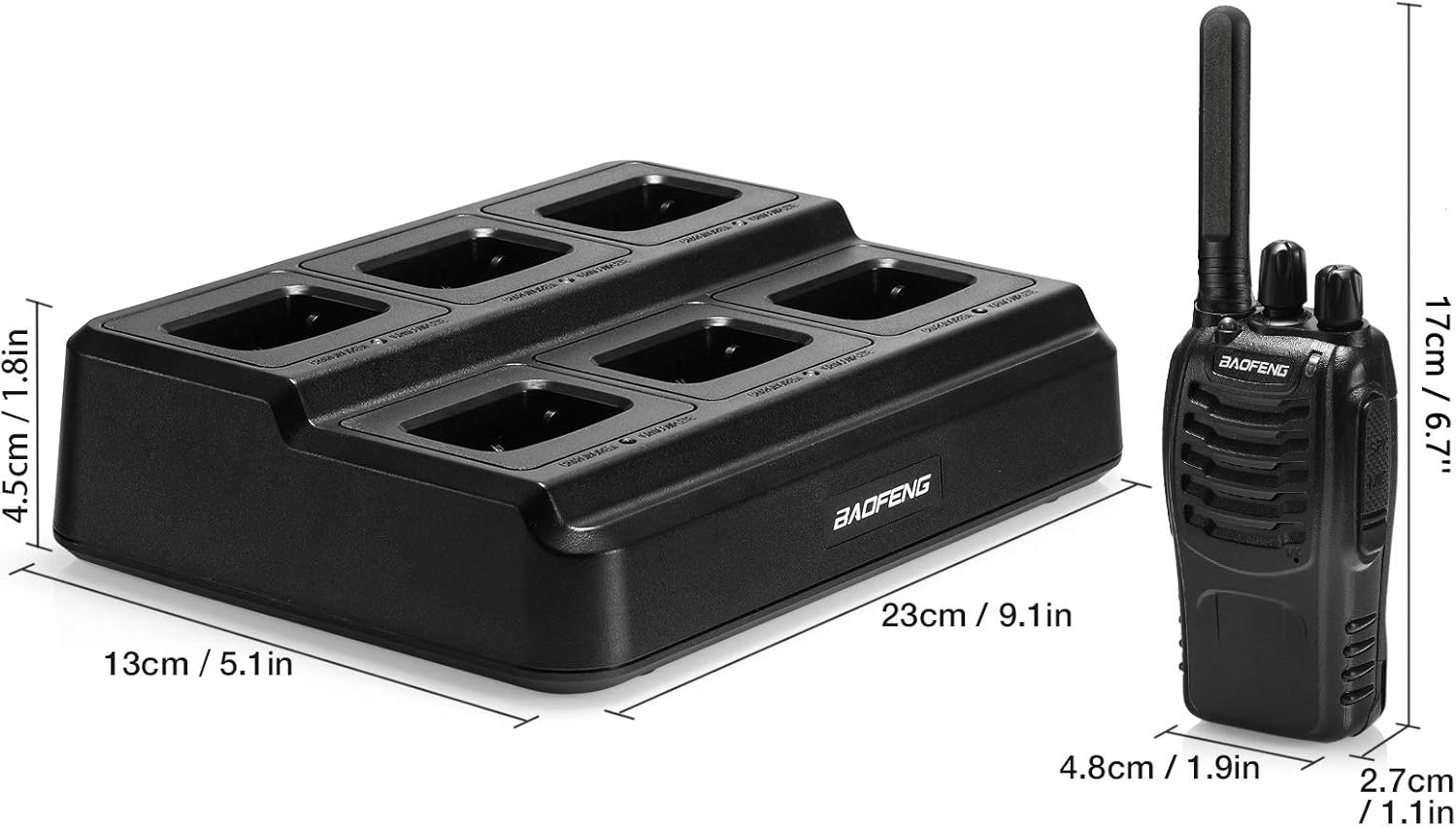
Image: Dimensions of the BF-88ST radio and its multi-unit charger.
| Specification | Detail |
|---|---|
| Model Number | BF 88ST |
| Number of Channels | 16 FRS Channels |
| Frequency Range | FRS frequency |
| Talking Range Maximum | 3 Miles (approx. 4.8 km) |
| Battery Type | Lithium Ion (included) |
| Voltage | 22.2 Volts (charger input) |
| Product Dimensions (Radio) | Approx. 17 cm (6.7 in) height, 4.8 cm (1.9 in) width, 2.7 cm (1.1 in) depth |
| Product Dimensions (Charger) | Approx. 23 cm (9.1 in) length, 13 cm (5.1 in) width, 4.5 cm (1.8 in) height |
| Item Weight (Total Package) | 4.84 pounds (approx. 2.2 kg) |
| Water Resistance Level | Not Water Resistant |
| FCC Certified | Yes (FCC ID: 2AJGM-BF88ST) |
9. Safety Information
Please read and understand all safety precautions before operating your BAOFENG BF-88ST walkie talkies.
- Battery Safety: Use only BAOFENG approved batteries and chargers. Do not disassemble, puncture, short-circuit, or expose batteries to fire or extreme temperatures. Dispose of batteries properly according to local regulations.
- Charging Safety: Do not charge batteries in wet environments. Ensure the charger is placed on a stable, non-flammable surface. The multi-unit charger includes overheating, high voltage, and overcharging protection.
- Antenna: Do not touch the antenna during transmission.
- Explosive Environments: Do not operate the radio in environments with flammable gases, vapors, or explosive dust.
- Medical Devices: Keep the radio away from pacemakers or other medical devices. Consult your physician and the medical device manufacturer for specific guidelines.
- Driving: Do not operate the radio while driving. Always prioritize safe driving.
- Hearing Protection: Avoid prolonged exposure to loud volumes, especially when using earpieces, as this can cause hearing damage.
- Service: Do not attempt to repair the radio yourself. Refer all servicing to qualified personnel.

Image: Safety features of the multi-unit charger, including protection against overheating, high voltage, and overcharging.
10. Warranty and Support
For warranty information and technical support, please refer to the documentation provided with your purchase or contact BAOFENG customer service directly. Keep your purchase receipt as proof of purchase for warranty claims.