1. Introduction
This manual provides essential information for the safe and efficient installation, operation, and maintenance of your HOFTRONIC F03 IP66 LED Luminaire. This 150 cm, 60W, 7800lm luminaire features an integrated Osram transformer and offers adjustable color temperature and power output. Its IP66 rating ensures suitability for damp and dusty environments.

A close-up view of the HOFTRONIC F03 IP66 LED Luminaire, showcasing its robust design and sealed end cap.
2. Safety Instructions
- Always disconnect power before installation, maintenance, or cleaning.
- Installation must be performed by a qualified electrician in accordance with local electrical codes.
- Do not modify the luminaire in any way.
- Ensure the mounting surface can support the weight of the luminaire.
- Avoid looking directly into the LED light source when it is active.
- This product is designed for AC/DC power supply at 230 Volts.
3. Package Contents
Verify that all components are present before beginning installation:
- 1x LED TL Fixture F-Series F03
- 2x Caps
- 2x Clamps
- 2x Rubber Rings + Plugs
- 4x Screws
- 4x Smaller Screws
- 4x Plugs

An overview of all components included in the package: 1x LED TL Fixture F-Series F03, 2x Caps, 2x Clamps, 2x Rubber Rings + Plugs, 4x Screws, 4x Smaller Screws, and 4x Plugs.
4. Setup and Installation
4.1 Mounting
- Choose a suitable location for wall mounting, ensuring the surface is stable and can support the luminaire's weight.
- Use the provided clamps and screws to securely attach the luminaire to the desired surface.
4.2 Wiring and Connection
The luminaire is designed for direct connection to a 200-240V AC power supply. It is also connectable to other HOFTRONIC F03 luminaires using Hoftronic Xtrem cables (SKU: 250596) for extended lighting setups.
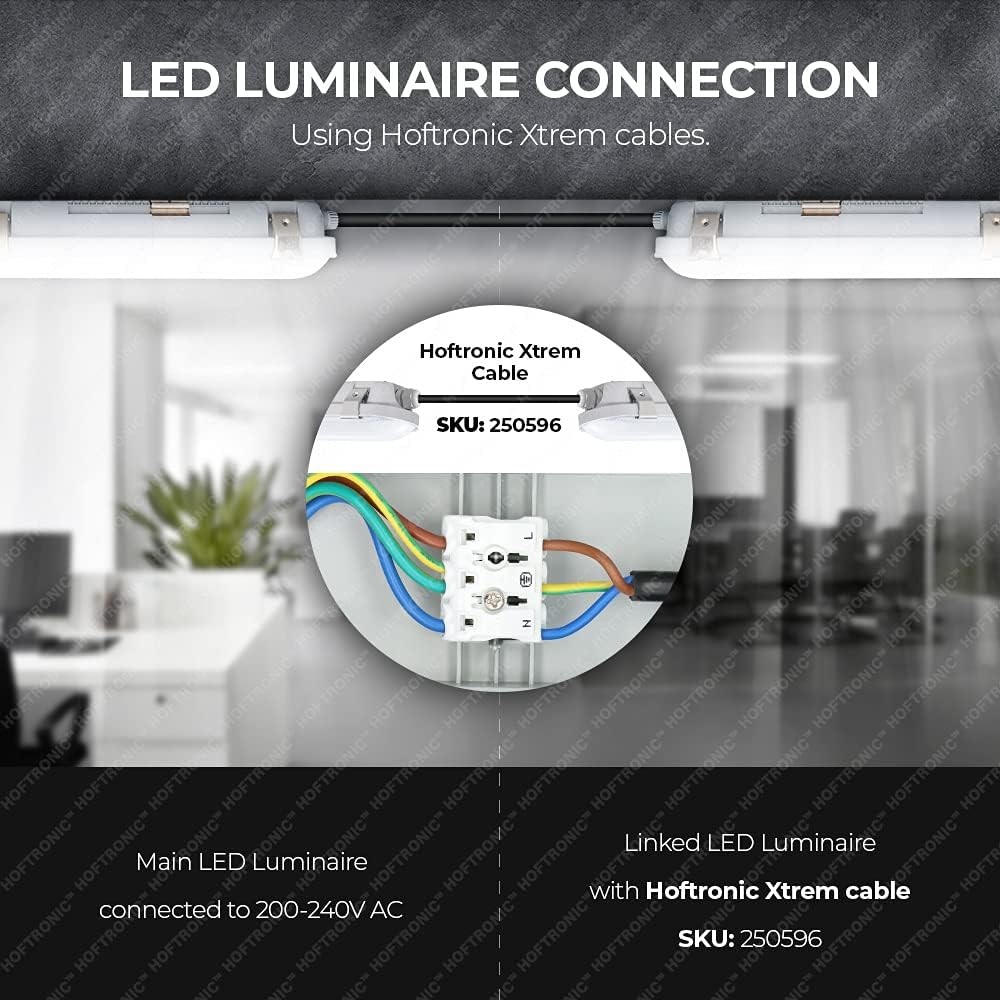
A detailed diagram illustrating how to connect the HOFTRONIC F03 LED Luminaire, including connections for the main luminaire and linking additional units using Hoftronic Xtrem cables (SKU: 250596).
- Ensure power is disconnected at the main circuit breaker.
- Open the luminaire's wiring compartment.
- Connect the live (brown), neutral (blue), and ground (green/yellow) wires from your power supply to the corresponding terminals inside the luminaire.
- If linking multiple luminaires, connect the Hoftronic Xtrem cable between the designated linking ports of each luminaire.
- Securely close the wiring compartment, ensuring a watertight seal with the provided caps and rubber rings to maintain the IP66 rating.
- Restore power and test the luminaire.
5. Operating Instructions
The HOFTRONIC F03 LED Luminaire offers adjustable power output and color temperature to suit various lighting needs.
5.1 Power Adjustment
The luminaire allows for adjustment of its power consumption, which directly affects its brightness. Refer to the product's internal settings or external controls (if applicable) to select between 35W, 40W, 50W, or 60W output.
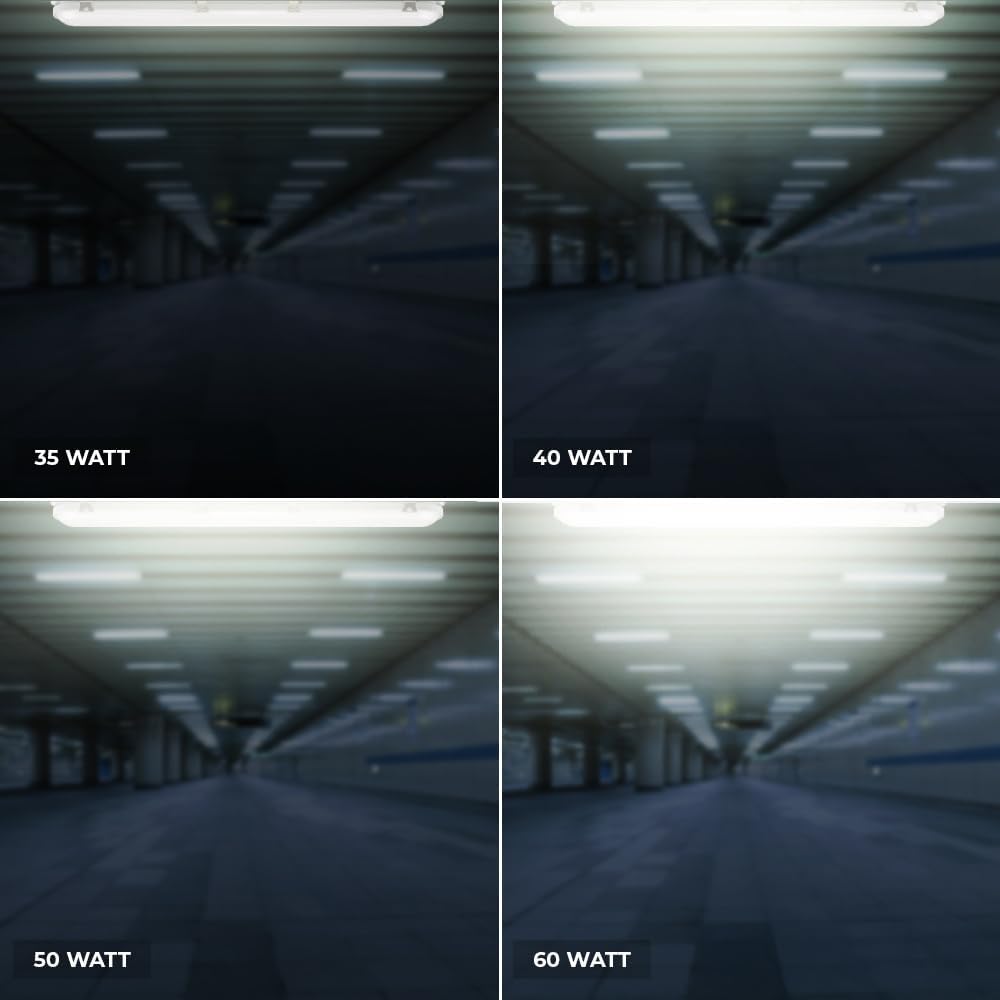
Visual representation of the HOFTRONIC F03 LED Luminaire's adjustable power output, demonstrating light intensity at 35W, 40W, 50W, and 60W settings.
5.2 Color Temperature Adjustment
You can adjust the color temperature of the light to create different ambiances or suit specific tasks. Options typically include 3000K (warm white), 4000K (neutral white), and 5000K (cool white).

Illustration of the HOFTRONIC F03 LED Luminaire's adjustable color temperature feature, displaying light outputs at 3000K (warm white), 4000K (neutral white), and 5000K (cool white).
6. Maintenance
The HOFTRONIC F03 LED Luminaire requires minimal maintenance due to its durable design and IP66 rating.
- Cleaning: Periodically clean the exterior of the luminaire with a soft, damp cloth. Do not use abrasive cleaners or solvents. Ensure power is off before cleaning.
- Inspection: Regularly inspect the luminaire for any signs of damage, loose connections, or wear. If any issues are found, disconnect power and consult a qualified technician.
- LEDs: The integrated LEDs are designed for a long lifespan (50,000 hours) and are not user-replaceable.

The HOFTRONIC F03 LED Luminaire is shown with water splashing, emphasizing its IP66 rating for water and dust resistance, making it suitable for harsh environments.
7. Troubleshooting
If you encounter issues with your luminaire, refer to the following common problems and solutions:
- Luminaire does not turn on:
- Check the power supply and circuit breaker.
- Ensure all wiring connections are secure.
- Light output is dim or flickers:
- Verify the selected power setting.
- Check for stable power supply.
- Incorrect color temperature:
- Adjust the color temperature setting as desired.
For persistent issues, contact customer support.
8. Specifications
| Feature | Specification |
|---|---|
| Brand | HOFTRONIC |
| Model Number | 5430022 |
| Item Weight | 5 Kilograms |
| IP Rating | IP66 (Water and Dust Resistant) |
| Style | Modern |
| Material | Plastic |
| Finish Type | Powder coated |
| Number of Light Sources | 1 (Integrated LED) |
| Maximum Wattage | 60 Watts (Adjustable) |
| Voltage | 230 Volts |
| Specific Uses | Suitable for damp and dusty environments (e.g., garage, workshop, outdoor covered areas) |
| Special Features | Dimmable, Color Adjustable |
| Light Angle | Downlight |
| Power Source | AC / DC |
| Installation Type | Wall Mount |
| Battery Required | No |
| Luminous Flux | 7800 lm |
| Incandescent Equivalent | 300 Watts |
| Average Lifespan | 50,000 Hours |
| Energy Efficiency Class (2019/2015) | E |

The EU energy label for the HOFTRONIC LED Luminaire model 5430022, indicating an energy efficiency class of E and energy consumption of 60 kWh/1000h. For more product information, scan the QR code or visit eprel.ec.europa.eu/qr/739049.
9. Warranty and Support
For warranty information and customer support, please refer to the documentation provided with your purchase or visit the official HOFTRONIC website. Keep your proof of purchase for any warranty claims.