1. Introduction
This manual provides essential information for the safe and efficient operation of your Victron Energy Blue Smart IP22 12V 30A 3 Output Battery Charger. This professional battery charger is designed for various battery types, including lead-acid (flooded, GEL, AGM) and Lithium-ion (LiFePO4) batteries, offering advanced charging algorithms and Bluetooth connectivity for monitoring and control.
The Blue Smart IP22 charger is suitable for use in workshops and on motor or marine vehicles such as cars, motorcycles, boats, yachts, and camper-vans.

Figure 1: Victron Energy Blue Smart IP22 12V 30A 3 Output Battery Charger with power cord.
2. Safety Instructions
WARNING: Read all safety instructions before operating the charger.
- Disconnect Power: Always disconnect the AC power supply before making or breaking connections to the battery.
- Explosive Gases: Batteries can produce explosive gases. Ensure adequate ventilation during charging to prevent the accumulation of these gases. Do not smoke or allow open flames or sparks near the battery or charger.
- Battery Terminal Connection: Ensure the battery terminal is not connected to the chassis of the vehicle.
- Placement: For lead-acid or Li-ion batteries, the charger should be located at least 18 inches (45 cm) above the floor.
- Overheating Protection: The charger is equipped with protection against overheating. Output current will automatically reduce as the internal temperature increases, typically above 50°C (122°F).
- Water and Moisture: The IP22 rating indicates protection against solid objects larger than 12.5mm and vertically dripping water. Avoid direct exposure to rain or excessive moisture.
- Children: This appliance is not intended for use by persons (including children) with reduced physical, sensory or mental capabilities, or lack of experience and knowledge, unless they have been given supervision or instruction concerning use of the appliance by a person responsible for their safety.

Figure 2: The charger reduces output current to prevent overheating, especially above 50°C.
3. Setup and Installation
The Victron Energy Blue Smart IP22 charger is designed for ease of use. Follow these steps for initial setup:
- Mounting: Choose a suitable location for the charger, ensuring adequate ventilation and protection from direct water exposure. The charger can be mounted vertically or horizontally.
- Battery Connection:
- Connect the positive (+) charger cable to the positive (+) battery terminal.
- Connect the negative (-) charger cable to the negative (-) battery terminal.
- This model features 3 outputs, allowing simultaneous charging of up to three separate battery banks. Ensure each output is connected to a battery bank of the same chemistry.
- AC Power Connection: Once battery connections are secure, plug the AC power cord into a suitable mains outlet (120VAC NEMA 5-15).
- Initial Power-On: The charger will power on and begin its charging process based on the detected battery state and selected mode.
4. Operating Instructions
The Blue Smart IP22 charger features a microprocessor-controlled adaptive battery management system, optimizing the charging process. You can monitor and configure the charger using the VictronConnect app via Bluetooth.
4.1. Charging Modes
The charger offers several modes, selectable via the mode button on the unit or through the VictronConnect app:
- Li-ion: Charges 12.8V LiFePO4 Batteries. Can recover from 0V in case of BMS low voltage protection.
- Recondition: Helps restore under-charged or sulfated lead-acid batteries to optimal state. Use with caution.
- High [14.7V]: Recommended for specific flooded lead batteries. Use with care.
- Normal [14.4V]: Recommended for most lead-acid batteries, including flooded, GEL, and AGM starter and deep cycle batteries.
- Night: Output current drops to 50% maximum, making the charger silent.
The charger also employs a 6-step smart charge algorithm:
- Bulk: Charges with maximum current until absorption voltage is reached.
- Absorption: Charges with a set voltage/timer, depending on the charge mode.
- Float: Maintains batteries at a lower voltage, keeping them full while passing through power to loads.
- Storage: Keeps charged batteries healthy by reducing the charge voltage to limit tail current, corrosion, and gassing.
- Recondition: (If selected) Applies a higher voltage to recondition batteries.
- Test: The charger performs a test to determine battery condition.

Figure 3: Overview of Blue Smart IP22 charging modes and their functions.

Figure 4: Visual representation of the 6-step smart charge algorithm, including Bulk, Absorption, Recondition, Float, and Storage phases.
4.2. VictronConnect App
The VictronConnect app allows you to monitor voltage, current, and change settings wirelessly via Bluetooth. It also enables firmware updates.
- Download: Download the VictronConnect app from your device's app store (Apple App Store, Google Play Store) or for Mac/Windows.
- Connect: Enable Bluetooth on your smartphone or tablet and open the VictronConnect app. The charger should appear in the device list.
- Monitor & Configure: Once connected, you can view real-time charging status, historical data, and adjust charging parameters.
- Firmware Updates: The app facilitates firmware updates, which may be necessary for new features or performance improvements. Ensure a stable connection during updates.
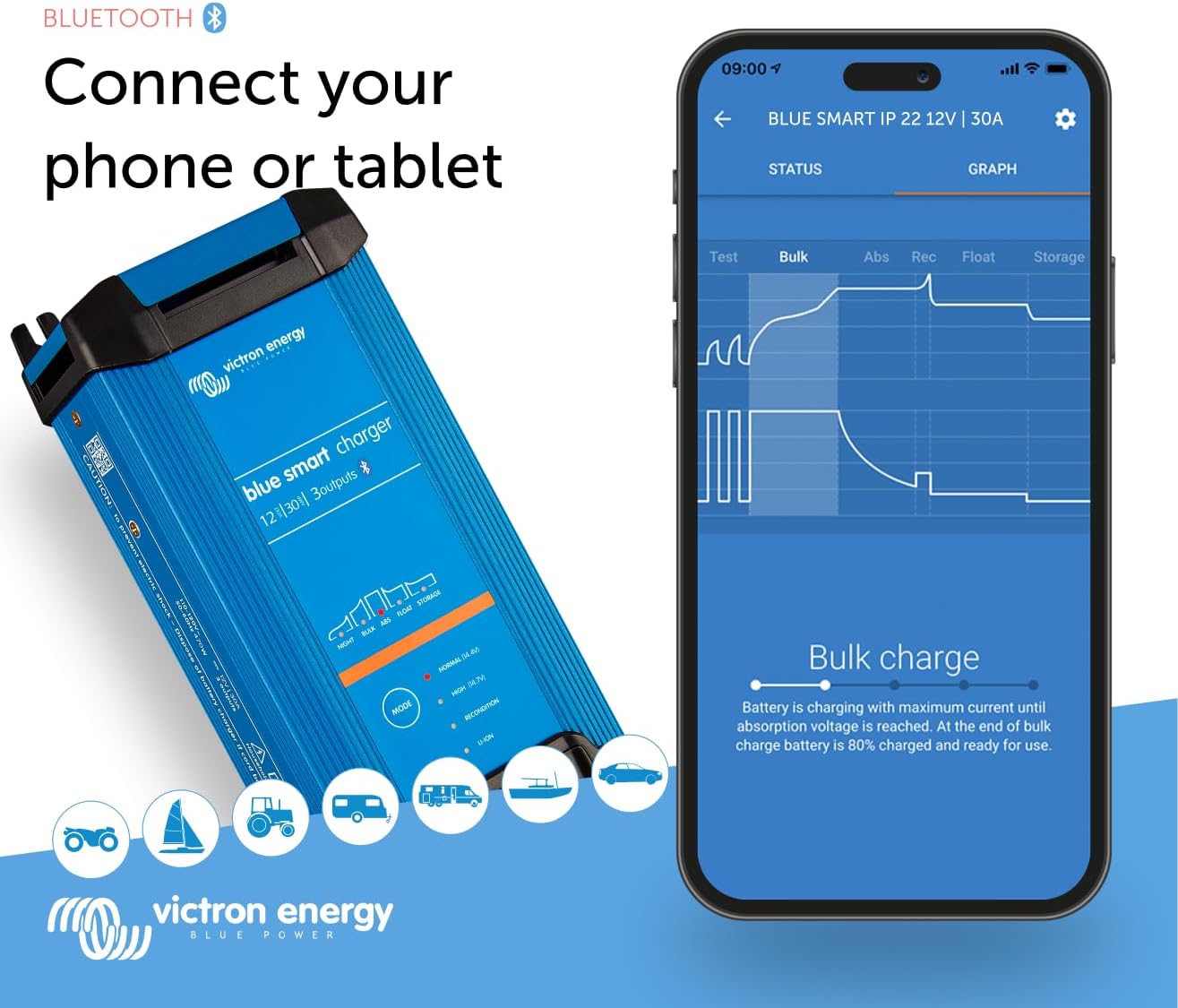
Figure 5: Connecting the charger to a phone or tablet via Bluetooth for monitoring and control using the VictronConnect app.

Figure 6: The VictronConnect app allows monitoring, operation, and configuration of the Blue Smart IP22 Charger.
5. Maintenance
Regular maintenance ensures optimal performance and longevity of your charger:
- Cleaning: Keep the charger clean and free from dust and debris. Use a dry cloth for cleaning. Do not use solvents or abrasive cleaners.
- Connections: Periodically check all cable connections to ensure they are tight and free from corrosion.
- Ventilation: Ensure the ventilation openings are not blocked to allow proper airflow and prevent overheating.
- Storage: When not in use for extended periods, store the charger in a dry, cool place.
6. Troubleshooting
If you encounter issues with your Victron Energy Blue Smart IP22 charger, consider the following:
- Charger Not Turning On:
- Check the AC power connection to the wall outlet.
- Verify battery connections are correct and secure.
- No Charging Output:
- Ensure the correct charging mode is selected for your battery type.
- Check for any error indicators on the charger or in the VictronConnect app.
- Confirm the battery voltage is within the charger's operating range.
- Overheating:
- Ensure the charger has adequate ventilation and is not covered.
- Reduce ambient temperature if possible. The charger will automatically reduce output to protect itself.
- Bluetooth Connection Issues:
- Ensure Bluetooth is enabled on your device and the charger is within range.
- Restart the VictronConnect app or your device.
- If firmware updates fail, try placing your phone closer to the unit and ensure a stable connection.
- Error Codes: If an error code (e.g., E1) appears, consult the Victron Energy support documentation or contact customer support for specific guidance.
7. Specifications
| Feature | Specification |
|---|---|
| Brand | Victron Energy |
| Model Name | Blue Smart IP22 12-Volt 30 amp 120VAC, 3 Output Battery Charger NEMA 5-15, Bluetooth |
| Part Number | BPC123048102 |
| Output Voltage | 12 Volts |
| Output Current | 30 Amps |
| Number of Outputs | 3 |
| Item Weight | 1.45 Kilograms (3.2 lbs) |
| Product Dimensions (LxWxH) | 9.2" x 4.2" x 2.5" (235mm x 108mm x 65mm) |
| Material | Plastic |
| Color | Blue |
| IP Rating | IP22 |
| Connectivity | Bluetooth (VictronConnect App) |

Figure 7: Physical dimensions of the Blue Smart IP22 charger.

Figure 8: Compact size and visual representation of the 6-step smart charge algorithm.
8. Warranty and Support
The Victron Energy Blue Smart IP22 charger comes with a manufacturer's warranty. Please refer to the warranty documentation included with your product for specific terms and conditions.
For technical support, troubleshooting assistance, or warranty claims, please contact Victron Energy customer support or visit their official website. Ensure you have your product model number (BPC123048102) and purchase details available when seeking support.
Online resources and FAQs can often be found on the Victron Energy website.


