
Everwell MGTC2423X-20
EVERWELL MGTC2423X-20 Inverter Mini-Split Air Conditioner User Manual
Model: MGTC2423X-20, MGTC-20, MGTC2423E-20, MGTC2423C-20
1. Introduction
This manual provides essential information for the installation, operation, and maintenance of your EVERWELL MGTC2423X-20 Inverter Mini-Split Air Conditioner. This unit is designed for cooling only, offering 24,000 BTU capacity with a high efficiency rating of 20 SEER. It operates on a 220V/1Ph/60Hz power supply and uses R410A refrigerant.
Key features include:
- Full DC Inverter Technology: Enables up to 65% energy savings.
- High Energy Efficiency: 20 SEER rating for optimal performance.
- Wi-Fi Ready: Control your unit remotely via a smartphone or tablet app.
- Gold Fin Technology: Extends the functional life of the equipment, especially in high humidity and salinity environments.
- Noiseless Technology: Ensures quiet operation.
- AHRI and ETL Certified: Guarantees quality and performance standards.
- Featured Operations: Includes ECO, SUPER, SLEEP, and TIMER modes for enhanced control and energy management.

Figure 1: Overview of the Everwell MGTC2423X-20 Mini-Split Air Conditioner system, showing the indoor unit, outdoor unit, and included installation accessories.
2. Important Safety Instructions
WARNING: Failure to follow these instructions could result in electric shock, fire, or serious injury.
- Read all instructions before using this appliance.
- This unit must be installed by a qualified and licensed HVAC technician in accordance with all local and national electrical and building codes.
- Ensure the power supply matches the unit's requirements (220V/1Ph/60Hz).
- Do not operate the unit with a damaged power cord or plug.
- Do not insert fingers or objects into the air inlet/outlet.
- Do not attempt to repair or modify the unit yourself. Refer all servicing to qualified personnel.
- Ensure proper grounding to prevent electrical shock.
- Keep flammable materials away from the unit.
3. What's in the Box
Your EVERWELL MGTC2423X-20 Mini-Split Air Conditioner package includes the following components:
- Indoor Evaporating Unit
- Outdoor Condensing Unit
- Wireless Control Remote
- Communication Cable
- Copper Tubing (3m / 9.8 ft)
- Drain Hose
- Insulation Tape
- Wall Sleeve

Figure 2: Detailed view of the installation kit components, including pre-flared copper lines, communication wire, and drainage hose.
4. Installation and Setup
The EVERWELL MGTC2423X-20 is a split-system air conditioner. Due to the complexity involving refrigerant lines, electrical connections, and proper drainage, professional installation by a certified HVAC technician is mandatory to ensure safe and efficient operation and to maintain warranty validity.
4.1 Pre-Installation Checks
- Verify the power supply at the installation site matches the unit's requirements (220V/1Ph/60Hz).
- Ensure adequate space for both indoor and outdoor units, allowing for proper airflow and maintenance access.
- Confirm the installation location complies with all local building and electrical codes.
4.2 Installation Overview (For Qualified Technicians)
- Mount the indoor unit securely on a wall, ensuring it is level and has proper drainage.
- Install the outdoor condensing unit on a stable, level surface, ensuring proper clearance from obstructions.
- Connect the copper refrigerant lines between the indoor and outdoor units. Ensure proper flaring and torque for leak-free connections.
- Connect the communication cable and power wiring according to the wiring diagram provided in the full installation manual.
- Perform a vacuum evacuation of the refrigerant lines to remove air and moisture.
- Open the refrigerant service valves.
- Check for leaks using appropriate methods.
- Connect the drain hose from the indoor unit to a suitable drainage point.
- Restore power and test the unit's operation.


Figure 3: Indoor (left) and Outdoor (right) units of the Everwell Mini-Split system, illustrating their design and connection points.
5. Operating Instructions
Your Everwell Mini-Split can be operated using the included wireless remote control or via the Wi-Fi app on your smartphone/tablet.
5.1 Remote Control Operation
The remote control allows you to adjust settings, change modes, and set timers. Refer to the remote control's specific manual for detailed button functions.
- ON/OFF Button: Powers the unit on or off.
- MODE Button: Cycles through available operating modes (e.g., Cool, Fan).
- Temperature Adjustment: Use + and - buttons to set desired temperature.
- FAN Button: Adjusts fan speed.
- SWING Button: Controls the louver swing for air distribution.
- TIMER Button: Sets the auto-on or auto-off time.
- ECO Button: Activates energy-saving mode, optimizing operation for minimal power consumption.
- SUPER Button: Initiates rapid cooling to quickly reach the desired temperature.
- SLEEP Button: Adjusts temperature and fan speed for comfortable sleep conditions and energy saving overnight.
5.2 Wi-Fi App Control
The unit is Wi-Fi ready, allowing remote control via a dedicated smartphone application. Download the "Smart Life - SmartHome" app from your device's app store (available for iOS and Android).
- Download and install the "Smart Life - SmartHome" app.
- Register an account and log in.
- Follow the in-app instructions to add your Everwell Mini-Split unit to your account. This typically involves putting the unit into pairing mode and connecting it to your home Wi-Fi network.
- Once connected, you can control the unit's functions (ON/OFF, mode, temperature, fan speed, timer, etc.) from anywhere with an internet connection.

Figure 4: The Everwell Mini-Split can be controlled via its dedicated smartphone app (left) or the included wireless remote control (right).
6. Maintenance
Regular maintenance ensures optimal performance and extends the lifespan of your air conditioner. Always disconnect power before performing any maintenance.
6.1 Air Filter Cleaning (Monthly)
- Open the front panel of the indoor unit.
- Remove the air filters.
- Clean the filters using a vacuum cleaner or wash them with lukewarm water and a mild detergent.
- Allow filters to dry completely before reinserting them.
6.2 Outdoor Unit Cleaning (Seasonally)
- Clear any debris (leaves, dirt) from around the outdoor unit.
- Gently clean the outdoor coil fins with a soft brush or water hose. Be careful not to bend the fins.
- Ensure the drainage holes at the base of the outdoor unit are clear.
6.3 Professional Servicing (Annually)
It is recommended to have a qualified HVAC technician perform an annual check-up, including refrigerant level checks, coil cleaning, and electrical connection inspections.
7. Troubleshooting
Before contacting customer support, please check the following common issues:
| Problem | Possible Cause | Solution |
|---|---|---|
| Unit does not turn on. | No power; remote control batteries dead; circuit breaker tripped. | Check power supply; replace remote batteries; reset circuit breaker. |
| Insufficient cooling. | Dirty air filters; blocked outdoor unit; windows/doors open; temperature setting too high. | Clean air filters; clear obstructions from outdoor unit; close windows/doors; lower temperature setting. |
| Unusual noise. | Loose parts; foreign object in fan; unit not level. | Check for loose parts; inspect fan for obstructions (with power off); ensure unit is level. If noise persists, contact a technician. |
| Water leakage from indoor unit. | Clogged drain hose; improper installation. | Check and clear drain hose; contact a professional for installation inspection. |
For issues not listed above or if solutions do not resolve the problem, please contact Everwell customer support or a qualified HVAC technician.
8. Technical Specifications
| Feature | Specification |
|---|---|
| Brand | Everwell |
| Model Numbers | MGTC2423X-20, MGTC-20, MGTC2423E-20, MGTC2423C-20 |
| Cooling Capacity | 24,000 BTU (2 Tons) |
| Seasonal Energy Efficiency Ratio (SEER) | 20.00 |
| Voltage | 220V / 1 Phase / 60Hz |
| Refrigerant Type | R410A |
| Installation Type | Split System |
| Indoor Unit Dimensions (W×H×D) | 46.7 × 13.3 × 10.1 inches |
| Outdoor Unit Dimensions (W×H×D) | 36.2 × 14.9 × 27.5 inches |
| Special Features | Wi-Fi Ready, Gold Fin, Noiseless Technology, ECO, SUPER, SLEEP, TIMER Operations |
| Certifications | AHRI Certified, ETL Mark |
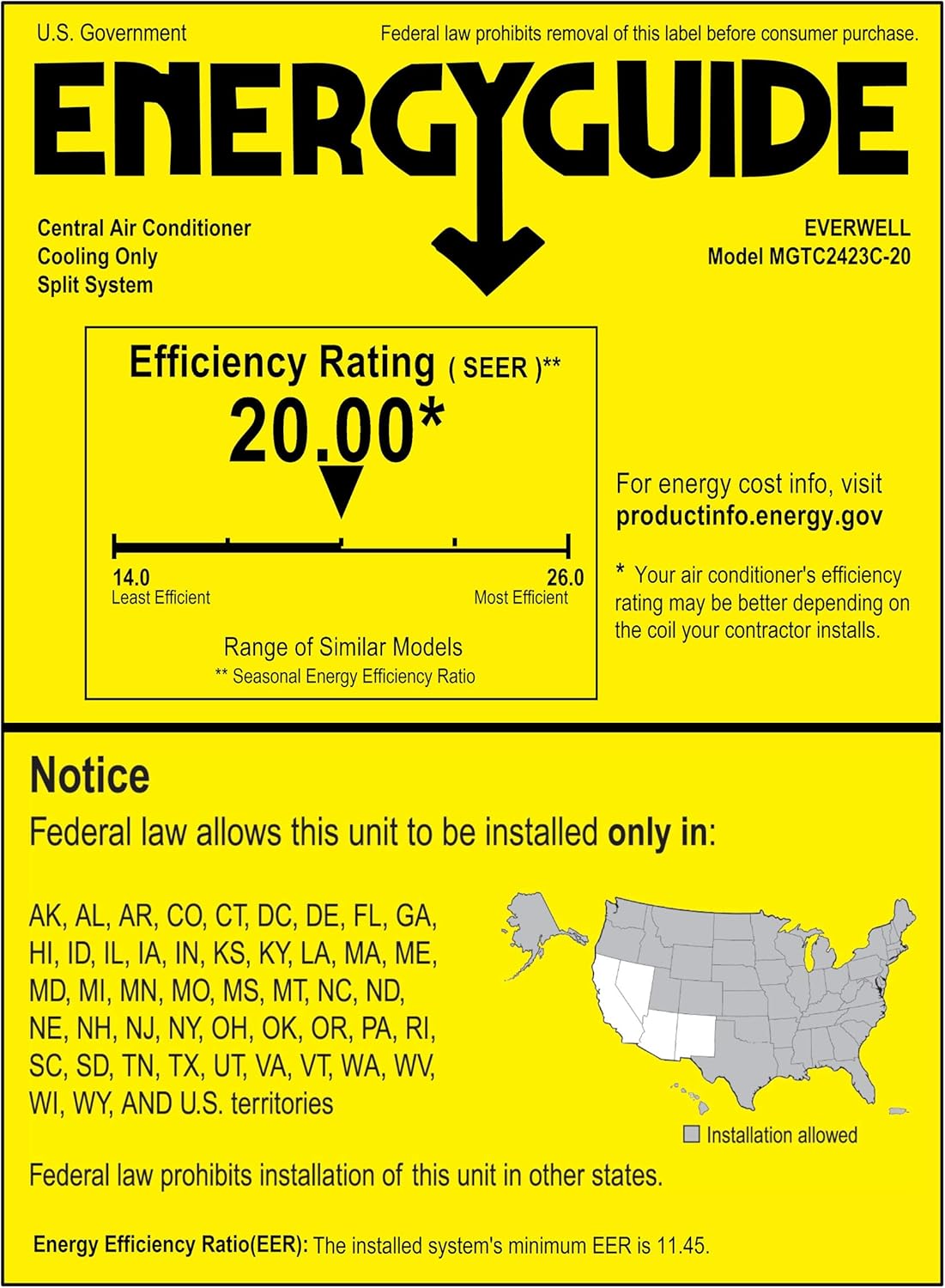
Figure 5: EnergyGuide label indicating the 20.00 SEER rating and states where installation is allowed.
9. Warranty Information
The EVERWELL MGTC2423X-20 Mini-Split Air Conditioner comes with a limited warranty:
- 5 Years Compressor Warranty
- 2 Years Parts Warranty
Important: Warranty is valid only with registered equipment and professional installation by a certified HVAC technician.

Figure 6: Warranty details and various certifications for the Everwell Mini-Split system.
10. Customer Support
For technical assistance, warranty claims, or further inquiries, please contact Everwell customer support. Ensure you have your model number and purchase details ready when contacting support.
For the most up-to-date contact information, please visit the official Everwell website or refer to your purchase documentation.
Website: www.everwellparts.com (Example link, actual link may vary)
Related documentsMGTC2423X-20


Ask a question about this manual
Ask about setup, troubleshooting, compatibility, parts, safety, or missing instructions. Manuals+ will review the question and use this page’s manual context to help answer it.