
Introduction
Thank you for choosing the MEIKEE SWL-FL01 Rechargeable LED Work Light. This versatile and durable work light is designed to provide reliable illumination for a wide range of activities, including construction, camping, fishing, garage work, and emergency situations. Featuring multiple lighting modes, adjustable brightness, and flexible charging options, this manual will guide you through its proper use and maintenance to ensure optimal performance.
Safety Instructions
- Do not look directly into the LED light when it is on, as this may cause eye damage.
- Keep the device away from extreme temperatures, direct sunlight, and corrosive liquids.
- Do not disassemble or modify the product. Repairs should only be performed by qualified personnel.
- Ensure the USB port's silicone cover is properly sealed when not in use, especially in wet conditions, to maintain splash resistance.
- Keep out of reach of children.
Package Contents
Please check the package for the following items:
- MEIKEE SWL-FL01 Rechargeable LED Work Light
- USB Charging Cable
- User Manual

Image: MEIKEE Rechargeable LED Work Light package contents including the light, USB cable, and user manual, along with product dimensions. The image also shows the product dimensions: 154mm (6.06in) length, 114mm (4.49in) height, and 32mm (1.25in) thickness.
Product Overview
The MEIKEE SWL-FL01 features a robust design with intuitive controls and multiple functionalities.
Components:
- LED Light Panel
- Solar Charging Panel (rear)
- Power Button
- Mode/Brightness Adjustment Buttons
- USB-A Output Port (for charging external devices)
- USB-C Input Port (for charging the work light)
- Splash-proof Silicone Cover for USB ports
- Adjustable 180-degree Handle/Stand
- Integrated Magnets (2)
- 1/4-inch Tripod Mount Hole
- Power Indicator Lights (4 green LEDs)
- Charging Indicator Light (1 red/green LED)

Image: MEIKEE LED Work Light functioning as a power bank, charging a mobile phone via its USB output port, with a detailed view of the USB-A output, USB-C input, and splash-proof cover. The image shows the USB-A output (Out 5V 2A), USB-C input (In 5V 2A), and the protective silicone cover.
Setup
Initial Charging:
Before first use, it is recommended to fully charge the work light. Connect the provided USB-C cable to the input port on the device and to a compatible USB power adapter (not included). The charging indicator light will illuminate during charging. A full charge via USB takes approximately 8 hours.
Power Indicator:
The four green LED lights indicate the remaining battery capacity. Each light represents approximately 25% of the battery charge. Check these indicators regularly to ensure your device is sufficiently charged for your tasks.

Image: MEIKEE LED Work Light illuminating a wide area at 1000 lumens, with a close-up of the battery power indicator lights. The green LEDs indicate the battery level.
Operating Instructions
Power On/Off:
Press and hold the power button for 3 seconds to turn the work light ON or OFF.
Adjusting Modes and Brightness:
Once the light is on, short press the mode button to cycle through the four lighting modes:
- Warm White (2700K): Ideal for a cozy ambiance or situations requiring less harsh light.
- Natural White (4000K): A balanced light suitable for general tasks.
- Cool White (6000K): Bright, clear light for detailed work or maximum visibility.
- Red & Blue SOS Flash: For emergency signaling.
Short press the brightness button to cycle through the five brightness levels (100%, 75%, 50%, 25%, 10%) within each mode. The MEIKEE work light maintains constant brightness throughout its operation, unlike some other lights that dim over time.
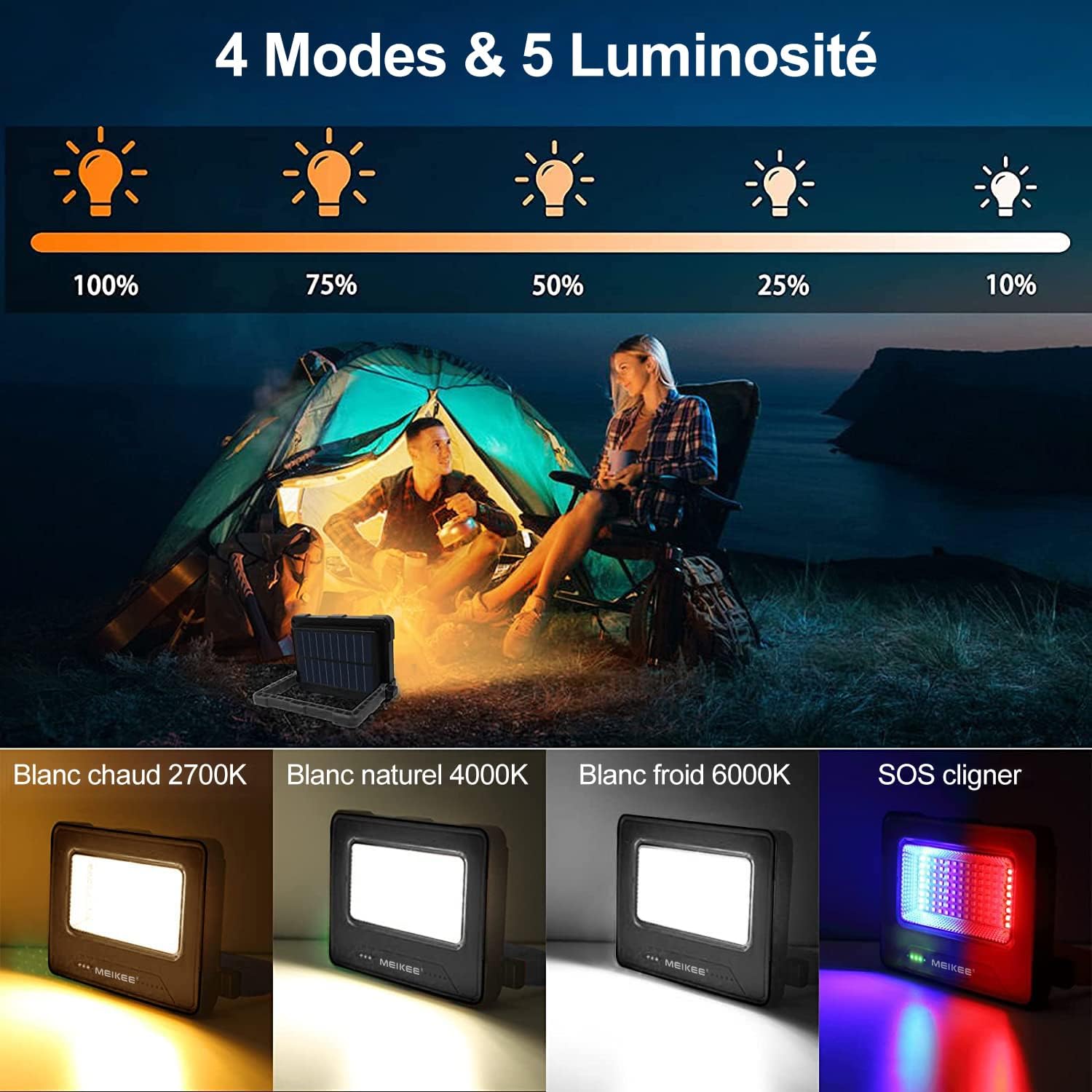
Image: MEIKEE LED Work Light displaying its four lighting modes (Warm, Natural, Cool White, SOS) and five brightness levels. The image shows the light in use during camping and detailed views of each light mode and brightness percentage.

Image: Comparison demonstrating MEIKEE LED Work Light's constant brightness feature (1000LM for 10 hours) versus other lights that dim over time (500LM after 5 hours). This highlights the stable illumination provided by the MEIKEE light.
Charging the Work Light:
The MEIKEE SWL-FL01 offers three convenient charging methods:
- USB Charging: Connect the provided USB-C cable to the input port and a 5V USB power source. Full charge takes approximately 8 hours.
- Solar Charging: Place the work light with its solar panel facing direct sunlight. This method takes approximately 24 hours for a full charge, depending on sunlight intensity.
- Light Charging: In low light conditions, the solar panel can still trickle charge the battery, though this is the slowest method, taking up to 60 hours for a full charge.

Image: MEIKEE LED Work Light showing two charging methods: solar charging via its integrated panel and USB charging. The image depicts both solar panel exposure and USB cable connection for charging.
Power Bank Functionality:
The integrated 12000mAh lithium polymer battery allows the work light to double as a power bank. Connect your mobile phone or other USB-powered device to the USB-A output port (Out 5V 2A) using your device's charging cable. The work light can charge a typical smartphone 3-4 times.
Mounting Options:
The MEIKEE SWL-FL01 is designed for flexible positioning:
- Adjustable Handle/Stand: The 180-degree adjustable handle can be used to carry the light or to position it as a stand on flat surfaces.
- Magnetic Attachment: Two powerful magnets on the back allow you to securely attach the light to metal surfaces for hands-free operation, such as under a car hood or on a metal workbench.
- Tripod Mount: A standard 1/4-inch screw hole is provided for mounting the light onto a tripod (not included) for elevated or more stable positioning.
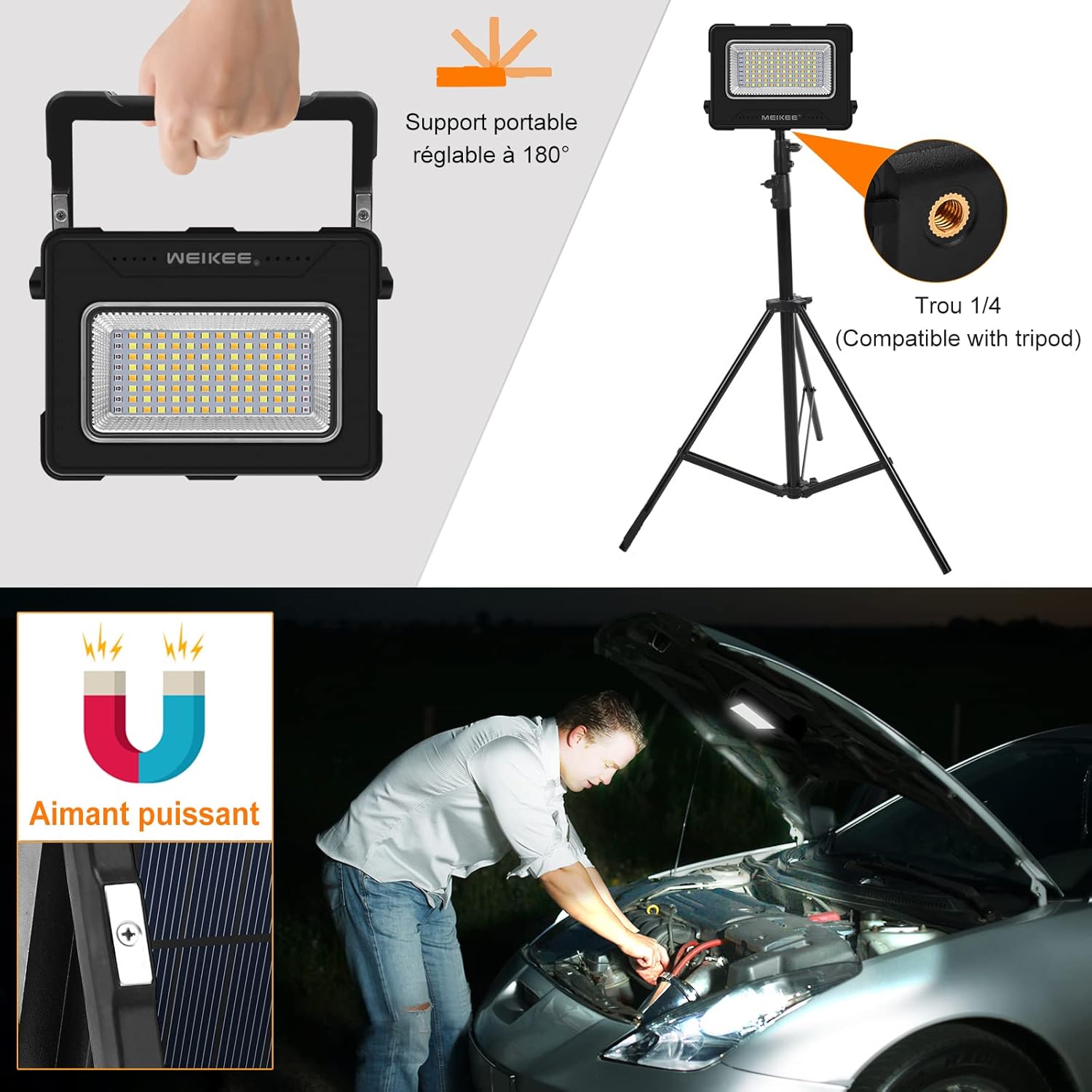
Image: MEIKEE LED Work Light showcasing its versatile mounting options: a 180-degree adjustable stand, a 1/4-inch tripod mount, and powerful integrated magnets for hands-free use. The image demonstrates the adjustable handle, tripod compatibility, and magnetic attachment under a car hood.
Maintenance
- Cleaning: Wipe the light with a soft, damp cloth. Do not use abrasive cleaners or solvents. Ensure the solar panel is clean for efficient charging.
- Storage: Store the work light in a cool, dry place when not in use. If storing for extended periods, charge the battery every 3-6 months to prolong its lifespan.
- USB Port Protection: Always ensure the silicone cover for the USB ports is securely closed to prevent dust and water ingress.
Troubleshooting
| Problem | Possible Cause | Solution |
|---|---|---|
| Light does not turn on. | Battery is depleted. | Charge the work light using USB or solar power. |
| Light dims unexpectedly. | Battery is low. | Recharge the device. |
| Solar charging is slow or ineffective. | Insufficient direct sunlight; dirty solar panel. | Place in direct sunlight; clean the solar panel. |
| Cannot charge external device. | Work light battery is low; incorrect cable/port. | Ensure work light is charged; use the correct USB-A output port and a functional cable. |
| Buttons are unresponsive. | Temporary software glitch. | Try turning the device off and on again by holding the power button for 3 seconds. |
Specifications
| Feature | Detail |
|---|---|
| Brand | MEIKEE |
| Model Number | SWL-FL01 |
| Product Dimensions | 15.4 x 3.2 x 11.4 cm |
| Item Weight | 490 grams |
| Power Source | Solar Powered, USB Rechargeable |
| Battery Type | Rechargeable Lithium Polymer |
| Battery Capacity | 12000mAh |
| Voltage | 5 Volts |
| Wattage | 60 Watts |
| Light Source Type | LED |
| Max Lumens | 1000 Lumens |
| Color Temperature Modes | 2700K (Warm White), 4000K (Natural White), 6000K (Cool White), Red & Blue SOS |
| Brightness Levels | 5 (100%, 75%, 50%, 25%, 10%) |
| Material | Acrylonitrile Butadiene Styrene (ABS) |
| Finish Type | Matte |
| Special Features | 180° Adjustable Stand, 2 Magnets, Tripod Mount, Power Bank Function, Splash-proof USB Port |
Warranty and Support
MEIKEE products are manufactured to high-quality standards. For warranty information or technical support, please refer to the contact details provided on the product packaging or visit the official MEIKEE website. Please retain your proof of purchase for any warranty claims.


