
1. Introduction
Thank you for choosing the Philips PerfectCare 8000 Series Steam Generator Iron. This appliance is designed to make your ironing experience effortless and efficient. Featuring advanced motion sensor technology and OptimalTEMP, it provides powerful steam and ensures no burns on any ironable fabric. Please read this instruction manual carefully before first use and keep it for future reference.

Image 1.1: Overview of the Philips PerfectCare 8000 Series Steam Generator Iron.
2. Important Safety Information
Before using the appliance, read this user manual and the safety leaflet carefully and save them for future reference. This appliance has been designed for domestic use only.
- Always place the iron and its base on a stable, level, and heat-resistant surface.
- Do not leave the iron unattended while it is connected to the mains or while it is still hot.
- Keep the appliance out of reach of children and persons with reduced physical, sensory, or mental capabilities.
- Do not immerse the iron or the base in water or any other liquid.
- Regularly check the mains cord for any damage. If the cord is damaged, it must be replaced by Philips, a service agent authorized by Philips, or similarly qualified persons to avoid a hazard.
- Use only tap water. Do not use perfumed water, water from tumble dryers, or other additives.
- The soleplate of the iron can become extremely hot and cause burns if touched.
3. Setup and Preparation
3.1 Unpacking
Carefully remove the appliance from its packaging. Retain the packaging for future storage or transport.
3.2 Filling the Water Tank
- Ensure the appliance is unplugged from the power outlet.
- Remove the detachable water tank from the base.
- Fill the water tank with tap water up to the 'MAX' indication. The tank has a capacity of 1.8 liters, allowing for extended ironing sessions.
- Place the water tank back into the base until it clicks into place.
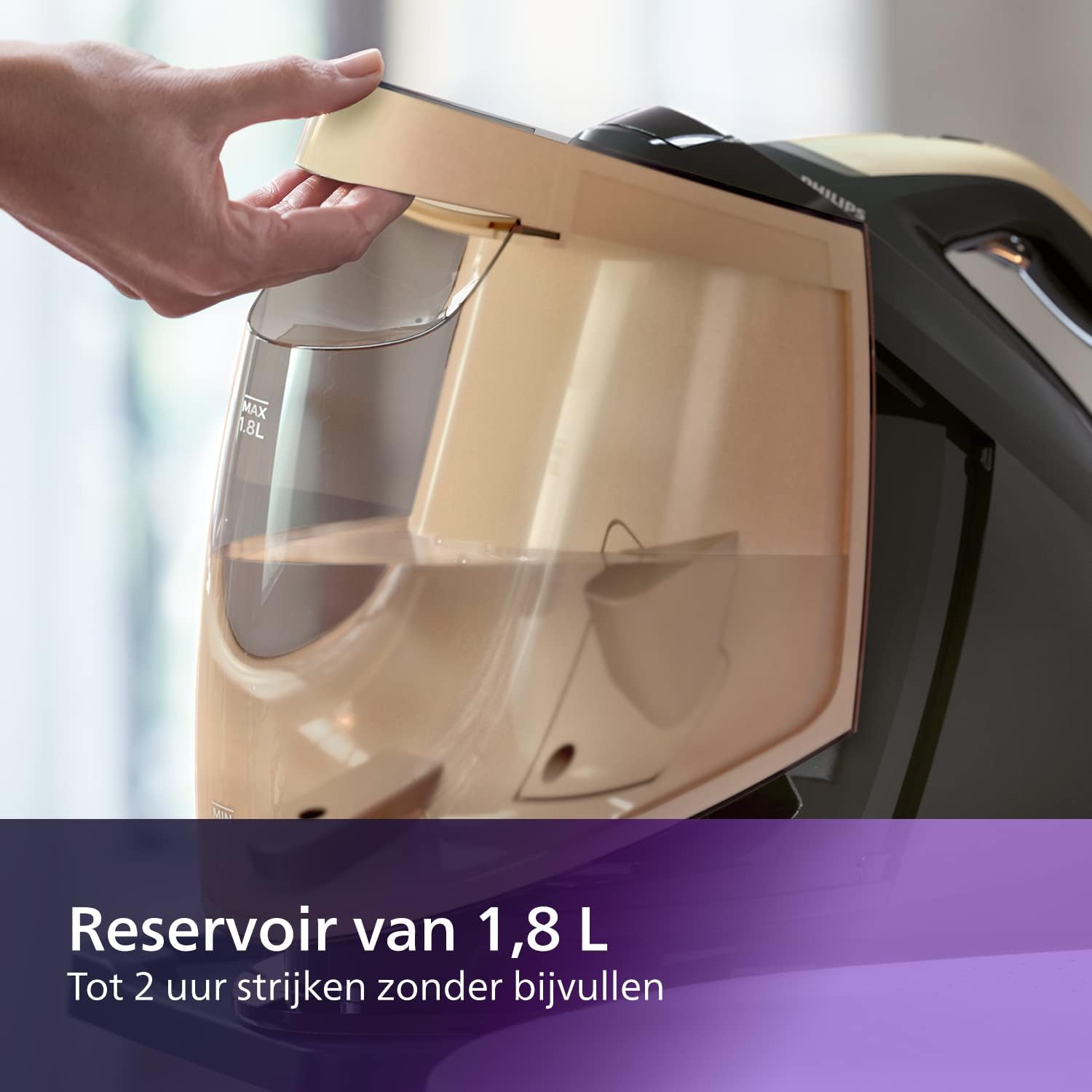
Image 3.1: Demonstrates filling the 1.8-liter detachable water tank.
3.3 Connecting to Power
Plug the mains plug into a grounded wall socket. The appliance is now ready for use.
4. Operating Instructions
4.1 OptimalTEMP Technology
The Philips PerfectCare 8000 Series features OptimalTEMP technology, which allows you to iron all ironable fabrics from denim to silk without adjusting the temperature. This eliminates the need for sorting laundry and prevents burns.

Image 4.1: The iron resting on fabric, illustrating the no-burn OptimalTEMP technology.
4.2 Ironing with Steam
- Press the on/off button. The 'iron ready' light will flash slowly.
- When the 'iron ready' light stops flashing and stays on, the appliance is ready for use.
- Press and hold the steam trigger under the handle to release steam. The motion sensor technology automatically adjusts steam output based on your ironing speed.
- For a powerful steam boost to remove stubborn creases, press the steam trigger twice quickly. The iron delivers up to 700g steam boost.

Image 4.2: The iron actively releasing steam during use.
4.3 Vertical Steaming
The steam generator iron can also be used for vertical steaming to refresh hanging garments, curtains, or delicate fabrics.
- Hang the garment on a hanger.
- Hold the iron in a vertical position, slightly away from the fabric.
- Press the steam trigger to release steam and move the iron up and down over the fabric.

Image 4.3: A user demonstrating vertical steaming on curtains.
4.4 SteamGlide Elite Soleplate
The SteamGlide Elite soleplate provides excellent gliding performance and scratch resistance, ensuring smooth movement over all fabrics.

Image 4.4: Detailed view of the SteamGlide Elite soleplate design.
5. Maintenance and Cleaning
5.1 Easy De-Calc Plus System
To maintain optimal steam performance and prolong the life of your appliance, regular descaling is essential. The Easy De-Calc Plus system makes this process simple.
- When the 'De-Calc' light flashes and the appliance beeps, it's time to descale.
- Ensure the appliance is unplugged and has cooled down for at least 2 hours.
- Place the appliance on the edge of a table or sink.
- Unscrew the Easy De-Calc knob (usually gold-colored) and let the water and scale particles drain into a cup or basin.
- Once empty, screw the Easy De-Calc knob back firmly.

Image 5.1: Illustrates the process of draining water and scale from the Easy De-Calc Plus system.
5.2 Cleaning the Soleplate
- To clean the soleplate, wipe it with a damp cloth and a non-abrasive (liquid) cleaner.
- Never use scouring pads, abrasive cleaning agents, or sharp objects to clean the soleplate.
5.3 Storage
After use, allow the appliance to cool down completely. You can secure the iron to its base using the carry lock. Store the appliance in a dry, safe place.
6. Troubleshooting
| Problem | Possible Cause | Solution |
|---|---|---|
| No steam is coming out. | Water tank is empty. Appliance is not heated up. | Fill the water tank. Wait until the 'iron ready' light is continuously on. |
| Water drips from the soleplate. | The iron is not hot enough. | Wait until the 'iron ready' light is continuously on before using steam. |
| The iron produces a pumping sound. | This is normal. The pump is transporting water to the iron. | No action required. |
| The 'De-Calc' light flashes. | The appliance needs descaling. | Perform the Easy De-Calc Plus procedure as described in section 5.1. |
| The iron does not heat up. | The appliance is not plugged in or the power button is not pressed. | Check the power connection and press the on/off button. |
7. Specifications
| Feature | Detail |
|---|---|
| Model Number | PSG8140/80 |
| Power | 2700 Watts |
| Voltage | 120 Volts |
| Water Tank Capacity | 1.8 Liters |
| Steam Pressure | 8.5 Bars |
| Continuous Steam Output | Up to 120 g/min |
| Steam Boost | Up to 700 g |
| Soleplate | SteamGlide Elite |
| Product Dimensions (L x W x H) | 24 x 69 x 2.5 cm |
| Item Weight | 4.9 Kilograms |
| Special Feature | Automatic Shut-off, OptimalTEMP Technology |
8. Warranty
This Philips appliance is covered by a standard manufacturer's warranty. Please refer to the warranty card included in your product packaging for specific terms and conditions, including the warranty period and coverage details. Keep your proof of purchase for warranty claims.
9. Support
For further assistance, product registration, or to find answers to frequently asked questions, please visit the official Philips website or contact Philips customer support in your region. Contact details can typically be found in the warranty leaflet or on the Philips website.
Online Support: www.philips.com/support


