
1. Introduction
Thank you for choosing the Muzen OTR Metal Retro Portable Bluetooth Speaker. This manual provides essential information for setting up, operating, and maintaining your speaker. Please read it thoroughly before use to ensure optimal performance and longevity of your device.
The Muzen OTR Metal speaker combines vintage aesthetics with modern audio technology, offering FM radio, Bluetooth connectivity, and AUX input in a compact, durable metal design.
2. Package Contents
Upon opening your package, please verify that all the following items are included:
- Muzen OTR Metal Portable Bluetooth Speaker
- Retro Suitcase Carrying Case
- USB-C Charging Cable
- AUX Cable
- FM Antenna
- Owner's Manual
- Decorative Stickers
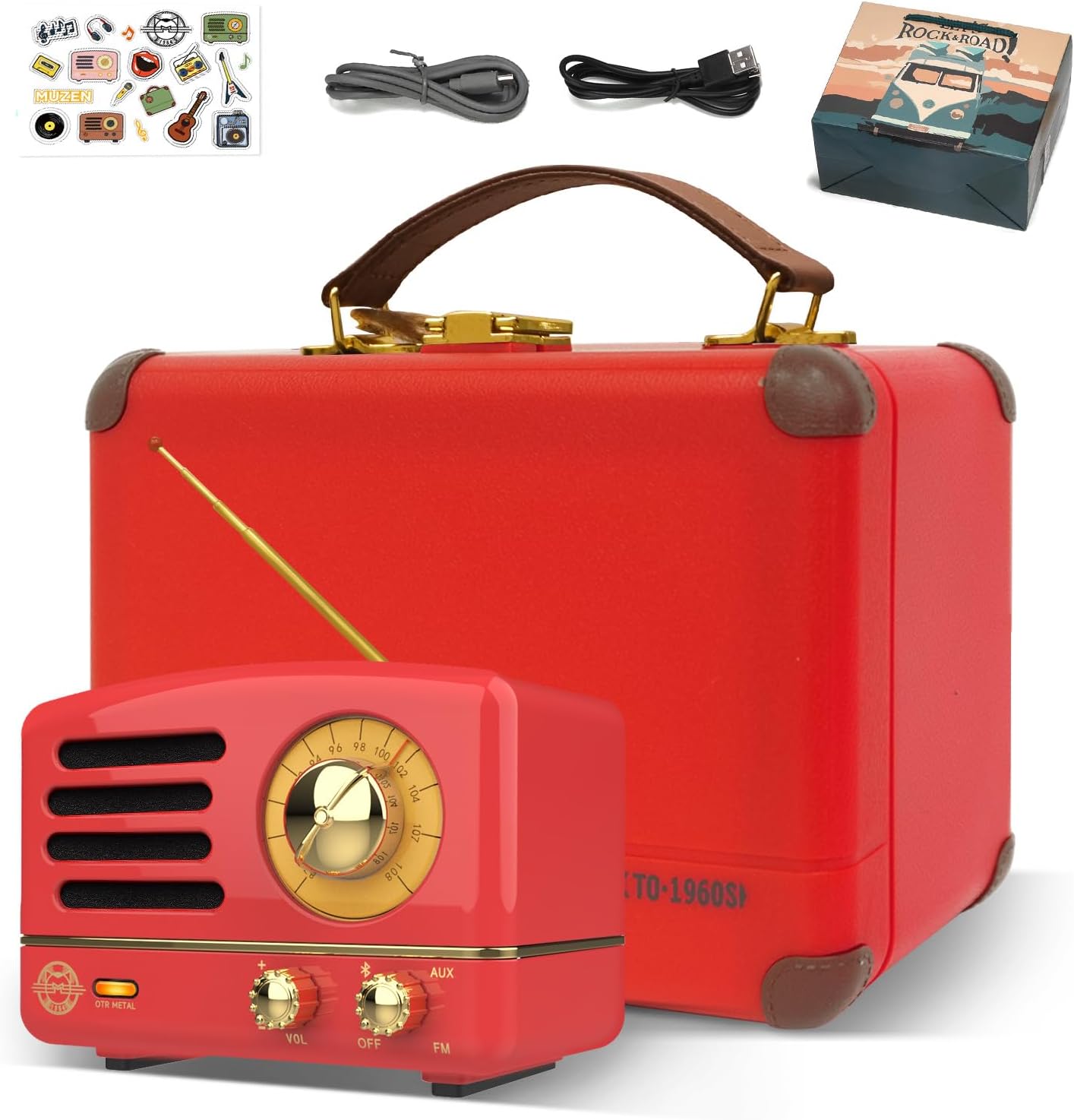
Image: The Muzen OTR Metal speaker, its dedicated retro suitcase, charging cables, and decorative stickers.

Image: A comprehensive view of all items included in the package, neatly arranged.
3. Setup
3.1 Charging the Speaker
Before first use, fully charge the speaker. Connect the provided USB-C charging cable to the charging port on the back of the speaker and the other end to a USB power source (e.g., computer, wall adapter). The charging indicator light will show the charging status.

Image: The back of the Muzen OTR Metal speaker, highlighting the USB-C charging port and other connections.
3.2 Installing the FM Antenna
For optimal FM radio reception, connect the included FM antenna to the designated port on the back of the speaker. Extend the antenna fully for better signal strength.

Image: The Muzen OTR Metal speaker with its FM antenna extended, ready for radio reception.
4. Operating Instructions
4.1 Power On/Off
To power on the speaker, rotate the right knob from 'OFF' to either 'Bluetooth' or 'FM' mode. To power off, rotate the knob back to 'OFF'.
4.2 Bluetooth Mode
Rotate the right knob to the 'Bluetooth' position. The indicator light will flash, indicating pairing mode. On your device (smartphone, tablet, etc.), enable Bluetooth and select 'Muzen OTR Metal' from the list of available devices. Once connected, the indicator light will remain solid. The speaker features Bluetooth 5.0 for high-speed, stable connections.

Image: A user connecting their mobile phone to the Muzen OTR Metal speaker via Bluetooth, demonstrating the wireless connectivity.
4.3 FM Radio Mode
Rotate the right knob to the 'FM' position. Ensure the FM antenna is connected and extended. Use the tuning dial on the front of the speaker to scan for radio stations. The dial will illuminate to indicate active tuning.

Image: Close-up of the Muzen OTR Metal speaker's front panel, showing the illuminated FM radio tuning dial and controls.
4.4 AUX Mode
To use the AUX input, connect one end of the provided AUX cable to the AUX port on the back of the speaker and the other end to your audio device's headphone jack. The speaker will automatically switch to AUX mode.
4.5 Volume Control
Adjust the volume by rotating the left 'VOL' knob on the front of the speaker. Turn clockwise to increase volume and counter-clockwise to decrease.
5. Maintenance
To ensure the longevity and optimal performance of your Muzen OTR Metal speaker, follow these maintenance guidelines:
- Cleaning: Use a soft, dry cloth to wipe the speaker's surface. Avoid using abrasive cleaners or solvents, which may damage the finish.
- Storage: When not in use, store the speaker in its provided retro suitcase to protect it from dust and scratches. Keep it in a cool, dry place away from direct sunlight and extreme temperatures.
- Battery Care: To preserve battery life, avoid fully discharging the speaker frequently. Charge it regularly, even if not in constant use. The built-in 1000mAh rechargeable battery provides up to 10 hours of Bluetooth playtime and up to 20 hours in FM mode.
- Water Exposure: This speaker is not waterproof. Avoid exposing it to water or high humidity.
6. Troubleshooting
If you encounter any issues with your Muzen OTR Metal speaker, please refer to the following common troubleshooting steps:
| Problem | Possible Cause | Solution |
|---|---|---|
| No Power | Battery is depleted. | Charge the speaker fully using the provided USB-C cable. |
| No Sound | Volume is too low or muted; incorrect mode selected. | Increase volume using the 'VOL' knob. Ensure the correct mode (Bluetooth, FM, AUX) is selected. |
| Bluetooth Disconnection / Cannot Pair | Speaker is out of range; interference; device not in pairing mode. | Ensure speaker and device are within 33 feet. Turn speaker off and on again. Forget device on your phone and re-pair. |
| Poor FM Reception | Antenna not extended; weak signal area. | Fully extend the FM antenna. Try repositioning the speaker for better reception. |
If the problem persists after trying these steps, please refer to the detailed troubleshooting section in the included Owner's Manual or contact Muzen customer support.
7. Specifications
| Feature | Detail |
|---|---|
| Model Number | MW-2AI |
| Product Dimensions | 3.46 x 2.2 x 2.56 inches |
| Item Weight | 15 ounces |
| Battery | 1000mAh rechargeable (1 A battery included) |
| Playtime (Bluetooth) | Up to 10 hours |
| Playtime (FM) | Up to 20 hours |
| Connectivity Technology | Auxiliary, Bluetooth 5.0, USB |
| Tuner Technology | FM |
| Audio Output | 5-watt high-power amplifier, high-fidelity full-range speaker |
| Material | Metal (High-density zinc-aluminum alloy) |
8. Warranty and Support
For detailed warranty information and customer support, please refer to the Owner's Manual included with your Muzen OTR Metal speaker. You may also visit the official Muzen website or the Muzen Store on Amazon for further assistance and product registration.
Muzen Store Link: https://www.amazon.com/stores/MUZEN/page/971A8946-BC32-49C3-B047-DD88476A4EA1


