
1. Product Overview
The NICREW Magi 200 Internal Filter is designed to provide comprehensive filtration for aquariums ranging from 5 to 10 gallons. It offers biological, chemical, and mechanical filtration to maintain a healthy aquatic environment. This submersible power filter is equipped with an adjustable air regulator for controlled water flow and oxygenation.

Figure 1: NICREW Magi 200 Internal Filter. This image shows the compact design of the filter unit with its adjustable spray bar.
2. Components
The NICREW Magi 200 Internal Filter includes the following main components:
- Filter Unit with Pump
- Filter Media (Activated Carbon and Bio-foam)
- Adjustable Spray Bar
- Air Regulator Tube
- Suction Cups (4x)
- Replacement Impeller
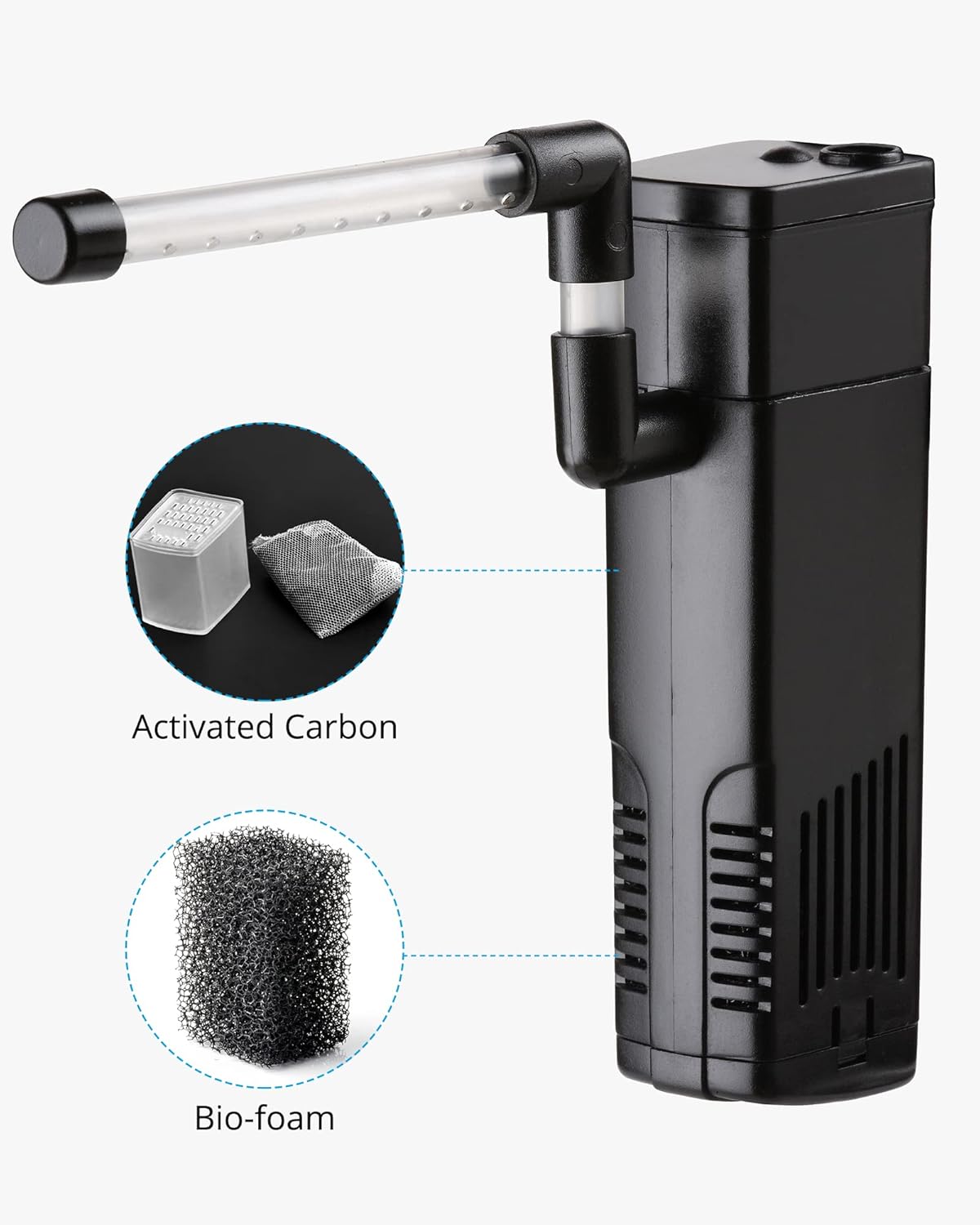
Figure 2: Filter Media. This image highlights the activated carbon and bio-foam filter media included with the unit.
3. Setup Instructions
- Unpack Components: Carefully remove all parts from the packaging. Inspect for any damage.
- Assemble Filter Media: Insert the bio-foam and activated carbon cartridge into the filter unit. Ensure they are seated correctly.
- Attach Spray Bar/Air Regulator: Connect the adjustable spray bar to the filter outlet. If desired, attach the air regulator tube to the designated inlet for aeration.
- Mount Suction Cups: Secure the four suction cups to the back of the filter unit.
- Position in Aquarium: Submerge the filter completely in the aquarium water. Attach it to the inside wall of the tank using the suction cups. Ensure the filter is fully underwater for proper operation.
- Connect Power: Once the filter is securely installed and fully submerged, plug the power cord into a suitable electrical outlet.

Figure 3: Installation Options. This diagram illustrates various ways to position the filter and its spray bar within an aquarium or terrarium, emphasizing full submersion.
4. Operating Instructions
The NICREW Magi 200 filter provides three main functions: filtration, oxygenation, and circulation.
- Filtration: Water is drawn into the filter, passing through the bio-foam for mechanical filtration and the activated carbon for chemical filtration, removing debris and odors.
- Oxygenation: The adjustable air regulator allows for the introduction of air bubbles, increasing oxygen levels in the water.
- Circulation: The pump creates water movement, ensuring even distribution of filtered water and preventing stagnant areas.

Figure 4: Filter Functions. This image visually represents the three core functions: filtration, oxygenation, and circulation.
Adjusting Water Flow and Aeration
The filter features a rotary regulator to adjust the airflow and water output. Rotate the air regulator to control the intensity of bubbles and the gentleness of the water flow, making it suitable for various fish types, including delicate species.

Figure 5: Rotary Regulator. This image shows the rotary regulator used to adjust the airflow and water output for customized operation.
5. Maintenance
Regular maintenance is crucial for the optimal performance and longevity of your filter.
Filter Media Replacement
- Activated Carbon: Replace every 30 days to ensure effective chemical filtration and odor absorption.
- Bio-foam: Replace every 90 days. Rinse regularly during weekly tank maintenance to remove trapped debris.

Figure 6: Activated Carbon. This image shows activated carbon, which should be replaced monthly.

Figure 7: Bio-foam Sponge. This image shows the bio-foam sponge, recommended for replacement every 90 days.
Cleaning the Filter Unit and Impeller
To prevent noise and prolong product life, clean the inside of the filter monthly.
- Disconnect Power: Always unplug the filter before performing any maintenance.
- Remove from Tank: Carefully remove the filter unit from the aquarium.
- Disassemble: Separate the pump from the filter body.
- Remove Impeller: Gently remove the impeller from its chamber.
- Clean Components: Use a small brush (not included) to clean the impeller and its chamber thoroughly. Rinse all parts with aquarium water or dechlorinated tap water.
- Reassemble: Reinsert the clean impeller, reassemble the filter, and place it back into the aquarium.
- Reconnect Power: Plug the filter back in.

Figure 8: Filter Noise Solution. This image illustrates the steps for cleaning the filter, including separating the pump, removing the impeller, and cleaning the components.
Impeller Replacement
An extra impeller is included to extend the service life of the filter. Replace the water pump impeller every 2-3 years, or more often if loud noise is noted, to reduce noise and improve hydraulic efficiency.

Figure 9: Replacement Impeller. This image shows the replacement impeller, which helps maintain filter performance and reduce noise over time.
6. Troubleshooting
| Problem | Possible Cause | Solution |
|---|---|---|
| Filter not running | Not plugged in; power outage; impeller jammed. | Check power connection; verify power supply; clean impeller and chamber. |
| Reduced water flow | Clogged filter media; dirty impeller; air regulator closed. | Clean or replace filter media; clean impeller; adjust air regulator. |
| Excessive noise | Impeller dirty or worn; air trapped in filter; filter not fully submerged. | Clean or replace impeller; gently shake filter to release air; ensure filter is fully submerged. |
| Poor water clarity | Clogged filter media; incorrect filter size for tank; insufficient water changes. | Clean or replace filter media; ensure filter is appropriate for tank size; perform regular water changes. |
7. Specifications
| Feature | Detail |
|---|---|
| Model | Magi 200 |
| Recommended Tank Size | 5 - 10 Gallons |
| Flow Rate (GPH) | 53 GPH |
| Power Consumption | 5W |
| Dimensions (L x W x H) | 6.3 x 4.02 x 1.81 inches (approximate package dimensions, actual unit is similar) |
| Material | Plastic |
| Filtration Type | Mechanical, Chemical, Biological |

Figure 10: Product Dimensions. This image provides key measurements of the filter unit.
8. Warranty and Support
NICREW offers a 12-month warranty for this product. For technical support, warranty claims, or any questions regarding your NICREW Aquarium Internal Filter Magi 200, please contact NICREW customer service. Refer to the official NICREW website or your purchase documentation for contact details.
Customer Service: NICREW provides 24-hour friendly customer service.