Introduction
This manual provides detailed instructions for operating and maintaining your SOWO Wireless Portable Speaker, Model Q18. Designed for both indoor and outdoor use, this speaker delivers powerful stereo sound with Bassboom Technology, TWS pairing, and vibrant RGB colorful lights. Its IP67 waterproof and dustproof rating ensures durability in various environments.
Key Features
- Brilliant Sound: Advanced DSP technology with 25W stereo audio drivers and two wide bass passive radiators for a rich stereo sound effect and high volume output.
- Bassboom Bass: Enhanced bass by 28% on the original basis, providing stronger auditory enjoyment.
- Wireless Stereo Surround Sound (TWS): Supports TWS function, allowing you to use two speakers simultaneously for a true stereo surround sound experience.
- 16H Powerful Battery: Built with a high-capacity super electric vehicle battery, rechargeable more than a thousand times, offering extended playtime.
- Exquisite Fabric with RGB Colorful Light: Durable fabric and streamlined cylindrical design with cool LED lights featuring dual 256-level brightness display on the radiators.
- IP67 Waterproof and Dustproof: Lightweight and portable, suitable for various environments like bathrooms, camping, or beaches. It will even float back up to the surface if dropped in water.
- Strong Bluetooth 5.0 Signal: Connects devices up to 39 feet unobstructed, easily reading music playlists and connecting to smartphones, PCs, and laptops.
Safety Information
Most users do not need a license to operate this wireless microphone system. Nevertheless, operating this microphone system without a license is subject to certain restrictions: the system may not cause harmful interference; it must operate at a low power level; and it has no protection from interference received from any other device. Purchasers should also be aware that the FCC is currently evaluating use of wireless microphone systems, and these rules are subject to change. For more information, call the FCC at 1-888- CALL-FCC (TTY: 1-888-TELL-FCC) or visit the FCC’s wireless microphone website at https://www.fcc.gov/cgb/wirelessmicrophones.
What's in the Box
- SOWO Portable Bluetooth Speaker
- Type-C Charge Cable
- Hanging Line
- User Manual

Image showing the SOWO Portable Bluetooth Speaker, a Type-C charging cable, a hanging line, and the Quick Start Guide. The package dimensions are also indicated.
Product Overview

The SOWO Wireless Portable Speaker in black, showcasing its cylindrical design and top-mounted control panel.
Controls and Ports
The speaker features intuitive controls for easy operation.
- Power Button: Press and hold to power on/off.
- Volume Up (+): Increase volume.
- Volume Down (-): Decrease volume.
- Play/Pause Button: Control music playback and answer/end calls.
- Bluetooth Button: Initiate Bluetooth pairing and TWS pairing.
- RGB Light Button: Cycle through light modes or turn off lights.
- Charging Port (Type-C): Located under a protective flap for charging the device.
- Auxiliary Port: Located under a protective flap, allows for wired audio connection.

A detailed view of the speaker's control buttons, including power, volume, play/pause, Bluetooth, and RGB light controls.

The side of the speaker with a protective flap lifted, revealing the Type-C charging port and the auxiliary input.
Setup
Charging the Speaker
Before first use, fully charge the speaker.
- Open the protective flap on the side of the speaker.
- Connect the provided Type-C charging cable to the speaker's charging port.
- Connect the other end of the cable to a compatible USB power adapter (not included).
- The charging indicator light will illuminate. Once fully charged (approximately 3 hours), the light will change or turn off.
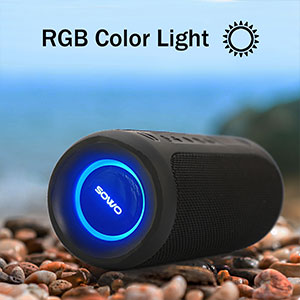
Image illustrating the speaker connected to a charging cable, indicating the charging process.
Power On/Off
Press and hold the Power button (usually marked with a power symbol) on the control panel for 2-3 seconds until you hear an audible prompt or see the indicator lights activate/deactivate.
A detailed view of the speaker's control buttons, highlighting the power button for turning the device on or off.
Bluetooth Pairing
To connect your speaker to a Bluetooth-enabled device:
- Ensure the speaker is powered on. The Bluetooth indicator light will flash, indicating it's in pairing mode.
- On your device (smartphone, tablet, laptop), enable Bluetooth and search for available devices.
- Select "SOWO Q18" (or similar name) from the list of found devices.
- Once connected, the Bluetooth indicator light on the speaker will become solid, and you will hear a confirmation tone.

The SOWO speaker wirelessly connected to a smartphone, demonstrating its Bluetooth capabilities for audio playback.
Operating Instructions
TWS (True Wireless Stereo) Pairing
To achieve true stereo sound, you can pair two SOWO Q18 speakers together:
- Ensure both speakers are powered on and not connected to any other Bluetooth devices.
- On one speaker, press and hold the Bluetooth button for a few seconds until you hear a pairing prompt.
- The two speakers will automatically search for and connect to each other. Once paired, you will hear a confirmation tone.
- Connect your device to one of the paired speakers via Bluetooth as described in the "Bluetooth Pairing" section. Both speakers will now play audio simultaneously.

Two SOWO speakers demonstrating the True Wireless Stereo (TWS) pairing feature, providing a wider soundstage for outdoor enjoyment.
RGB Colorful Lights
The speaker features dynamic RGB lights on its radiators.
Press the Light button (often marked with a sun or lightbulb icon) to cycle through different light modes or to turn the lights off.

A close-up of the speaker's end, highlighting the vibrant RGB lighting feature.
Hands-Free Calling
When connected to your smartphone via Bluetooth, the speaker can be used for hands-free calls thanks to its built-in microphone.
- Answer/End Call: Press the Play/Pause button once.
- Reject Call: Press and hold the Play/Pause button.

Image depicting the SOWO speaker in use for a hands-free phone call, with a phone displaying an incoming call.
Maintenance
Cleaning
To maintain the speaker's appearance and functionality, especially the flexible areas around the radiators and ports, regular cleaning is recommended.
Use a soft, dry cloth to wipe down the speaker's surface. For hard-to-reach areas or lint accumulation, a soft brush or compressed air can be used carefully. Ensure the protective flap over the ports is closed before cleaning to prevent dust or debris from entering.

The SOWO speaker displayed upright, emphasizing its durable fabric and sleek design.
Storage
Store the speaker in a cool, dry place away from extreme temperatures and direct sunlight when not in use for extended periods.
Troubleshooting
| Problem | Solution |
|---|---|
| Speaker does not power on. | Ensure the battery is charged. Connect the speaker to a power source using the provided Type-C cable. |
| Cannot pair via Bluetooth. | Make sure the speaker is in pairing mode (flashing Bluetooth light). Ensure your device's Bluetooth is enabled and within range. Forget previous pairings on your device and try again. |
| No sound or low volume. | Check the volume levels on both the speaker and your connected device. Ensure the speaker is properly paired. |
| TWS pairing fails. | Ensure both speakers are not connected to any other devices. Power both speakers off and on, then try TWS pairing again. |
| Lint accumulation in flexible areas. | Use a soft brush or compressed air to gently remove lint from the flexible rubber areas and around the ports. |
Specifications
| Feature | Detail |
|---|---|
| Model Name | Q18 |
| Brand | SOWO |
| Speaker Type | Surround |
| Connectivity Technology | Bluetooth |
| Wireless Communication Technology | Bluetooth |
| Bluetooth Range | 30.48 Meters (39 feet unobstructed) |
| Speaker Maximum Output Power | 39 Watts |
| Audio Output Mode | Stereo |
| Frequency Response | 20 KHz |
| Signal-to-Noise Ratio | 75 dB |
| Battery Life | 16 Hours |
| Charging Time | 3 Hours |
| Is Waterproof | True (IP67) |
| Product Dimensions | 3"D x 3"W x 7.48"H |
| Item Weight | 16 ounces (1 pound) |
| Number of Microphones | 1 |
| Power Source | Battery Powered |
| Recommended Uses | Indoor/Outdoor |
Warranty and Support
The SOWO Wireless Portable Speaker comes with a 18-month warranty.
For further assistance or detailed information, please refer to the official User Guide PDF available online: Download User Guide (PDF).
You can also visit the official SOWO Store for more products and support: Visit SOWO Store.


