
1. Introduction
This manual provides essential information for the correct installation, safe use, and maintenance of your Candy Smart CS 1410TXME/1-S washing machine. Please read these instructions carefully before using the appliance and retain them for future reference. Proper use ensures optimal performance and extends the lifespan of your washing machine.
2. Safety Information
Always follow basic safety precautions when using electrical appliances to reduce the risk of fire, electric shock, or injury to persons.
- Ensure the appliance is properly grounded.
- Do not allow children to play with the appliance.
- Never force the door open during a cycle.
- Unplug the appliance before cleaning or performing any maintenance.
- Do not install the appliance in a damp environment or outdoors.
- Keep packaging materials out of reach of children.
3. Installation
Proper installation is crucial for the safe and efficient operation of your washing machine.
3.1 Unpacking
Remove all packaging materials, including the polystyrene base and any inserts in the drum. Ensure all transit bolts are removed from the rear of the machine before use. Failure to remove transit bolts will cause severe vibration and damage.
3.2 Positioning and Leveling
Place the washing machine on a firm, flat floor. Adjust the feet to ensure the appliance is perfectly level. An unlevel machine can cause excessive noise and vibration.

Image: The Candy Smart CS 1410TXME/1-S washing machine positioned in a home environment.
3.3 Water Connection
Connect the water inlet hose to a cold water tap with a 3/4" thread. Ensure the hose is securely fastened to prevent leaks. Do not reuse old hoses.
3.4 Drain Connection
Position the drain hose at a height between 50 cm and 85 cm from the floor. Ensure the hose is not kinked or obstructed.
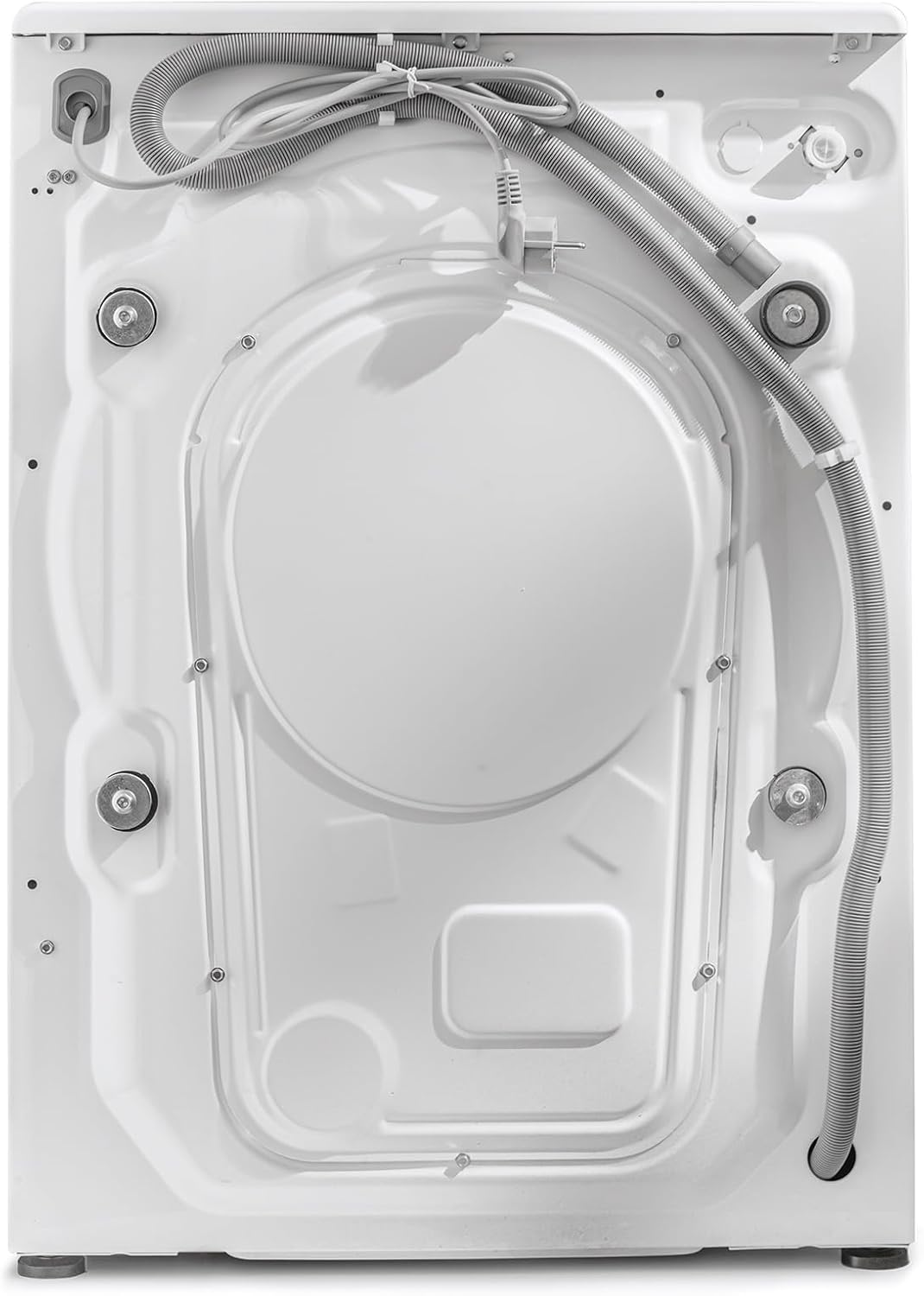
Image: Rear view of the washing machine, illustrating hose connections.
3.5 Electrical Connection
Plug the appliance into a grounded electrical outlet. Ensure the voltage and frequency match the specifications on the rating plate of the appliance. Do not use extension cords or multiple adapters.
4. Operating Instructions
Familiarize yourself with the control panel and available programs for efficient washing.
4.1 Control Panel Overview
The control panel features a program selector dial, a digital display, and various function buttons.

Image: Digital display showing temperature, spin speed, and program indicators.

Image: Program selector dial with various wash cycle options.
4.2 Washing Programs
Your washing machine offers 16 standard programs, including specialized cycles for different fabric types and rapid wash options ranging from 14 to 59 minutes. The Active Motion Technology enhances detergent cleaning action for improved results.

Image: Features panel highlighting 10kg capacity, 1400 RPM, Active Motion System, and Rapid Cycles.
4.3 NFC Connectivity (Simply-Fi App)
The appliance features NFC connectivity, allowing you to connect your smartphone via the Candy Simply-Fi app. This enables you to download additional wash programs and access extra functionalities.
4.4 Loading Laundry
Open the door and load laundry into the drum. Do not overload the machine; the maximum capacity is 10 kg. Close the door firmly.

Image: The washing machine drum with the door open, ready for loading.
4.5 Detergent Dispenser
Add the appropriate amount of detergent and fabric softener to the designated compartments in the dispenser drawer.
4.6 Starting a Wash Cycle
- Turn the program selector dial to choose your desired wash program.
- Adjust temperature and spin speed using the corresponding buttons on the display, if desired.
- Press the 'Start/Pause' button to begin the cycle.
5. Maintenance
Regular maintenance helps ensure the longevity and efficiency of your washing machine.
5.1 Cleaning the Exterior
Wipe the exterior surfaces with a soft, damp cloth. Do not use abrasive cleaners or solvents.
5.2 Cleaning the Detergent Drawer
Periodically remove and clean the detergent drawer under running water to prevent residue buildup.
5.3 Cleaning the Filter
The filter should be cleaned regularly to prevent blockages. Refer to the detailed instructions in the full user manual for filter access and cleaning procedures.
5.4 Care for the Drum
To prevent odors and mold, leave the washing machine door slightly ajar after each wash to allow the drum to air dry.

Image: Interior of the washing machine drum.
6. Troubleshooting
This section addresses common issues you might encounter. For more complex problems, consult a qualified technician.
- Machine does not start: Check if the power cord is plugged in, the door is closed properly, and the 'Start/Pause' button has been pressed.
- Water not filling: Ensure the water tap is open and the water inlet hose is not kinked.
- Excessive vibration: Verify that the transit bolts have been removed and the machine is level.
- Water not draining: Check the drain hose for kinks or blockages, and clean the filter.
7. Specifications
Key technical specifications for the Candy Smart CS 1410TXME/1-S washing machine.
| Specification | Value |
|---|---|
| Brand | Candy |
| Model Number | CS 1410TXME/1-S |
| Capacity | 10 Kilograms |
| Maximum Spin Speed | 1400 RPM |
| Dimensions (L x W x H) | 58 x 60 x 85 cm |
| Weight | 65 Kilograms |
| Noise Level (Spin) | 78 dB |
| Energy Efficiency Class (New) | A |
| Energy Consumption (per 100 cycles) | 51 kWh |
| Water Consumption (per cycle) | 51 Liters |
| Connectivity | NFC |
| Special Features | Child Safety, Active Motion Technology, Rapid Cycles |

Image: EU Energy Label for the appliance. For more details, visit the official EPREL database.
8. Warranty and Support
Your Candy Smart CS 1410TXME/1-S washing machine comes with a standard manufacturer's warranty. Please refer to the warranty card included with your purchase for specific terms and conditions. For technical support, spare parts, or service requests, please contact Candy customer service or visit their official website.


