
1. Introduction
Thank you for choosing the LEXiBOOK HPBT010AV Avengers Marvel 2-in-1 Bluetooth Headphones. These headphones are designed for children, offering both wireless Bluetooth 5.0 connectivity and a wired audio option. They feature a sound limit of 85 dB to protect young ears, an integrated microphone, and easy-to-use controls. Please read this manual carefully before using the product to ensure proper operation and safety.
2. Product Overview
2.1 Package Contents
- 1 x LEXiBOOK HPBT010AV Avengers Marvel Headphones
- 1 x Removable 3.5mm Jack Cable
- 1 x User Manual (this document)
2.2 Headphone Features
- 2-in-1 Connectivity: Use wirelessly via Bluetooth 5.0 or wired with the included 3.5mm jack cable.
- Kids Safe Volume: Sound output is limited to 85 dB to protect children's hearing.
- Integrated Microphone: For hands-free calls and online communication.
- Control Buttons: Easy access to play/pause and volume adjustments.
- Rechargeable Battery: Provides several hours of wireless playback.
- Foldable and Adjustable Design: For portability and a comfortable fit for various head sizes.

Image 1: Front view of the LEXiBOOK HPBT010AV Avengers Marvel Headphones, showcasing the Captain America shield design on the earcups and the red and blue color scheme.

Image 2: A child wearing the LEXiBOOK HPBT010AV headphones, demonstrating their comfortable fit and appealing design for young users.
3. Safety Information
- Do not expose the headphones to extreme temperatures, direct sunlight, or moisture.
- Avoid dropping or subjecting the headphones to strong impacts.
- Keep out of reach of very young children to prevent choking hazards from small parts.
- The volume limit of 85 dB is designed for hearing protection; do not attempt to bypass or modify this feature.
- Use only the provided charging cable or a certified equivalent for charging.

Image 3: Illustration highlighting the <85 dB sound limit feature for child safety.
4. Setup
4.1 Charging the Headphones
Before initial use in wireless mode, fully charge the headphones. Connect the charging cable (not included, typically USB-C or Micro-USB) to the charging port on the headphones and the other end to a USB power source (e.g., computer, wall adapter). The LED indicator will show charging status and turn off or change color when fully charged.
4.2 Bluetooth Pairing (Wireless Mode)
- Ensure the headphones are charged and powered off.
- Press and hold the Power button on the headphones until the LED indicator flashes blue and red, indicating pairing mode.
- On your device (smartphone, tablet, etc.), go to Bluetooth settings and enable Bluetooth.
- Search for available devices. Select "HPBT010AV" or a similar name from the list.
- Once connected, the LED indicator will typically show a solid blue light or flash blue slowly.
The headphones will automatically attempt to reconnect to the last paired device when powered on.
4.3 Wired Mode Connection
To use the headphones in wired mode, simply plug the included 3.5mm audio jack cable into the headphone's audio input port and the other end into your audio device's 3.5mm output jack. The headphones do not require power in wired mode, offering unlimited listening time.

Image 4: The LEXiBOOK HPBT010AV headphones connected via the 3.5mm audio jack cable, illustrating wired usage.
5. Operating Instructions
5.1 Basic Controls
- Power On/Off: Press and hold the Power button.
- Play/Pause: Press the Play/Pause button once.
- Volume Up: Press the Volume Up button.
- Volume Down: Press the Volume Down button.
- Answer/End Call: Press the Play/Pause button once during an incoming call.
5.2 Adjusting the Fit
The headband is adjustable. Gently slide the earcups up or down to achieve a comfortable and secure fit on the user's head. The earcups are designed to sit comfortably over the ears.
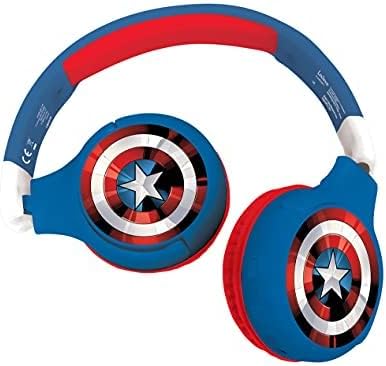
Image 5: The LEXiBOOK HPBT010AV headphones in a folded position, demonstrating their portability.
6. Maintenance
6.1 Cleaning
Wipe the headphones with a soft, dry cloth. Do not use abrasive cleaners, solvents, or immerse the headphones in water. Ensure no liquid enters the ports.
6.2 Storage
When not in use, store the headphones in a cool, dry place, away from direct sunlight and extreme temperatures. The foldable design allows for compact storage.
7. Troubleshooting
- No Power: Ensure the headphones are fully charged.
- Cannot Pair Bluetooth: Make sure the headphones are in pairing mode (flashing blue/red LED). Ensure Bluetooth is enabled on your device and it is within 10 meters of the headphones. Try turning both devices off and on again.
- No Sound in Wireless Mode: Check if the headphones are paired and connected. Adjust the volume on both the headphones and your connected device.
- No Sound in Wired Mode: Ensure the 3.5mm jack cable is fully inserted into both the headphones and the audio device. Test with another audio cable if available.
- Poor Sound Quality: Ensure the headphones are within Bluetooth range. Check for interference from other wireless devices. For wired mode, ensure the cable is not damaged.
8. Specifications
| Feature | Specification |
|---|---|
| Model Name | HPBT010AV |
| Connectivity Technology | Bluetooth 5.0, Wired (3.5mm Jack) |
| Bluetooth Range | Up to 10 meters (33 feet) |
| Sound Sensitivity | 85 dB (Limited for child safety) |
| Battery Life (Wireless) | Several hours (approx. 3 hours) |
| Charging Time | Not specified (typical for small electronics) |
| Included Components | Headphones, User Manual, 3.5mm Jack Cable |
| Material | Plastic |
| Weight | 0.26 Kilograms (9.2 ounces) |
| Dimensions | 16.5 x 7.5 x 17 inches (Product dimensions as packaged) |
9. Warranty and Support
This product typically comes with a 2-year warranty from the date of purchase. For warranty claims, technical support, or further assistance, please contact LEXiBOOK customer service through their official website or the retailer where the product was purchased. Please retain your proof of purchase.

Image 6: The official LEXiBOOK brand logo.