Introduction
This manual provides comprehensive instructions for the safe installation, operation, and maintenance of your Philips Bliss LED Ceiling Light with Fan. Please read this manual thoroughly before installation and use, and retain it for future reference.
For more information about Philips products, visit the Philips Store.
Safety Information
- Ensure power is disconnected at the main circuit breaker before installation or maintenance.
- Installation should be performed by a qualified electrician in accordance with local electrical codes.
- Do not attempt to repair or modify the unit yourself. Contact qualified service personnel.
- Keep hands clear of fan blades during operation.
- This product is designed for indoor use only.
Package Contents
Verify that all components are present before beginning installation:
- Philips Bliss LED Ceiling Light with Fan unit
- Remote Control
- Mounting Hardware (screws, anchors)
- User Manual (this document)
Setup and Installation
Follow these steps for proper installation:
- Preparation: Turn off power at the circuit breaker. Ensure the mounting surface is structurally sound to support the unit's weight (7.8 kg).
- Mounting Bracket Installation: Secure the mounting bracket to the ceiling junction box using the provided screws and anchors.
- Wiring: Connect the household electrical wires to the corresponding wires on the fan unit. Ensure all connections are secure and insulated. Refer to local electrical codes for proper wiring procedures.
- Attaching the Unit: Carefully lift the fan unit and attach it to the mounting bracket. Secure it with the designated screws.
- Final Check: Ensure all connections are tight and the unit is securely mounted. Restore power at the circuit breaker.
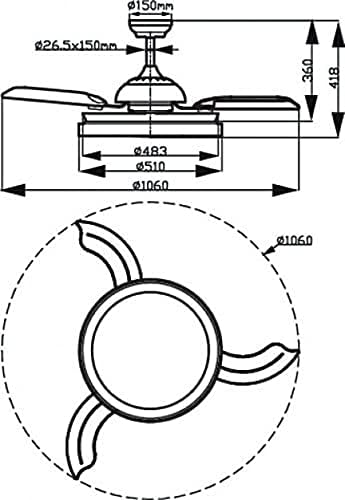
Figure 1: Dimensional diagram of the Philips Bliss LED Ceiling Light with Fan, illustrating measurements for installation. The diagram shows a top-down view and a side profile with dimensions in millimeters, including a diameter of 1060mm when fan blades are extended.
Operating Instructions
Your Philips Bliss LED Ceiling Light with Fan is operated via the included remote control.
Remote Control Functions:
- Power On/Off: Press the ON/OFF button to turn the light and fan on or off.
- Light Control:
- Light On/Off: Separate button for light control.
- SceneSwitch: Cycle through different light color temperatures (Warm White, Cool White, Neutral White) by pressing the SceneSwitch button.
- Dimming: Use the +/- buttons to adjust light brightness.
- Fan Speed: Press the FAN SPEED buttons to cycle through three fan speed settings (Low, Medium, High).
- Fan On/Off: Separate button for fan control.
- Timer Function: Set a timer for automatic shutdown (e.g., 1 hour, 2 hours, 4 hours).
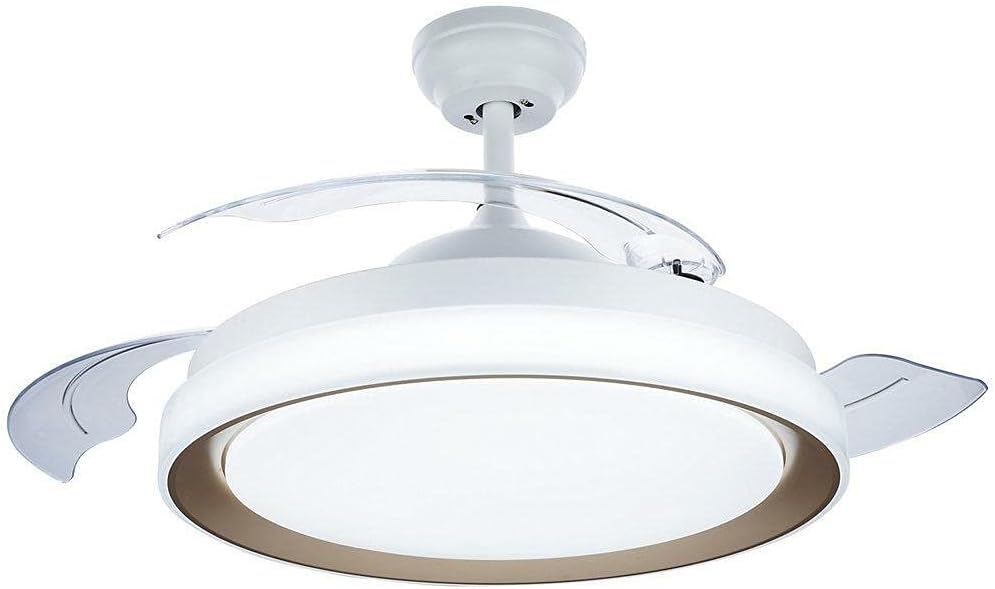
Figure 2: The Philips Bliss LED Ceiling Light with Fan, featuring a gold accent ring, illuminated and with its transparent fan blades extended, indicating active operation.

Figure 3: The Philips Bliss LED Ceiling Light with Fan in its retracted state, where the transparent fan blades are folded inward, making the unit appear as a standard ceiling light fixture when the fan is not in use.
Maintenance
Regular maintenance ensures optimal performance and longevity of your ceiling light with fan.
- Cleaning: Before cleaning, ensure the power is turned off at the circuit breaker. Use a soft, dry cloth to wipe the exterior surfaces. Do not use abrasive cleaners or solvents.
- Blade Cleaning: If fan blades accumulate dust, gently wipe them with a damp cloth. Ensure blades are completely dry before operating the fan.
- Bulb Replacement: The LED light source is integrated and not user-replaceable. If the light source fails, contact Philips customer support.
Troubleshooting
| Problem | Possible Cause | Solution |
|---|---|---|
| Light or Fan does not turn on. | No power supply. Remote control battery depleted. Loose wiring connection. | Check circuit breaker. Replace remote control batteries. Verify wiring connections (power off first). |
| Fan makes excessive noise. | Loose mounting screws. Blades are unbalanced. | Ensure mounting screws are tight. Check for any obstructions or damage to blades. |
| Remote control not responding. | Batteries depleted. Obstruction between remote and unit. Remote not paired (if applicable). | Replace batteries. Ensure clear line of sight. Refer to remote pairing instructions (if provided separately). |
| Light flickers or changes color unexpectedly. | Electrical interference. Faulty internal component. | Ensure proper grounding. If problem persists, contact customer support. |
Specifications
- Model Number: 8719514334489
- Brand: PHILIPS
- Product Dimensions: 51 x 51 x 41.8 cm (L x W x H)
- Item Weight: 7.8 Kilograms
- Light Wattage: 45W (LED)
- Fan Wattage: 35W
- Voltage: 220 Volts
- Number of Light Sources: 1 (Integrated LED)
- Bulb Base: E27 (Note: Integrated LED, not user-replaceable bulb)
- Room Type: Bedroom (Suitable for various indoor spaces)
- Installation Type: Flush Mount
- Finish Type: Brushed (Gold accent)
- Light Color Temperature: Warm to Cool White (SceneSwitch function)
Warranty and Support
For warranty information and technical support, please refer to the warranty card included with your purchase or visit the official Philips website. Do not attempt to service the product yourself.
You can also visit the Philips Store on Amazon for product information and support resources.


