
Sena SC-A0326
Sena HD Speakers User Manual
Model: SC-A0326
Introduction
Thank you for choosing Sena HD Speakers. These speakers are engineered to provide superior audio quality for communication and an immersive music listening experience. Featuring enhanced volume and bass, they are designed to fit seamlessly into existing helmet pockets, offering a comfortable and high-fidelity audio solution for your Sena communication device.
For optimal performance, ensure your Sena device's firmware is updated and utilize the Sena device mobile app for access to new Audio EQ presets.
Safety Information
Always prioritize safety when using your Sena HD Speakers.
- Do not operate your communication device or adjust speakers in a way that distracts you from safe riding.
- Ensure speakers are securely installed in your helmet to prevent movement during operation.
- Avoid listening at excessively high volumes for prolonged periods to prevent hearing damage.
- Keep the speakers and cables away from sharp objects or extreme temperatures.
Package Contents
The Sena HD Speakers package includes the following items:
- Sena HD Speaker Type B (Pair)

Image: Retail packaging for Sena HD Speakers, showing the box with "SENA HD SPEAKERS" and compatible models listed.
Product Overview
The Sena HD Speakers are designed for easy integration into compatible Sena communication systems. Each speaker features a low-profile bevel for enhanced comfort within helmet pockets.

Image: A close-up view of the two Sena HD Speakers, highlighting their design and texture.

Image: Sena HD Speakers shown with their connecting cables, illustrating the compact design.
Setup and Installation
These HD Speakers are compatible with Sena 10C EVO, 10C Pro, and 5S headsets. Follow these steps for proper installation:
- Prepare your Helmet: Identify the speaker pockets inside your helmet. Most helmets designed for communication systems have designated areas for speakers.
- Insert Speakers: Carefully place each Sena HD Speaker into the designated speaker pockets within your helmet. The low-profile bevel design helps them fit comfortably. Ensure the speakers are positioned directly over your ears for optimal sound.

Image: Sena HD Speakers shown near a helmet and a Sena communication device, illustrating the installation process.
- Route Cables: Route the speaker cables neatly along the helmet's interior, tucking them under padding or liners to prevent interference or discomfort.
- Connect to Sena Device: Plug the speaker connector into the corresponding port on your Sena 10C EVO, 10C Pro, or 5S communication device. Ensure the connection is secure.
Note: Refer to your specific Sena communication device's manual for detailed instructions on helmet disassembly/assembly if needed.
Operating Instructions
Once installed, the Sena HD Speakers will function with your connected Sena communication device.
- Firmware Update: For the best audio experience, it is highly recommended to update the firmware of your Sena 10C EVO, 10C Pro, or 5S device. Sena has developed specific firmware to optimize the performance of these HD speakers. Visit the official Sena website for the latest firmware and update instructions.
- Sena Device Mobile App: Download and install the Sena Device Manager app on your smartphone. This app provides access to various settings, including new Audio EQ presets specifically designed to enhance the output of your HD speakers. Adjust these presets to customize your listening experience.
- Audio Playback: Play music, receive GPS directions, or engage in intercom communication as you normally would with your Sena device. The HD speakers will deliver enhanced bass and clarity.
Maintenance
Proper maintenance ensures the longevity and performance of your Sena HD Speakers.
- Cleaning: Gently wipe the speaker surfaces with a soft, dry cloth. Do not use harsh chemicals, solvents, or abrasive cleaners.
- Storage: When not in use for extended periods, store the speakers in a cool, dry place, away from direct sunlight and extreme temperatures.
- Cable Care: Avoid sharp bends or excessive pulling on the speaker cables to prevent internal damage.
Troubleshooting
If you encounter issues with your Sena HD Speakers, try the following solutions:
- No Sound:
- Ensure the speaker connector is fully and securely plugged into your Sena device.
- Check the volume level on your Sena device and connected media player.
- Verify that your Sena device is powered on and properly paired/connected.
- Poor Sound Quality (Low Bass/Clarity):
- Confirm your Sena device's firmware is updated to the latest version.
- Adjust Audio EQ presets via the Sena Device Manager app.
- Ensure speakers are positioned correctly over your ears within the helmet.
- Intermittent Sound:
- Check for loose cable connections.
- Ensure cables are not pinched or damaged within the helmet.
If problems persist, contact Sena customer support for further assistance.
Specifications
| Attribute | Detail |
|---|---|
| Model Name | SC-A0326 |
| Compatible Devices | Sena 10C PRO, 10C EVO, 5S |
| Included Components | HD Speaker Type B (Pair) |
| Dimensions (L x W x H) | 13.6 x 3.5 x 8.7 cm |
| Weight | 63.5 g (0.14 Pounds) |
| Material | Plast |
| Speaker Maximum Output Power | 50 Watts |
| Color | Black |
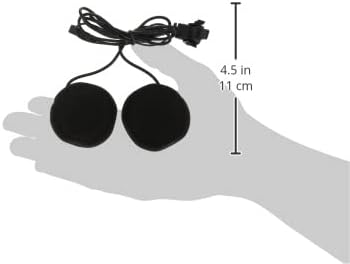
Image: Sena HD Speakers shown with a ruler for scale, indicating approximate dimensions.
Warranty and Support
For information regarding warranty coverage, technical support, or service, please visit the official Sena website or contact their customer service department.
Official Sena Website: www.sena.com
Related documentsSC-A0326


Ask a question about this manual
Ask about setup, troubleshooting, compatibility, parts, safety, or missing instructions. Manuals+ will review the question and use this page’s manual context to help answer it.