
1. Introduction
The Ambient Weather WH31SM Soil Moisture Sensor is designed to provide accurate soil moisture readings for integration with your Ambient Weather WS-2000 or WS-5000 weather station console. This sensor helps monitor the moisture levels in your garden or lawn, allowing for optimized watering practices. It operates wirelessly, transmitting data to your compatible weather station.
2. What's in the Box
- 1 x WH31SM Soil Moisture Sensor
3. Product Overview
The WH31SM sensor is a compact, wireless device designed for outdoor use. It measures soil moisture and transmits data to your weather station console.

Figure 1: Ambient Weather WH31SM Soil Moisture Sensor
Key Features:
- Supports up to 8 channels for integration with WS-2000 or WS-5000 consoles.
- Wireless 915 MHz sensor with a range up to 300 feet (100 feet in most conditions).
- Data refresh rate of 71 seconds.
- Compact design: 6 x 3.5 x 1 inches.
- Powered by 1 x AA battery (not included).
4. Installation and Setup
4.1 Battery Installation
- Twist the top cap of the sensor counter-clockwise to open the battery compartment.
- Insert one (1) AA battery, observing the correct polarity (+/-).
- Securely close the battery compartment by twisting the cap clockwise until it is sealed.
4.2 Sensor Placement
Proper placement of the soil moisture sensor is crucial for accurate readings. Choose a location that is representative of the area you wish to monitor.
- Dig a small hole in the soil where you intend to measure moisture.
- Insert the sensor into the soil, ensuring that the main body of the sensor is buried up to the indicated maximum bury depth line. The maximum recommended bury depth is 4 inches (10 cm).
- Gently pack the soil around the sensor to ensure good contact. Avoid damaging the sensor during this process.
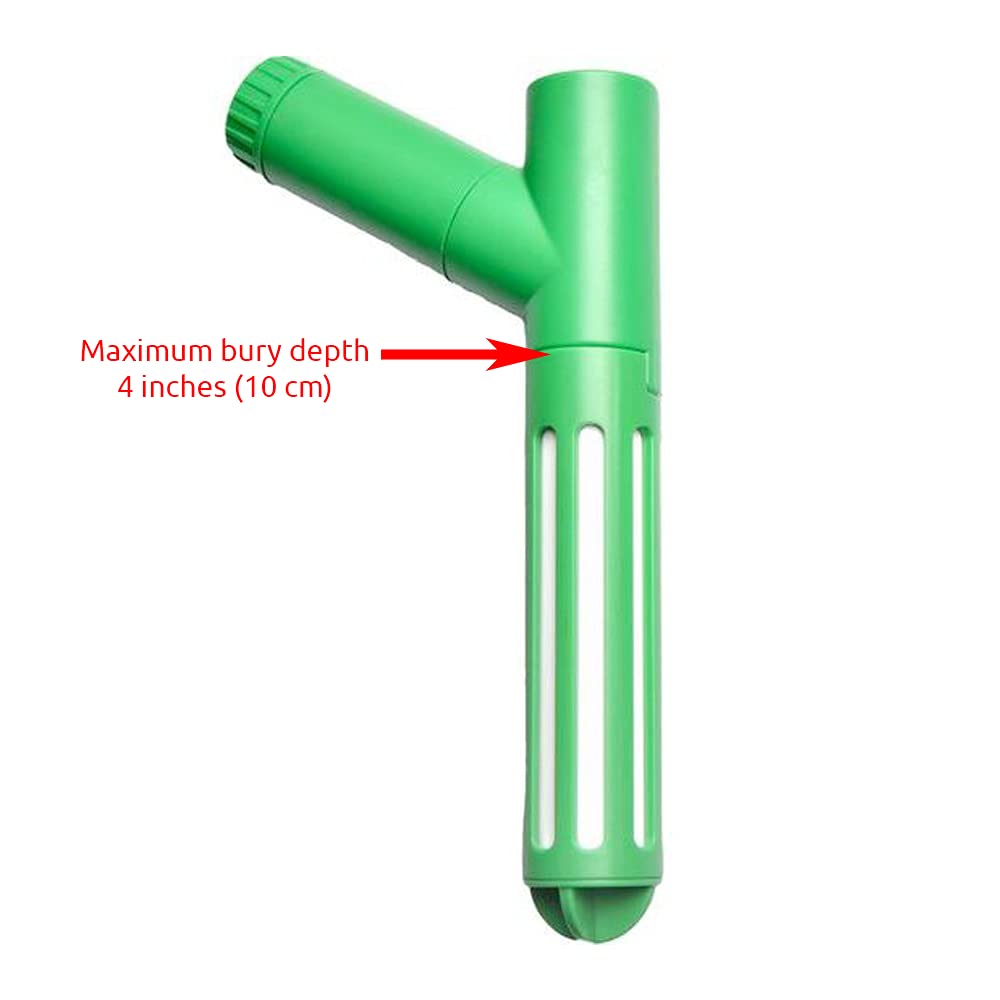
Figure 2: Proper sensor placement with indicated bury depth.

Figure 3: Soil moisture sensor installed in a garden bed.
4.3 Pairing with Weather Station
Once the sensor is powered on and placed, it will automatically attempt to transmit data to your Ambient Weather WS-2000 or WS-5000 console. Refer to your weather station's main manual for specific instructions on adding and viewing data from external sensors, including selecting the appropriate channel for your soil moisture sensor.
5. Operation
5.1 Reading Soil Moisture
The soil moisture data will be displayed on your compatible Ambient Weather console. The sensor transmits data every 71 seconds, providing near real-time updates.

Figure 4: Example of soil moisture reading on a weather station console.
5.2 Understanding Readings
The moisture percentage displayed indicates the volumetric water content of the soil. Higher percentages mean more moisture. Your weather station console may also provide descriptive terms like 'MOIST' or 'DRY' based on predefined thresholds. Consult gardening resources for optimal moisture levels for specific plants.
6. Maintenance
6.1 Battery Replacement
When the battery level is low, an indicator may appear on your weather station console. Replace the AA battery by following the steps in Section 4.1. It is recommended to use high-quality alkaline or lithium batteries for optimal performance and longevity.
6.2 Cleaning
Periodically inspect the sensor for any dirt or debris buildup, especially on the probe section. Gently clean the sensor with a soft, damp cloth. Avoid using abrasive cleaners or harsh chemicals that could damage the sensor's components.
7. Troubleshooting
- No Reading on Console:
- Ensure the battery is correctly installed and not depleted. Replace if necessary.
- Verify the sensor is within the wireless range of your weather station console (up to 300 feet, 100 feet in most conditions). Obstructions like walls or dense foliage can reduce range.
- Check that the sensor is assigned to an active channel on your weather station console. - Inaccurate Readings:
- Ensure the sensor is buried to the correct depth and has good contact with the soil.
- Check for any physical damage to the sensor.
- Allow sufficient time for the sensor to stabilize after installation or significant changes in soil conditions. - Intermittent Connectivity:
- Relocate the sensor or console to improve signal strength. Avoid placing the sensor near large metal objects or other sources of radio interference.
- Ensure the sensor's battery is not low.
8. Specifications
| Feature | Specification |
|---|---|
| Model | WH31SM |
| Power Source | 1 x AA Battery (not included) |
| Wireless Frequency | 915 MHz |
| Wireless Range | Up to 300 feet (100 feet in most conditions) |
| Refresh Rate | 71 seconds |
| Sensor Dimensions (L x W x H) | 6 x 3.5 x 1 inches (1"D x 3.5"W x 6"H) |
| Material | Ceramic |
| Operating Temperature Range | 14°F to 122°F (-10°C to 50°C) |
| Compatible Consoles | Ambient Weather WS-2000, WS-5000 |
| UPC | 816982018533 |
9. Warranty and Support
For warranty information and technical support, please visit the official Ambient Weather website or contact their customer service. Keep your purchase receipt as proof of purchase for any warranty claims.
Ambient Weather Contact Information:
Website: www.ambientweather.com
(Refer to the website for the most current support contact details.)


