Introduction
Thank you for choosing the Zoop Kids Digital Watch. This manual provides essential information for the proper setup, operation, and maintenance of your new watch. Please read it carefully to ensure optimal performance and longevity of the product.
The Zoop Kids Digital Watch is designed for children who appreciate style and functionality. It features a durable strap material for easy maintenance and a secure buckle closure. With a water resistance rating of 30 meters, it is suitable for everyday wear and minor water exposure.
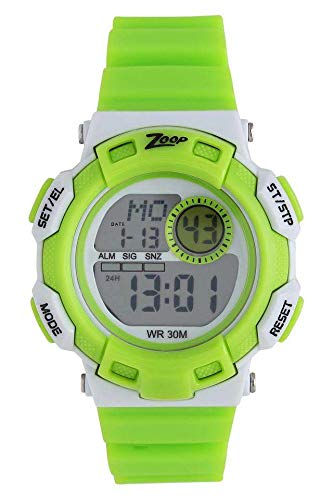
This image shows the Zoop Kids Digital Watch in grey, featuring a round dial and a green strap. The digital display is visible.
Setup
Initial Power On and Time Setting
- Activate the Watch: If the display is off, press any button to activate the watch.
- Enter Setting Mode: Locate the 'MODE' button (usually on the side). Press and hold it until the time display starts flashing.
- Adjust Time: Use the 'SET' or 'ADJUST' button (refer to watch specific button labels) to change the flashing digits (hours, then minutes). Press 'MODE' again to switch between hours and minutes.
- Set Date (if applicable): After setting the time, continue pressing 'MODE' to cycle through date settings (month, day, year) and adjust using the 'SET' or 'ADJUST' button.
- Exit Setting Mode: Once all settings are complete, press 'MODE' or wait a few seconds for the watch to automatically exit the setting mode.
Battery Information
The watch requires 1 Lithium Metal battery. The battery is pre-installed. For optimal performance, ensure the battery is properly seated. If the display is dim or unresponsive, the battery may need replacement.
Operating Instructions
Basic Functions
- Time Display: The watch primarily displays the current time (hours, minutes, seconds).
- Date Display: Press the 'MODE' button briefly to cycle through different display modes, which may include the date.
- Backlight: Some models feature a backlight. Press the designated 'LIGHT' button (if available) to illuminate the display in low-light conditions.
Water Resistance
This watch has a water resistance depth of 30 meters (3 ATM). This means it is suitable for everyday use and can withstand splashes or brief immersion in water. It is not recommended for swimming, showering, or diving, as prolonged water exposure or high-pressure water jets can compromise the seals.
Maintenance
Cleaning Your Watch
- Wipe the watch case and strap with a soft, dry cloth.
- For stubborn dirt, use a slightly damp cloth and mild soap, then wipe dry immediately.
- Avoid using harsh chemicals, solvents, or abrasive cleaners, as these can damage the watch's finish or seals.
Battery Replacement
When the display becomes dim or the watch stops functioning, the battery may need to be replaced. It is recommended to have the battery replaced by a qualified watch technician to ensure the water resistance seal is properly maintained.
Storage
Store your watch in a cool, dry place away from direct sunlight and extreme temperatures to prevent damage to the battery and internal components.
Troubleshooting
- Watch not displaying time: Check if the battery is depleted. If recently replaced, ensure it is inserted correctly.
- Incorrect time displayed: Refer to the 'Setup' section to reset the time.
- Buttons not responding: Ensure the watch is not in a locked mode (if applicable). Try pressing buttons firmly. If unresponsive, the battery might be very low or depleted.
- Condensation under the crystal: This indicates a breach in the water resistance. Avoid further water exposure and seek professional service immediately.
Specifications
| Brand | Zoop |
| Model Number | 206499368 |
| Item Model Name | Kids Digital Watch |
| Display Type | Digital |
| Movement Type | Automatic |
| Case Shape | Round |
| Case Diameter | 43 Millimetres |
| Case Thickness | 15 Millimetres |
| Band Width | 20 Millimetres |
| Band Colour | Green |
| Dial Colour | Grey |
| Strap Type | Two Piece Strap |
| Clasp Type | Tang Buckle |
| Water Resistance Depth | 30 Metres |
| Item Weight | 46 Grams |
| Batteries Required | 1 Lithium Metal battery |
| Department | Unisex-Child |
Warranty and Support
Warranty Information
Zoop products are manufactured to high-quality standards. For specific warranty details, please refer to the warranty card included with your purchase or visit the official Zoop website. The warranty typically covers manufacturing defects under normal use.
Customer Support
If you encounter any issues not covered in this manual or require further assistance, please contact Zoop customer support. Contact details can usually be found on the product packaging or the official brand website.
- Online Support: Visit the official Zoop website for FAQs and support resources.
- Service Centers: For repairs or technical assistance, locate an authorized service center.


