
1. Introduction
The Elitech EMG-20V is an intelligent digital manifold gauge designed for HVAC/R system analysis and maintenance. It integrates multiple functions, providing precise measurements and data analysis for vacuum, pressure, and temperature. This manual provides essential information for the proper setup, operation, and maintenance of your device.

Image 1.1: Elitech EMG-20V Digital Manifold Gauge with included temperature clamps.
Key Features:
- Touch Screen Interface: Intuitive display for viewing data and graphs.
- Smart Application Connectivity: Bluetooth connection for real-time data monitoring, analysis, and export.
- System Leak Testing: Monitors pressure holding and vacuum leakage with temperature compensation.
- Automatic Calculations: Measures superheating and subcooling for 88 refrigerants.
- Integrated Vacuum Sensor: Provides precise vacuum measurements.
- Heat Pump Mode: Simplifies operation without requiring hose changes.
2. Safety Information
Please read and understand all safety warnings and instructions before operating the Elitech EMG-20V Digital Manifold Gauge. Failure to follow these instructions may result in electric shock, fire, or serious injury.
- Always wear appropriate personal protective equipment (PPE), including safety glasses and gloves, when working with refrigerants.
- Ensure proper ventilation when handling refrigerants.
- Do not expose the device to extreme temperatures, moisture, or direct sunlight.
- Only use the device for its intended purpose as an HVAC/R diagnostic tool.
- Refer to refrigerant manufacturer safety data sheets (SDS) for specific handling procedures.
- Disconnect the device from pressure sources before performing any maintenance or cleaning.
3. Package Contents
Verify that all items listed below are included in your package. If any items are missing or damaged, please contact Elitech customer support.
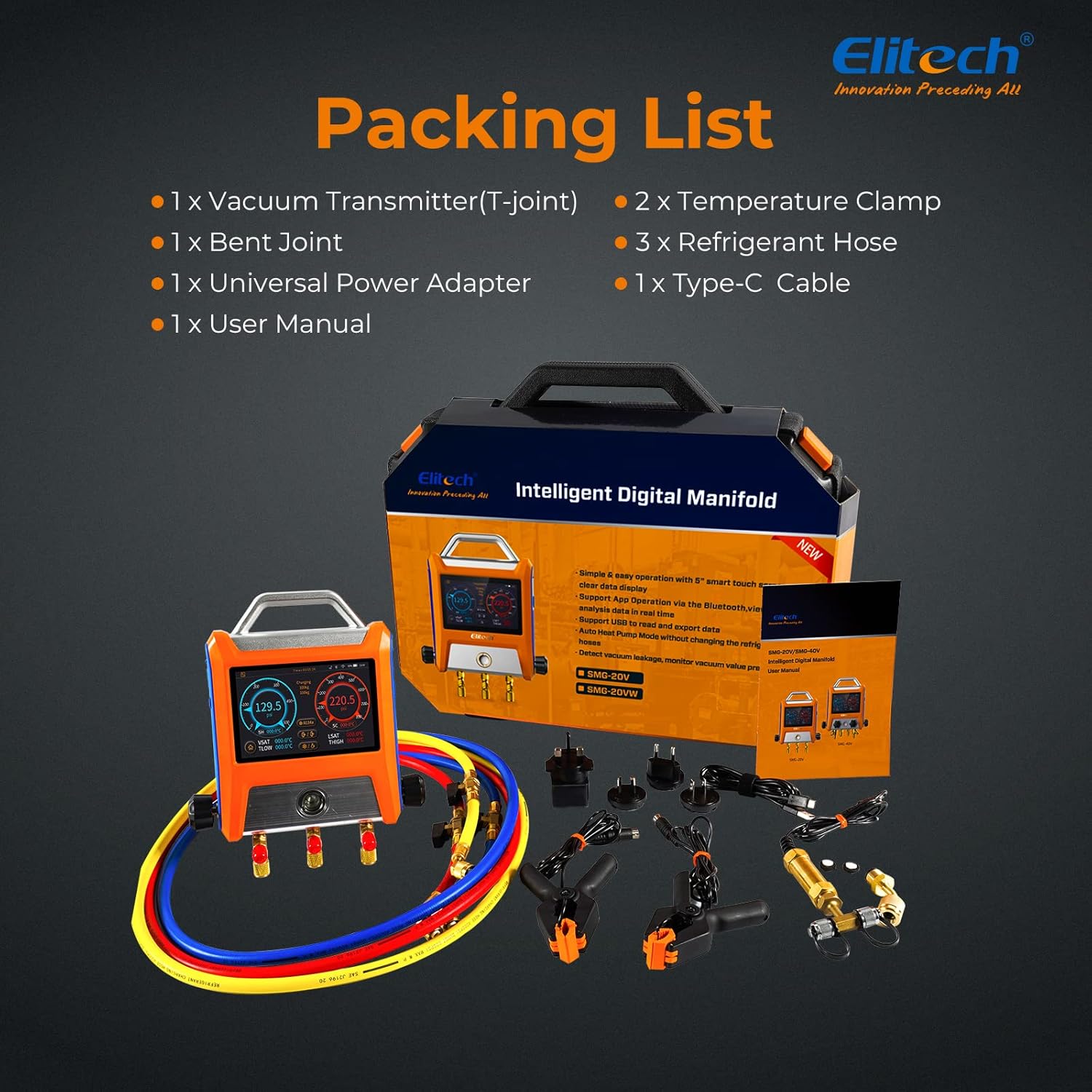
Image 3.1: Contents included in the Elitech EMG-20V package.
- 1 x Elitech EMG-20V Digital Manifold Gauge
- 1 x Vacuum Transmitter (T-Joint)
- 1 x Bent Joint
- 2 x Temperature Clamps
- 3 x Refrigerant Hoses
- 1 x Universal Power Adapter
- 1 x Type-C Cable
- 1 x User Manual
4. Product Overview
Familiarize yourself with the components of the EMG-20V Digital Manifold Gauge.

Image 4.1: Labeled components of the EMG-20V Digital Manifold Gauge.
- Power Button: Used to turn the device on and off.
- Magnetic Hook: For convenient hanging of the device during use.
- High Temp Interface: Connection port for the high-temperature clamp.
- Low Temp Interface: Connection port for the low-temperature clamp.
- Type-C Charging Port: For charging the internal battery.
- Low Pressure Valve: Controls the low-pressure side of the manifold.
- High Pressure Valve: Controls the high-pressure side of the manifold.
- 1/4 SAE Port (x3): Standard connections for refrigerant hoses.
5. Setup
Follow these steps to prepare your EMG-20V for operation.
- Charging the Device: Connect the device to a power source using the provided Type-C cable and universal power adapter. Ensure the device is fully charged before initial use.
- Attaching Temperature Clamps: Connect the high and low temperature clamps to their respective interfaces on the manifold. Securely attach the clamps to the refrigerant lines for accurate temperature readings.
- Connecting Refrigerant Hoses: Connect the refrigerant hoses to the 1/4 SAE ports on the manifold. Ensure all connections are tight to prevent leaks.
- Power On: Press and hold the power button to turn on the device. The touch screen will illuminate.
6. Operating Instructions
6.1. Basic Operation
The EMG-20V features a touch screen for navigation and data display. Swipe the screen to access different views and settings.

Image 6.1: Main display showing pressure, temperature, superheat, and subcooling.
6.2. Refrigerant Selection
The device supports 88 types of refrigerants. To select the appropriate refrigerant:
- Navigate to the refrigerant selection menu on the touch screen.
- Scroll through the list and tap to select the refrigerant currently in the system.

Image 6.2: Refrigerant selection interface.
6.3. Superheat and Subcooling Calculation
The EMG-20V automatically calculates superheating (SH) and subcooling (SC) values based on pressure and temperature readings from the connected sensors. These values are displayed in real-time on the main screen.

Image 6.3: Real-time superheat and subcooling display.
6.4. System Leak Testing
The device can monitor pressure holding and vacuum leakage tests with temperature compensation for enhanced accuracy.
- Access the leak test function from the main menu.
- Configure test parameters such as allowable leakage percentage and duration.
- Enable temperature compensation for more reliable results.
- Start the test and monitor the pressure changes displayed on the screen.

Image 6.4: Leak test settings and temperature compensation.
6.5. Vacuum Measurement
The integrated vacuum sensor provides precise vacuum readings. The vacuum measurement screen displays the current vacuum level, rate of change, and test duration.

Image 6.5: Vacuum measurement display.
6.6. App Connectivity and Data Export
Connect the EMG-20V to the Elitech Tools app via Bluetooth for advanced monitoring and data management.
- Download the Elitech Tools app from your device's app store.
- Enable Bluetooth on your mobile device and the EMG-20V.
- Open the app and follow the instructions to pair with your device.
- Monitor data in real-time, view graphs, and export data (up to 100,000 points) via USB to a computer for detailed analysis.

Image 6.6: App monitoring and data export functionality.
6.7. Heat Pump Mode
The automatic heat pump mode simplifies operation by eliminating the need to change refrigerant hoses when switching between heating and cooling cycles.

Image 6.7: Heat pump mode interface.
7. Maintenance
Proper maintenance ensures the longevity and accuracy of your EMG-20V Digital Manifold Gauge.
- Cleaning: Wipe the device with a soft, damp cloth. Do not use abrasive cleaners or solvents. Ensure the device is dry before storage.
- Storage: Store the device in its carrying case in a cool, dry place away from direct sunlight and extreme temperatures.
- Battery Care: Charge the device regularly, even when not in use, to maintain battery health. Avoid fully discharging the battery for extended periods.
- Sensor Calibration: Periodically check the calibration of pressure and temperature sensors. Refer to the app or device settings for calibration options or contact support if recalibration is needed.
- Hose Inspection: Regularly inspect refrigerant hoses for wear, cracks, or damage. Replace damaged hoses immediately to prevent refrigerant leaks.
8. Troubleshooting
This section addresses common issues you might encounter with your EMG-20V.
| Problem | Possible Cause | Solution |
|---|---|---|
| Device does not power on | Low battery; device malfunction | Charge the device. If the issue persists, contact customer support. |
| Inaccurate readings | Sensors not properly connected; incorrect refrigerant selected; calibration needed | Ensure all sensors and hoses are securely connected. Verify the correct refrigerant is selected. Perform a sensor calibration if available, or contact support. |
| Bluetooth connection issues | Bluetooth disabled; device out of range; app issue | Ensure Bluetooth is enabled on both devices. Move closer to the manifold. Restart the app and the manifold. |
| Screen unresponsive | Software glitch; physical damage | Restart the device. If the screen remains unresponsive or is physically damaged, contact customer support. |
| Error message (e.g., 'E04') | Specific operational error | Refer to the device's on-screen prompt or the full user manual for specific error code definitions and solutions. Often requires zeroing out pressures or a full reset. |
9. Specifications
Technical specifications for the Elitech EMG-20V Digital Manifold Gauge.
| Feature | Specification |
|---|---|
| Model Number | EMG-20V |
| Product Dimensions | 6.5 x 10 x 1.8 inches |
| Item Weight | 3.51 Pounds (1.59 Kilograms) |
| Material | Acrylonitrile Butadiene Styrene (ABS) |
| Temperature Measurement Range | -40 to 302°F (-40 to 150°C) |
| Pressure Measurement Range | -14.5 to 800 psi |
| Vacuum Measurement Range | 1 to 19000 microns |
| Pressure Units | psi, kg/cm², cmHg, inHg, bar, kPa, MPa |
| Vacuum Units | micron, inHg, Torr, psia, mbar, mTorr, Pa, kPa |
| Interface | 3 x 1/4 SAE port, Ps/2 Temp Interface |
| Batteries | 1 Lithium Ion battery (included) |
| Data Record Points | Up to 100,000 points |
10. Warranty and Support
Elitech provides a limited warranty for the EMG-20V Digital Manifold Gauge against defects in materials and workmanship under normal use. For specific warranty terms and conditions, please refer to the warranty card included with your product or visit the official Elitech website.
For technical support, troubleshooting assistance, or warranty claims, please contact Elitech customer service through their official channels. You can find more information and contact details on the Elitech Store.


