
1. Important Safety Information
Before operating the EVOLAND CF-917ES Exercise Bike, please read and understand all instructions in this manual. Retain this manual for future reference.
- Ensure all parts are securely assembled before each use.
- Place the exercise bike on a flat, stable surface.
- The maximum user weight capacity is 120 kg (265 lbs). Do not exceed this limit.
- Consult a physician before starting any new exercise program.
- Keep children and pets away from the equipment during operation.
- Stop exercising immediately if you feel faint, dizzy, or experience pain.
2. Package Contents
Verify that all components are present before assembly. If any parts are missing or damaged, contact customer support.
- 1 x EVOLAND CF-917ES Exercise Bike (main frame and components)
- 1 x User Manual
- Assembly Tools (usually included)
- 2 x AAA Batteries (for LCD monitor)
3. Assembly and Setup
Follow these steps to assemble your EVOLAND CF-917ES Exercise Bike.
- Unpack Components: Carefully remove all parts from the packaging and lay them out on a clean, flat surface.
- Attach Stabilizers: Secure the front and rear stabilizer bars to the main frame using the provided bolts and nuts. Ensure they are tightened for stability.
- Install Pedals: Identify the left (L) and right (R) pedals. The left pedal screws counter-clockwise, and the right pedal screws clockwise. Ensure pedals are fully threaded and tightened to prevent loosening during use.
- Mount Seat: Attach the seat post to the main frame and then secure the seat to the seat post. Adjust the seat height to your preference using the adjustment knob. The seat offers 4 levels of height adjustment.

Image: The adjustable seat mechanism, showing 4 levels of height adjustment for user comfort.
- Install Handlebars and LCD Monitor: Attach the handlebars to the main frame. Connect the sensor cable from the main frame to the LCD monitor. Ensure the cable is not pinched. Insert the 2 AAA batteries into the LCD monitor. Secure the LCD monitor to the handlebar assembly.
- Folding Mechanism: The bike features a compact, foldable design for storage. To fold, locate the folding pin or knob on the frame, release it, and carefully fold the bike. To unfold, reverse the process, ensuring the frame is securely locked in the open position before use.
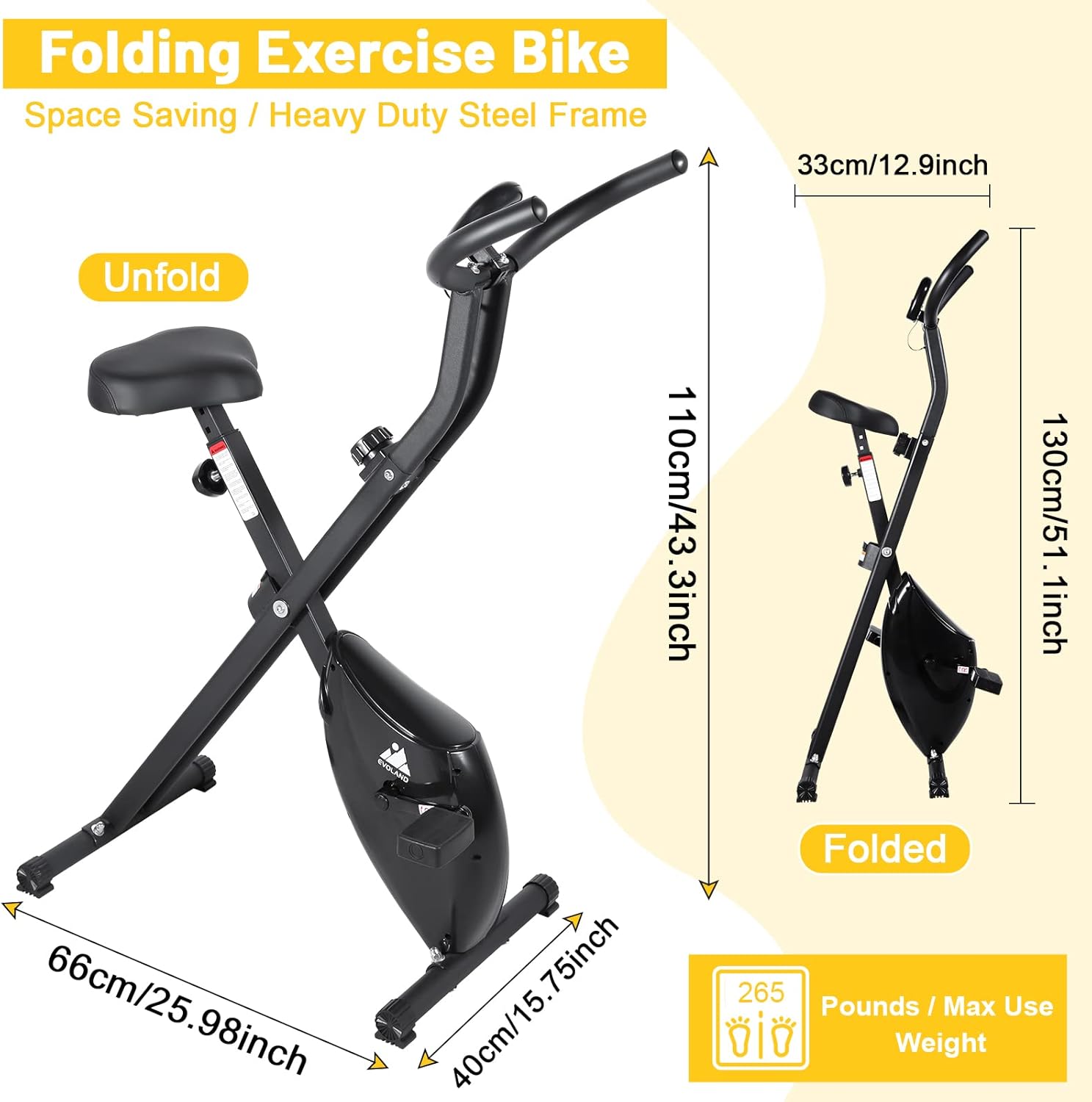
Image: The exercise bike in both unfolded and folded states, illustrating its space-saving design and dimensions (Unfolded: 66cm/25.98inch x 40cm/15.75inch x 110cm/43.3inch; Folded height: 130cm/51.1inch).
4. Operating Instructions
This section details how to use your EVOLAND CF-917ES Exercise Bike for an effective workout.
4.1 LCD Monitor Display
The integrated LCD monitor tracks your workout progress. It displays the following metrics:
- TIME: Duration of your workout.
- SPEED: Current cycling speed.
- DISTANCE: Total distance covered during the workout.
- CALORIES: Estimated calories burned.
- SCAN: Automatically cycles through all display functions.

Image: Close-up of the LCD monitor display, indicating the tracked metrics: Time, Speed, Distance, and Calories.
4.2 Adjusting Resistance
The EVOLAND CF-917ES features 8 levels of magnetic resistance, allowing you to customize your workout intensity. Turn the resistance knob located below the handlebars to increase or decrease the resistance.
- Levels 1-3 (Relaxed Mode): Suitable for warm-up, cool-down, or light cardio.
- Levels 3-5 (Motion Mode): Ideal for moderate intensity workouts, improving endurance.
- Levels 6-8 (Captain Mode): Provides high intensity for challenging cardio and muscle toning.
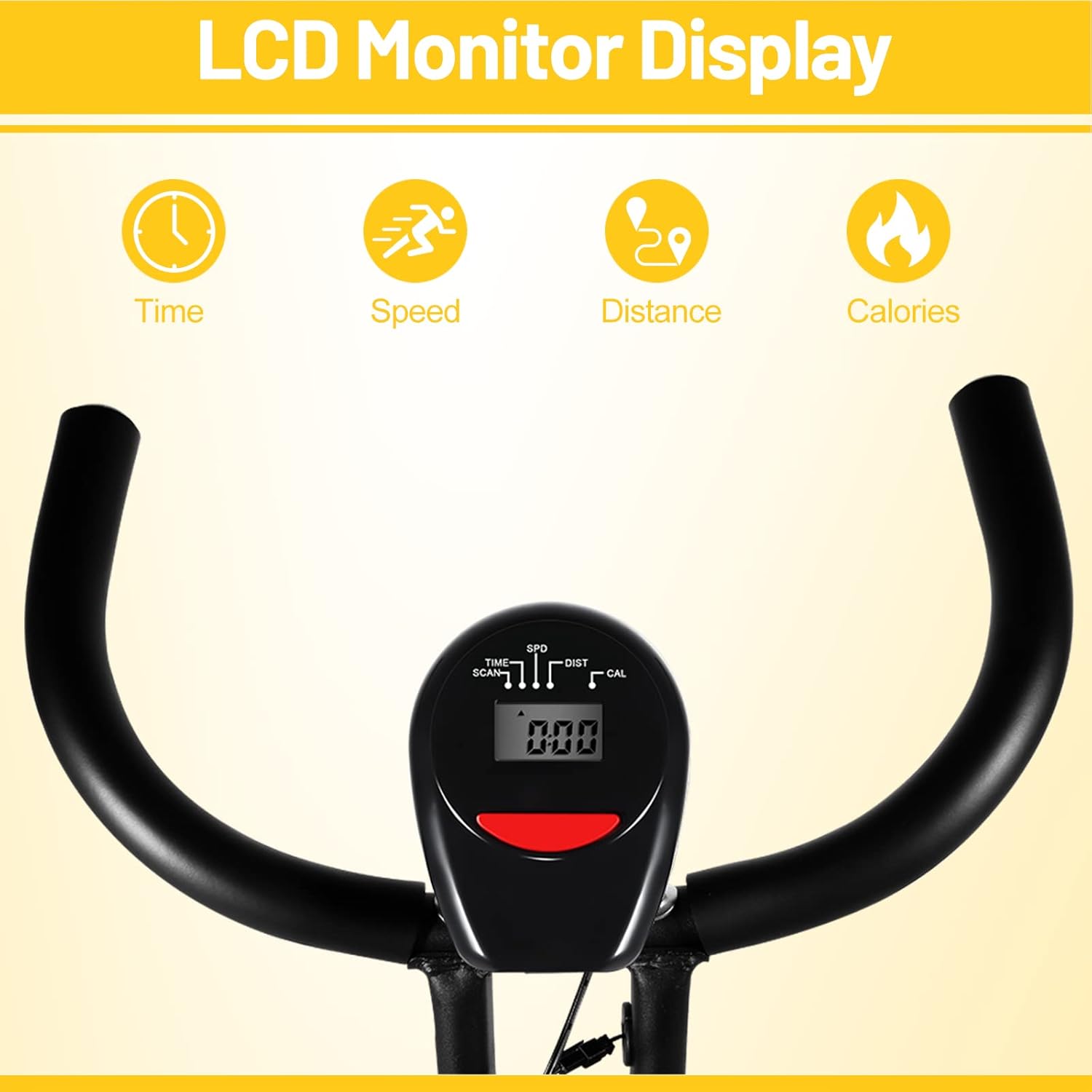
Image: Visual representation of the 8 resistance levels and their corresponding workout modes (Relaxed, Motion, Captain).
4.3 Starting Your Workout
- Sit comfortably on the seat and place your feet securely on the pedals.
- Adjust the seat height and resistance level as desired.
- Begin pedaling. The LCD monitor will automatically activate and display your workout data.
5. Maintenance
Regular maintenance ensures the longevity and safe operation of your exercise bike.
- Cleaning: Wipe down the bike with a damp cloth after each use to remove sweat and dust. Avoid abrasive cleaners.
- Check Connections: Periodically check all bolts, nuts, and screws to ensure they are tight. Tighten any loose connections.
- Pedal Inspection: Ensure pedals are securely attached and rotate smoothly.
- Drive Belt: The bike uses a silent belt drive system, which typically requires minimal maintenance. Keep the area around the flywheel clean.

Image: View of the silent drive belt and flywheel mechanism, highlighting the 1.5kg flywheel.
6. Troubleshooting
This section addresses common issues you might encounter with your exercise bike.
- Pedal not fitting during assembly: Ensure you are using the correct pedal for the correct side (L for left, R for right) and that you are threading it in the correct direction (left pedal is reverse-threaded, right pedal is standard-threaded). Do not force the pedal, as this can damage the crank arm threads.
- LCD monitor not displaying: Check if the 2 AAA batteries are correctly installed and have sufficient charge. Ensure the sensor cable from the main frame is securely connected to the monitor.
- Resistance not changing: Verify that the resistance knob is turning freely and that the internal mechanism is engaging. If the issue persists, inspect the connection between the knob and the magnetic resistance system.
- Bike feels unstable or makes noise: Check all assembly bolts and nuts, especially on the stabilizer bars and seat post, and tighten them if loose. Ensure the bike is on a level surface.
- Missing or damaged parts upon delivery: If you receive the product with missing parts or visible damage, do not attempt to assemble or use it. Contact EVOLAND customer support immediately for assistance.
7. Specifications
| Feature | Specification |
|---|---|
| Model Number | CF-917ES |
| Brand | EVOLAND |
| Dimensions (Unfolded L x W x H) | 65.5 x 40.5 x 110 cm (25.98 x 15.75 x 43.3 inches) |
| Weight | 14.3 kg (31.5 lbs) |
| Maximum User Weight | 120 kg (265 lbs) |
| Resistance Levels | 8 levels |
| Resistance Mechanism | Magnetic (Belt Drive System) |
| Power Source (LCD) | 2 x AAA Batteries |
| Material | Alloy Steel |
| Special Features | Adjustable, Compact/Foldable |
| Recommended Use | Indoor |
8. Warranty and Support
EVOLAND is committed to providing quality products. While specific warranty details are not provided in this manual, please retain your proof of purchase for any warranty claims.
If you have any questions, require assistance with assembly, operation, or encounter any issues not covered in this manual, please do not hesitate to contact EVOLAND customer support. Contact information can typically be found on the product packaging or the official EVOLAND website.


