
ATOTO A5LG211T
ATOTO A5L Series Car Stereo User Manual
Model: A5LG211T
1. Introduction
Thank you for choosing the ATOTO A5L Series Car Stereo. This manual provides detailed instructions for the installation, operation, and maintenance of your new device. The ATOTO A5L is a versatile 10-inch Android car stereo featuring a double DIN and adaptive single DIN design, equipped with 2GB RAM and 32GB storage. It offers advanced connectivity options including Bluetooth, wireless Apple CarPlay, wireless Android Auto, Wi-Fi/Bluetooth/USB tethering, and Mirrorlink. Enhance your in-car audio experience with its Digital Signal Processor (DSP) and enjoy FM/RDS radio.

Figure 1.1: ATOTO A5L 10-inch Car Stereo Main Unit
This image displays the ATOTO A5L car stereo, highlighting its large 10-inch touchscreen. The screen shows a user interface with music playback, a digital clock, and various application icons such as OBD Check, YouTube, DriveChat, and Play Store. The physical buttons for power, volume, and navigation are visible at the bottom of the unit.
2. Setup and Installation
2.1. Package Contents
Before beginning installation, please verify that all components are present in the package.

Figure 2.1: Product Dimensions, Installation Diagram, and Package Contents
This image provides critical information for installation. It shows the precise dimensions of the ATOTO A5L unit, including the 10.1-inch display and the main body. A diagram illustrates how the unit integrates into a vehicle's dashboard, emphasizing the adaptive single DIN and double DIN compatibility. Below these diagrams, a visual list of included accessories is presented, which typically includes the car stereo unit, power cable, rear camera input harness, RCA connectors, USB storage cable, USB smartphone connection cable, GPS antenna, double DIN bracket, mounting bracket, mounting screws, online quick guide, and product care/online support information.
The standard package typically includes:
- ATOTO A5L Car Stereo Unit (with mounting frame)
- Power Cable
- Rear Camera Input Harness
- RCA Connectors
- USB Storage Cable
- USB Smartphone Connection Cable
- GPS Antenna
- Double DIN Bracket
- Mounting Bracket
- Mounting Screws
- Online Quick Guide
- Product Care & Online Support Information
2.2. Installation Guidelines
The ATOTO A5L features an IAH10D style (Integrated and Adaptive 10.1-inch Display Head Unit), designed to work with vehicle-specific installation dash kits (wiring harness, data interface, mounting kit). Over 200 vehicle models can achieve an OEM-style installation.
Important Note: For some vehicles, the edge of the 10.1-inch display part may obstruct air vents, emergency switches, or other buttons located around the installation area, leading to inconvenience. Please verify compatibility and potential obstructions before proceeding with installation.

Figure 2.2: Wiring Diagram
This comprehensive diagram illustrates all the necessary wiring connections for the ATOTO A5L car stereo. It details connections for audio outputs (front, rear, subwoofer), video input/output, microphone input, amplifier power, GPS antenna, radio antenna, USB ports, TF card slot, HDMI, Bluetooth antenna, Wi-Fi antenna, parking brake, steering wheel remote, and the ATOTO CANBUS decoder box. Each pin is clearly labeled with its function and corresponding wire color, providing essential guidance for proper electrical installation.
For detailed wiring instructions, refer to the provided wiring diagram (Figure 2.2) and consult a professional installer if you are unsure about any steps. Ensure all connections are secure and properly insulated to prevent short circuits.
3. Operating Instructions
3.1. Basic Controls and Interface
The ATOTO A5L features a responsive touchscreen interface and physical buttons for essential controls.
- Touchscreen: Navigate through menus, select applications, and control media playback.
- Physical Buttons: Located at the bottom of the unit, these typically include Power/Mute, Volume Up/Down, and Home/Back functions.

Figure 3.1: Android Interface and Connectivity Options
This image showcases the ATOTO A5L's Android interface, displaying various applications and features. Prominently featured are icons for Wi-Fi Hotspot, Bluetooth Tethering, and USB Tethering, indicating the device's robust connectivity capabilities. The screen also shows a YouTube interface, suggesting multimedia playback functionality.
3.2. Connectivity Features
3.2.1. Wireless CarPlay and Android Auto
Integrated CarPlay and Android Auto seamlessly connect your smartphone with the F7's built-in display and controls via USB. You can make phone calls, access your music, send and receive messages, and get directions while staying focused on the road.
Note: Use the original/factory USB cable for Android Auto/CarPlay connection. A non-manufacturer USB cable may cause connection issues.
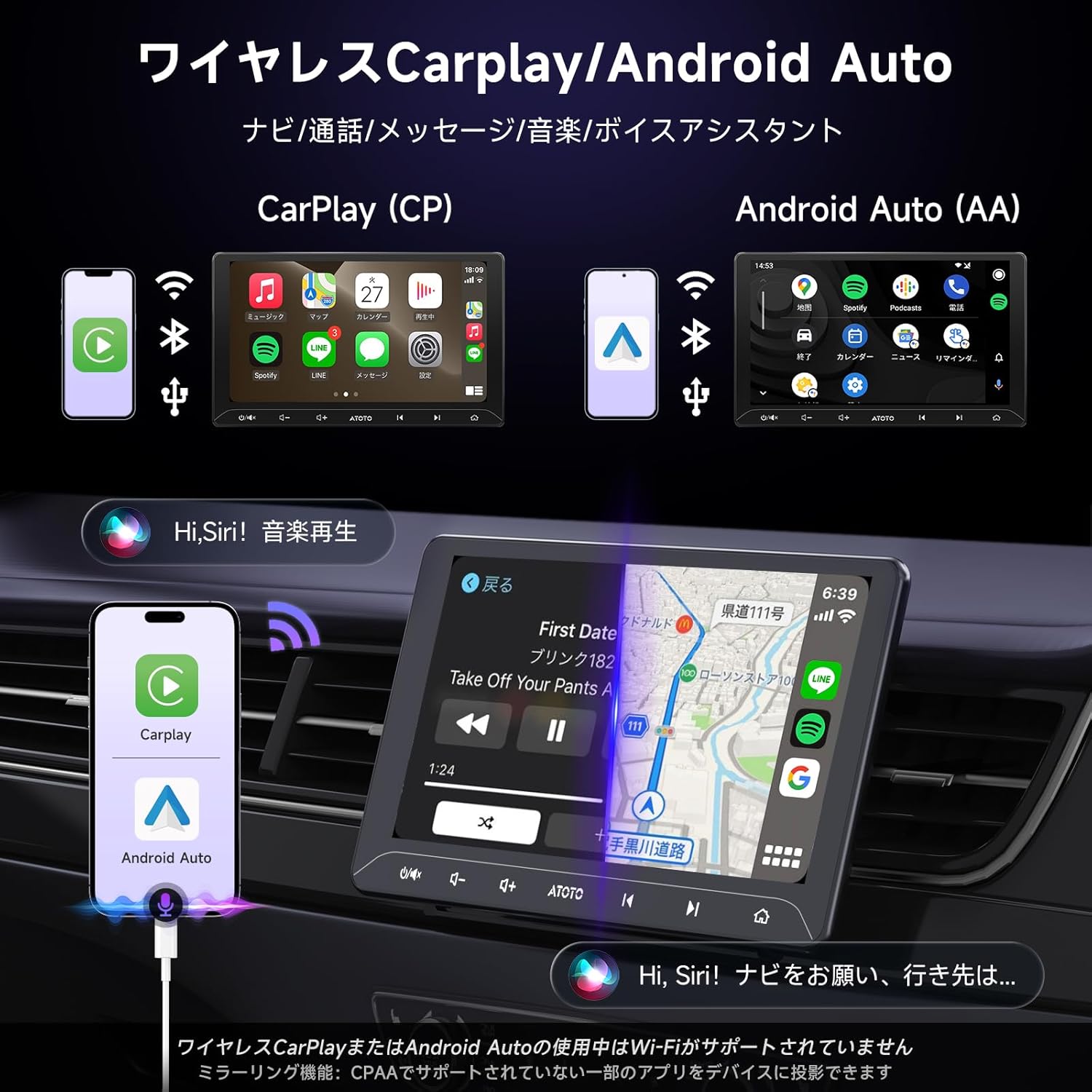
Figure 3.2: Wireless CarPlay and Android Auto
This image demonstrates the wireless Apple CarPlay and Android Auto functionalities of the ATOTO A5L. It shows side-by-side comparisons of the CarPlay (CP) and Android Auto (AA) interfaces as they appear on the car stereo's screen, mirroring smartphone applications for navigation, communication, and music. The diagram also illustrates how a smartphone connects wirelessly or via USB for these features, emphasizing voice assistant integration (Siri/Google Assistant).
3.2.2. Bluetooth Connectivity
The unit supports Bluetooth hands-free calling and A2DP audio streaming. Pair your smartphone to make and receive calls directly from the car stereo and stream your favorite music wirelessly.
3.2.3. Wi-Fi/BT/USB Tethering & Mirrorlink
Utilize Wi-Fi, Bluetooth, or USB tethering to connect the stereo to the internet. With the AutoLink option, you can also cast your phone's screen to the F7 display. This allows viewing of apps not supported by CarPlay or Android Auto.
3.3. Multimedia and Audio Features
3.3.1. Radio (FM/AM)
The ATOTO A5L includes a built-in tuner for FM and AM radio reception. You can listen to radio while running navigation from CarPlay or Android Auto in the background.

Figure 3.3: Multimedia Playback Options
This image highlights the multimedia capabilities of the ATOTO A5L. It shows three distinct sections: Bluetooth music and calls, FM/AM radio interface with frequency display, and USB video/music playback. The image also emphasizes the 10.1-inch IPS screen with a 178° full viewing angle and glare suppression, ensuring clear visibility.
3.3.2. USB Media Playback
Play audio and video files directly from a USB storage device connected to the unit's USB port.
3.3.3. Digital Signal Processor (DSP)
The integrated DSP allows for an upgraded audio experience with 9 preset equalizer settings and time alignment adjustments. This enables precise tuning of sound output to optimize audio quality within your vehicle's cabin.

Figure 3.4: Digital Signal Processor (DSP) Settings
This image illustrates the advanced audio customization options available through the ATOTO A5L's Digital Signal Processor (DSP). The screen displays a graphic equalizer with adjustable frequency bands and 9 presets. Below the equalizer, a diagram shows the time alignment feature, allowing users to optimize sound delivery to different seating positions (e.g., far distance, mid distance, near distance) for an enhanced listening experience.
3.4. Camera and Display Features
3.4.1. Rear Camera Input and Live Rear-view (LRV)
The unit supports 720P HD rear camera input. An additional LRV (Live Rear-view) option allows users to have a real-time rear view even when the vehicle is moving forward.

Figure 3.5: Camera Input and Smartphone Mirroring
This image demonstrates two key display features: AHD 720P real-time backup camera functionality and smartphone mirroring. The top section shows the clear, high-definition view from a connected rear camera, including parking guidelines and night vision capability. The bottom section illustrates how a smartphone's screen can be mirrored onto the car stereo's display, supporting both wireless and wired connections.
3.5. Voice Assistant
Activate Siri or Google Assistant by pressing the physical key on the F7, the steering wheel audio key (if applicable), or the voice key from the ATOTO wireless remote control.
3.5.1. DriveChat - GenAI Voice Assistant
The unit features DriveChat, a dedicated in-car GenAI voice assistant powered by ChatGPT. This allows for easy switching between multiple AI chatbots and deep AI conversations for various tasks and information retrieval.

Figure 3.6: DriveChat GenAI Voice Assistant
This image highlights the DriveChat feature, an in-car GenAI voice assistant integrated with ChatGPT. The display shows a conversational interface, demonstrating the ability to switch between multiple AI chatbots and engage in deep AI conversations. The visual emphasizes the seamless interaction between the user and the AI assistant for various in-car tasks.
4. Maintenance
- Cleaning the Screen: Use a soft, lint-free cloth to gently wipe the touchscreen. Do not use abrasive cleaners or solvents.
- Software Updates: Periodically check the ATOTO official website or the device's settings for available software updates to ensure optimal performance and access to new features.
- General Care: Avoid exposing the unit to extreme temperatures, direct sunlight for prolonged periods, or excessive moisture.
5. Troubleshooting
| Problem | Possible Cause | Solution |
|---|---|---|
| Unit does not power on. | Incorrect wiring; Blown fuse; Power supply issue. | Check power connections (ACC, B+, GND). Verify vehicle fuse and unit's fuse. Consult wiring diagram. |
| No sound output. | Speaker wires disconnected; Volume too low; Mute activated; DSP settings. | Check speaker connections. Increase volume. Deactivate mute. Reset DSP settings if necessary. |
| CarPlay/Android Auto not connecting. | Non-original USB cable; Phone software issue; USB port issue. | Use original/factory USB cable. Restart phone and unit. Try a different USB port if available. Ensure phone OS is updated. |
| Touchscreen unresponsive. | Temporary software glitch; Screen damage. | Restart the unit. If issue persists, contact ATOTO support. |
| GPS signal weak or lost. | GPS antenna placement; Obstruction. | Ensure GPS antenna is placed in an unobstructed location (e.g., dashboard, away from metal). |
For further assistance, please refer to the online quick guide or contact ATOTO customer support.
6. Specifications
| Feature | Detail |
|---|---|
| Brand | ATOTO |
| Model | A5LG211T |
| Screen Size | 10.1 Inches |
| Display Type | IPS with 178° Full Viewing Angle |
| RAM + Storage | 2GB RAM + 32GB Storage |
| Operating System | Android |
| Connectivity Technology | USB, Bluetooth, Wi-Fi |
| Special Features | Wireless CarPlay, Wireless Android Auto, DSP, FM/RDS, Mirrorlink, Live Rear-view (LRV), GenAI Voice Assistant (DriveChat) |
| Compatible Devices | Smartphone |
| Audio Output Mode | Stereo |
| Surround Configuration | 4.0 |
| Output Power | 180 Watts |
| Input Human Interface | Buttons, Touchscreen |
| Item Weight | 1.96 Kilograms |
| Product Dimensions | 29.3 x 24.6 x 11.4 cm |
| First Available Date | January 27, 2021 |
7. Warranty and Support
For warranty information, please refer to the documentation included with your product or visit the official ATOTO website.
For technical support, troubleshooting beyond this manual, or service inquiries, please contact ATOTO customer support through their official channels.
ATOTO Official Store: Visit ATOTO Store on Amazon
Related Documents - A5LG211T
 |
ATOTO A5 Lite (A5L) Series Android Head Unit Operation Manual Explore the features and operation of the ATOTO A5 Lite (A5L) Series Android Head Unit. This manual guides you through installation, setup, connectivity (CarPlay, Android Auto, Bluetooth), navigation, media playback, and system settings for a seamless in-car experience. |
 |
ATOTO A5 User Manual: Comprehensive Guide to Car Multimedia System Features Detailed user manual for the ATOTO A5 car multimedia system, covering Bluetooth, CarPlay, Android Auto, Mirroring, Navigation, Radio, Camera Input, AUX, DSP, Network, FOTA, TrackHU, DAB+, SWC, Fast Boot, Split Screen, Image Scan, Settings, and Specifications. |
 |
ATOTO A7 Series Android Car Stereo User Manual - Features, Setup & Operation Comprehensive user manual for the ATOTO A7 Series Android Car Stereo. Covers installation, safety, Bluetooth, Wi-Fi, Apple CarPlay, Android Auto, AI voice assistant, media playback, and more for an enhanced driving experience. |
 |
ATOTO AC-4450 Bluetooth OBD II Adapter: Installation and Usage Guide User guide for the ATOTO AC-4450 Bluetooth OBD II Diagnostic Adapter. This document details installation, Bluetooth pairing with Android head units (like ATOTO A6, S8, X10), and using the Torque app for comprehensive vehicle diagnostics, fault code reading, and real-time health monitoring. |
 |
ATOTO A6 Car Infotainment System: Phone Link, CarPlay, Android Auto, EasyConnection Guide Comprehensive guide to connecting your smartphone to the ATOTO A6 head unit using Apple CarPlay, Android Auto, and EasyConnection (CarbitLink) via USB and Wi-Fi. Includes system settings, audio setup, and troubleshooting. |
 |
ATOTO F7 WE System Operation Manual Comprehensive user manual for the ATOTO F7 WE car navigation multimedia receiver, covering system operation, phone linking (Apple CarPlay, Android Auto, AutoLink), radio functions, Bluetooth connectivity, and media playback. |