
1. Important Safety Instructions
Please read all instructions carefully before using this treadmill. Keep this manual for future reference.
- Always place the treadmill on a flat, stable surface.
- Ensure adequate clear space around the treadmill during operation.
- Keep children and pets away from the treadmill during use.
- Do not operate the treadmill if it has a damaged cord or plug, or if it is not working properly.
- Always attach the safety key clip to your clothing before starting your workout. The treadmill will stop if the safety key is disengaged.
- Consult a physician before starting any exercise program.
- The maximum user weight for this treadmill is 300 pounds (approximately 136 kg).
2. Package Contents
Verify that all components are present in the package:
- ANCHEER Under Desk Treadmill
- Remote Control (CR2025 battery included)
- Safety Key
- Power Cord
- User Manual
3. Setup and Assembly
This ANCHEER treadmill is designed for quick setup with no complex installation required.
- Unpacking: Carefully remove the treadmill and all components from the packaging.
- Positioning: Place the treadmill on a firm, level surface. Ensure there is sufficient space around the unit for safe operation.
- Unfolding (for Running Mode): If using the treadmill in running mode, lift the handle bar into the upright position until it locks securely. Use the fixed lock mechanism to ensure stability.
- Folding (for Walking Pad Mode/Storage): To use as a walking pad or for storage, unlock the fixed lock and gently lower the handle bar until it is flat against the base.
- Power Connection: Plug the power cord into the treadmill and then into a grounded electrical outlet.

4. Operating Instructions
4.1 Control Panel and Remote Control
The treadmill features a digital display with touch controls and a convenient wrist-worn remote control.
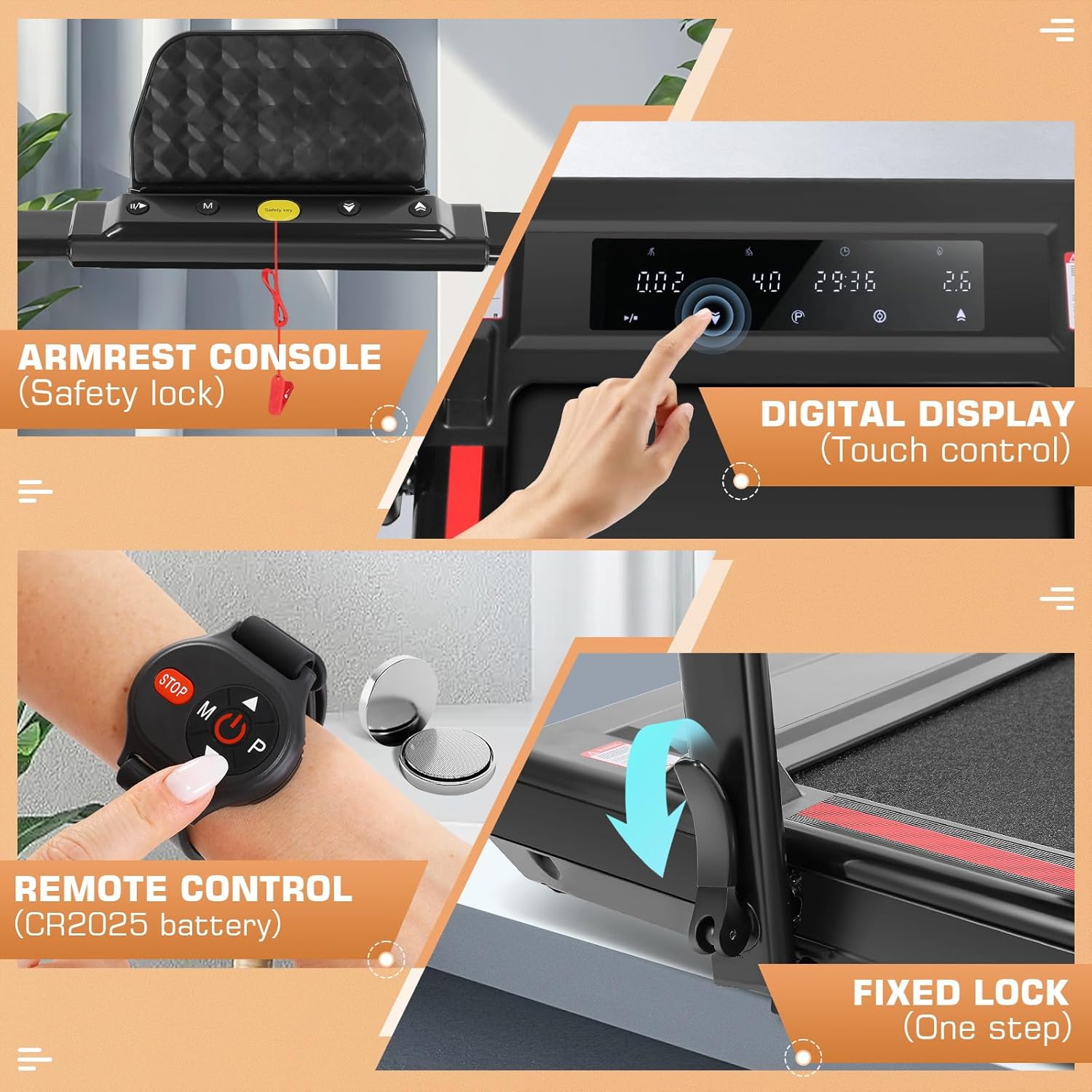
- Digital Display: Shows speed, time, distance, and calories burned. Touch controls allow for direct adjustment.
- Remote Control: Use the remote to start/stop the treadmill, adjust speed, and change modes. Ensure the CR2025 battery is correctly installed.
- Safety Key: Insert the safety key into the designated slot on the console. The treadmill will not operate without the safety key in place.
4.2 Starting a Workout
- Ensure the treadmill is plugged in and the safety key is inserted.
- Attach the safety key clip to your clothing.
- Press the 'Start' button on the console or remote control. The treadmill will begin at a low speed.
- Adjust the speed using the '+' and '-' buttons on the console or remote.
4.3 Usage Modes
The ANCHEER treadmill supports multiple modes to suit your exercise needs.

- Walking Mode: Treadmill is flat, ideal for light exercise or under-desk use.
- Running Mode: Handlebar is upright, allowing for higher speeds and more intense workouts.
- Climbing Mode: Utilizes the incline feature for a more challenging workout.
- Working Mode: Treadmill is flat and positioned under a standing desk, allowing for active work.
4.4 Adjusting Incline
The treadmill features an adjustable incline to vary your workout intensity.

Refer to the specific controls on your treadmill's console or remote for incline adjustment. The incline can typically be adjusted between 0% and 8% to simulate walking or running uphill.
5. Maintenance
Regular maintenance ensures the longevity and optimal performance of your treadmill.
- Cleaning: Wipe down the treadmill after each use with a damp cloth to remove sweat and dust. Do not use abrasive cleaners.
- Belt Lubrication: The running belt requires periodic lubrication to reduce friction. Refer to the specific instructions provided with your treadmill for the correct lubricant and frequency (typically every 3-6 months depending on usage).
- Belt Tension and Alignment: Check the running belt periodically for proper tension and alignment. Adjust as needed according to the instructions in this manual or contact customer support.
- Storage: When not in use, especially for extended periods, fold the treadmill for compact storage. Store in a dry, cool place away from direct sunlight.
6. Troubleshooting
If you encounter any issues, refer to the following common problems and solutions:
| Problem | Possible Cause | Solution |
|---|---|---|
| Treadmill does not start | Power cord not plugged in; Safety key not inserted; Power switch off. | Ensure power cord is securely plugged in. Insert the safety key. Turn on the power switch. |
| Running belt slips or hesitates | Belt tension too loose; Belt requires lubrication. | Adjust belt tension according to manual. Lubricate the running belt. |
| Unusual noise during operation | Loose components; Motor issue; Belt friction. | Check for and tighten any loose bolts. Lubricate belt if needed. If noise persists, contact customer support. |
| Remote control not working | Battery depleted or incorrectly installed. | Replace the CR2025 battery. Ensure it is installed with correct polarity. |
If the problem persists after attempting these solutions, please contact ANCHEER customer support.
7. Specifications
Key technical specifications for the ANCHEER Under Desk Treadmill with Incline:
- Brand: ANCHEER
- Product Class: 5 US
- Product Weight: 24 Kilograms (approx. 52.9 lbs)
- Assembly Required: No
- Recommended Maximum Weight: 300 Pounds (approx. 136 kg)
- Motor: 2.5 HP (Horsepower)
- Speed Range: 0.6 - 7.5 MPH
- Noise Level: < 45 dB
- Running Surface Dimensions: Approximately 16 inches (width) x 40 inches (length)


8. Warranty and Support
ANCHEER products are designed for quality and durability. For warranty information, product support, or to report any issues, please contact ANCHEER customer service through the retailer where the product was purchased or visit the official ANCHEER website.
Please have your product model and purchase date available when contacting support.
