
1. Introduction
Thank you for choosing the LUKO 3-in-1 Portable Air Conditioner. This versatile unit is designed to provide efficient cooling, dehumidification, and fan functions for rooms up to 300 square feet. With its compact design, remote control, and easy-to-install window kit, it offers a convenient solution for maintaining a comfortable indoor environment.
Please read this manual thoroughly before operating your new appliance to ensure safe use, optimal performance, and proper maintenance. Keep this manual for future reference.

Image: The LUKO portable air conditioner, a white rectangular unit with a silver top, emitting cool air. A hand holds the remote control, demonstrating its wireless operation.

Image: A person relaxing near the LUKO portable air conditioner, with icons illustrating its three primary functions: cooling, dehumidifying, and fan operation.
2. Safety Information
To prevent injury to the user or other people and property damage, the following instructions must be followed. Incorrect operation due to ignoring instructions may cause harm or damage.
- Always use a grounded electrical outlet.
- Do not operate the unit with a damaged power cord or plug.
- Do not block air inlets or outlets. Ensure proper ventilation.
- Keep the unit away from heat sources and direct sunlight.
- Do not insert fingers or foreign objects into the air inlets/outlets.
- Unplug the unit before cleaning or servicing.
- Ensure the unit is placed on a flat, stable surface.
3. Product Overview and Components
3.1 Package Contents
Verify that all components are present and in good condition:
- Portable Air Conditioner Unit
- Remote Control
- Exhaust Hose
- Window Sealing Plate Kit (Adjustable)
- Hose Adapter
- Drain Hose (for dehumidifier mode)
- User Manual
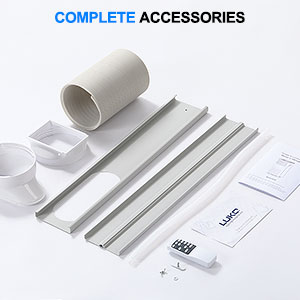
Image: A collection of all included accessories for the portable air conditioner, including the exhaust hose, window kit, remote control, and manual.
3.2 Unit Diagram and Control Panel
Familiarize yourself with the main parts of the unit and the control panel layout.
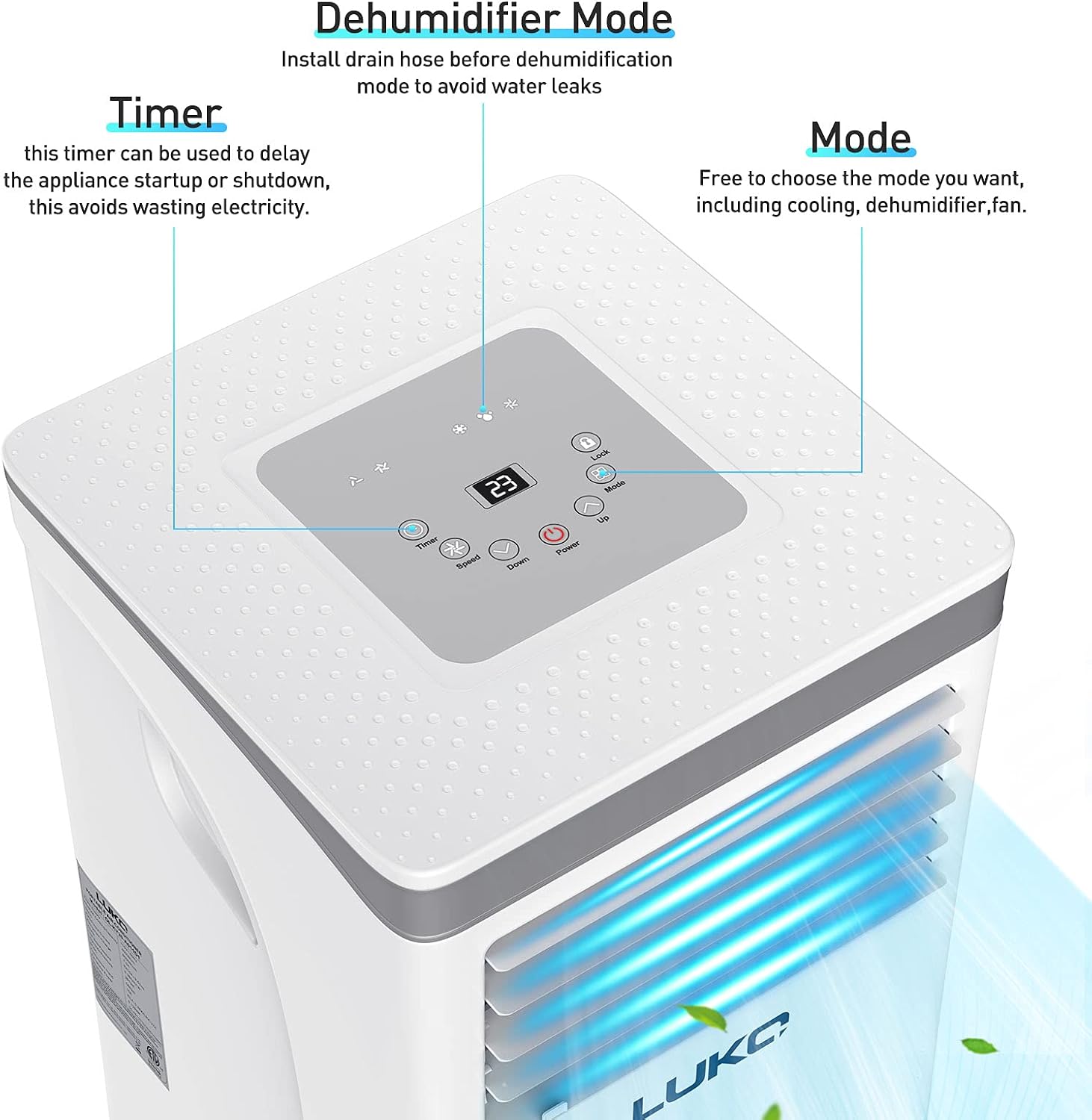
Image: A close-up view of the portable air conditioner's top control panel, highlighting the digital display, timer button, and mode selection button.

Image: Front and back views of the LUKO portable air conditioner with its dimensions clearly labeled: 13.2 inches deep, 12.8 inches wide, and 27.4 inches high.
4. Setup and Installation
The LUKO Portable Air Conditioner is designed for easy installation. Follow these steps to set up your unit.
4.1 Unpacking
- Carefully remove the unit and all accessories from the packaging.
- Inspect the unit for any shipping damage. If damaged, do not operate and contact customer support.
- Retain the original packaging for future storage or transport.
4.2 Window Kit Installation
The adjustable window bracket allows for installation in both horizontal and vertical windows.
- Open the window and place the adjustable window sealing plate kit into the window opening. Adjust the length to fit snugly.
- Connect the exhaust hose to the hose adapter.
- Attach the other end of the exhaust hose to the exhaust outlet on the back of the air conditioner unit.
- Insert the hose adapter into the opening of the window sealing plate. Ensure a secure fit to prevent air leakage.

Image: The LUKO portable air conditioner positioned near a window, demonstrating the easy installation of the adjustable window bracket and exhaust hose.
4.3 Power Connection
Plug the power cord into a grounded 220 Volt electrical outlet. Ensure the outlet meets the unit's power requirements.
5. Operating Instructions
Your LUKO Portable Air Conditioner can be operated using the control panel on the unit or the included remote control.
5.1 Control Panel and Remote Control Functions

Image: Side-by-side view of the portable air conditioner's remote control and its top-mounted control panel, illustrating the available buttons and display.
- Power Button: Turns the unit ON or OFF.
- Mode Button: Cycles through operating modes: Cool, Dehumidifier, Fan.
- Speed Button: Adjusts fan speed (Low, Medium, High) in Fan or Cool mode.
- Timer Button: Sets the auto-on or auto-off timer (up to 24 hours).
- Up/Down Buttons: Adjusts temperature settings in Cool mode or timer settings.
- Sleep Button (Remote Only): Activates Sleep mode for quiet, energy-efficient operation during sleep.
5.2 Operating Modes
- Cool Mode: Provides powerful cooling. Set your desired temperature using the Up/Down buttons. The unit will cool until the set temperature is reached.
- Dehumidifier Mode: Removes excess moisture from the air. In this mode, it is recommended to attach the drain hose for continuous drainage to avoid water leaks.
- Fan Mode: Circulates air without cooling. Choose your preferred fan speed.

Image: The LUKO portable air conditioner with visual indicators for both low and high wind settings, demonstrating its adjustable fan speeds.
5.3 Timer and Sleep Mode
The 24-hour timer and sleep mode help to keep your energy bill low while you stay comfortable.

Image: A family sleeping peacefully in a bedroom, with the LUKO portable air conditioner operating quietly in the foreground, illustrating its energy-saving features like the 24-hour timer and sleep mode.

Image: The LUKO portable air conditioner displayed alongside icons representing its Sleep Mode and Time Mode functionalities, indicating its advanced operational features.
6. Maintenance
Regular maintenance ensures the longevity and efficient operation of your air conditioner.
6.1 Air Filter Cleaning
The air filter should be cleaned every two weeks or more frequently depending on usage and air quality.
- Unplug the unit from the power outlet.
- Locate the air filter on the back of the unit.
- Gently pull out the filter.
- Wash the filter under running water (warm, soapy water if very dirty) or use a vacuum cleaner to remove dust.
- Allow the filter to air dry completely before reinserting it into the unit. Do not expose to direct sunlight.
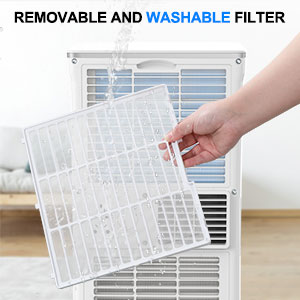
Image: A hand holding the removable and washable air filter from the LUKO portable air conditioner, demonstrating the ease of cleaning.
6.2 Water Drainage
In dehumidifier mode, or if the internal water tank becomes full in cooling mode, the unit will require drainage. The unit has a continuous drain option for dehumidifier mode.
- Continuous Drainage (Dehumidifier Mode): Attach the provided drain hose to the continuous drain port on the back of the unit. Position the other end of the hose into a floor drain or suitable container.
- Manual Drainage (Cooling Mode): If the internal tank is full, the unit may stop operating and display an error code. Place a shallow pan or tray under the drain plug at the bottom rear of the unit. Remove the drain plug to allow water to flow out. Replace the plug once drained.
6.3 Storage
Before storing the unit for an extended period:
- Drain all condensed water from the unit.
- Clean the air filter.
- Unplug the power cord and coil it neatly.
- Store the unit in a cool, dry place, away from direct sunlight and extreme temperatures.
7. Troubleshooting
Before contacting customer support, please refer to the following troubleshooting guide for common issues.
| Problem | Possible Cause | Solution |
|---|---|---|
| Unit does not turn on. | No power, power cord unplugged, circuit breaker tripped. | Check power connection, reset circuit breaker. |
| Unit does not cool effectively. | Air filter dirty, room too large, windows/doors open, exhaust hose blocked or disconnected. | Clean air filter, ensure room size is within specifications, close windows/doors, check exhaust hose connection. |
| Water leakage. | Drain plug loose, unit not level, drain hose improperly connected (dehumidifier mode). | Ensure drain plug is secure, place unit on a level surface, check drain hose connection. |
| Noisy operation. | Unit not on a level surface, foreign object in fan. | Place unit on a level surface. If noise persists, contact customer support. |
8. Specifications
Detailed technical specifications for the LUKO Portable Air Conditioner Model A011D-7000A:
- Model Number: A011D-7000A
- Cooling Power: 8,000 British Thermal Units (BTU)
- Coverage Area: Up to 300 Square Feet
- Functions: Air Conditioner, Dehumidifier, Fan
- Power Source: Corded Electric
- Voltage: 220 Volts
- Wattage: 2343.75 Watts
- Refrigerant: R 410A
- Seasonal Energy Efficiency Ratio (SEER): 2.6
- Product Dimensions (D x W x H): 13.2" x 12.8" x 27.4"
- Item Weight: 52.9 pounds
- Color: White
- Installation Method: Window (with included kit)
- Special Features: Portable, LED Display, Dehumidifier
9. Warranty and Support
9.1 Warranty Information
Specific warranty details for your LUKO Portable Air Conditioner may vary. Please refer to the warranty card included with your product packaging or visit the official LUKO website for the most up-to-date warranty policy.
9.2 Customer Support
If you encounter any issues not covered in the troubleshooting section or require further assistance, please contact LUKO customer support. You can find contact information on the LUKO brand store on Amazon or through the official LUKO website.
For more information, visit the LUKO Store on Amazon.
