1. Product Overview
The BASON LIGHTING 65.6ft LED Strip Lights provide versatile and customizable illumination for indoor spaces. Featuring SMD 5050 RGB LEDs, these lights offer millions of color options, dynamic lighting modes, and music synchronization capabilities. Control is available via a dedicated Bluetooth application and an included remote control, allowing for personalized ambiance in various settings such as bedrooms, living rooms, and entertainment areas.

2. Package Contents
Verify that all items listed below are present in your package:
- One (1) 65.6ft (20M) LED Strip Light Roll (SMD 5050, 450 LEDs)
- One (1) Power Adapter (24V)
- One (1) Remote Control
- One (1) Bluetooth Controller
- Auxiliary Mounting Buckles (Clips)
3. Safety Information
Please read and follow these safety guidelines to prevent damage to the product or personal injury:
- Ensure the power adapter is connected to a compatible power outlet (120V AC).
- Do not cut the LED strip while it is connected to power.
- Avoid bending the LED strip at sharp angles to prevent damage to the circuit board.
- This product is designed for indoor use only. Do not expose to water or high humidity.
- Keep out of reach of children.
- If any part of the product is damaged, discontinue use immediately and contact support.
4. Setup and Installation
Follow these steps for proper installation of your LED strip lights:
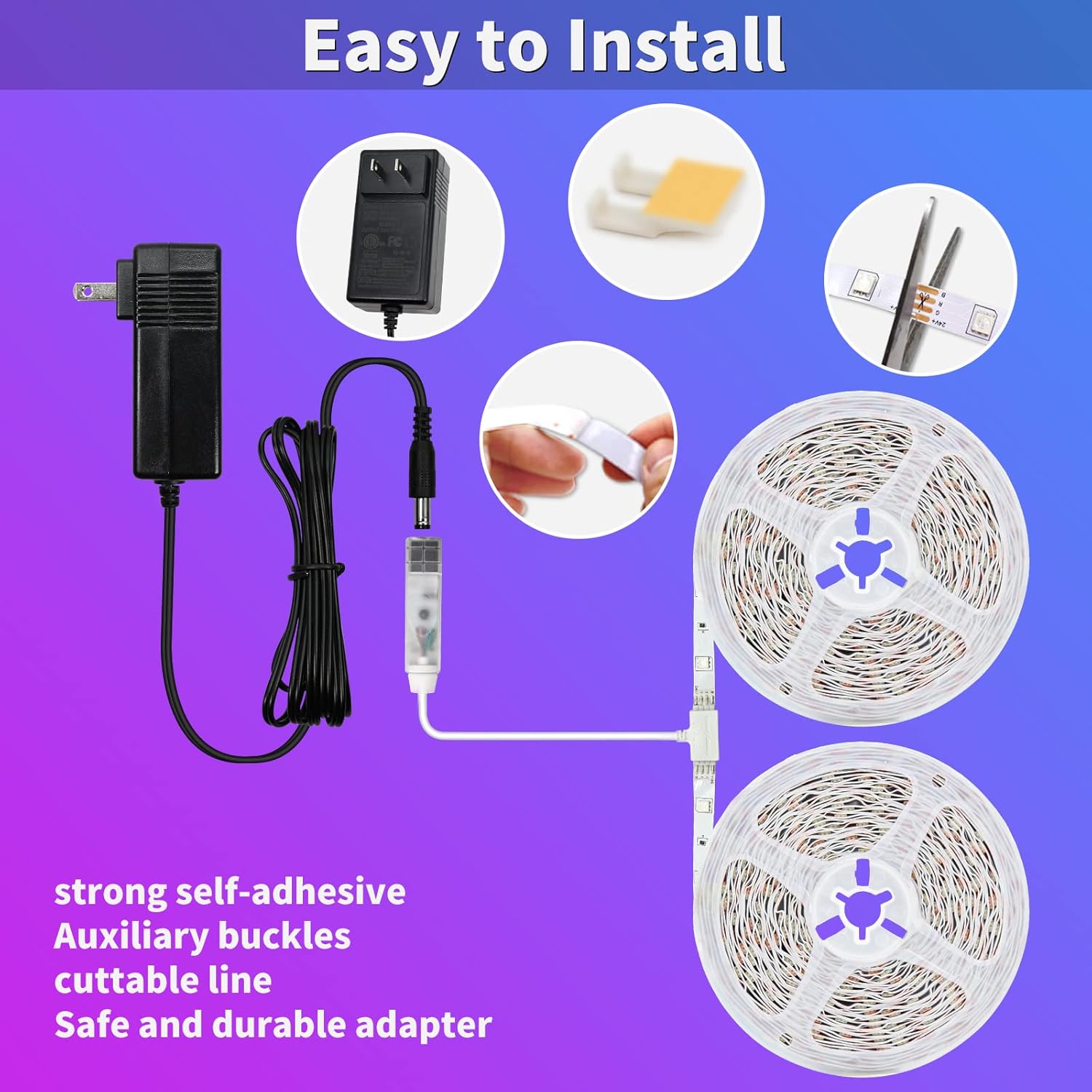
- Prepare the Surface: Clean the desired installation surface thoroughly to ensure it is dry and free of dust or oil. A clean surface is crucial for optimal adhesive performance.
- Measure and Plan: Unroll the LED strip and plan its placement. The strip can be cut at designated marks (usually indicated by a scissor icon) if a shorter length is required. Ensure the strip is unplugged before cutting.
- Apply the Strip: Peel off the protective backing from the adhesive tape on the back of the LED strip. Carefully press the strip onto the prepared surface, applying firm and even pressure.
- Secure with Buckles (Optional): For added security, use the provided auxiliary mounting buckles at regular intervals or around corners.
- Connect the Controller: Connect the end of the LED strip to the Bluetooth controller. Ensure the connectors are aligned correctly.
- Connect Power: Plug the power adapter into the Bluetooth controller, then plug the power adapter into a standard electrical outlet.
5. Operating Instructions
Your BASON LIGHTING LED Strip Lights can be controlled using either the Bluetooth app or the included remote control.
5.1 Bluetooth App Control
The dedicated app provides extensive control over your LED strip lights.
- Download the App: Search for 'DoTint BT' in your smartphone's App Store (iOS) or Google Play Store (Android) and install it.
- Enable Bluetooth and Location: Ensure Bluetooth and location services are enabled on your smartphone.
- Open and Connect: Open the 'DoTint BT' app. The app should automatically detect your LED strip lights. Follow the on-screen prompts to add and connect to the device.
- Control Functions:
- Color Selection: Choose from millions of DIY colors using a color wheel or preset options.
- Dynamic Modes: Select from 22 dynamic modes, including various fades, jumps, and flashes.
- Music Synchronization: Allow the app access to your music and microphone to enable music sync mode, where lights change with audio.
- Timing Modes: Set schedules for the lights to turn on or off automatically.
- Brightness and Speed: Adjust the brightness level and the speed of dynamic modes.


5.2 Remote Control Operation
The included remote control offers convenient access to essential functions.
- Power Button: Turn the lights on or off.
- Color Buttons: Select static colors (e.g., red, green, blue, white).
- Brightness Adjustment: Increase or decrease the light intensity.
- Dynamic Modes: Cycle through various pre-programmed lighting effects.
- DIY Color Mode: Some remotes allow for custom color mixing.
- Sleep Mode: Activates a gentle dimming sequence.
Ensure the remote control is pointed towards the Bluetooth controller for optimal response.

6. Maintenance
To ensure the longevity and optimal performance of your LED strip lights, follow these simple maintenance guidelines:
- Cleaning: Gently wipe the LED strip with a dry, soft cloth to remove dust. Do not use liquid cleaners or abrasive materials.
- Connection Check: Periodically inspect all connections (strip to controller, controller to power adapter, power adapter to outlet) to ensure they are secure.
- Adhesive Integrity: If the strip begins to peel, re-secure it using the auxiliary buckles or additional adhesive tape.
- Storage: If storing the lights, ensure they are clean, dry, and coiled loosely to prevent damage.
7. Troubleshooting
If you encounter issues with your LED strip lights, refer to the following troubleshooting steps:
| Problem | Possible Cause | Solution |
|---|---|---|
| Lights do not turn on. | No power, loose connection, faulty adapter. | Check if the power adapter is securely plugged into the outlet and the controller. Ensure the strip is correctly connected to the controller. Try a different outlet. |
| Remote control not working. | Battery depleted, obstruction, not pointed at receiver. | Replace the remote control battery (1 Lithium Ion battery). Ensure there are no obstructions between the remote and the Bluetooth controller. Point the remote directly at the controller's receiver. |
| App cannot connect to lights. | Bluetooth off, location services off, app permissions denied. | Ensure Bluetooth and location services are enabled on your smartphone. Grant the 'DoTint BT' app all necessary permissions. Restart the app and try connecting again. |
| Lights are dim or flickering. | Insufficient power, damaged strip section. | Ensure the power adapter is the correct one provided with the product. Check for any visible damage to the LED strip. |
| Adhesive is not holding. | Surface not clean, improper application. | Clean the surface thoroughly before re-applying. Use the provided auxiliary buckles for additional support. |
8. Specifications
| Feature | Detail |
|---|---|
| Model Number | 04f1126d-4035-4529-af5c-2419566be693 |
| Brand | BASON LIGHTING |
| Length | 65.6ft (20M) |
| LED Type | SMD 5050 RGB |
| Number of LEDs | 450 |
| Color Options | 16 Million DIY Colors |
| Control Methods | Bluetooth App Control, Remote Control |
| Input Voltage | 120 Volts AC |
| Output Voltage | 24 Volts DC |
| Wattage | 36 Watts |
| Indoor/Outdoor Use | Indoor |
| Remote Battery | 1 Lithium Ion battery (included) |
9. Warranty and Support
For warranty information or technical support, please contact BASON LIGHTING directly through their official channels or the retailer where the product was purchased. Keep your purchase receipt as proof of purchase.


