
Introduction
Thank you for choosing the TEMOLA TM26 Instant Read Meat Thermometer. This digital thermometer is designed to provide quick and accurate temperature readings for various foods, ensuring safe and perfectly cooked meals. Its durable, waterproof design and user-friendly features make it an essential tool for any kitchen, grill, or smoker.

Image: The TEMOLA TM26 Instant Read Meat Thermometer, showing its sleek black design, extended stainless steel probe, and clear digital display. The product packaging and a temperature guide are also visible.
Package Contents
Please check the package to ensure all items are present:
- 1 x TEMOLA TM26 Meat Thermometer
- 1 x Meat Temperature Guide
- 1 x Detailed Instruction Manual
- 2 x CR2032 Batteries (one pre-installed, one spare)
- 1 x Drawstring Bag
- 4 x Hook/Loops
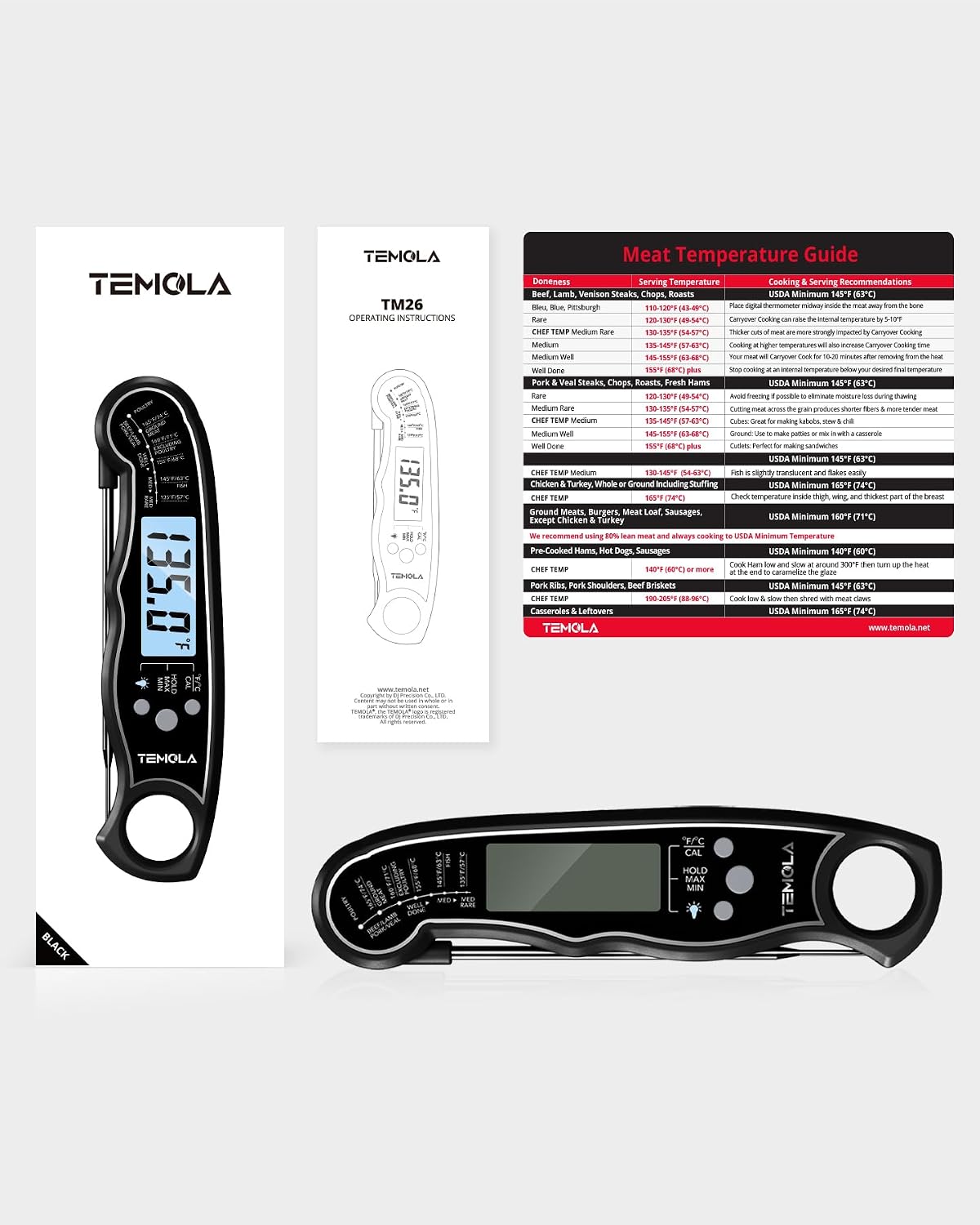
Image: An overview of the TEMOLA TM26 package contents, including the thermometer, instruction manual, meat temperature guide, and storage bag.
Product Features
- Ultra-Fast & Accurate: 4.6-inch food-grade stainless steel probe provides 2-3 second response time with an accuracy of ±1°C (±1.8°F). Wide temperature range of -58°F to 572°F (-50°C to 300°C).
- IP67 Waterproof: Constructed from high-quality, eco-friendly ABS plastic, allowing for easy cleaning under running water.
- Calibration Function: Pre-calibrated at the factory, with an option for user calibration using ice water.
- Temperature Records: Records maximum and minimum temperatures during use.
- Power Saving: Automatic on/off when the probe is opened/closed. Powered by a CR2032 battery with over 10,000 hours of battery life.
- Easy to Use: Large LCD with bright backlight for clear readings day or night.
- Convenient Storage: Features a large hang hole and built-in magnets for easy storage on metal surfaces or hooks.

Image: The thermometer measuring the temperature of a cooked turkey, highlighting its 2-3 second response time and ±1°F accuracy.

Image: The thermometer being splashed with water, illustrating its IP67 waterproof capability and switchable °F/°C units.
Parts Diagram

Image: A detailed diagram labeling the key components of the TEMOLA TM26 thermometer, including the temperature guide, probe, LED display, light button, °F/°C/CAL button, HOLD/MAX/MIN button, hang hole, battery compartment, and built-in magnets.
- Temperature Guide
- Probe Shaft and Sensor
- LED Display
- Light Button
- °F/°C / CAL Button
- HOLD / MAX / MIN Button
- Large Hang Hole
- Battery Compartment
- Built-in Magnets
Setup
Battery Installation
The thermometer comes with one CR2032 battery pre-installed. If the display does not turn on or is dim, you may need to replace the battery.
- Locate the battery compartment (8) on the back of the thermometer.
- Use a small screwdriver (not included) to open the battery cover.
- Insert a new CR2032 battery with the positive (+) side facing up.
- Securely close the battery cover.
Operating Instructions
Turning On/Off
The thermometer automatically turns on when the probe is unfolded and turns off when the probe is folded back into the body.
Taking a Temperature Reading
- Unfold the probe to turn on the thermometer.
- Insert the stainless steel probe into the thickest part of the food, avoiding bone or gristle.
- The temperature will display on the LCD within 2-3 seconds.
- Once the reading stabilizes, remove the probe.
Switching Temperature Units (°F/°C)
Press the “°F/°C / CAL” button (5) to switch between Fahrenheit and Celsius.
HOLD / MAX / MIN Function
Press the “HOLD / MAX / MIN” button (6) to cycle through the following modes:
- HOLD: Freezes the current temperature reading on the display. Press again to release.
- MAX: Displays the maximum temperature recorded since the thermometer was turned on or reset.
- MIN: Displays the minimum temperature recorded since the thermometer was turned on or reset.

Image: The thermometer displaying temperature readings, illustrating the calibration process with ice water and the Max/Min temperature record function.
Backlight
Press the “Light” button (4) to activate the backlight for easier reading in low-light conditions.
Calibration
The TM26 thermometer is pre-calibrated at the factory. However, if you suspect inaccuracy, you can perform a simple ice water calibration:
- Fill a glass with crushed ice and top it off with cold water. Stir well.
- Insert the thermometer probe into the ice water, ensuring the tip is fully submerged but not touching the bottom or sides of the glass.
- Wait for the reading to stabilize (approximately 30 seconds). The temperature should read 32°F (0°C).
- If the reading is not 32°F (0°C), press and hold the “°F/°C / CAL” button (5) for 3 seconds until “CAL” appears on the display.
- The display will adjust to 32°F (0°C), indicating successful calibration.
Maintenance and Care
- Cleaning: The thermometer is IP67 waterproof. After each use, wipe the probe with a soapy cloth or rinse it under running water. DO NOT soak the thermometer in water or place it in a dishwasher.
- Storage: Fold the probe to turn off the thermometer. Store it in the provided drawstring bag. The built-in magnets allow for convenient storage on metallic surfaces like a refrigerator, or use the hang hole to store it on a hook.
- Battery: Replace the CR2032 battery when the display becomes dim or unresponsive.
- Avoid Extreme Temperatures: Do not expose the thermometer to extreme heat (e.g., inside a hot oven) or cold for prolonged periods, as this may damage internal components.

Image: The thermometer demonstrating its versatile storage options, including magnetic attachment to a refrigerator and hanging from a kitchen rail.
Troubleshooting
- No Display/Dim Display: Check or replace the CR2032 battery. Ensure the probe is fully unfolded to turn on the device.
- Inaccurate Readings: Perform an ice water calibration as described in the “Calibration” section. Ensure the probe is inserted correctly into the food and not touching bone or the cooking surface.
- Slow Readings: Ensure the probe tip is fully immersed in the food. If the battery is low, it might affect response time.
If you encounter any issues not covered here, please refer to the Warranty and Support section for assistance.
Specifications
| Feature | Specification |
|---|---|
| Model Number | DT-68 (TM26) |
| Temperature Range | -58°F to 572°F (-50°C to 300°C) |
| Accuracy | ±1°C (±1.8°F) |
| Response Time | 2-3 seconds |
| Probe Length | 4.6 inches |
| Waterproof Rating | IP67 |
| Display Type | LCD with Backlight |
| Battery Type | 1 x CR2032 (included) |
| Product Dimensions | 4.6 x 0.99 x 0.2 inches |
| Weight | 2.89 ounces |
| Outer Material | ABS, Stainless Steel |
Warranty and Support
TEMOLA is committed to providing quality kitchen appliances. Each product is tested before shipping to ensure quality. If you are not satisfied with your TEMOLA product for any reason, please contact us for replacement or support.
Good communication is the best solution to any problem. For assistance, please reach out to TEMOLA customer service through the platform where you purchased the product or visit the official TEMOLA store online.
Contact Information:
- Online Store: Visit the TEMOLA Store on Amazon
- Customer Service: Refer to your purchase documentation for specific contact details or use the messaging system on the retail platform.