
FEZIBO SDE-DC
FEZIBO 48x24 Inch Standing Desk with Drawer (Model SDE-DC) User Manual
Adjustable Height Electric Sit-Stand Home Office Desk
1. Introduction
This manual provides detailed instructions for the assembly, operation, maintenance, and troubleshooting of your FEZIBO 48x24 Inch Standing Desk with Drawer (Model SDE-DC). Please read this manual thoroughly before assembly and use to ensure proper function and safety.
The FEZIBO standing desk is designed to support a healthy work environment by allowing seamless transitions between sitting and standing positions. It features an electric height adjustment system, a convenient storage drawer, and various accessories to enhance your workspace.

Image 1.1: FEZIBO 48x24 Inch Standing Desk with Drawer.
2. Important Safety Information
WARNING:
- Do not exceed the maximum recommended weight limit of 176 pounds (80 kg) on the desktop. Overloading can cause damage to the desk and potential injury.
- Ensure the desk is placed on a level surface.
- Keep children and pets away from the desk during operation.
- Avoid placing liquids directly on the control panel or near electrical components.
- Regularly check all screws and bolts to ensure they are tightened.
- Do not disassemble or modify the desk's electrical components. Contact customer support for service.
3. Package Contents
Before beginning assembly, verify that all components are present and undamaged. If any parts are missing or damaged, please contact customer support.
- Desktop (48 x 24 inches)
- Electric Lifting Columns (Legs)
- Desk Feet
- Control Panel
- Power Adapter and Cable
- Upgraded Leather Drawer
- Desk Hooks (Set of 2)
- Cable Grommets
- Casters (Set of 4)
- Assembly Hardware (screws, bolts, washers)
- Basic Assembly Tools (L-shaped hex keys)
- Assembly Instructions with Diagram

Image 3.1: Desk dimensions and included accessories (desk hooks, upgraded leather drawer).
4. Assembly Instructions
Assembly is straightforward with the provided detailed manual and tools. It is recommended to have a second person assist with certain steps, especially when handling the desktop and lifting the assembled desk.
- Unpack Components: Carefully remove all parts from the packaging and lay them out on a clean, soft surface to prevent scratches.
- Assemble Desk Frame: Follow the diagrams in the included assembly manual to attach the lifting columns to the desk feet and then to the crossbar. Ensure all screws are securely tightened.
- Attach Desktop: Carefully place the desktop upside down on a soft surface. Align the assembled desk frame with the pre-drilled holes on the underside of the desktop. Secure the frame to the desktop using the provided screws.
- Install Control Panel: Mount the control panel to the underside of the desktop in the designated location. Connect the necessary cables from the lifting columns and power adapter to the control box.
- Install Drawer: Attach the upgraded leather drawer to the underside of the desktop according to the instructions. Ensure it slides smoothly.
- Attach Accessories: Install the desk hooks and casters (if desired) in their respective positions. The casters allow for easy movement of the desk.
- Cable Management: Utilize the desktop cable grommets to organize and route your wires neatly.
- Power On: Connect the power cable to a wall outlet.
For visual guidance, refer to the detailed installation video guide provided by FEZIBO.

Image 4.1: The integrated drawer helps maintain an organized workspace.
5. Operating Instructions
5.1 Height Adjustment
The desk features an electric motor system for smooth and quiet height adjustments. The desk can be adjusted from a minimum height of approximately 27.7 inches (70.3 cm) to a maximum height of approximately 46.6 inches (118.4 cm).
- Press and hold the UP (▲) button to raise the desk.
- Press and hold the DOWN (▼) button to lower the desk.
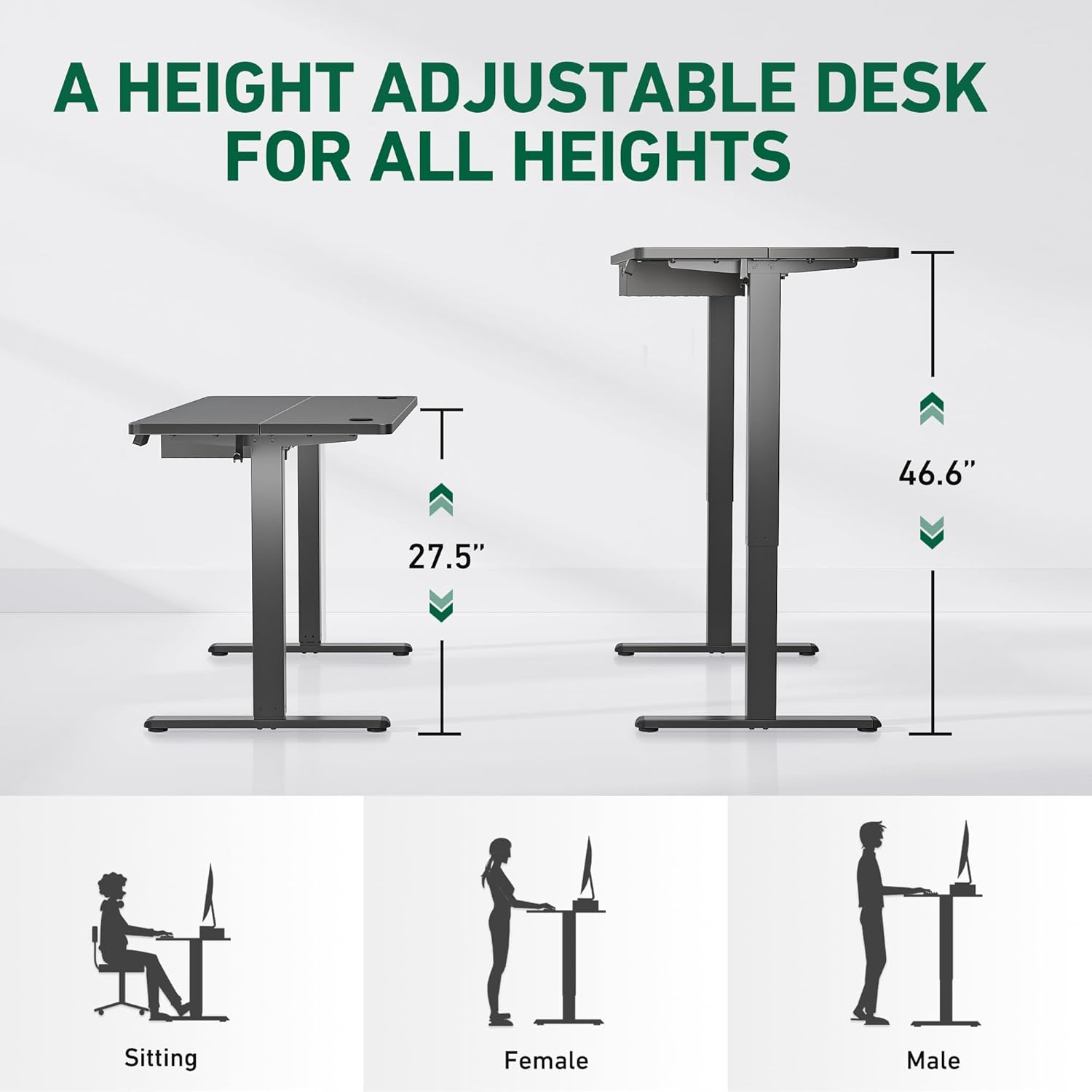
Image 5.1: Height adjustment range for sitting and standing positions.
5.2 Memory Presets
The control panel includes two memory preset buttons (1 and 2) to save and recall your preferred sitting and standing heights.

Image 5.2: Desk control panel with up/down buttons and memory presets.
- To Save a Preset: Adjust the desk to your desired height. Press the M button (if present, or a similar 'Set' button), then press the desired memory button (1 or 2) until you hear a beep or see a confirmation on the display.
- To Recall a Preset: Simply press the corresponding memory button (1 or 2). The desk will automatically move to the saved height.
5.3 Noise Level
The desk operates with a low noise level of approximately 45 dB, comparable to a quiet library, ensuring minimal disruption to your work environment.

Image 5.3: Desk noise level and maximum load capacity.
6. Maintenance
- Cleaning: Wipe the desktop and frame with a soft, damp cloth. Avoid harsh chemicals or abrasive cleaners. The upgraded leather drawer has a waterproof function, making it easy to clean spills.
- Inspection: Periodically check all connections and fasteners to ensure they are secure. Tighten any loose screws.
- Cable Management: Ensure cables are not pinched or tangled, especially during height adjustments.
7. Troubleshooting
If you encounter any issues with your FEZIBO standing desk, refer to the following common problems and solutions:
| Problem | Possible Cause | Solution |
|---|---|---|
| Desk does not move or respond to controls. | Power cable disconnected, motor overload, control panel issue. | Check power connections. Unplug and replug the power cable. Reduce weight on the desk. If the issue persists, contact customer support. |
| Desk moves unevenly or makes unusual noises. | Uneven load, loose connections, obstruction. | Ensure weight is evenly distributed. Check all screws and bolts for tightness. Remove any obstructions under or around the desk. |
| Memory presets not working. | Presets not properly saved. | Re-save your desired heights following the instructions in Section 5.2. |
If these solutions do not resolve the issue, please contact FEZIBO customer support for further assistance.
8. Specifications
| Feature | Detail |
|---|---|
| Model Number | SDE-DC |
| Product Dimensions (D x W x H) | 24"D x 48"W x 27.7"H (61 cm D x 122 cm W x 70.3 cm H) |
| Minimum Height | 27.7 inches (70.3 cm) |
| Maximum Height | 46.6 inches (118.4 cm) |
| Tabletop Thickness | 0.75 inches (1.9 cm) |
| Maximum Weight Capacity | 176 pounds (80 kg) |
| Item Weight | 30 pounds (13.6 kg) |
| Lifting Mechanism | Electric |
| Noise Level | Approximately 45 dB |
| Number of Drawers | 1 |
| Base Material | Alloy Steel |
| Top Material Type | Wood |
| Color | Light Rustic |
9. Warranty and Support
9.1 Warranty Information
The FEZIBO Standing Desk (Model SDE-DC) comes with a Limited Warranty. Please refer to the warranty card included with your product for specific terms and conditions, or visit the official FEZIBO website for more details.
9.2 Customer Support
For any questions, technical support, or assistance with assembly or operation, please do not hesitate to contact FEZIBO customer service. Our team is available to help you.
Contact Information:
- Email: Refer to your product packaging or official website.
- Phone: Refer to your product packaging or official website.
- Online Support: Visit the FEZIBO official website for FAQs and support resources.
Related documentsSDE-DC


Ask a question about this manual
Ask about setup, troubleshooting, compatibility, parts, safety, or missing instructions. Manuals+ will review the question and use this page’s manual context to help answer it.