
JJC JR1AQ3T30W180D30K-BL
JJC 30W 3000LM Motion Sensor Outdoor Flood Light User Manual
Model: JR1AQ3T30W180D30K-BL
Introduction
This manual provides detailed instructions for the installation, operation, and maintenance of your JJC 30W 3000LM Motion Sensor Outdoor Flood Light. This 3-head security light delivers 3000 lumens of 3000K warm white illumination, ideal for various outdoor applications. It features an advanced motion sensor and multiple working modes for enhanced security and convenience.

Image: The JJC 30W 3000LM Motion Sensor Outdoor Flood Light, showcasing its three adjustable light heads and motion sensor. The image highlights the warm white light output.

Image: A comparison of light color temperatures, emphasizing the 3000K warm white output of the JJC flood light, distinct from neutral white (4000K) and daylight white (5000K).
Package Contents
Please verify that all components are present before beginning installation:
- JJC 30W 3000LM Motion Sensor Outdoor Flood Light (1 unit)
- Mounting Bracket (1 unit)
- Wire Nuts (3 units)
- O-rings (quantity as needed for sealing)
- Rubber Screw Cap (1 unit)
- Various Screws for installation
- Spongy Cushion (1 unit)

Image: A visual representation of all items included in the product package, such as the light fixture, mounting bracket, wire nuts, screws, and other small accessories.
Specifications
| Feature | Detail |
|---|---|
| Brand | JJC |
| Model Number | JR1AQ3T30W180D30K-BL |
| Wattage | 30 Watts |
| Brightness | 3000 Lumens |
| Color Temperature | 3000 Kelvin (Warm White) |
| Voltage | 120V AC 50/60Hz |
| Motion Sensor Detection Angle | 180 degrees |
| Motion Sensor Detection Distance | 20-72 feet (adjustable) |
| Operating Modes | ON-TIME, AUTO, D2D (Dusk to Dawn) |
| Water Resistance Level | IP65 Waterproof |
| Material | Aluminum (fixture), Plastic (sensor, lens) |
| Installation Type | Surface Mount (wall, eave, soffit) |
| Item Dimensions (L x W x H) | 9.8" x 7.8" x 6.2" |
| Item Weight | 1.34 kg |

Image: A graphic summarizing key specifications of the JJC 30W motion sensor flood light, including wattage, lumen output, color temperature, and detection range.
Setup and Installation
Safety Warning: Always disconnect power at the circuit breaker before installing or servicing the fixture.
- Prepare the Installation Area: Ensure the power is off. A 4-inch junction box (not included) is required for hardwired installation.
- Mounting Location: The recommended installation height is between 6.56 ft and 13.12 ft. For optimal motion detection, the best installation height is 8.2 ft to 9.8 ft.
- Attach Mounting Bracket: Secure the provided mounting bracket to the junction box using appropriate screws.
- Wiring: Connect the fixture's wires to your household wiring using the wire nuts. Follow standard electrical codes (Black to Live, White to Neutral, Green/Bare to Ground).
- Secure the Fixture: Attach the light fixture to the mounting bracket, ensuring a tight and secure fit. Use the spongy cushion and O-rings for a weather-tight seal.
- Adjust Light Heads and Sensor: Position the three light heads and the motion sensor to cover the desired area. Ensure the motion sensor faces outwards when mounted on an eave or soffit for proper detection.

Image: An illustration demonstrating the correct orientation for mounting the motion sensor flood light on an eave or soffit, ensuring the sensor faces outwards for optimal performance.
Video: An official product video from JJC Lighting demonstrating the installation process and key features of the 30W Outdoor Motion Sensor Light.
Operating Modes
The JJC Motion Sensor Outdoor Flood Light supports three distinct operating modes, controlled by the switches and knobs on the sensor unit:
- ON-TIME Mode (Wall Switch Mode): In this mode, the light functions like a standard flood light. It can be manually turned on and off using a wall switch. The motion sensor is bypassed.
- AUTO Mode (Motion-Sensing Mode): The light will automatically turn on when motion is detected in darkness. It will then turn off after a set duration, which can be adjusted from 5 seconds to 5 minutes using the 'Time' knob. The 'Lux' knob determines the ambient light level at which the sensor becomes active.
- D2D Mode (Dusk To Dawn Mode): The light will automatically turn on at night (when ambient light falls below a certain threshold) and remain on until daytime. It will stay off during daylight hours. This mode operates independently of motion detection.
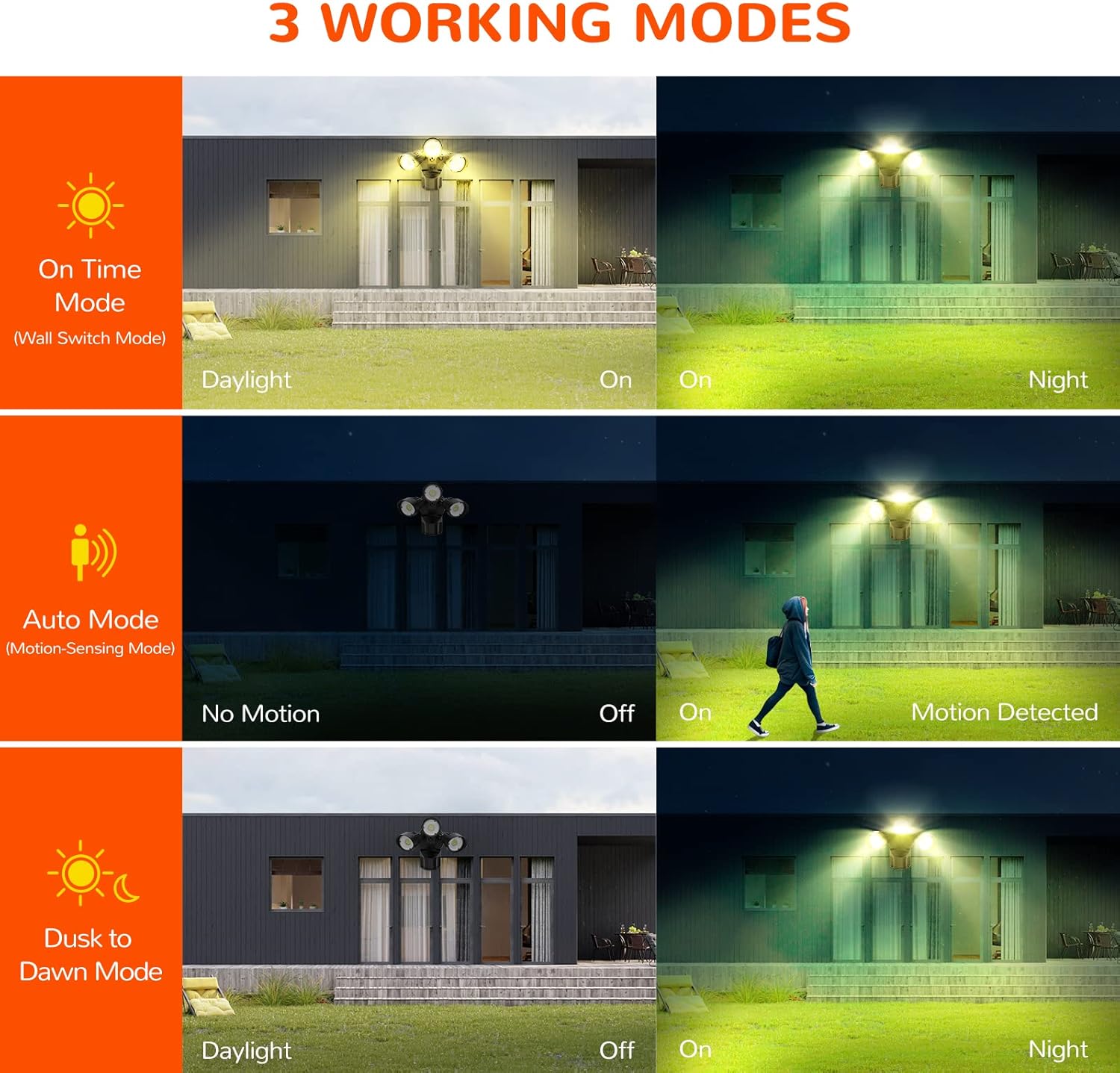
Image: A visual explanation of the three operating modes: On-Time, Auto (motion-sensing), and Dusk to Dawn, showing how the light behaves in different conditions.

Image: An illustration detailing the Dusk to Dawn mode, showing the light automatically turning on when the surrounding environment is dark (<10 Lux) and turning off when it is bright (>10 Lux).

Image: A close-up view of the motion sensor unit, highlighting the 'Lux', 'Time', and 'Range' adjustment knobs for customizing the light's behavior.
Motion Sensor and Light Head Adjustment
The JJC flood light offers flexible adjustment options to optimize coverage and detection:
- Adjustable Light Heads: Each of the three light heads can be independently rotated and tilted to direct illumination precisely where needed.
- Motion Sensor Rotation: The motion sensor itself can be rotated 360 degrees and tilted to fine-tune its detection area. This allows you to avoid false triggers from passing traffic or small animals, while ensuring coverage for desired zones.
- Detection Range: The sensor has a 180-degree detection angle and an adjustable range of up to 72 feet. Use the 'Range' knob on the sensor to set the desired detection distance.

Image: A diagram illustrating the 360-degree rotation capability of the motion sensor and the flexible adjustment of the light heads, allowing for comprehensive coverage.
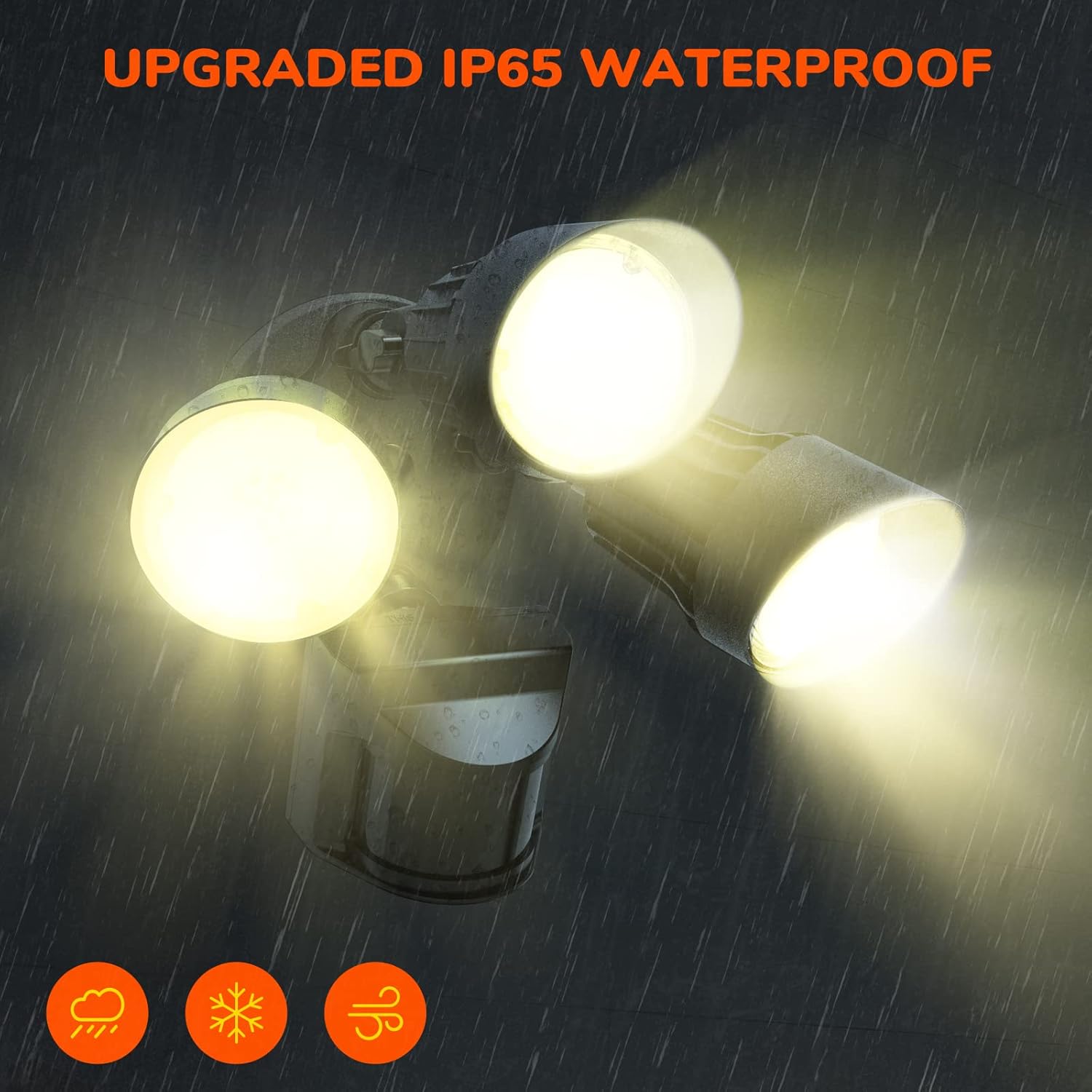
Image: A visual representation of the motion sensor's 180-degree detection angle and its maximum 72-foot sensing range, showing how it covers a wide area for security.
Maintenance
The JJC Outdoor Flood Light is designed for durability and minimal maintenance:
- Cleaning: Periodically clean the light fixture and sensor lens with a soft, damp cloth to remove dirt, dust, or debris that may obstruct the sensor or reduce light output. Do not use abrasive cleaners or solvents.
- Weather Resistance: The fixture has an IP65 waterproof rating, ensuring resistance against rain, sleet, snow, and UV exposure. No special weatherproofing maintenance is required beyond ensuring proper installation.
- Durability: Constructed with a full aluminum housing (excluding the motion sensor and light lens), the fixture is designed for effective heat dissipation and a long lifespan of over 50,000 hours.

Image: An illustration highlighting the IP65 waterproof rating of the flood light, demonstrating its ability to withstand various weather conditions like rain, snow, and wind.

Image: A graphic illustrating the durable full aluminum design of the light fixture, emphasizing its role in effective heat dissipation to ensure a long product lifespan.
Troubleshooting
If you encounter issues with your JJC Motion Sensor Outdoor Flood Light, please refer to the following common problems and solutions:
- Light does not turn on:
- Ensure power is supplied to the fixture. Check circuit breaker.
- Verify the operating mode setting. If in AUTO mode, check ambient light levels and motion detection. If in D2D mode, ensure it is dark enough.
- Check wiring connections for security.
- Light stays on continuously:
- If in AUTO mode, check if the 'Time' knob is set to maximum or if there is continuous motion in the detection area.
- If in D2D mode, ensure the ambient light sensor is not obstructed, causing it to perceive continuous darkness.
- Ensure the mode switch is not set to ON-TIME mode.
- Motion sensor is not detecting:
- Ensure the sensor lens is clean and unobstructed.
- Adjust the 'Range' knob to increase detection distance.
- Verify the sensor's orientation; it should face the area where motion is expected.
- Check the 'Lux' setting; if set too high, the sensor may not activate in dim conditions.
- Light flickers or dims:
- Ensure stable power supply.
- Check for loose wiring connections.
Warranty and Support
The JJC 30W 3000LM Motion Sensor Outdoor Flood Light is ETL certified, ensuring it meets high safety and quality standards. For any issues or inquiries regarding your product, please contact JJC customer support. Refer to your purchase documentation for specific warranty terms and contact information.
We are committed to providing reliable quality and hassle-free service.
Ask a question about this manual
Ask about setup, troubleshooting, compatibility, parts, safety, or missing instructions. Manuals+ will review the question and use this page’s manual context to help answer it.