Download PDFFree PDF. The Save button below keeps a bookmark and private notes in your account.
HH Electronics VECTOR VRC-210 Portable PA System User Manual
Model: VRC-210
Introduction
The HH Electronics VECTOR VRC-210 is a versatile and portable PA system designed for a wide range of applications, including live performances, conferences, fitness classes, and public address. This system features a powerful 2 x 500W output, a 6-channel mixer with integrated DSP effects, and a media player with Bluetooth, USB, and SD card inputs. Its lightweight and robust polypropylene construction, along with a unique 'clip-together' design, ensures easy transport and quick setup.
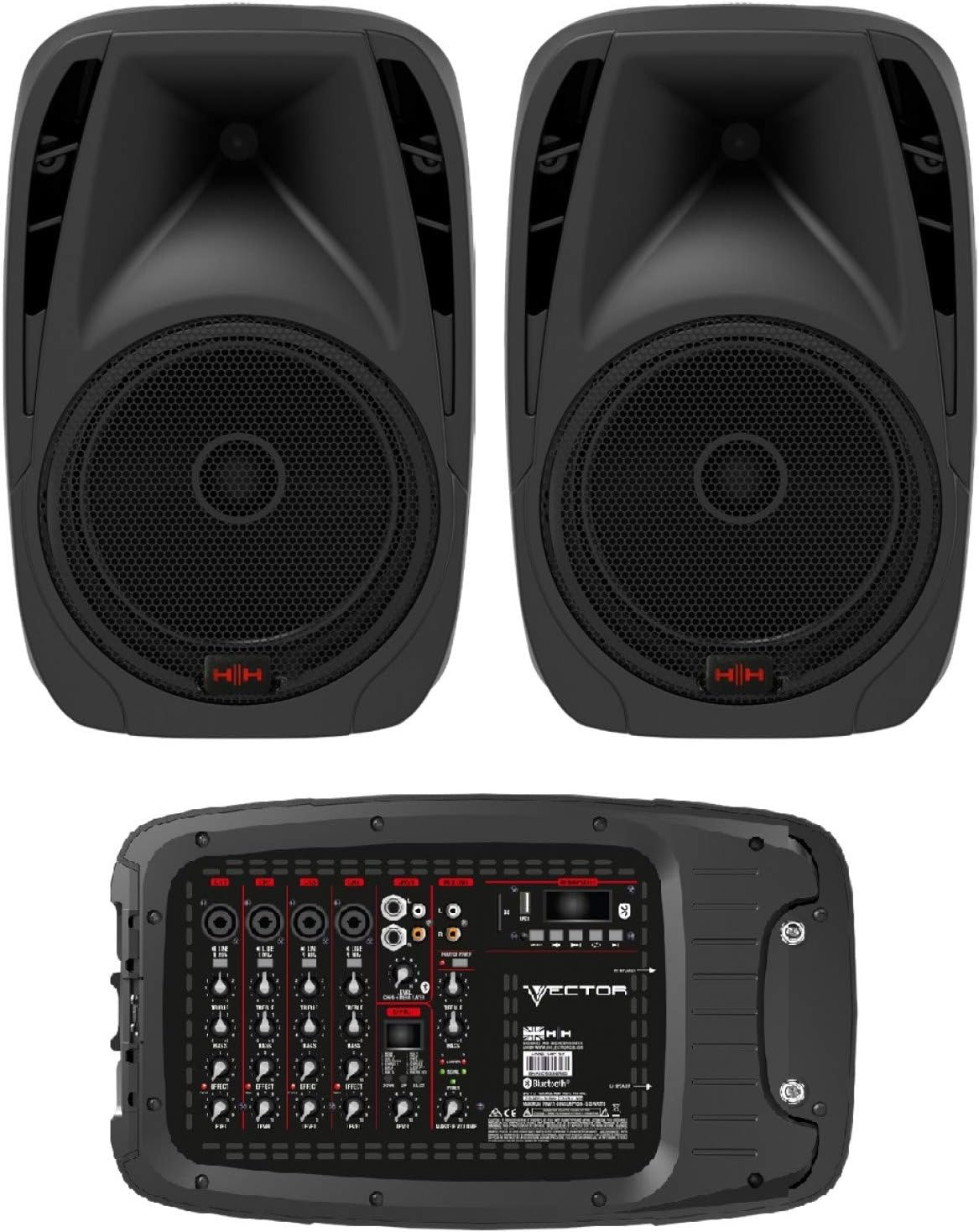
Figure 1: The HH Electronics VECTOR VRC-210 Portable PA System, showing the two speaker units and the central mixer module.
Key Features
Powerful Output: 2 x 500 Watts (peak) power output, suitable for various events.
Integrated Mixer: 6-channel detachable mixer for simultaneous connection of multiple instruments and microphones.
Digital Effects: 16 built-in Digital Signal Processing (DSP) effects to enhance vocals and instruments.
Versatile Media Player: Features Bluetooth V5.0, USB, and SD card inputs for easy audio playback.
Portable Design: Lightweight polypropylene construction with integrated carry handles and a unique 'clip-together' design for convenient transport.
Multiple Inputs: Includes 4 x Balanced Combi XLR/Socket with Microphone/Line Power Switch, 2 x 6.3mm Single Ended Socket Inputs, and 2 x RCA Inputs.
UK Engineered: Designed and engineered in the UK.
Figure 2: Key features of the VRC-210, emphasizing sound quality, portability, robust construction, and practical design.
Package Contents
Upon unpacking your HH Electronics VECTOR VRC-210 system, please ensure all the following components are present and in good condition:
2 x HH Electronics VECTOR VRC-210 Speaker Units
1 x Detachable 6-Channel Mixer Module
2 x Speaker Cables
1 x Power Cable
User Manual (this document)
Setup Guide
1. Unpacking and Assembly
Carefully remove all components from the packaging. The VRC-210 features a unique 'clip-together' design, allowing the mixer module to securely attach to the rear of one of the speaker units for compact transport. To separate the mixer from the speaker, gently unclip the fasteners.
Figure 3: The VRC-210 speakers demonstrating the clip-together design for easy transport.
2. Speaker Placement
Position the two speaker units in your desired location. For optimal sound dispersion, place them on a stable, elevated surface or use compatible 35mm pole mounts (not included). Ensure there is adequate space around each speaker for ventilation.
3. Connecting the Speakers to the Mixer
Connect each speaker unit to the mixer module using the provided speaker cables. The speaker outputs on the mixer are clearly labeled. Ensure a secure connection at both ends.
4. Power Connection
Before connecting the power cable, ensure all volume controls on the mixer are set to their minimum (off) position. Connect the power cable to the mixer's power input and then to a suitable AC power outlet. The system operates on corded electric power and does not require batteries.
Operating Instructions
1. Mixer Overview and Controls
The VRC-210 mixer provides comprehensive control over your audio inputs and outputs. Familiarize yourself with the layout:
Figure 4: The VRC-210 mixer control panel, showing input channels, EQ, effects, and media player controls.
Input Channels (CH1-CH6): Each channel features input jacks (Combi XLR/6.3mm Jack), gain control, 2-band EQ (Treble, Bass), Effect send, and Level control. Channels 1-4 support both microphone and line-level signals.
Media Player: Located on the top right, with controls for USB, SD card, and Bluetooth playback.
DSP Effects Section: Controls for selecting and adjusting the 16 built-in digital effects.
Master Volume: Controls the overall output level of the system.
Mix Out: RCA outputs for connecting to external recording devices or additional PA systems.
2. Input Connections
Connect your microphones, instruments, or other audio sources to the appropriate input channels. Channels 1-4 offer versatile Combi XLR/6.3mm Jack inputs, while channels 5/6 provide 6.3mm Jack and RCA inputs for stereo sources like laptops or smartphones.
3. Bluetooth Connectivity
To connect a Bluetooth device:
Select the Bluetooth mode on the media player.
On your device, search for available Bluetooth devices.
Select "HH VRC-210" (or similar) from the list to pair.
Once paired, audio from your device will play through the system.
4. USB/SD Card Playback
Insert a USB drive or SD card containing audio files into the respective slot on the media player. The system will automatically detect and begin playing compatible audio files. Use the media player controls (play/pause, skip, mode) to navigate your media.
5. Using DSP Effects
The VRC-210 includes 16 digital effects. Use the 'Effect Select' knob to choose an effect and the 'Effect Level' control on each channel to send a desired amount of that effect to the individual input. The 'Effect Return' control adjusts the overall level of the effects in the main mix.
Maintenance and Care
Cleaning: Use a soft, dry cloth to clean the exterior surfaces of the speakers and mixer. Avoid using abrasive cleaners or solvents.
Storage: When not in use, store the system in a cool, dry place, away from direct sunlight and extreme temperatures. Utilize the 'clip-together' design for compact storage and transport.
Ventilation: Ensure that the ventilation openings on the mixer and speakers are not blocked during operation to prevent overheating.
Cable Care: Handle power and speaker cables carefully. Avoid sharp bends or kinks that could damage the internal wiring.
Troubleshooting
Problem
Possible Cause
Solution
No power
Power cable not connected; Power outlet faulty; System fuse blown.
Ensure power cable is securely connected. Test power outlet with another device. Check and replace fuse if necessary (refer to service manual or contact support).
No sound output
Volume controls too low; Speaker cables disconnected; Input source not connected or faulty; Incorrect input selected on mixer.
Increase Master Volume and individual channel levels. Check speaker cable connections. Verify input source is working and connected correctly. Ensure correct input mode (e.g., Bluetooth, USB, specific channel) is selected.
Distorted sound
Input gain too high; Master volume too high; Speaker damaged.
Reduce input gain on channels. Lower Master Volume. If distortion persists, contact support.
Bluetooth not connecting
Bluetooth mode not selected; Device too far; Interference; Previously paired device connected.
Ensure Bluetooth mode is active on the mixer. Move device closer to the mixer. Turn off other Bluetooth devices. Disconnect from previously paired devices.
Technical Specifications
Feature
Specification
Model
VRC-210
Output Wattage
2 x 500 Watts (Peak)
Number of Channels
6
Audio Inputs
4 x Combi XLR/6.3mm Jack, 2 x 6.3mm Jack, 2 x RCA
Connectivity Technology
Bluetooth V5.0, USB, SD Card
DSP Effects
16 Digital Effects
Material Type
Polypropylene (PP)
Power Source
Corded Electric
Product Dimensions (L x W x H)
64 x 37.5 x 56 cm
Item Weight
18 Kilograms
Included Components
Speakers, Mixer, Cables
Batteries Required
No
Support Information
For technical assistance, warranty inquiries, or further information regarding your HH Electronics VECTOR VRC-210 Portable PA System, please visit the official HH Electronics website or contact their customer support. As a UK-designed and serviced brand, HH Electronics is committed to providing comprehensive support for their products.
Please retain your proof of purchase for any warranty claims.
Ask about setup, troubleshooting, compatibility, parts, safety, or missing instructions. Manuals+ will review the question and use this page’s manual context to help answer it.