
1. Introduction
The Alctron MP200V2 is a high-quality FET microphone amplifier designed for professional audio recording applications. It is suitable for vocal recording, instrument amplification, and integration into both digital and analog recording setups. This unit features a fully discrete signal path and three separate transformers for the microphone input, line input, and line output, enhancing overall performance and sound quality. Its robust construction with an aluminum-alloy panel and steel housing ensures durability.
This manual provides essential information for the safe and efficient operation of your MP200V2. Please read it thoroughly before use and retain it for future reference.
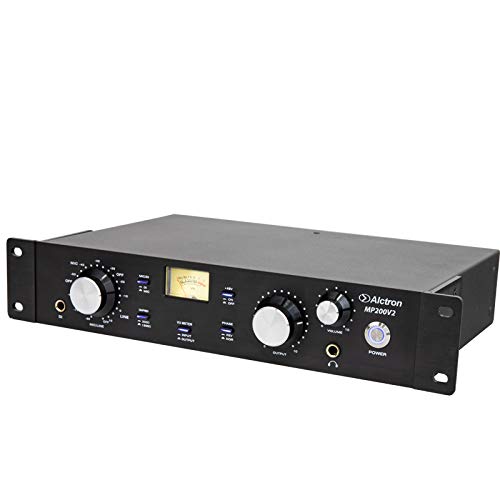
Image 1.1: Front view of the Alctron MP200V2 Microphone Amplifier.
2. Safety Instructions
- Power Source: Connect the unit only to the specified power adapter and voltage. Ensure the power outlet is properly grounded.
- Moisture: Do not expose the unit to rain, moisture, or extreme humidity. Avoid placing liquid-filled objects on the unit.
- Ventilation: Ensure adequate ventilation around the unit. Do not block ventilation openings.
- Heat: Keep the unit away from heat sources such as radiators, heat registers, stoves, or other apparatus that produce heat.
- Cleaning: Disconnect the power before cleaning. Use a dry cloth only.
- Servicing: Do not attempt to service this unit yourself. Refer all servicing to qualified service personnel.
- Placement: Place the unit on a stable, level surface to prevent damage from falling.
3. Package Contents
Please check that all items listed below are included in your package:
- Alctron MP200V2 Microphone Amplifier Unit
- Power Adapter
- User Manual (this document)
4. Product Overview
4.1 Front Panel Controls and Indicators

Image 4.1: Detailed view of the Alctron MP200V2 front panel.
The front panel of the MP200V2 features various controls for input selection, gain adjustment, output level, and monitoring. Key elements include:
- MIC/LINE Input Selector: A multi-function knob to select between microphone and line inputs.
- Gain Control: Adjusts the input gain for the selected source.
- VU Meter: Displays the input or output level, depending on the meter selection.
- Meter Selector: Buttons to switch the VU meter display between input and output levels.
- Phase Switch: Inverts the phase of the input signal.
- Output Level Control: Adjusts the overall output level.
- Headphone Output: 1/4-inch jack for monitoring.
- Headphone Volume: Controls the volume for the headphone output.
- Power Button: Turns the unit on or off.
4.2 Rear Panel Connections
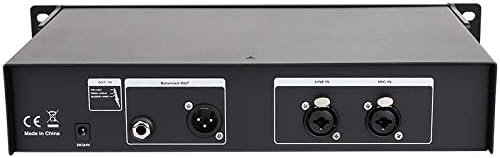
Image 4.2: Detailed view of the Alctron MP200V2 rear panel connections.
The rear panel provides all necessary audio input and output connections, as well as the power input.
- Power Input: DC 18V input for the power adapter.
- Balanced XLR Output: Main balanced audio output.
- Line Input: 1/4-inch TRS/TS input for line-level signals.
- MIC Input: XLR input for microphones.
5. Setup
- Power Connection: Connect the provided power adapter to the DC 18V input on the rear panel of the MP200V2, then plug the adapter into a suitable power outlet. Ensure the unit is powered off before connecting.
- Microphone Connection: Connect your microphone to the XLR MIC Input on the rear panel.
- Line Input Connection: If using a line-level source (e.g., instrument, pre-amp output), connect it to the 1/4-inch LINE Input on the rear panel.
- Output Connection: Connect the Balanced XLR Output of the MP200V2 to your audio interface, mixer, or recording device.
- Headphone Connection: For monitoring, plug your headphones into the 1/4-inch Headphone Output on the front panel.
6. Operating Instructions
- Power On: Press the POWER button on the front panel to turn on the unit. The indicator light will illuminate.
- Input Selection: Use the MIC/LINE knob to select the desired input source (microphone or line).
- Gain Adjustment: Slowly turn the GAIN control clockwise to increase the input level. Monitor the VU meter to ensure the signal does not clip (exceed 0 dB). Adjust for an optimal signal-to-noise ratio without distortion.
- Phase Inversion: If phase issues are detected (e.g., when combining multiple microphones), press the PHASE button to invert the signal phase.
- Output Level: Adjust the OUTPUT control to set the desired signal level sent to your recording device or mixer.
- Monitoring: Adjust the HEADPHONE VOLUME for comfortable listening through your headphones. Use the METER SELECTOR buttons to switch the VU meter between displaying input or output levels as needed.
The MP200V2's specific electronic circuit and three separate transformers contribute to its warm and sweet output tone, while also providing effective shielding against outside interference. The multi-function knob simplifies operation across various recording scenarios.
7. Maintenance
- Cleaning: Use a soft, dry cloth to clean the exterior of the unit. Do not use abrasive cleaners, solvents, or waxes.
- Storage: When not in use for extended periods, store the unit in a cool, dry place, away from direct sunlight and extreme temperatures.
- Ventilation: Ensure that the ventilation slots are free from dust and debris to prevent overheating.
8. Troubleshooting
| Problem | Possible Cause | Solution |
|---|---|---|
| No power | Power adapter not connected; power outlet faulty; unit faulty. | Check power adapter connection; try a different outlet; contact support. |
| No audio output | Incorrect input/output selection; gain too low; cables faulty; connected device faulty. | Verify input/output settings; increase GAIN and OUTPUT levels; check all cables; test with another device. |
| Distorted audio | Input gain too high; output level too high; faulty cable. | Reduce GAIN or OUTPUT levels; check cables for damage. |
| Hum or noise | Ground loop; interference from other electronics; faulty cable. | Ensure proper grounding; move unit away from other electronics; try different cables. |
9. Specifications
- Model: MP200V2
- Type: FET Microphone Amplifier
- Signal Path: Fully discrete
- Transformers: Three separate (Mic Input, Line Input, Line Output)
- Housing: Aluminum-alloy panel, steel housing
- Item Weight: 4 kg
- Package Dimensions: 47 x 27 x 11 cm
- ASIN: B08T61G69P
- Date First Available: 15 January 2021
10. Warranty and Support
Alctron products are designed for reliability and performance. This product comes with a standard manufacturer's warranty. Please refer to the warranty card included with your purchase or visit the official Alctron website for detailed warranty terms and conditions.
For technical support, service, or replacement parts, please contact your authorized Alctron dealer or the Alctron customer support team. Keep your purchase receipt as proof of purchase for warranty claims.
