
Kismile 30'' Tower Fan
Kismile 30'' Tower Fan User Manual
Model: 30'' Tower Fan (Green)
Introduction
Thank you for choosing the Kismile 30'' Tower Fan. This user manual provides important information regarding the safe operation, installation, maintenance, and troubleshooting of your new tower fan. Please read this manual thoroughly before using the product and retain it for future reference.

Image: The Kismile 30-inch tower fan in green, shown alongside its white remote control.
Important Safety Instructions
When using electrical appliances, basic precautions should always be followed to reduce the risk of fire, electric shock, and injury to persons, including the following:
- Read all instructions before using this fan.
- Always unplug the fan before moving, cleaning, or servicing.
- Do not operate any fan with a damaged cord or plug.
- Do not run cord under carpeting. Do not cover cord with throw rugs, runners, or similar coverings.
- Do not insert or allow foreign objects to enter any ventilation or exhaust opening as this may cause an electric shock or fire, or damage the fan.
- Do not use this fan in wet or damp locations, such as bathrooms.
- This appliance is not intended for use by persons (including children) with reduced physical, sensory or mental capabilities, or lack of experience and knowledge, unless they have been given supervision or instruction concerning use of the appliance by a person responsible for their safety.
- Children should be supervised to ensure that they do not play with the appliance.

Image: A Kismile tower fan positioned safely in a living room, with a father and child playing nearby, illustrating its low noise and child-safe design.
Package Contents
Please check the package contents upon unpacking. If any items are missing or damaged, please contact customer support.
- Kismile 30'' Tower Fan Unit
- Remote Control
- User Manual (this document)
Setup
The Kismile 30'' Tower Fan typically comes pre-assembled or requires minimal assembly for the base. Follow these steps:
- Carefully remove the fan and all packaging materials from the box.
- If the base is separate, align the base pieces and attach them securely to the bottom of the fan unit according to the markings. Ensure it clicks into place or is fastened with provided screws (if applicable).
- Place the fan on a firm, level surface.
- Insert batteries into the remote control (batteries not included, typically AAA).
- Plug the power cord into a standard electrical outlet.
Operating Instructions
Your Kismile Tower Fan can be operated using the control panel on top of the unit or the included remote control.
Control Panel Overview

Image: A detailed view of the Kismile tower fan's top control panel and the remote control, with numbered labels indicating functions like ON/OFF, Oscillation, Timer, Speed, and Mode.
- ON/OFF: Press to turn the fan on or off.
- OSC (Oscillation): Press to activate or deactivate the oscillation function.
- TIMER: Press to set the auto-off timer.
- SPEED: Press to cycle through fan speeds (Low, Middle, High).
- MODE: Press to cycle through wind modes (Normal, Natural, Sleep).
Remote Control
The remote control provides convenient access to all fan functions from a distance. Ensure the remote is pointed towards the fan's receiver.
- ON/SPEED: Turns the fan on and cycles through speed settings.
- OFF: Turns the fan off.
- MODE: Cycles through wind modes.
- TIMER: Sets the auto-off timer.
- SWING: Activates or deactivates oscillation.
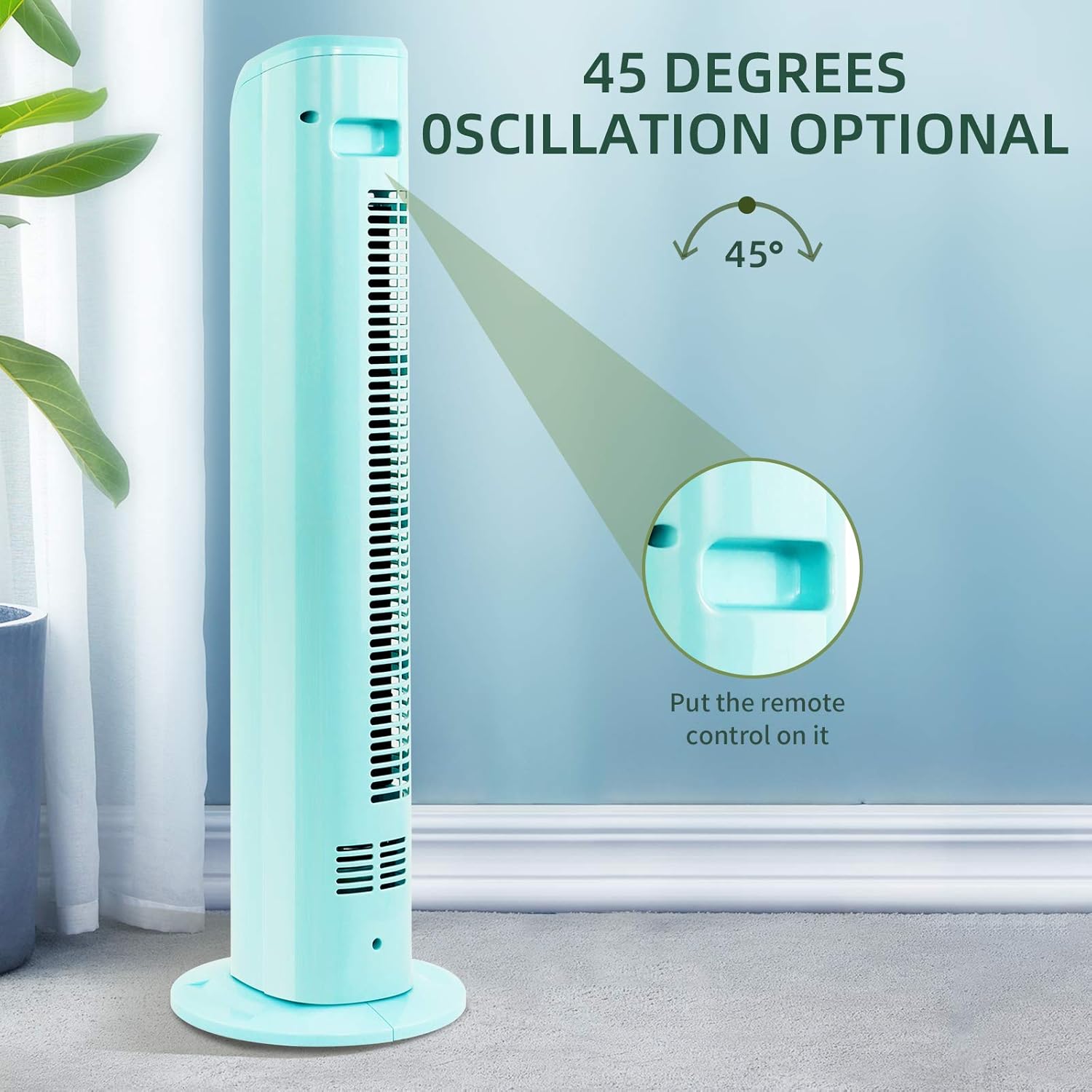
Image: The Kismile tower fan demonstrating its 45-degree oscillation capability. An inset shows a convenient slot on the fan's top for storing the remote control.
Modes and Features
The Kismile Tower Fan offers various settings to customize your cooling experience.
- Wind Modes:
- Normal Wind: Provides a constant, steady airflow at your selected speed.
- Natural Wind: Simulates a natural breeze by varying the fan speed intermittently.
- Sleep Wind: Operates at a lower, quieter speed, gradually decreasing over time to provide a comfortable sleeping environment.
- Wind Speeds: Choose from Low, Middle, or High settings to adjust the intensity of the airflow.
- Timer Setting: The built-in timer allows you to set the fan to automatically turn off after a specified period, ranging from 0.5 to 4.5 hours.
- Oscillation: The fan can oscillate up to 45 degrees, distributing air across a wider area. Press the OSC/SWING button to activate or deactivate this function.

Image: A graphic illustrating the three distinct wind modes of the Kismile tower fan: Natural wind (varying breeze), Normal wind (constant airflow), and Sleep wind (gentle, quiet operation).
Maintenance
Regular maintenance helps ensure the longevity and optimal performance of your fan.
- Cleaning: Always unplug the fan before cleaning. Use a soft, damp cloth to wipe the exterior surfaces. Do not use abrasive cleaners or solvents. For dust accumulation on the air intake/outlet grilles, use a vacuum cleaner with a brush attachment.
- Storage: If storing the fan for an extended period, unplug it, clean it thoroughly, and store it in a cool, dry place, preferably in its original packaging.
Troubleshooting
If you encounter issues with your Kismile Tower Fan, please refer to the following common problems and solutions:
| Problem | Possible Cause | Solution |
|---|---|---|
| Fan does not turn on. | No power supply; Power button not pressed; Remote control batteries dead. | Ensure fan is plugged into a working outlet. Press the ON/OFF button on the fan or remote. Replace remote control batteries. |
| Weak airflow. | Fan speed set too low; Air intake/outlet blocked by dust. | Increase fan speed. Clean the air intake and outlet grilles. |
| Fan is noisy. | Fan not on a level surface; Internal obstruction. | Place the fan on a flat, stable surface. Unplug and check for any visible obstructions in the grilles. |
| Oscillation not working. | Oscillation function not activated. | Press the OSC/SWING button on the control panel or remote. |
Specifications
Technical specifications for the Kismile 30'' Tower Fan:
| Feature | Detail |
|---|---|
| Brand | Kismile |
| Model | 30'' Tower Fan |
| Color | Green |
| Electric Fan Design | Floor Fan |
| Power Source | Corded Electric |
| Room Type | Bedroom, Living Room, Office, Kitchen |
| Special Feature | Bladeless, Oscillating, Remote Control, Timer |
| Control Method | Remote, Control Panel |
| Size | 30 inch (approx. 30.31" H x 8.66" W x 8.66" D) |
| Oscillation Angle | 45 degrees |
| Timer Range | 0.5 - 4.5 hours |
| Wind Modes | Normal, Natural, Sleep |
| Wind Speeds | Low, Middle, High |

Image: The Kismile tower fan with its approximate dimensions (30.31 inches height, 8.66 inches width/depth) and illustrations of suitable placement in living rooms, bedrooms, offices, and kitchens.
Warranty and Support
Kismile products are manufactured to high-quality standards. For information regarding warranty coverage, technical support, or replacement parts, please refer to the contact information provided with your purchase or visit the official Kismile website.
Ask a question about this manual
Ask about setup, troubleshooting, compatibility, parts, safety, or missing instructions. Manuals+ will review the question and use this page’s manual context to help answer it.