1. Introduction
This manual provides essential information for the safe and efficient operation of your LG HU810PW 4K UHD Smart Dual Laser CineBeam Projector. Please read it thoroughly before using the product and retain it for future reference.
Package Contents
- Projector
- LG Magic Remote (with batteries)
- User Manual
- Warranty Card
- Adapter
- Power Cord

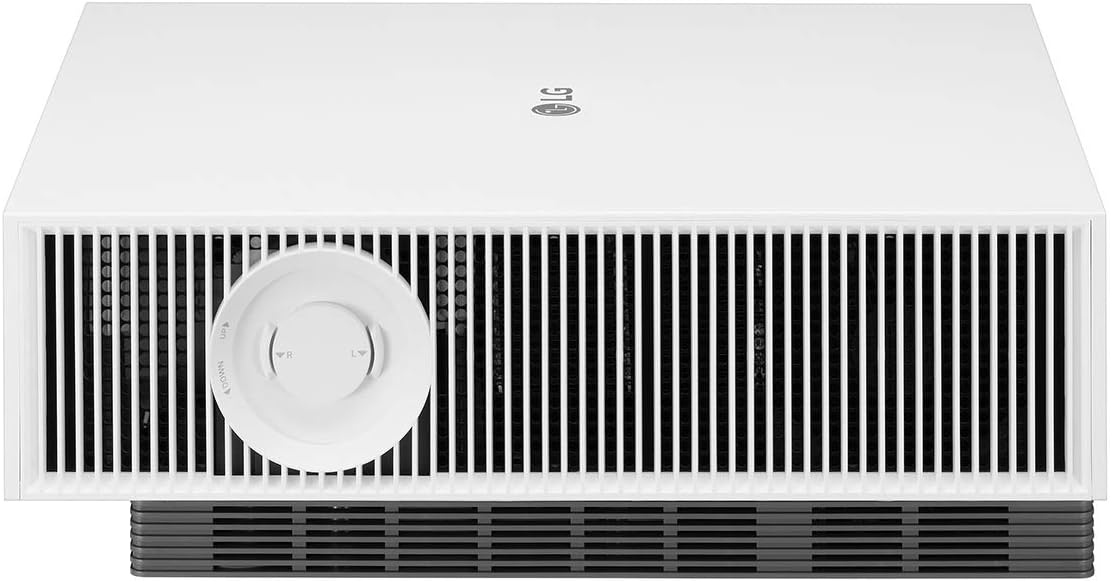
This image displays the LG HU810PW projector from a front-angle view, highlighting its compact, white design and the prominent lens.
2. Setup
Projector Placement
Position the projector on a stable, flat surface or mount it securely. Ensure adequate ventilation around the unit. The projector supports screen sizes up to 300 inches diagonally.

This image illustrates the dimensions of the LG HU810PW projector: 13.3 inches (W) x 5.7 inches (H) x 16.1 inches (D), with a weight of 24.3 lbs.
Connections
Connect your video sources (e.g., Blu-ray player, gaming console, streaming device) to the HDMI ports. For audio output, use the HDMI eARC port for compatible sound systems or the Optical Digital Audio Out. USB ports are available for media playback or connecting accessories.

This image shows the rear panel of the LG HU810PW projector, detailing its connectivity options including HDMI ports (one with eARC), USB ports, Optical Digital Audio Out, LAN port, and power input.
Lens Adjustment
The projector features both Lens Shift and Zoom functionality for precise image alignment without moving the unit. Use the dedicated controls on the projector to adjust the image position horizontally and vertically, and to fine-tune the zoom for your screen size.

This image highlights the manual lens shift and zoom controls located on the side of the LG HU810PW projector, allowing for precise image positioning and sizing.
3. Operating the Projector
Power On/Off
Press the Power button on the remote control or the joystick button on the projector to turn the unit on or off. The laser light source allows for quick startup.
Smart Features (webOS 5.0)
The LG HU810PW features webOS 5.0, providing a smart TV experience directly on your projector. Use the LG Magic Remote to navigate the intuitive interface, access built-in apps like YouTube, Amazon Prime, and Disney+, and manage settings.

This image illustrates the projector's advanced wireless capabilities, including AirPlay, Screen Share, and Bluetooth connectivity, allowing for seamless content streaming and device pairing.
Picture Modes and Optimization
The projector offers various picture modes and optimization features to enhance your viewing experience:
- Iris Mode: Adjusts brightness for optimal viewing in both dark and bright environments.
- Adaptive Contrast: Dynamically adjusts the laser output to create a high contrast ratio, making bright scenes brighter and dark scenes more detailed.
- Filmmaker Mode: Disables motion smoothing and other video processing settings to preserve the director's original intent for film content.

This image demonstrates the Iris Mode feature, showing how it optimizes brightness for both dark room viewing (enhanced black levels) and bright room viewing (vivid and visible picture).
This image illustrates the Adaptive Contrast feature, which enhances image depth by adjusting laser output to create a high contrast ratio, making bright scenes brighter and dark scenes more detailed.
4. Picture Quality Features
4K UHD Resolution
Experience stunning clarity and detail with 4K UHD (3840 x 2160) resolution, delivering 8.3 megapixels for a sharp and immersive image.

This image showcases the LG CineBeam 4K UHD projector's capability to project a large, high-resolution image, emphasizing its suitability for home cinema with up to a 300-inch display.
DCI-P3 97% Color Gamut
The dual laser light source achieves 97% DCI-P3 color gamut, providing a wide range of accurate and vibrant colors for a true cinematic experience.
HDR10 and HLG Support
The projector supports HDR10 and HLG (Hybrid Log-Gamma) high dynamic range formats, delivering enhanced contrast, brightness, and color detail in compatible content.

This image displays the HDR10 logo, indicating support for High Dynamic Range content.

This image displays the HLG (Hybrid Log-Gamma) logo, indicating support for this High Dynamic Range broadcast standard.
Dynamic Tone Mapping
This technology analyzes HDR content frame by frame to optimize brightness and contrast, ensuring vivid colors and deep blacks throughout your viewing.
5. Connectivity
Wired Connections
- HDMI: Multiple HDMI ports are available, including one with eARC (Enhanced Audio Return Channel) for high-quality audio passthrough to compatible sound systems. HDMI 2.1 supports 10-bit images with 4:4:4 RGB specifications.
- USB: Connect USB storage devices for media playback.
- LAN: For wired network connection.
- Optical Digital Audio Out: For connecting to external audio devices.
Wireless Connections
- Wi-Fi: Connect to your home network for smart features and streaming.
- Bluetooth: Connect wireless audio devices such as headphones or speakers.
- AirPlay: Stream content directly from your iOS devices.
- Screen Share (Miracast): Mirror content from compatible Android or Windows 8.1+ devices.
6. Maintenance
Cleaning
- Exterior: Wipe the projector's exterior with a soft, dry cloth. Do not use abrasive cleaners or solvents.
- Lens: Use a soft, lint-free cloth specifically designed for camera lenses. Avoid touching the lens directly with your fingers.
- Ventilation: Ensure the ventilation openings are clear of dust and obstructions to prevent overheating.
Laser Light Source
The dual laser light source has a long lifespan and does not require replacement under normal usage conditions.
7. Troubleshooting
- No Power: Check if the power cord is securely connected to the projector and the power outlet. Ensure the power outlet is functional.
- No Image: Verify that the video source is properly connected and powered on. Select the correct input source using the remote control. Check the lens cap (if applicable) and ensure the projector is not in standby mode.
- Blurred Image: Adjust the focus using the lens controls on the projector. Ensure the projection surface is flat and the projector is stable.
- Image Distortion: Use the lens shift controls to correct image position. Avoid using digital keystone correction unless necessary, as it can reduce image quality.
- No Audio: Check audio cable connections. Ensure the correct audio output is selected in the projector's settings. Verify the volume level on both the projector and your audio system.
- Remote Control Not Working: Check the batteries in the remote control. Ensure there are no obstructions between the remote and the projector's IR receiver.
8. Specifications
| Feature | Detail |
|---|---|
| Model Number | HU810PW |
| Display Resolution | 3840 x 2160 (4K UHD) |
| Brightness | 2700 ANSI Lumens |
| Contrast Ratio | 2,000,000:1 |
| Color Gamut | 97% DCI-P3 |
| Light Source | Dual Laser |
| HDR Support | HDR10, HLG |
| Smart Platform | LG webOS 5.0 |
| Connectivity | Bluetooth, HDMI (eARC), USB, LAN |
| Product Dimensions | 13.3 x 16.1 x 5.7 inches |
| Item Weight | 24.3 pounds |
9. Warranty and Support
Your LG HU810PW projector comes with a manufacturer's warranty. Please refer to the included Warranty Card for detailed terms and conditions. For additional support, product registration, or service inquiries, please visit the official LG support website: