
Konftel 931101001
Konftel CAM 10 Webcam User Manual
Model: 931101001
Introduction
The Konftel CAM 10 is a professional USB webcam designed for high-quality video conferencing and streaming. It features 1080p Full HD resolution, dual microphones for clear audio, and a built-in privacy screen for enhanced security. This manual provides detailed instructions for setting up, operating, maintaining, and troubleshooting your Konftel CAM 10 Webcam.

Figure 1: Front view of the Konftel CAM 10 Webcam.
What's in the Box
Please check the package contents to ensure all items are present:
- Konftel CAM 10 Webcam (with integrated USB cable)

Figure 2: Integrated USB 2.0 cable for connection.
Setup
Follow these steps to set up your Konftel CAM 10 Webcam:
Placement: Position the webcam on top of your monitor, laptop screen, or a tripod. The integrated mount allows for flexible placement.

Figure 3: The webcam features a standard tripod thread for versatile mounting options.
Connect to Computer: Plug the integrated USB cable from the Konftel CAM 10 into an available USB 2.0 port on your computer. The webcam is plug-and-play, meaning it does not require additional driver installation for most operating systems (Windows, macOS, Linux).
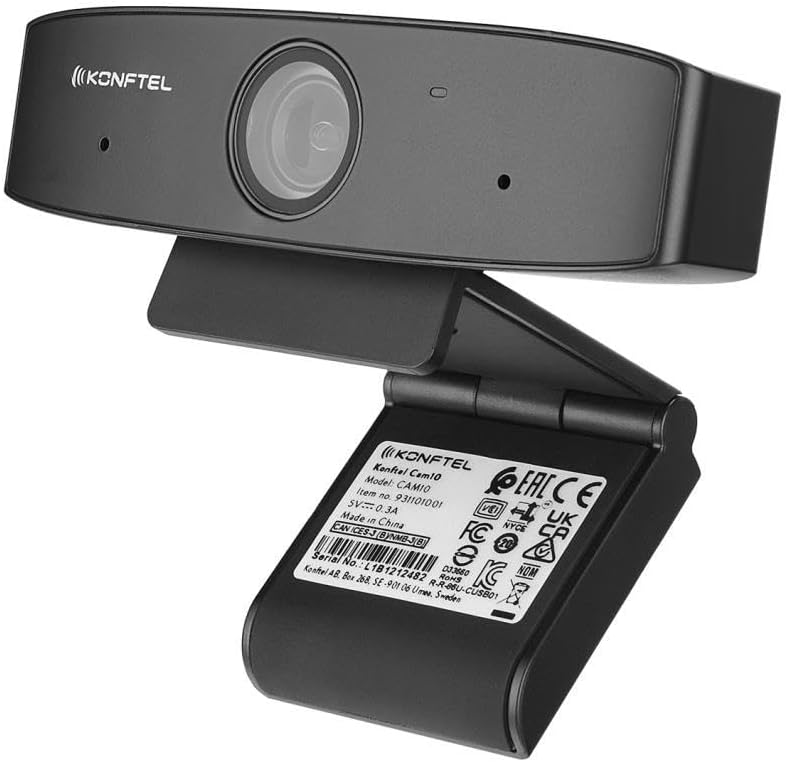
Figure 4: Rear view displaying product information and USB cable connection point.
Software Recognition: Your computer should automatically detect the webcam. You can verify this in your operating system's device manager or sound/video settings. For video conferencing applications (e.g., Zoom, Microsoft Teams, Google Meet), select "Konftel CAM 10" as your preferred camera and microphone device.
Operating Instructions
The Konftel CAM 10 is designed for ease of use. Here are key operational aspects:
Video Quality: The webcam supports 1080p Full HD video resolution, providing clear and sharp images for your calls and recordings. Ensure your video conferencing software is set to the highest available resolution for optimal performance.
Audio: Equipped with dual microphones, the CAM 10 captures clear audio, reducing background noise. Position the webcam appropriately to ensure your voice is picked up effectively.
Privacy Screen: The Konftel CAM 10 features a built-in mechanical privacy screen. To activate or deactivate the privacy screen, slide the small tab located above the lens. This physically blocks the camera lens, ensuring your privacy when the webcam is not in use.

Figure 5: Side view highlighting the integrated privacy slider for the camera lens.
Indicator Light: An LED indicator light on the webcam will illuminate when the camera is active and in use by an application.
Maintenance
To ensure the longevity and optimal performance of your Konftel CAM 10 Webcam, follow these maintenance guidelines:
- Cleaning: Use a soft, dry, lint-free cloth to clean the camera lens and body. For stubborn smudges on the lens, a slightly dampened microfiber cloth can be used, followed by a dry one. Avoid using harsh chemicals, solvents, or abrasive cleaners.
- Storage: When not in use, store the webcam in a clean, dry place away from extreme temperatures and direct sunlight.
- Cable Care: Do not bend or crimp the USB cable excessively. Always grasp the plug, not the cable, when disconnecting from your computer.
Troubleshooting
If you encounter issues with your Konftel CAM 10 Webcam, refer to the following common problems and solutions:
| Problem | Possible Cause / Solution |
|---|---|
| No video output / Camera not detected |
|
| No audio input / Microphone not working |
|
| Poor video quality |
|
Specifications
| Feature | Detail |
|---|---|
| Model Number | 931101001 |
| Video Resolution | 1080p Full HD |
| Connectivity | USB 2.0 |
| Microphones | Dual microphones |
| Privacy Feature | Built-in privacy screen |
| Mounting | Integrated clip/stand, Thread for tripod mount |
| Product Dimensions | 1.21 x 4.65 x 1.46 inches |
| Item Weight | 5.8 ounces |
| Manufacturer | KONFTEL |
| First Available Date | February 15, 2021 |
Warranty and Support
For warranty information and technical support, please refer to the official Konftel website or contact their customer service. Keep your purchase receipt as proof of purchase for warranty claims.
For further assistance, you may visit the Konftel support page or contact their customer service directly. Please have your product model number (931101001) and serial number ready when contacting support.
Related documents931101001


Ask a question about this manual
Ask about setup, troubleshooting, compatibility, parts, safety, or missing instructions. Manuals+ will review the question and use this page’s manual context to help answer it.