
1. Introduction
This manual provides instructions for the K&F CONCEPT 77mm Magnetic Nano-X Series Lens Filters Kit. It covers the components included, setup procedures, operational guidelines for each filter type, maintenance recommendations, and troubleshooting tips. Please read this manual thoroughly to ensure proper use and care of your filter kit.
2. Product Overview and Components
The K&F CONCEPT 77mm Magnetic Nano-X Series Lens Filters Kit is designed to enhance photographic capabilities through quick and efficient filter changes. The kit includes the following components:
- Magnetic MCUV Filter: A multi-coated ultraviolet filter that protects the lens and reduces UV haze.
- Magnetic CPL Filter: A circular polarizer filter that reduces glare from non-metallic surfaces and enhances color saturation and contrast.
- Magnetic Fixed ND1000 Filter: A neutral density filter that reduces light by 10 f-stops, enabling long exposure photography.
- Magnetic Basic Ring (Adapter Ring): A threaded ring that attaches to your camera lens, providing a magnetic base for quick filter attachment.
- Filter Pouch: A protective case for storing and transporting the filters.

3. Setup
- Attach the Magnetic Adapter Ring: Carefully screw the magnetic basic ring onto the front thread of your camera lens. Ensure it is securely fastened but do not overtighten. This ring provides the magnetic base for attaching the filters.
- Attach Filters: Once the magnetic adapter ring is in place, simply align the desired magnetic filter (MCUV, CPL, or ND1000) with the adapter ring and allow the magnets to snap it into position. The magnetic design allows for quick attachment and removal.
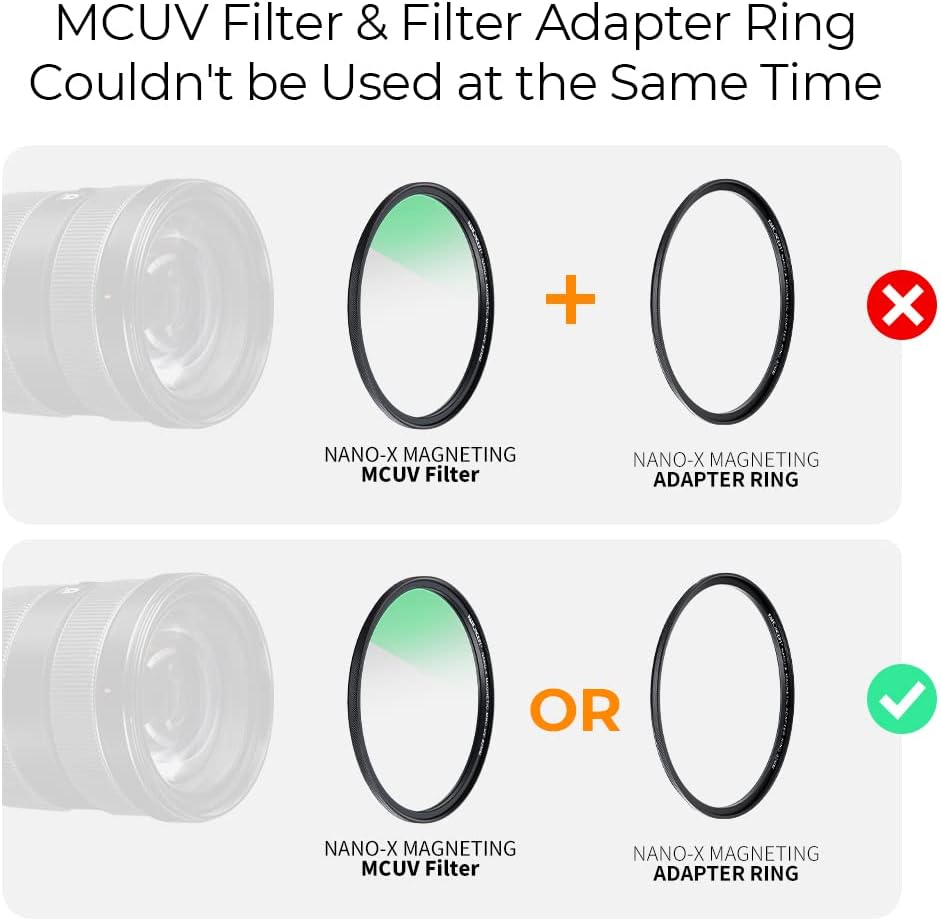
- Important Note on MCUV Filter and Adapter Ring: The magnetic MCUV filter and the magnetic adapter ring cannot be used simultaneously. If you wish to use the MCUV filter, it should be directly attached to the lens thread if it has one, or used as the primary magnetic base if it is designed to function as such. If your MCUV filter is magnetic, it can serve as the base for other magnetic filters.

4. Operating Instructions
Each filter in the kit serves a specific purpose to enhance your photography. Understanding their functions will help you achieve desired effects.
4.1. MCUV Protection Filter
- Function: The MCUV filter blocks ultraviolet light, which can cause a bluish cast and reduced clarity in images, especially in outdoor or high-altitude environments. It also serves as a protective layer for your lens against dust, scratches, and moisture.
- Usage: Attach the MCUV filter to your lens for general protection and to improve image clarity by reducing atmospheric haze.

4.2. Circular Polarizer (CPL) Filter
- Function: The CPL filter reduces reflections and glare from non-metallic surfaces such as water, glass, and foliage. It also enhances color saturation and contrast, making skies bluer and greenery more vibrant.
- Usage: Rotate the outer ring of the CPL filter while looking through your camera's viewfinder or live view to observe the effect. Adjust until the desired level of polarization is achieved. This filter is particularly effective for landscape photography.

4.3. Fixed ND1000 Filter
- Function: The ND1000 filter reduces the amount of light entering the lens by 10 stops (1024x), allowing for significantly longer exposure times. This is ideal for creating motion blur effects in bright conditions, such as smoothing water or clouds.
- Usage: Attach the ND1000 filter when you need to use a slow shutter speed in bright light. This filter is commonly used for landscape photography to achieve artistic long exposure effects.

4.4. Stacking Filters
Filters can be stacked (e.g., CPL + ND1000) for combined effects. When stacking multiple filters, especially on wide-angle lenses, there is a possibility of vignetting (darkening at the corners of the image). This effect can sometimes be mitigated by slightly zooming in or using a larger filter size with a step-up ring if available.

5. Maintenance
Proper maintenance ensures the longevity and optimal performance of your K&F CONCEPT filters.
- Cleaning: The filters feature 28 multi-layer nanometer coatings, making them waterproof, oil-resistant, and scratch-resistant. To clean, gently wipe the filter surface with a clean, soft microfiber cloth. For stubborn smudges, use a small amount of lens cleaning solution specifically designed for optical glass. Avoid harsh chemicals or abrasive materials.
- Storage: Always store the filters in the provided filter pouch when not in use. This protects them from dust, scratches, and impacts.
- Handling: Avoid touching the glass surface directly with your fingers to prevent oil and smudges. Handle filters by their metal frames.


6. Troubleshooting
- Issue: Vignetting (dark corners) appears in images.
- Possible Cause: This can occur when stacking multiple filters, especially on wide-angle lenses, due to the combined thickness of the filter frames.
Solution: Try using fewer stacked filters. If possible, zoom in slightly with your lens. For future use, consider if a larger filter size with a step-up ring would be appropriate for your specific lens. - Issue: Filters detach unexpectedly.
- Possible Cause: While the magnets are strong, a sharp bump or improper alignment during attachment can cause detachment.
Solution: Ensure the filter is flush and securely seated on the magnetic adapter ring. Avoid sudden impacts to the camera or lens when filters are attached. Always handle the camera carefully. - Issue: Slight color shift in images.
- Possible Cause: Some filters, particularly ND filters, can introduce a minor color cast. This is often subtle and varies by lighting conditions.
Solution: This can typically be corrected during post-processing using white balance adjustments in your image editing software. - Issue: Filters are difficult to clean or show persistent smudges.
- Possible Cause: Improper cleaning techniques or use of unsuitable cleaning materials.
Solution: Use only a clean, soft microfiber cloth and specialized lens cleaning solution. Avoid excessive pressure. If the coating is damaged, the filter may need replacement.
7. Specifications
| Brand | K&F CONCEPT |
| Model Number | KF-FT1626 |
| Product Dimensions | 3.03"L x 3.03"W (Filter Size) |
| Item Weight | 1.1 pounds (total kit) |
| Material | Optical Glass, Aluminum Magnesium Alloy |
| Photo Filter Thread Size | 77 Millimeters |
| Coating Description | 28 Multi-Layer Coatings (Nano-X Series) |
| Photo Filter Effect Type | Neutral Density (ND1000), Ultraviolet (MCUV), Polarizer (CPL) |
| Water Resistance Level | Waterproof |
| Photo Filter Factor (ND1000) | 1024x (10 f-stops) |
8. Warranty and Support
For warranty information and customer support, please refer to the documentation included with your product packaging or visit the official K&F CONCEPT website. The manufacturer provides support for product-related inquiries and assistance with any operational issues.
Online Resources:
- K&F CONCEPT Official Website: www.kentfaith.com