
1. Introduction
This manual provides essential information for the safe and efficient operation of your DOOGEE S97 Pro Rugged Smartphone. Please read it thoroughly before using your device.

Image 1.1: The DOOGEE S97 Pro Rugged Smartphone, showcasing its robust design and display.
2. Device Overview
The DOOGEE S97 Pro is a rugged smartphone designed for durability and performance. Key features include:
- Operating System: Android 11
- Processor: Helio G95 Octa Core 2.1GHz 12nm
- Memory: 8GB RAM + 128GB ROM
- Battery: 8500mAh Super Battery with 33W Fast Charging and 10W Wireless Charging
- Display: 5.71-inch Corning Gorilla Glass
- Rear Camera: Samsung 48MP AI Main Camera (48MP + 8MP + 2MP + 2MP)
- Front Camera: 16MP
- Special Features: 40m Rangefinder, IP68 Waterproof, Dustproof, Shockproof, NFC Support
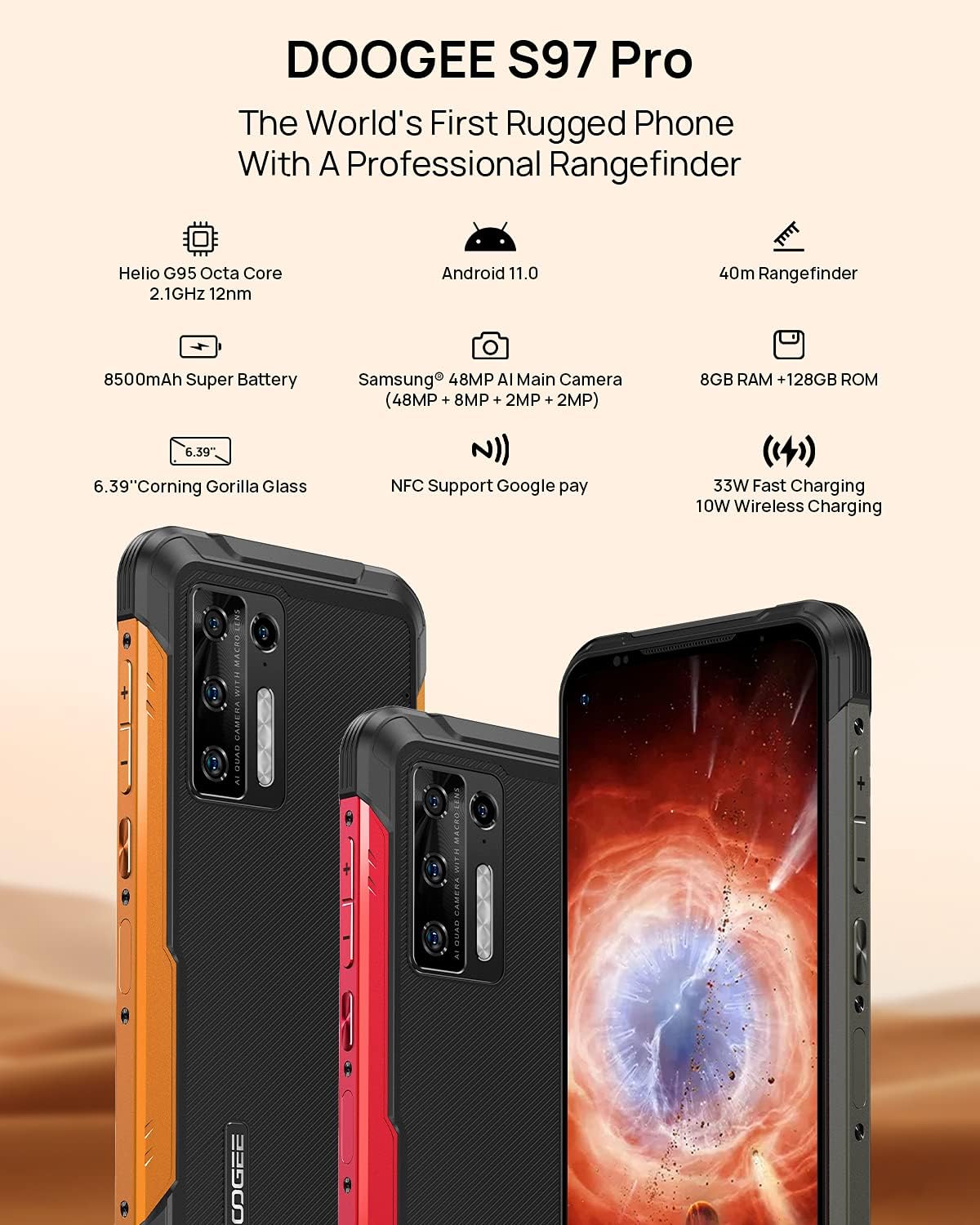
Image 2.1: Visual representation of the DOOGEE S97 Pro's main features, including processor, battery, camera, and display.
3. Setup
3.1 SIM Card Installation
- Locate the SIM card tray on the side of your device.
- Use the provided SIM ejector tool to open the tray.
- Carefully place your Nano SIM card(s) into the designated slots. Ensure proper orientation.
- Gently push the SIM card tray back into the device until it is flush with the body.
Note: This device supports specific frequency bands. Please verify compatibility with your network carrier before use. The DOOGEE S97 Pro does not support certain CDMA network carriers such as Verizon, Sprint, Xfinity, and TracFone.
3.2 Initial Power On
- Press and hold the Power button located on the side of the device until the DOOGEE logo appears.
- Follow the on-screen prompts to complete the initial setup, including language selection, Wi-Fi connection, and Google account setup.
4. Operating Instructions
4.1 Basic Navigation
- Back Function: Swipe from the left or right edge of the screen towards the center.
- Home Screen: Swipe up from the bottom of the screen to return to the home screen.
- Recent Apps: Swipe up from the bottom of the screen and hold briefly to view recent applications. Swipe left or right along the very bottom of the screen to scroll through recent apps.
- App Drawer: The device does not feature a traditional app drawer. All installed applications are displayed on the home screen. Additional home screens are automatically added to the right as more apps are installed.
4.2 Camera Usage
The DOOGEE S97 Pro is equipped with a versatile camera system:
- Rear Camera: 48MP main sensor, 8MP ultra-wide angle, 2MP portrait, and 2MP macro lens.
- Front Camera: 16MP for selfies and video calls.
To access the camera, tap the Camera icon on your home screen. Select desired modes (Photo, Video, Portrait, Macro, etc.) from the interface.

Image 4.1: Close-up view of the Samsung 48MP AI Quad Rear Camera system on the DOOGEE S97 Pro.
4.3 Rangefinder Functionality
The integrated 40m laser rangefinder allows for precise distance measurements. To use:
- Locate and open the 'Rangefinder' application on your device.
- Select the desired measurement mode (Length, Area, Volume, Pythagoras).
- Follow the on-screen instructions to aim the laser and take measurements.

Image 4.2: Screenshots of the DOOGEE S97 Pro's 40m Rangefinder application interface, showing various measurement modes.
4.4 Battery Management
The DOOGEE S97 Pro features an 8500mAh battery. To optimize battery life and charging:
- Wired Charging: Use the provided USB Type-C cable and a compatible 33W fast charger for optimal charging speed.
- Wireless Charging: The device supports 10W wireless charging. Place the phone on a compatible wireless charging pad.
- Battery Optimization: Access battery settings to manage app power usage and enable power-saving modes.

Image 4.3: Illustration of the DOOGEE S97 Pro's 8500mAh Super Battery and charging capabilities.
4.5 Durability Features
The S97 Pro is built to withstand harsh environments:
- IP68 Rating: Provides protection against dust ingress and immersion in water up to 1.5 meters for 30 minutes.
- Shockproof: Designed to resist drops and impacts.
- Corning Gorilla Glass: Enhances screen durability against scratches and minor impacts.

Image 4.4: Demonstrations of the DOOGEE S97 Pro's waterproof, dustproof, and shockproof capabilities.
Video 4.5: An official video from DOOGEE showcasing the rugged features and capabilities of the S59 Pro smartphone.
4.6 Android 11 Operating System
The device runs on Android 11, offering enhanced privacy controls, improved notification management, and a streamlined user experience.

Image 4.6: Visual representation of the Android 11 operating system interface on the DOOGEE S97 Pro.
5. Maintenance
5.1 Cleaning Your Device
Due to its waterproof design, the DOOGEE S97 Pro can be cleaned with water. Ensure all ports are securely closed before rinsing. Use a soft, damp cloth to wipe the screen and body. Avoid harsh chemicals or abrasive materials.
5.2 Software Updates
Regularly check for and install software updates to ensure optimal performance, security, and access to new features. Navigate to Settings > System > System update to check for available updates.
6. Troubleshooting
If you encounter issues with your device, refer to the following common solutions:
- Device Not Responding: Press and hold the Power button for approximately 10-15 seconds to force a restart.
- Network Connectivity Issues: Verify your SIM card is correctly inserted. Check network settings (Settings > Network & internet > Mobile network). Restart the device.
- Charging Problems: Ensure the USB cable and charger are securely connected and undamaged. Try a different charger or cable. For wireless charging, ensure the phone is correctly positioned on the charging pad.
- Fingerprint Sensor Inaccuracy: Ensure your finger is clean and dry. Re-register your fingerprints in Settings > Security > Fingerprint.
- Slow Performance: Close unused applications. Clear cache (Settings > Apps & notifications > See all apps > [App Name] > Storage & cache > Clear cache). Consider a factory reset as a last resort (Settings > System > Reset options > Erase all data (factory reset)).
7. Specifications
| Feature | Detail |
|---|---|
| Product Dimensions | 6.41 x 3.19 x 0.63 inches |
| Item Weight | 12 ounces (340 Grams) |
| Operating System | Android 11.0 |
| RAM | 8 GB (Note: Product data shows 4GB RAM, but images and title indicate 8GB. This manual uses 8GB as per prominent product claims.) |
| Memory Storage Capacity | 128 GB |
| Screen Size | 5.71 Inches |
| Battery Capacity | 8500 Milliamp Hours (Note: Product data shows 10050 mAh, but images and title indicate 8500 mAh. This manual uses 8500 mAh as per prominent product claims.) |
| Wireless Communication Technologies | Cellular, Wi-Fi |
| Cellular Technology | LTE |
| Connector Type | USB Type C |
| Human Interface Input | Buttons |
| What's in the box | USB Cable |
For detailed specifications, please refer to the product packaging or the official DOOGEE website.

Image 7.1: The DOOGEE S97 Pro highlighting its 8GB RAM and 128GB ROM, powered by a Helio G95 Octa Core processor.
8. Warranty and Support
Your DOOGEE S97 Pro smartphone is covered by a manufacturer's warranty. Please refer to the warranty card included in your product packaging for specific terms and conditions, including warranty duration and coverage details.
For technical support, product inquiries, or service requests, please visit the official DOOGEE website or contact their customer service department. Contact information can typically be found on the DOOGEE website or in the product packaging.


