
1. Introduction
This manual provides essential information for the safe and efficient operation of your Revv D20 20-/4-watt Tube Head. The Revv D20 is a versatile 1-channel tube guitar amplifier head featuring embedded Two Notes Reactive Load Virtual Cabinets and a power-reduction circuit, designed for both studio and stage use. Please read this manual thoroughly before using the amplifier to ensure proper setup and to maximize its performance and longevity.
2. Important Safety Information
- Electrical Shock Hazard: Do not open the amplifier chassis. There are no user-serviceable parts inside. Refer all servicing to qualified service personnel.
- High Voltage: Tube amplifiers operate with extremely high voltages internally, which can be lethal. Always disconnect the power cord before cleaning or moving the unit.
- Heat: Tube amplifiers generate significant heat. Ensure adequate ventilation around the unit. Do not block ventilation openings. Avoid placing the amplifier on heat-sensitive surfaces.
- Moisture: Do not expose the amplifier to rain, moisture, or excessive humidity. Do not place objects filled with liquids on or near the amplifier.
- Power Supply: Connect the amplifier only to a power supply of the type specified on the unit. Use only the provided power cord or a suitable replacement.
- Speaker Connection: Always connect a speaker cabinet of the correct impedance before powering on the amplifier, unless using the internal load or a reactive load box. Failure to do so can damage the amplifier.
3. Setup and Connections
The Revv D20 features a comprehensive rear panel for various connections. Refer to the diagram below for a visual guide to the rear panel inputs and outputs.
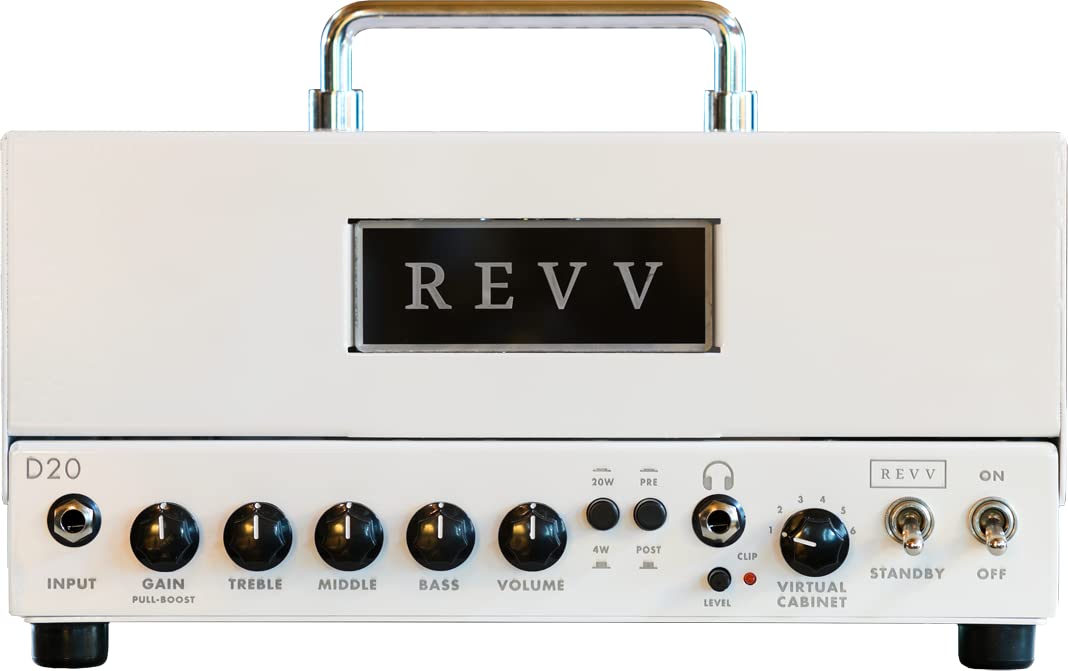
Image: Rear panel of the Revv D20 amplifier. This view displays the power input, fuse, MIDI IN/OUT, USB port, Balanced Output, FX Loop (Send/Return), Speaker outputs, and the Internal Load switch.
3.1 Power Connection
Connect the supplied power cord to the MAINS INPUT receptacle on the rear panel and then to a grounded AC outlet. Ensure the voltage matches your region's power supply.
3.2 Speaker Connection
- External Speaker Cabinet: Connect your speaker cabinet to one of the SPEAKER outputs. Ensure the impedance of your cabinet matches the selected output (e.g., 8 Ohm or 16 Ohm). Always connect a speaker cabinet before powering on the amplifier.
- Internal Load: The D20 features an internal reactive load. To use the amplifier without an external speaker cabinet (e.g., for silent recording or direct output), ensure the INTERNAL LOAD switch is engaged. When using an external speaker, ensure this switch is disengaged.
3.3 FX Loop
The D20 includes a buffered effects loop for integrating external effects pedals or rack units.
- Connect the SEND jack to the input of your effects unit.
- Connect the output of your effects unit to the RETURN jack.
3.4 MIDI IN
Use the MIDI IN port to connect a MIDI controller for remote control of amplifier functions, such as channel switching or engaging/disengaging the FX loop (refer to the full D20 manual for specific MIDI implementation details).
3.5 USB Connection
The USB port allows connection to a computer for firmware updates and access to the Two Notes Torpedo software for managing virtual cabinets and other features.
3.6 Balanced Output
The BALANCED OUTPUT (XLR) provides a direct, studio-quality signal for recording or connecting to a PA system. This output benefits from the embedded Two Notes Reactive Load Virtual Cabinets. A ground lift switch is provided to eliminate hum if present.
3.7 Bias Test Points
The BIAS TEST points are for qualified technicians to measure and adjust the amplifier's tube bias. Do not attempt to adjust bias without proper knowledge and equipment.
3.8 Cabinet Lighting
The CABINET LIGHTING port is for connecting compatible Revv cabinets with integrated lighting features.
4. Operation
4.1 Powering On/Off
- Ensure all connections (power, speaker, instrument) are correctly made.
- Flip the POWER switch to the ON position. Allow a few moments for the tubes to warm up.
- To power off, flip the POWER switch to the OFF position.
4.2 Power Reduction Circuit
The D20 features a power reduction circuit, allowing you to switch between 20-watt and 4-watt output modes. This is useful for achieving desired tube saturation at lower volumes. Consult the front panel controls for the specific switch or knob that controls this function.
4.3 Two Notes Reactive Load Virtual Cabinets
The embedded Two Notes technology provides high-quality virtual cabinet simulations. This allows for direct recording or silent practice with realistic speaker tones. Access and configure these virtual cabinets via the USB connection and the Two Notes Torpedo software.
5. Maintenance
5.1 Cleaning
Clean the amplifier's exterior with a soft, dry cloth. Do not use abrasive cleaners, solvents, or waxes. Ensure the amplifier is unplugged before cleaning.
5.2 Tube Replacement
Vacuum tubes have a finite lifespan and will eventually need replacement. Symptoms of worn tubes include reduced output, loss of clarity, or excessive noise. Tube replacement should ideally be performed by a qualified technician, as it involves high voltages and proper biasing. If replacing tubes yourself, ensure the amplifier is unplugged and allowed to cool completely. Use only tubes specified by Revv Amplification.
5.3 Fuse Replacement
If the amplifier fails to power on, check the fuse located near the power input. Always replace a blown fuse with one of the exact same type and rating as indicated on the amplifier's rear panel (e.g., T1.6A 250V). Using an incorrect fuse can cause serious damage or fire.
6. Troubleshooting
| Problem | Possible Cause | Solution |
|---|---|---|
| No power | Power cord disconnected, blown fuse, faulty outlet. | Check power cord connection. Replace fuse if blown (see 5.3). Test outlet with another device. |
| No sound | Speaker not connected, incorrect speaker impedance, internal load engaged with external speaker, faulty instrument cable, volume controls at zero. | Ensure speaker is connected and impedance matches. Disengage internal load if using external speaker. Check instrument cable. Increase volume controls. |
| Excessive hum or noise | Ground loop, faulty tubes, interference from other electronics. | Try the ground lift switch on the Balanced Output. Test with different cables. Consult a technician for tube inspection. Move amplifier away from other electronic devices. |
| Weak or distorted sound | Worn tubes, incorrect impedance match, faulty speaker. | Consult a technician for tube replacement/biasing. Verify speaker impedance. Test with a different speaker. |
If you encounter issues not listed here or if the suggested solutions do not resolve the problem, please contact Revv Amplification support or a qualified service technician.
7. Specifications
| Model | Revv D20 |
| Output Wattage | 20 Watts (switchable to 4 Watts) |
| Channels | 1-channel |
| Features | Embedded Two Notes Reactive Load Virtual Cabinets, Power-reduction Circuit, FX Loop |
| Compatible Devices | Guitar |
| Connector Type | 6.35mm Jack (for FX Loop, Speaker), XLR (Balanced Output), MIDI IN, USB |
| Power Source | Corded Electric |
| Material | Stainless Steel |
| Color | White |
| Item Weight | 12.47 pounds (5.66 kg) |
| Product Dimensions | 6.5 x 12.13 x 6.61 inches (16.5 x 30.8 x 16.8 cm) |
| Model Number | 00153-00109577 |
8. Warranty and Support
For detailed warranty information, please refer to the warranty card included with your product or visit the official Revv Amplification website.
For technical support, service inquiries, or to purchase replacement parts, please contact Revv Amplification customer service through their official website or authorized dealers.
Website: www.revvamplification.com


