
1. Introduction
This manual provides detailed instructions for the setup, operation, and maintenance of your Nixon A1309 Sport Watch. Please read this manual thoroughly to ensure proper use and to maximize the lifespan of your watch.
The Nixon A1309 Sport Watch features a digital LCD display, a durable polycarbonate case made from recycled marine plastic, and a comfortable rubber strap. It includes functions such as time, date, alarm, chronograph, and backlight, designed for daily wear and active lifestyles.
2. Product Overview
Familiarize yourself with the components of your Nixon A1309 Sport Watch.
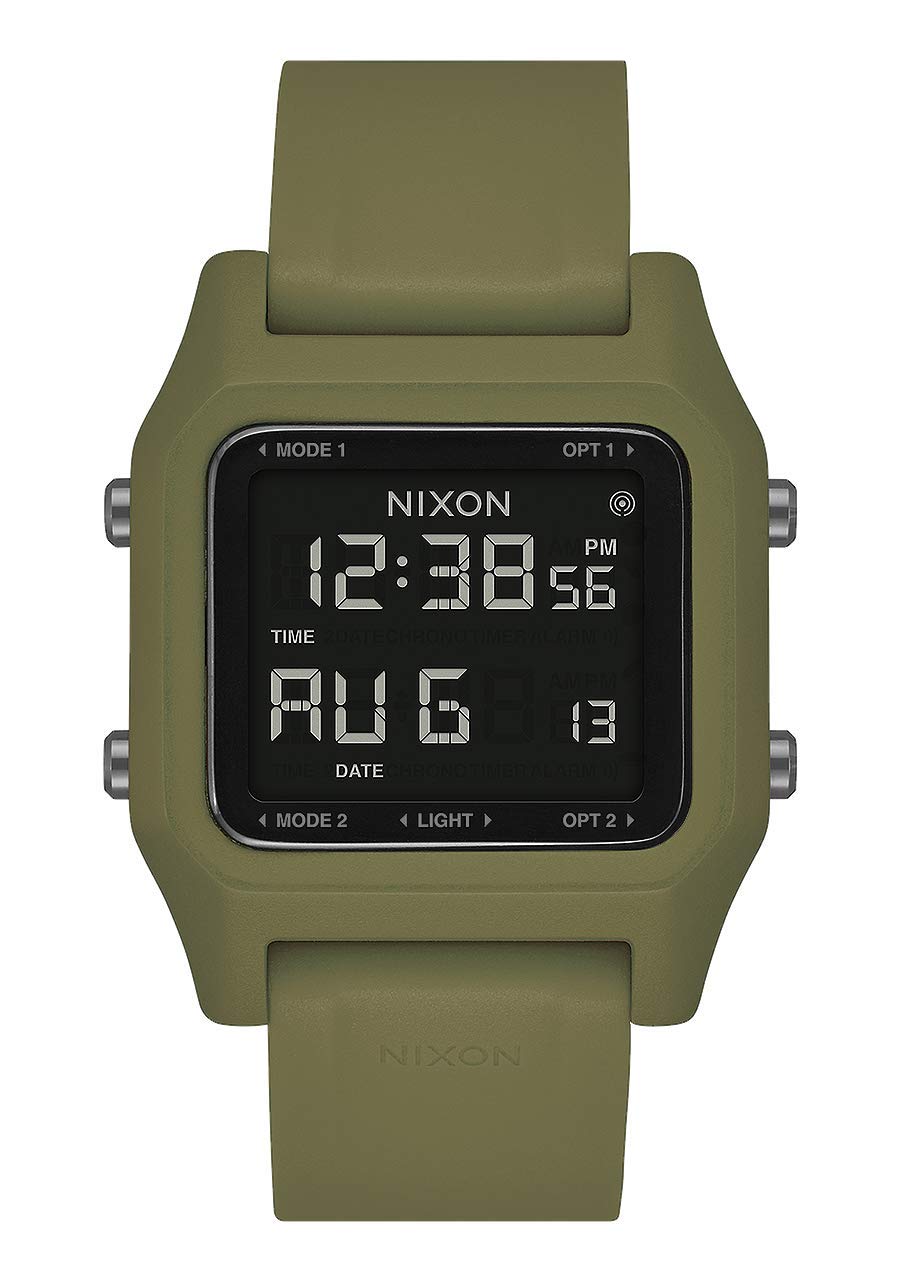
Image 2.1: Side view of the Nixon A1309 Sport Watch. This image displays the watch's profile, highlighting the two control buttons located on the left side of the watch case. These buttons are used for navigating modes and adjusting settings.
2.1 Watch Components
- Digital LCD Display: Shows time, date, and other function information.
- Control Buttons: Typically located on the sides of the watch case, used for mode selection, setting adjustments, and activating functions like the backlight. (Specific functions detailed in Section 4).
- Case: Made from durable polycarbonate, designed for protection.
- Strap: Olive green rubber strap with a buckle clasp for secure wearing.
- Case Back: Provides information such as water resistance and material details.
3. Setup
3.1 Initial Power-On and Time Setting
Your watch comes with a battery installed. If the display is blank, press any button to activate it. To set the time and date:
- Press the Mode Button (usually bottom left) repeatedly until the time setting mode is displayed (e.g., flashing hours).
- Use the Adjust Button (usually top left) to change the flashing value (hours, minutes, year, month, day).
- Press the Mode Button again to move to the next setting parameter.
- Once all settings are correct, press the Mode Button to exit the setting mode and return to the normal time display.
Refer to the specific button labels on your watch for exact button identification if not explicitly marked as 'Mode' or 'Adjust'.
4. Operating Instructions
The Nixon A1309 Sport Watch offers several functions accessible via its control buttons.

Image 4.1: The Nixon A1309 Sport Watch worn on a wrist, clearly showing the digital LCD display with the current time (12:58) and date (FEB 21).
4.1 Time and Date Display
- In normal time mode, the watch displays the current time (hours, minutes, seconds) and date (month, day).
- To switch between 12-hour and 24-hour format, enter the time setting mode and adjust the hour format.
4.2 Chronograph (Stopwatch)
The chronograph function allows you to measure elapsed time with 1/100 second resolution.
- Press the Mode Button until the chronograph display appears (usually '00:00:00').
- Press the Start/Stop Button (often the top right or a dedicated button) to start timing.
- Press the Start/Stop Button again to pause/stop timing.
- Press the Reset Button (often the bottom right or a dedicated button) to clear the chronograph to zero.
4.3 Alarm Function
Set an alarm to sound at a specific time.
- Press the Mode Button until the alarm setting mode is displayed.
- Use the Adjust Button to set the desired alarm hour and minute.
- Press the Mode Button to confirm and exit.
- To activate/deactivate the alarm, typically press a specific button (e.g., Adjust Button) while in alarm mode. An alarm icon will appear on the display when active.
4.4 Backlight
To illuminate the display in low-light conditions:
- Press the Light Button (often a dedicated button, or one of the control buttons with a light icon). The display will illuminate for a few seconds.
5. Maintenance
5.1 Cleaning
- Wipe the watch case and strap with a soft, damp cloth.
- Avoid using harsh chemicals, solvents, or abrasive cleaners, as these can damage the watch's finish and materials.
- For stubborn dirt, a mild soap solution can be used, followed by rinsing with clean water and thorough drying.
5.2 Water Resistance
Your Nixon A1309 Sport Watch has a water resistance rating of 10 ATM (100 meters).
- This rating means the watch is suitable for swimming, snorkeling, and general water sports.
- Do not operate the buttons while the watch is submerged in water, as this can compromise the water seal.
- Avoid exposing the watch to hot water, steam, or extreme temperature changes, which can affect the seals.
- After exposure to saltwater, rinse the watch with fresh water and dry it thoroughly.
5.3 Battery Replacement
The watch is powered by a product-specific battery. When the display becomes dim or functions become erratic, it may be time to replace the battery.
- Battery replacement should ideally be performed by a qualified watch technician to ensure the water resistance seal is properly maintained.
- Attempting to replace the battery yourself may void the warranty and compromise the watch's water resistance.
6. Troubleshooting
If you encounter issues with your watch, refer to the following common troubleshooting steps:
- Display is blank: The battery may be low or depleted. Consider professional battery replacement.
- Buttons are unresponsive: Ensure the watch is not in a locked mode (if applicable). If the issue persists, a reset may be required (consult a professional) or the battery may be low.
- Time is incorrect: Re-enter the time setting mode and adjust the time and date as described in Section 3.1.
- Water inside the watch: Immediately take the watch to a professional watch repair service. Do not attempt to dry it yourself.
For issues not covered here, please contact Nixon customer support.
7. Specifications
Detailed technical specifications for the Nixon A1309 Sport Watch.

Image 7.1: Back view of the Nixon A1309 Sport Watch. This image shows the stainless steel case back, which typically includes engravings for model information and water resistance, and how the rubber strap attaches to the watch case.
| Brand | NIXON |
| Model Name | Staple |
| Model Number | A1309 |
| Part Number | A1309-333-00 |
| Display Type | Digital |
| Movement Type | Quartz |
| Power Source | Battery Powered (1 product-specific battery required) |
| Case Material Type | Polycarbonate |
| Case Diameter | 39 Millimeters |
| Case Thickness | 8 Millimeters |
| Dial Window Material Type | Mineral |
| Dial Color | Black |
| Band Material Type | Rubber |
| Band Color | Green (Olive) |
| Band Width | 22 Millimeters |
| Clasp Type | Buckle |
| Water Resistance Depth | 100 Meters (10 ATM) |
| Special Features | Time of day display, Date display, Alarm, Timer, Backlight |
| Intended User | Unisex (Adult) |
| Sport Type | Swimming |
8. Warranty and Support
For warranty information, please refer to the warranty card included with your purchase or visit the official Nixon website. Keep your proof of purchase for any warranty claims.
If you require further assistance, technical support, or have questions regarding your Nixon A1309 Sport Watch, please contact Nixon customer service through their official channels.
- Manufacturer: Nixon
- Spare Parts Availability: Information unavailable


