
1. Introduction
This manual provides instructions for the proper use and care of your Diesel Timeframe DZ4547 chronograph watch. Please read this manual thoroughly to ensure optimal performance and longevity of your timepiece.
Product Overview
The Diesel Timeframe DZ4547 is a dive-inspired sports watch featuring a chronograph display, date window, and a durable silicone band. It is designed for active lifestyles and offers water resistance suitable for various water activities.
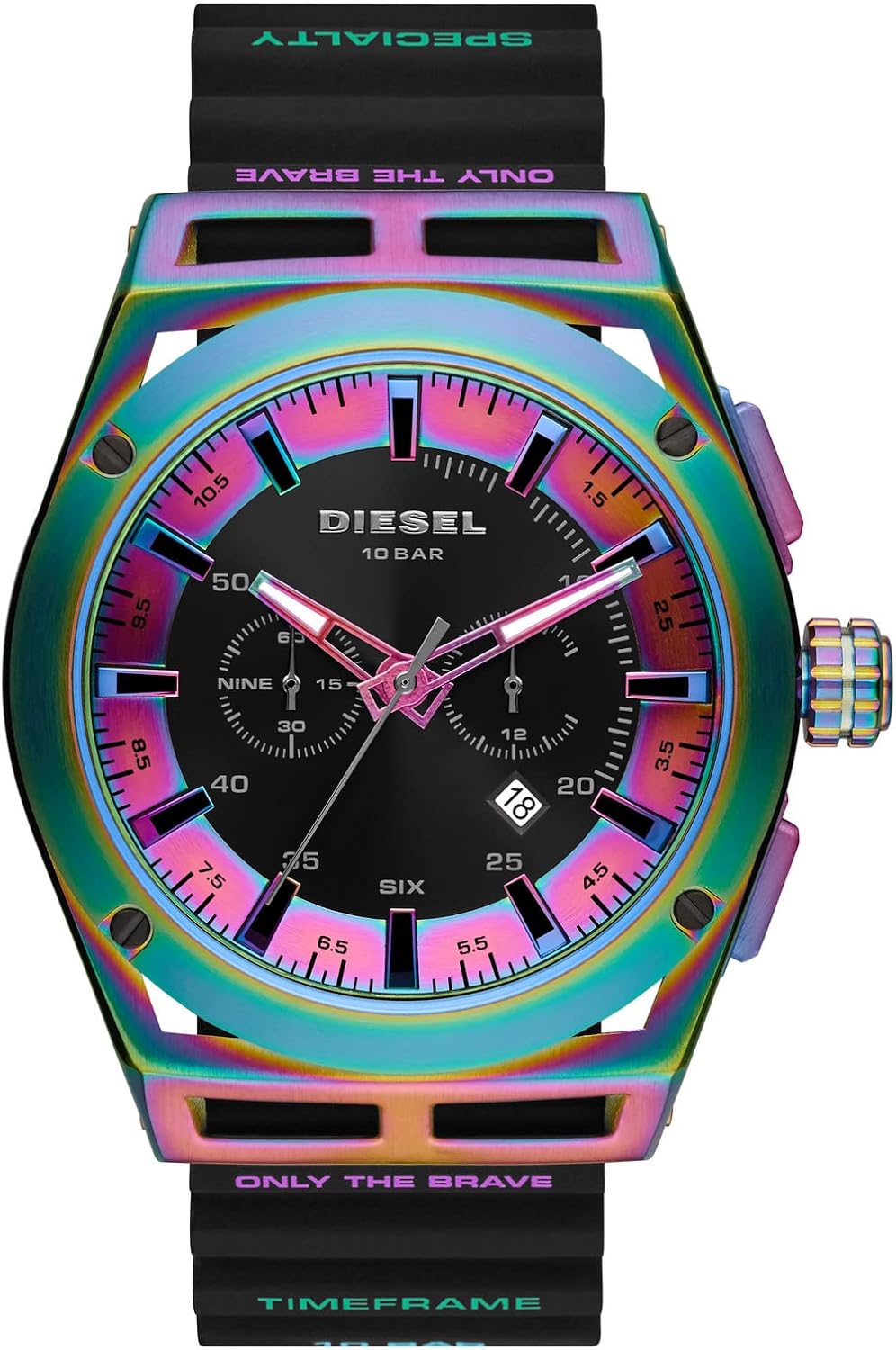
Image: Front view of the Diesel Timeframe DZ4547 watch with its distinctive rainbow-colored case and black dial.
2. Watch Components
Familiarize yourself with the main components of your Diesel Timeframe watch.
- Crown: Used for setting time and date.
- Pushers (A & B): Used for chronograph functions.
- Hour Hand: Indicates the hour.
- Minute Hand: Indicates the minute.
- Second Hand: Main second hand for timekeeping.
- Chronograph Second Hand: Large second hand for stopwatch function.
- Chronograph Minute Subdial: Tracks elapsed minutes for the stopwatch.
- 24-Hour Subdial: Displays time in a 24-hour format.
- Date Window: Displays the current date.
- Silicone Band: Durable and adjustable band.
- Case: Stainless steel case with mineral crystal.

Image: Side view of the Diesel Timeframe DZ4547 watch, showing the crown and pushers.
3. Setup and Initial Use
Setting the Time
- Pull the crown out to position 2. The second hand will stop.
- Turn the crown to set the hour and minute hands. Ensure the AM/PM is correctly set if your watch has a 24-hour subdial.
- Push the crown back to position 0.
Setting the Date
- Pull the crown out to position 1.
- Turn the crown clockwise or counter-clockwise (depending on the model) to set the date. Avoid setting the date between 9 PM and 3 AM to prevent damage to the movement.
- Push the crown back to position 0.
4. Operating the Chronograph
Your Diesel Timeframe watch features a chronograph function for measuring elapsed time.
Starting and Stopping the Chronograph
- Press pusher A to start the chronograph. The chronograph second hand will begin to move.
- Press pusher A again to stop the chronograph. The elapsed time will be displayed.
Resetting the Chronograph
- After stopping the chronograph, press pusher B to reset all chronograph hands to their zero positions.
Split Time Measurement
This function allows you to measure intermediate times without stopping the main timing.
- Start the chronograph by pressing pusher A.
- Press pusher B to measure a split time. The chronograph hands will stop, but timing continues internally.
- Press pusher B again to resume display of the ongoing elapsed time.
- Press pusher A to stop the chronograph.
- Press pusher B to reset all hands to zero.
5. Care and Maintenance
- Cleaning: Clean your watch regularly with a soft, damp cloth. For silicone bands, mild soap and water can be used.
- Water Resistance: This watch is water resistant up to 100 meters (10 ATM). It is suitable for bathing, swimming, snorkeling, and shallow diving. Do not operate the crown or pushers while the watch is wet or submerged.
- Temperature: Avoid exposing your watch to extreme temperatures (above 60°C / 140°F or below 0°C / 32°F) or sudden temperature changes.
- Chemicals: Avoid contact with solvents, detergents, perfumes, and cosmetic products, as they may damage the band, case, or gaskets.
- Battery Replacement: The watch uses 1 product-specific battery. When the battery is depleted, have it replaced by a qualified watch technician to ensure water resistance is maintained.

Image: Rear view of the Diesel Timeframe DZ4547 watch, showing the buckle closure on the black silicone band.
6. Troubleshooting
Watch Not Running
- Check if the crown is pushed all the way in to position 0.
- The battery may be depleted. Replace the battery.
Date Not Changing Correctly
- Ensure the time is set correctly, especially the AM/PM cycle. The date changes around midnight.
- Avoid setting the date between 9 PM and 3 AM.
Chronograph Hands Not Resetting to Zero
- If the chronograph hands do not reset to the 12 o'clock position, consult a qualified watch technician for adjustment.
7. Specifications
| Feature | Detail |
|---|---|
| Model Number | DZ4547 |
| Case Diameter | 48 mm |
| Case Material | Stainless Steel |
| Crystal Material | Mineral |
| Band Material | Silicone |
| Band Width | 26 mm |
| Band Length | 205 mm |
| Movement Type | Quartz |
| Display Type | Analog |
| Water Resistance | 10 ATM (100 meters / 330 feet) |
| Functions | Time, Date, Chronograph (Minutes, Seconds, 24-hour) |
| Battery | 1 Product Specific (included) |
| Item Weight | 124 Grams |

Image: The Diesel Timeframe DZ4547 watch displayed on a wrist, showcasing its size and appearance when worn.
8. Warranty and Support
Your Diesel Timeframe watch is covered by a manufacturer's warranty. Please refer to the warranty card included with your purchase for specific terms and conditions.
For technical support, service, or warranty claims, please contact Diesel customer service or visit their official website.
Manufacturer: Diesel
Warranty Type: Manufacturer

Image: The Diesel watch box, indicating original packaging and branding.

