1. Introduction
The Beurer FT95 Bluetooth Non-Contact Thermometer provides a hygienic and comfortable method for measuring temperature. It is designed for accurate measurement of forehead, object, and room temperatures. This manual provides essential information for the safe and effective use of your device.

Image 1.1: The Beurer FT95 Bluetooth Non-Contact Thermometer.
2. Safety Information
- Read the entire instruction manual carefully before use.
- This device is not a substitute for a medical examination by a doctor.
- Do not use the thermometer for purposes other than those specified in this manual.
- Keep the device away from direct sunlight, extreme temperatures, and high humidity.
- Do not drop the device or expose it to strong shocks.
- Keep out of reach of children.
- Statements regarding dietary supplements have not been evaluated by the FDA and are not intended to diagnose, treat, cure, or prevent any disease or health condition.
3. Product Overview and Features
The Beurer FT95 thermometer offers versatile temperature measurement and smart connectivity.
Key Features:
- 3-in-1 Measurement: Measures forehead, object, and room temperatures.
- Non-Contact: Hygienic measurement from a distance of 0.8 to 1.2 inches (2-3 cm).
- Bluetooth Connectivity: Syncs with the free Beurer HealthCoach App for tracking and storing measurements.
- 60 Memory Spaces: Stores up to 60 previous measurements for monitoring temperature changes.
- XL Backlit LCD Display: Ensures clear readability, even in the dark.
- Fever Alarm: Visual (Red/Yellow/Green LED) and acoustic indicators for elevated temperatures (≥ 100.4°F / 38°C). Displays 'Happy' or 'Frown' face icons for easy interpretation.
- Measurement Units: Displays temperatures in Fahrenheit (°F) or Celsius (°C).
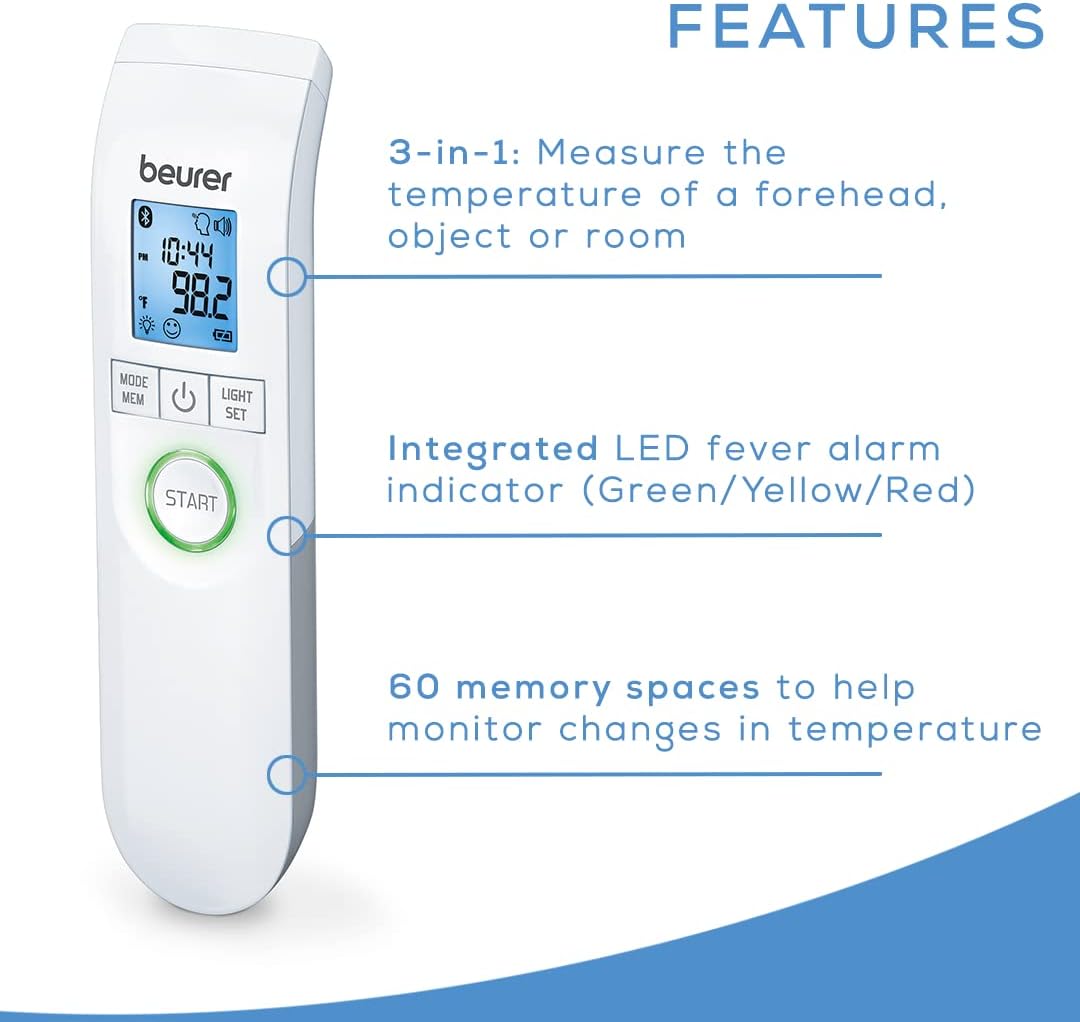
Image 3.1: Overview of the Beurer FT95's main features.

Image 3.2: The thermometer's capability to measure body, object, and room temperatures.
4. Setup
4.1 Battery Installation
The device requires 2 AA batteries, which are included. To install or replace batteries:
- Open the battery compartment cover on the back of the device.
- Insert the 2 AA batteries, ensuring correct polarity (+/-).
- Close the battery compartment cover securely.
4.2 Pairing with Beurer HealthCoach App
The FT95 thermometer can connect to your smartphone via Bluetooth for data tracking.
- Download the free 'Beurer HealthCoach' App from your device's app store.
- Enable Bluetooth on your smartphone.
- Follow the in-app instructions to pair your FT95 thermometer.
- Once paired, measurements will automatically sync to the app.

Image 4.1: The Beurer FT95 is compatible with the Beurer HealthCoach app for data management.
5. Operating Instructions
5.1 Taking a Forehead Temperature
- Ensure the thermometer is in forehead measurement mode (indicated by a forehead icon on the display).
- Hold the thermometer approximately 0.8 to 1.2 inches (2-3 cm) from the center of the forehead.
- Press the 'START' button.
- The measurement will be displayed within seconds, accompanied by an acoustic signal.
- The LED indicator around the 'START' button will light up green (normal), yellow (slight elevation), or red (fever).

Image 5.1: Proper distance for forehead temperature measurement.
5.2 Measuring Object and Room Temperature
- Switch the thermometer to object or room measurement mode using the 'MODE/MEM' button.
- For objects, hold the thermometer 0.8 to 1.2 inches (2-3 cm) from the surface of the object.
- For room temperature, point the thermometer towards an open space in the room.
- Press the 'START' button.
- The temperature will be displayed.
5.3 Interpreting Readings and Fever Alarm
- An acoustic signal indicates the completion of a measurement.
- The display will show a 'Happy' face icon for normal temperature or a 'Frown' face icon if the temperature is elevated.
- If a temperature of 100.4°F (38°C) or higher is detected, a fever alarm will sound, and the LED indicator will turn red.
- The fever alarm sound can be muted or turned off via settings.
5.4 Memory Function
The thermometer automatically stores the last 60 measurements. To access memory:
- With the device turned on, press the 'MODE/MEM' button repeatedly to cycle through stored measurements.
- Each press will display the next stored reading, along with the time and date of measurement.
5.5 Changing Measurement Units (°F/°C)
To switch between Fahrenheit and Celsius:
- With the device turned off, press and hold the 'LIGHT/SET' button for a few seconds until the unit changes.
- Release the button when the desired unit is displayed.
5.6 Official Product Video
Video 5.1: An official video demonstrating the features and use of the Beurer FT95 Bluetooth Non-Contact Thermometer.
6. Maintenance
6.1 Cleaning the Thermometer
To ensure accurate readings and hygiene, clean the thermometer regularly:
- Wipe the probe and the device body with a soft cloth moistened with 70% isopropyl alcohol or a disinfectant wipe.
- Do not immerse the thermometer in water or any cleaning solution.
- Allow the device to air dry completely before storage or next use.
6.2 Storage
Store the thermometer in its original storage box in a cool, dry place, away from direct sunlight and extreme temperatures.
7. Troubleshooting
If you encounter issues with your Beurer FT95 thermometer, refer to the following common problems and solutions:
| Problem | Possible Cause | Solution |
|---|---|---|
| Inaccurate readings | Incorrect measurement distance; dirty sensor; environmental factors. | Ensure correct distance (0.8-1.2 inches). Clean the sensor. Allow thermometer to acclimatize to room temperature. |
| Device does not turn on | Low or depleted batteries; incorrect battery installation. | Replace batteries with new AA batteries. Check battery polarity. |
| Bluetooth pairing failure | Bluetooth not enabled; app not open; device too far from phone. | Ensure Bluetooth is on. Open Beurer HealthCoach App. Keep devices close. Restart both devices. |
| Error message on display | Measurement outside range; device malfunction. | Refer to the specific error code in the full manual. If persistent, contact customer support. |
8. Specifications
| Specification | Detail |
|---|---|
| Model Number | FT95 |
| Product Dimensions | 6.6 x 1.6 x 1.1 inches |
| Weight | 3.2 ounces |
| Batteries | 2 x AA batteries (included) |
| Measurement Type | Non-Contact Infrared |
| Measurement Distance | 0.8 - 1.2 inches (2-3 cm) |
| Memory Spaces | 60 |
| Display Type | Digital, XL Backlit LCD |
| Connectivity | Bluetooth |
| Material | Plastic |
| Color | White |
| Regulatory Compliance | FDA |
9. Warranty and Support
For warranty information and customer support, please refer to the documentation included with your product or visit the official Beurer website. Beurer North America LP provides customer assistance from their Florida-based team.


