
SNOOKER SK-1000P
SNOOKER Commercial Cube Ice Machine User Manual
Model: SK-1000P
Product Overview
The SNOOKER SK-1000P Commercial Cube Ice Machine is a high-capacity, freestanding unit designed for demanding commercial environments such as restaurants, bars, and hotels. This robust ice maker features a stainless steel construction, an air-cooled compressor, and an integrated insulated storage bin. It is engineered to produce uniform, crystal-clear full dice ice cubes efficiently and reliably.
Key features include a digital control system for ice thickness and temperature adjustments, adjustable legs for stable placement, and an internal self-cleaning system to simplify maintenance.
Setup and Installation
Proper installation is crucial for the optimal performance and longevity of your SNOOKER SK-1000P ice machine. This unit arrives ready to install, but careful attention to placement and connections is required.
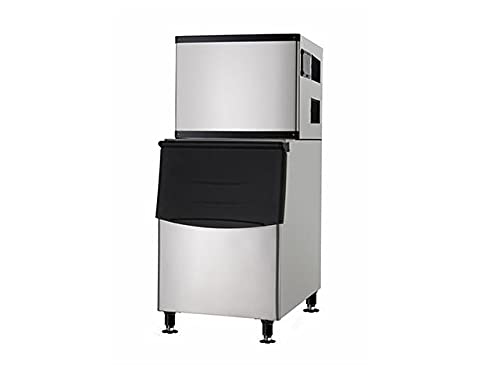
Image: The SNOOKER SK-1000P Commercial Cube Ice Machine, showcasing its modular design with the ice production head positioned above the insulated ice storage bin. The unit is constructed from stainless steel and stands on four adjustable leveling legs.
Location Requirements:
- Ventilation: Install the machine in a well-ventilated area to ensure proper air circulation for the air-cooled compressor.
- Water Supply: A reliable water intake line must be accessible for ice production.
- Drainage: A drainage pipe is required to manage water discharge from the unit.
- Level Surface: For full ice-making capacity and consistent functionality, the ice maker must remain level at all times. The four adjustable legs allow for leveling on uneven floors or warped surfaces.
Initial Setup Steps:
- Unpack the unit carefully, ensuring all components and accessories (pipe fittings, water filter, ice scoop, LED lamp) are present.
- Position the ice machine in the chosen location, ensuring adequate clearance for ventilation and access for connections.
- Adjust the four leveling legs to ensure the machine is perfectly level. Use a spirit level for accuracy.
- Connect the water intake line to the designated inlet on the machine. It is recommended to use the included standard water filter.
- Connect the drainage pipe to the machine's outlet and route it to an appropriate drain.
- Plug the machine into a compatible 220V power outlet.
Operating Instructions
The SNOOKER SK-1000P is designed for user-friendly operation with its digital control system.
Starting the Machine:
- Ensure the machine is properly connected to power and water supply.
- Turn on the main power switch, usually located on the control panel.
- The digital control screen will illuminate. Follow the on-screen prompts for initial setup.
Adjusting Ice Production:
- Use the digital control screen to adjust ice thickness and temperature settings. Refer to the on-screen menu for specific options.
- The machine is capable of producing up to 1000 pounds of full dice ice cubes per day under optimal conditions.
Ice Storage and Dispensing:
- The integrated insulated storage bin can hold up to 350 pounds of fresh-made cubed ice.
- An LED light inside the bin provides visibility for ice levels.
- Use the provided durable ice scoop for hygienic dispensing of ice.
Maintenance
Regular maintenance ensures the efficiency and longevity of your SNOOKER ice machine. The unit features a convenient internal self-cleaning system to reduce manual upkeep.
Self-Cleaning System:
- Activate the self-cleaning cycle via the digital control panel as recommended by the system or on a regular schedule (e.g., monthly).
- This system helps maintain the internal components and reduces the frequency of manual cleanings.
Manual Cleaning and Inspection:
- Despite the self-cleaning feature, periodic manual cleaning of the ice bin and accessible components is recommended to ensure hygiene and optimal performance.
- Regularly inspect the water filter and replace it as needed to prevent mineral buildup and ensure clean ice production.
- Keep the exterior of the machine clean with a damp cloth. Avoid abrasive cleaners.
- Ensure the ventilation grilles are free from dust and obstructions to maintain proper airflow for the condenser.
Troubleshooting
This section provides guidance for common issues you might encounter with your SNOOKER SK-1000P ice machine. For problems not listed here or if solutions do not resolve the issue, please contact SNOOKER customer support.
| Problem | Possible Cause | Solution |
|---|---|---|
| Machine not making ice or insufficient ice production. |
|
|
| Unusual noises during operation. |
|
|
| Ice quality is poor (cloudy, small, or misshapen). |
|
|
Specifications
| Model | SK-1000P |
| Dimensions (W x D x H) | 30 x 33 x 66 inches |
| Ice Production Output | Up to 1000 lbs per day |
| Ice Shape | Full Dice Cubes |
| Bin Capacity | 350 lbs |
| Voltage | 220V |
| Wattage | 2300W |
| Condenser Unit | Air-cooled |
| Refrigerant | R404A |
| Net Weight (Head) | 145 lbs |
| Net Weight (Bin) | 100 lbs |
| Gross Weight (Head) | 155 lbs |
| Gross Weight (Bin) | 110 lbs |
| Included Accessories | Pipe Fittings, Water Filter, Ice Scoop, LED Lamp (with Bin) |
Warranty and Support
SNOOKER provides a comprehensive warranty package for the SK-1000P Commercial Cube Ice Machine:
- Parts: 1 Year
- Labor: 1 Year
- Compressor: 3 Years
For technical assistance, warranty claims, or any inquiries regarding your SNOOKER ice machine, please contact SNOOKER customer support. Ensure you have your model number (SK-1000P) and purchase date available when contacting support.
Note: Warranty terms may vary. Please refer to your purchase documentation for the most accurate and up-to-date warranty information.
Related documentsSK-1000P


Ask a question about this manual
Ask about setup, troubleshooting, compatibility, parts, safety, or missing instructions. Manuals+ will review the question and use this page’s manual context to help answer it.