
Introduction
The FEELWORLD LUT7S PRO is a 7-inch ultra-bright 2200nits DSLR camera field monitor designed to provide professional monitoring solutions for filmmakers. It features a 3D LUT touch screen, HDR support, waveform, and 4K HDMI and 3G-SDI connectivity. This manual provides essential information for setting up, operating, and maintaining your monitor.

Figure 1: FEELWORLD LUT7S PRO 7-inch Ultra Bright Field Monitor.
Setup
Package Contents
Before you begin, ensure all items are present in the package:
- 1 × FEELWORLD LUT7S PRO Monitor
- 1 × Mini/Micro HDMI to HDMI Cable
- 1 × Tilt Arm
- 1 × Disassemble Wrench
- 1 × User Manual
Note: Battery and power adapter are not included and must be purchased separately.

Figure 2: Included accessories with the LUT7S PRO monitor.
Powering the Monitor
The LUT7S PRO can be powered by an F970 series battery or a 12V 3A power adapter. For extended use, a larger capacity battery like the F970 (7.4V 6600mah) is recommended, providing approximately 3 hours of operation.
- Attach a compatible F970 battery to the battery plate on the rear of the monitor.
- Alternatively, connect a 12V 3A power adapter to the DC IN 12V port.
- Press and hold the power button located on the side of the monitor until the FEELWORLD logo appears.
Video 1: A brief overview of the FEELWORLD LUT7S PRO Camera Monitor, demonstrating its features and setup. This video is a short preview from the seller.
Mounting the Monitor
The monitor can be mounted using the included tilt arm, which allows for flexible positioning on your camera rig.

Figure 3: The F970 external install and power kit design simplifies equipment setup by integrating power for external devices.
Connecting to Your Camera
The LUT7S PRO supports both 4K HDMI and 3G-SDI inputs and outputs, making it compatible with a wide range of cameras.
- Connect your camera's HDMI output to the monitor's HDMI IN port using the provided Mini/Micro HDMI to HDMI cable.
- For SDI connections, use appropriate 3G-SDI cables for input and output.
- The monitor also provides a DC 8V power out to power your DSLR or mirrorless camera.

Figure 4: Detailed view of the monitor's input and output ports for versatile connectivity.
Operating the Monitor
Touchscreen Operations
The LUT7S PRO features a touch screen for intuitive control. You can use simple tap and swipe gestures to access and adjust important monitoring functions.

Figure 5: The touchscreen allows for easy navigation and adjustment of monitor settings.
Key Monitoring Functions
The monitor offers a comprehensive suite of professional auxiliary tools to help you accurately expose and focus every shot:
- HDR Monitoring: Display an HDR signal for improved dynamic range.
- 3D LUT Support: Load up to 50 custom LUTs to apply a "look" to the monitor, giving you an idea of how finished images will appear during editing.
- Waveform, Vectorscope, Histogram: Essential tools for analyzing video signals and ensuring proper exposure and color balance.
- Focus Assist: Aids in achieving sharp focus.
- Monochrome: View your footage in black and white.
- Nine Grid, False Color, Exposure, Zoom, Image Flip, Anamorphic Mode, Embedded Audio: Additional features for versatile monitoring.

Figure 6: Visual representation of the monitor's advanced monitoring features.

Figure 7: Demonstrating the effect of loading a 3D LUT for color grading preview.
Daylight Viewability
With an ultra-bright 2200nit backlight and an ambient light sensor, the LUT7S PRO is easily viewable outdoors without a hood, making it ideal for bright daylight shooting conditions. The light sensor automatically adjusts screen brightness to protect your eyes in various environments.
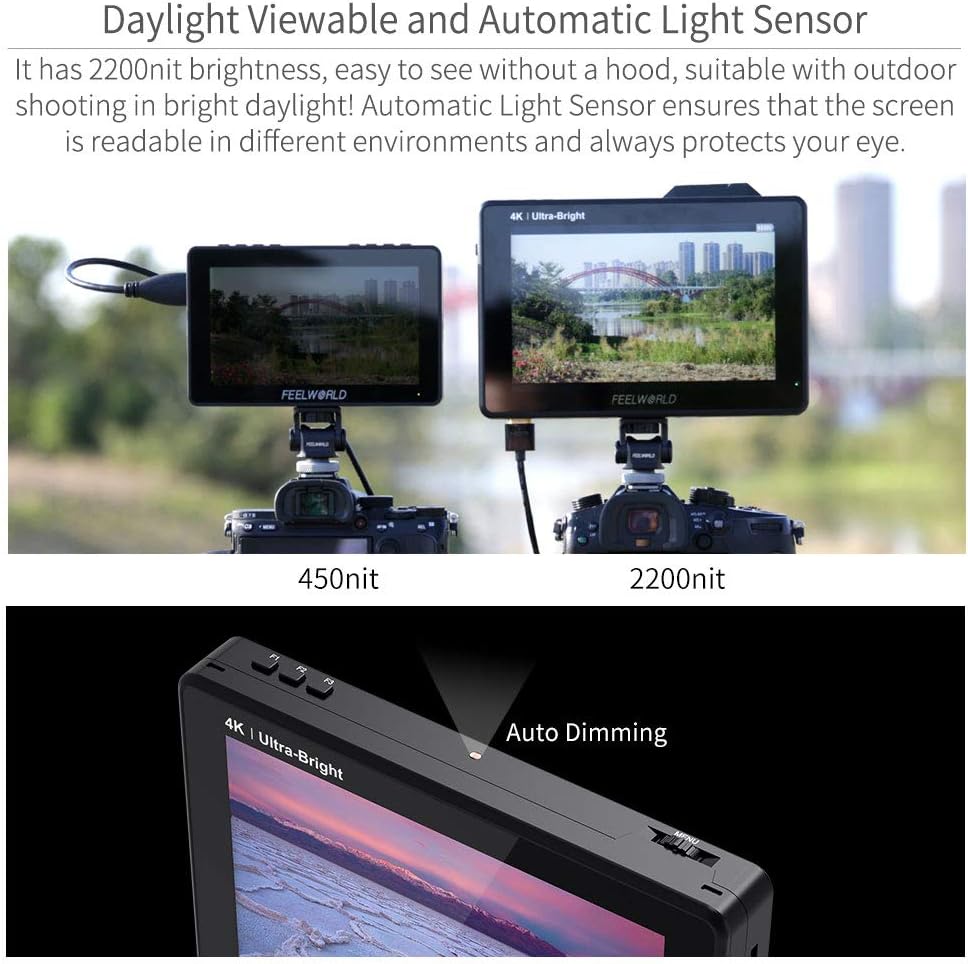
Figure 8: The monitor's high brightness ensures clear visibility even in direct sunlight.
Video 2: A short preview from the seller showcasing the FEELWORLD LUT7S PRO's 2200 nits bright display in various shooting scenarios.
Maintenance
To ensure the longevity and optimal performance of your FEELWORLD LUT7S PRO monitor, follow these maintenance guidelines:
- Cleaning: Use a soft, dry cloth to clean the monitor screen and body. For stubborn smudges, lightly dampen the cloth with a screen-safe cleaning solution. Avoid abrasive materials or harsh chemicals.
- Storage: When not in use, store the monitor in a cool, dry place away from direct sunlight and extreme temperatures. Use the original packaging or a padded case for protection during transport.
- Handling: Avoid dropping or subjecting the monitor to strong impacts. Do not attempt to disassemble the monitor, as this will void the warranty.
- Battery Care: If using batteries, ensure they are charged regularly and stored properly when not in use to maintain their lifespan.
Troubleshooting
Here are solutions to common issues you might encounter with your monitor:
- Monitor does not turn on:
- Ensure you are using the standard 12V 3A power adapter.
- If powering by F970 battery, check if the battery is fully charged.
- Noise during recording:
- Long press the "<" button to turn down the volume to near zero. This can help avoid noise during recording. Long pressing ">" increases the volume.
- Monitor displays "no signal":
- Try using a different HDMI cable.
- Connect the monitor's HDMI to your computer to check if the monitor receives a signal.
- Change the camera's output signal and confirm if the monitor's input signal supports the camera's output signal.
- Information on monitor displayed when focus peak is on:
- You can turn off "HDMI Information Display" under the "HDMI Settings" tab in the menu system to prevent this.
Specifications
| Feature | Detail |
|---|---|
| Model Number | LUT7-FBA |
| Screen Size | 7 Inch |
| Brightness | 2200nits |
| Resolution | 1920x1200 |
| Contrast Ratio | 1200:1 |
| Viewing Angle | 160° wide viewing angles IPS Panel |
| Input Ports | 4K HDMI, 3G-SDI |
| Output Ports | 4K HDMI, 3G-SDI, DC 8V Power Out |
| Power Input | DC 12V |
| Compatible Battery | F970, F960, F950, F930, F770, F750, F730, F570, F550, F530, QM91D, QM91, QM90D, QM90, QM71D, QM71, QM70D, QM70, QM51D, QM51, FM71, FM70 series |
| Item Weight | 2.23 pounds |
| Package Dimensions | 8.78 x 6.38 x 3.11 inches |
Warranty and Support
FEELWORLD is committed to providing high-quality products and solutions. The company offers a 1-year warranty on its products, demonstrating dedication to quality and stability.
For further assistance, you may refer to the official User Manual (PDF) available for download: Download User Manual.
You can also visit the official FEELWORLD Store for more information and support: FEELWORLD Official Store.