
1. Introduction
This manual provides detailed instructions for the proper use and care of your Casio W219H Series Digital Watch. Designed for durability and functionality, this watch offers essential features for daily use and outdoor activities. Please read this manual thoroughly to ensure optimal performance and longevity of your timepiece.

Image 1.1: Casio W219H Series Digital Watch, showcasing its robust design.
2. Key Features
The Casio W219H Series Digital Watch is equipped with the following features:
- 7-Year Battery Life: Enjoy extended operation without frequent battery changes.
- 50-Meter Water Resistance: Suitable for swimming and showering, but not for diving.
- LED Illuminator: Provides clear visibility in low-light conditions.
- 1/100 Second Chronograph: Precise stopwatch function for measuring elapsed time.
- Daily Alarm: Set a single alarm to sound at a specific time each day.
- Hourly Time Signal: An optional chime that sounds every hour on the hour.
- Auto Calendar: Automatically adjusts for different month lengths, including leap years.
- Countdown Timer (1 Hour): A convenient timer for various activities.
3. Initial Setup
Before using your watch, it is important to set the current time and date. The watch typically has three or four buttons: MODE, ADJUST/SET, LIGHT, and sometimes a dedicated START/STOP button.
3.1 Setting Time and Date
- In the Timekeeping Mode, press and hold the ADJUST/SET button until the seconds begin to flash. This indicates the setting mode.
- Press the MODE button to cycle through the settings: Seconds → Hour → Minute → Year → Month → Day.
- Use the START/STOP or LIGHT button to increase or decrease the flashing value.
- Once all settings are correct, press the ADJUST/SET button again to exit the setting mode.
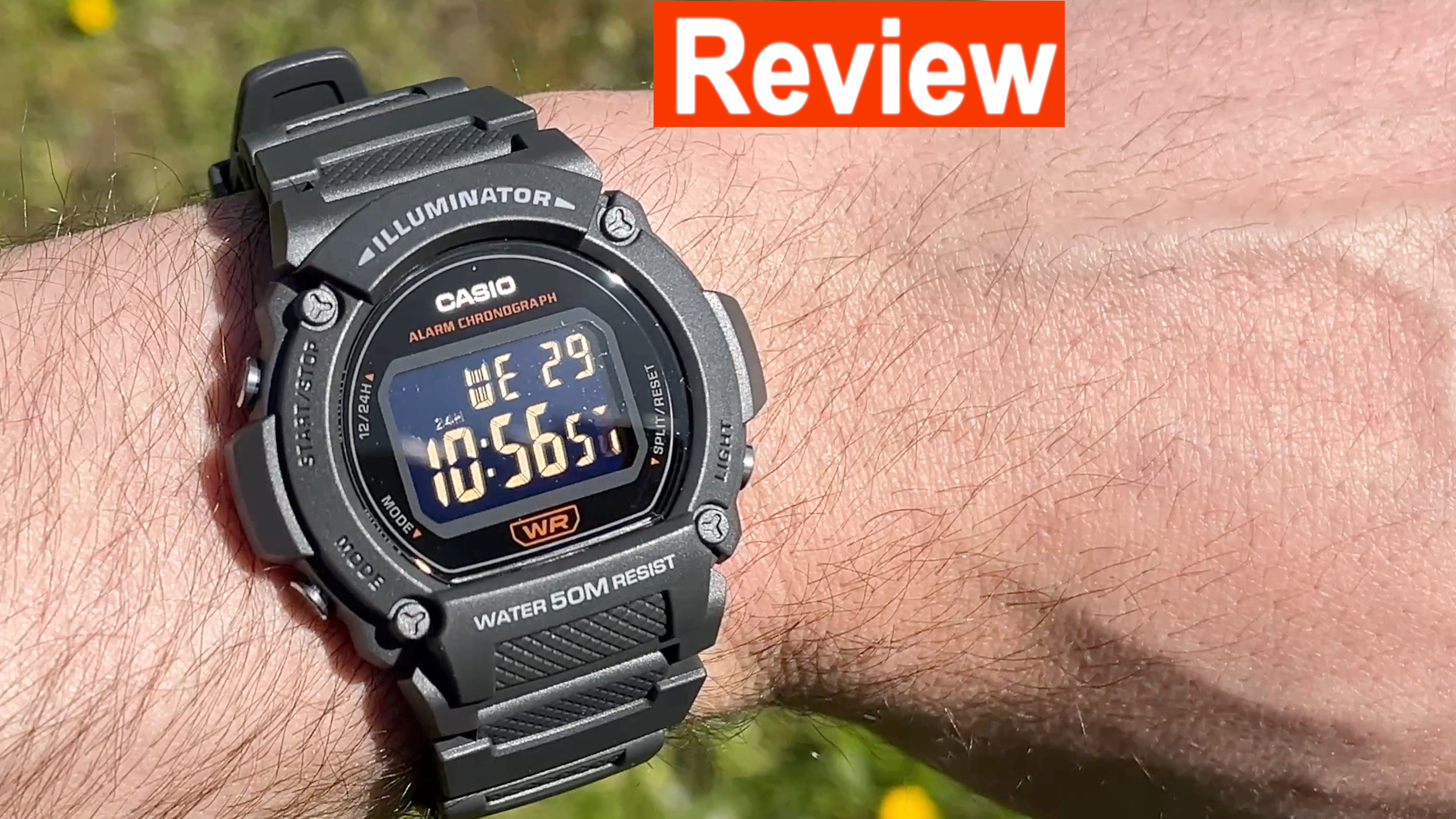
Image 3.1: A close-up view of the watch display, illustrating the digital time and date format.
For a visual guide on setting up the watch, refer to the video below:
Video 3.1: A detailed review of the Casio W-219H, demonstrating its features and basic setup. This video is provided by Adam (Seller).
4. Operating Instructions
Your Casio W219H watch offers several modes for various functions. Use the MODE button to navigate between them.
4.1 Timekeeping Mode
This is the default mode, displaying the current time (hour, minute, second), day of the week, and date.
4.2 Using the LED Illuminator
Press the LIGHT button to illuminate the display for a few seconds. This feature is useful in dark environments.

Image 4.1: Illustration of the watch display with the LED backlight activated.
4.3 Stopwatch Function
The stopwatch measures elapsed time up to 23 hours, 59 minutes, 59.99 seconds.
- From Timekeeping Mode, press the MODE button until 'ST' (Stopwatch) appears on the display.
- Press the START/STOP button to start and stop the stopwatch.
- Press the ADJUST/SET button to reset the stopwatch to zero.

Image 4.2: A graphic representation of the stopwatch icon, indicating the watch's 1/100 second chronograph capability.
4.4 Daily Alarm
The watch features a daily alarm that sounds for 20 seconds at the preset time.
- From Timekeeping Mode, press the MODE button until 'AL' (Alarm) appears.
- Press and hold the ADJUST/SET button until the alarm hour flashes.
- Use the START/STOP or LIGHT button to set the hour and minute.
- Press the ADJUST/SET button to confirm and exit.
- To turn the alarm on/off, press the START/STOP button in Alarm Mode.

Image 4.3: A visual representation of the daily alarm function on the watch display.
4.5 Water Resistance
The Casio W219H is water resistant up to 50 meters (5 ATM). This means it is suitable for everyday use and can withstand splashes, rain, and brief immersion in water, such as during swimming or showering. It is not suitable for diving or prolonged underwater use.
- Do not operate buttons while the watch is wet or submerged.
- Avoid exposing the watch to hot water or steam, as this can compromise the water resistance seals.

Image 4.4: Icon indicating 50-meter water resistance, highlighting the watch's durability in wet conditions.
For a comprehensive overview of the watch's features and operation, consider watching the following video:
Video 4.5: A detailed review of the W219H series digital watch, covering its various functions and design aspects. This video is provided by James Pearson (Seller).
5. Maintenance
Proper maintenance ensures the longevity and reliable performance of your Casio W219H watch.
5.1 Cleaning Your Watch
- Wipe the watch case and band with a soft, dry cloth to remove dirt and moisture.
- For resin bands, you can use a mild soap solution and a soft brush, then rinse thoroughly with clean water and dry completely.
- Avoid using harsh chemicals, solvents, or abrasive cleaners, as these can damage the watch's finish and seals.
5.2 Battery Replacement
The watch is equipped with a battery designed to last approximately 7 years. When the display becomes dim or functions become erratic, it is an indication that the battery needs replacement. Battery replacement should be performed by a qualified watch technician to ensure proper sealing and water resistance.
5.3 Band Care
The resin band is durable but can degrade over time with exposure to sweat, moisture, and UV light. To extend its life:
- Clean the band regularly as described above.
- Avoid excessive bending or pulling of the band, especially near the lugs, to prevent premature breakage.
- If the band shows signs of cracking or damage, replace it promptly to prevent loss of the watch.
6. Troubleshooting
If you encounter issues with your Casio W219H watch, refer to the following common problems and solutions:
| Problem | Possible Cause | Solution |
|---|---|---|
| Display is blank or dim. | Low battery. | Replace the battery. |
| Time is incorrect. | Time not set correctly or accidental button press. | Refer to Section 3.1 to reset the time and date. |
| Buttons are unresponsive. | Watch may be in a locked mode or internal malfunction. | Try pressing all buttons firmly. If issue persists, a reset may be needed (consult a professional) or battery issue. |
| Water inside the display. | Water resistance seals compromised. | Stop using the watch immediately and take it to a qualified technician for inspection and repair. |
If the problem persists after attempting these solutions, please contact Casio customer support or an authorized service center.
7. Specifications
Detailed technical specifications for the Casio W219H Series Digital Watch:
| Feature | Detail |
|---|---|
| Model Name | W219H-1AV |
| Display Type | Digital |
| Watch Movement Type | Quartz |
| Water Resistance Depth | 50 meters (5 ATM) |
| Case Material Type | Resin |
| Band Material Type | Resin |
| Clasp Type | Tang Buckle |
| Case Diameter | 41 millimeters |
| Case Thickness | 15 millimeters |
| Band Width | 25.5 millimeters |
| Item Weight | 0.14 kg (approximately 4.97 ounces) |
| Battery Life | Approximately 7 years |
| Included Components | Battery |
| Manufacturer | Casio |
8. Warranty & Support
8.1 Manufacturer's Warranty
Your Casio W219H Series Digital Watch is covered by a manufacturer's warranty. The terms and duration of the warranty may vary by region. Please refer to the warranty card included with your purchase or visit the official Casio website for specific details regarding coverage and claims.
8.2 Customer Support
For further assistance, technical support, or service inquiries, please visit the official Casio website or contact their customer service department. You can find contact information and frequently asked questions on their support pages.
For additional insights and demonstrations of the watch, you may find the following videos helpful:
Video 8.1: A brief overview highlighting the versatility of the Casio W219H watch for everyday use. This video is provided by Nicolas Siplenko (Seller).
Video 8.2: A demonstration of the Casio watch's durability and quality. This video is provided by altagracia cabral rivas (Seller).


